Skip to content
  • Categories
  • Recent
  • Tags
  • Popular
  • World
  • Users
  • Groups
Skins
  • Light
  • Brite
  • Cerulean
  • Cosmo
  • Flatly
  • Journal
  • Litera
  • Lumen
  • Lux
  • Materia
  • Minty
  • Morph
  • Pulse
  • Sandstone
  • Simplex
  • Sketchy
  • Spacelab
  • United
  • Yeti
  • Zephyr
  • Dark
  • Cyborg
  • Darkly
  • Quartz
  • Slate
  • Solar
  • Superhero
  • Vapor

  • Default (Cyborg)
  • No Skin
Collapse
Brand Logo

CIRCLE WITH A DOT

  1. Home
  2. Uncategorized
  3. I have an issue with mounting a cheap smart watch in #linux: Device is seen by the kernel, but never registered as a storage device /dev/sd*:

I have an issue with mounting a cheap smart watch in #linux: Device is seen by the kernel, but never registered as a storage device /dev/sd*:

Scheduled Pinned Locked Moved Uncategorized
linux
40 Posts 12 Posters 53 Views
  • Oldest to Newest
  • Newest to Oldest
  • Most Votes
Reply
  • Reply as topic
Log in to reply
This topic has been deleted. Only users with topic management privileges can see it.
  • root42@chaos.socialR root42@chaos.social

    Nope, that was not it. I downgraded to Linux 6.14.0-37, but USB still doesn't work. So it must be something with my installation! But what?

    root42@chaos.socialR This user is from outside of this forum
    root42@chaos.socialR This user is from outside of this forum
    root42@chaos.social
    wrote last edited by
    #19

    I am onto something: Attaching an OLD Apple keyboard with a USB-C to A adapter WORKS. But all my USB3.x devices do NOT work!
    So how do I tell the USB controller to also work with USB3 devices...? Which works on the live thumbdrive!

    Link Preview Image
    root42@chaos.socialR 1 Reply Last reply
    0
    • root42@chaos.socialR root42@chaos.social

      Nope, that was not it. I downgraded to Linux 6.14.0-37, but USB still doesn't work. So it must be something with my installation! But what?

      1024bytes@masto.ai1 This user is from outside of this forum
      1024bytes@masto.ai1 This user is from outside of this forum
      1024bytes@masto.ai
      wrote last edited by
      #20

      @root42 it sounds like it does not load some usb drivers. But for default usb never seen that happen.

      1 Reply Last reply
      0
      • root42@chaos.socialR root42@chaos.social

        I am onto something: Attaching an OLD Apple keyboard with a USB-C to A adapter WORKS. But all my USB3.x devices do NOT work!
        So how do I tell the USB controller to also work with USB3 devices...? Which works on the live thumbdrive!

        Link Preview Image
        root42@chaos.socialR This user is from outside of this forum
        root42@chaos.socialR This user is from outside of this forum
        root42@chaos.social
        wrote last edited by
        #21

        Yes, so it seems the controller is stuck in EHCI mode, instead of switching to xHCI for USB3 devices. Bummer... how to switch it back...?

        sebastiaanfranken@mastodon.nlS robert@people.unfoo.netR 2 Replies Last reply
        0
        • root42@chaos.socialR root42@chaos.social

          @dr_laemmerbein Yes, it works fine in macOS as mass storage. No issue. However I just noticed that no other USB mass storage gets detected either. This is on the 2017 13" MacBook Pro. I have tried a USB thumb drive (That I installed Mint off of!) and a card reader with an SD card. No dice. Something is seriously wrong.

          dr_laemmerbein@mastodon.socialD This user is from outside of this forum
          dr_laemmerbein@mastodon.socialD This user is from outside of this forum
          dr_laemmerbein@mastodon.social
          wrote last edited by
          #22

          @root42 Did you install a kernel update by any chance? Then you might need a reboot to make it work again, I ran into that a few times...

          root42@chaos.socialR 1 Reply Last reply
          0
          • root42@chaos.socialR root42@chaos.social

            I have an issue with mounting a cheap smart watch in #linux: Device is seen by the kernel, but never registered as a storage device /dev/sd*:

            usb 1-2: new full-speed USB device number 3 using xhci_hcd
            usb 1-2: New USB device found, idVendor=0e8d, idProduct=0002, bcdDevice= 1.00
            ...
            usb-storage 1-2:1.0: USB Mass Storage device detected
            scsi host0: usb-storage 1-2:1.0

            zyx@social.treehouse.systemsZ This user is from outside of this forum
            zyx@social.treehouse.systemsZ This user is from outside of this forum
            zyx@social.treehouse.systems
            wrote last edited by
            #23

            @root42 I also had this problem once where the kernel showed the usb drive was plugged in but no /dev/sd* showed up, the problem was the usb kernel modules weren't loaded so 'modeprobe usb' or a similar modeprobe command to that fixed it

            1 Reply Last reply
            0
            • root42@chaos.socialR root42@chaos.social

              Yes, so it seems the controller is stuck in EHCI mode, instead of switching to xHCI for USB3 devices. Bummer... how to switch it back...?

              sebastiaanfranken@mastodon.nlS This user is from outside of this forum
              sebastiaanfranken@mastodon.nlS This user is from outside of this forum
              sebastiaanfranken@mastodon.nl
              wrote last edited by
              #24

              @root42 Is your USB controller properly listed in `lspci`? And if it is, what kernel options does it use (see with `lspci -s <address of controller> -k`. For example, here's mine:

              04:00.3 USB controller: Advanced Micro Devices, Inc. [AMD] Renoir/Cezanne USB 3.1
              Subsystem: Advanced Micro Devices, Inc. [AMD] Renoir/Cezanne USB 3.1
              Kernel driver in use: xhci_hcd
              Kernel modules: xhci_pci

              root42@chaos.socialR 1 Reply Last reply
              0
              • dr_laemmerbein@mastodon.socialD dr_laemmerbein@mastodon.social

                @root42 Did you install a kernel update by any chance? Then you might need a reboot to make it work again, I ran into that a few times...

                root42@chaos.socialR This user is from outside of this forum
                root42@chaos.socialR This user is from outside of this forum
                root42@chaos.social
                wrote last edited by
                #25

                @dr_laemmerbein lots of reboots...

                dr_laemmerbein@mastodon.socialD 1 Reply Last reply
                0
                • sebastiaanfranken@mastodon.nlS sebastiaanfranken@mastodon.nl

                  @root42 Is your USB controller properly listed in `lspci`? And if it is, what kernel options does it use (see with `lspci -s <address of controller> -k`. For example, here's mine:

                  04:00.3 USB controller: Advanced Micro Devices, Inc. [AMD] Renoir/Cezanne USB 3.1
                  Subsystem: Advanced Micro Devices, Inc. [AMD] Renoir/Cezanne USB 3.1
                  Kernel driver in use: xhci_hcd
                  Kernel modules: xhci_pci

                  root42@chaos.socialR This user is from outside of this forum
                  root42@chaos.socialR This user is from outside of this forum
                  root42@chaos.social
                  wrote last edited by
                  #26

                  @sebastiaanfranken Seems so:

                  07:00.0 USB controller: Intel Corporation JHL6540 Thunderbolt 3 USB Controller (C step) [Alpine Ridge 4C
                  2016] (rev 02)
                  Subsystem: Intel Corporation JHL6540 Thunderbolt 3 USB Controller (C step) [Alpine Ridge 4C 2016]
                  Kernel driver in use: xhci_hcd

                  sebastiaanfranken@mastodon.nlS 1 Reply Last reply
                  0
                  • root42@chaos.socialR root42@chaos.social

                    @sebastiaanfranken Seems so:

                    07:00.0 USB controller: Intel Corporation JHL6540 Thunderbolt 3 USB Controller (C step) [Alpine Ridge 4C
                    2016] (rev 02)
                    Subsystem: Intel Corporation JHL6540 Thunderbolt 3 USB Controller (C step) [Alpine Ridge 4C 2016]
                    Kernel driver in use: xhci_hcd

                    sebastiaanfranken@mastodon.nlS This user is from outside of this forum
                    sebastiaanfranken@mastodon.nlS This user is from outside of this forum
                    sebastiaanfranken@mastodon.nl
                    wrote last edited by
                    #27

                    @root42 Ok, so that's good. Also the fact the proper hcd (xhci_hcd) module is loaded is good. Anything related to it in your system journal? And if you want you can get more output / info with

                    > sudo lspci -s 07:00.0 -k -v

                    root42@chaos.socialR 1 Reply Last reply
                    0
                    • sebastiaanfranken@mastodon.nlS sebastiaanfranken@mastodon.nl

                      @root42 Ok, so that's good. Also the fact the proper hcd (xhci_hcd) module is loaded is good. Anything related to it in your system journal? And if you want you can get more output / info with

                      > sudo lspci -s 07:00.0 -k -v

                      root42@chaos.socialR This user is from outside of this forum
                      root42@chaos.socialR This user is from outside of this forum
                      root42@chaos.social
                      wrote last edited by
                      #28

                      @sebastiaanfranken First the lspci output
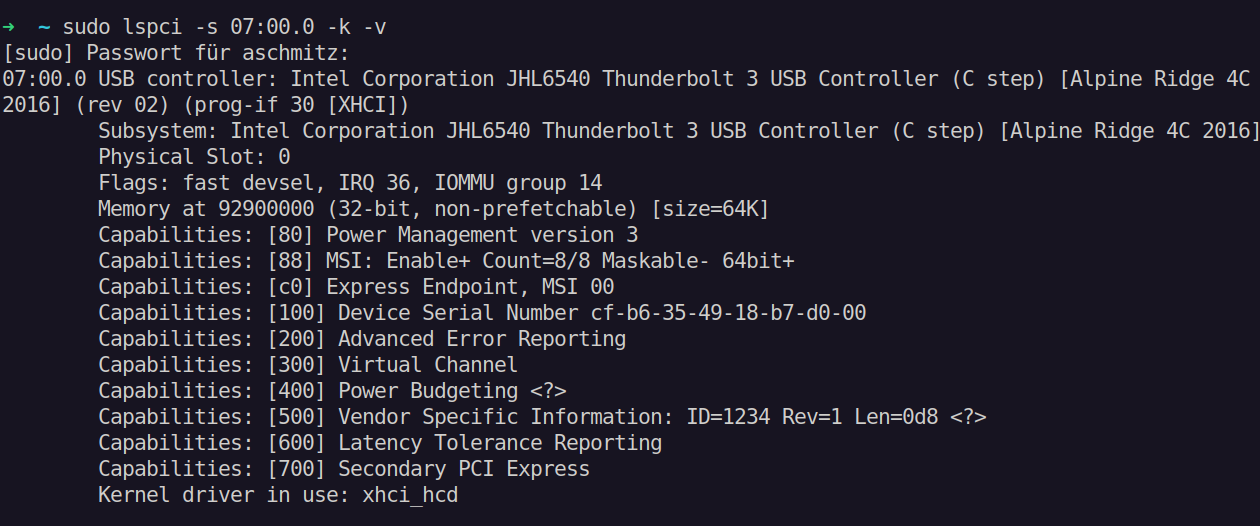
                      Link Preview Image
                      root42@chaos.socialR 1 Reply Last reply
                      0
                      • root42@chaos.socialR root42@chaos.social

                        @sebastiaanfranken First the lspci output

                        Link Preview Image
                        root42@chaos.socialR This user is from outside of this forum
                        root42@chaos.socialR This user is from outside of this forum
                        root42@chaos.social
                        wrote last edited by
                        #29

                        @sebastiaanfranken Then syslog:
                        https://privatebin.net/?83d299418ae3e05a#2ZQSiucLStRySg7yKv35MQ799oqivhZVM8ftmKLAyxQ8

                        1 Reply Last reply
                        0
                        • root42@chaos.socialR root42@chaos.social

                          @dr_laemmerbein lots of reboots...

                          dr_laemmerbein@mastodon.socialD This user is from outside of this forum
                          dr_laemmerbein@mastodon.socialD This user is from outside of this forum
                          dr_laemmerbein@mastodon.social
                          wrote last edited by
                          #30

                          @root42 Maybe you can get some hints by running `dmesg -w` in a terminal as root. This will show you all the kernel events and if you plug in your USB drive you should see some logs related to that. Maybe you'll get an error message or something like that.

                          root42@chaos.socialR 1 Reply Last reply
                          0
                          • root42@chaos.socialR root42@chaos.social

                            Yes, so it seems the controller is stuck in EHCI mode, instead of switching to xHCI for USB3 devices. Bummer... how to switch it back...?

                            robert@people.unfoo.netR This user is from outside of this forum
                            robert@people.unfoo.netR This user is from outside of this forum
                            robert@people.unfoo.net
                            wrote last edited by
                            #31
                            @root42 Check the pins in the connectors. I had a problem like this where in a thumb drive some pins belonging to USB3 were bent / damaged and it would not work in a USB3 port. Although it worked fine in a USB2 port, those 4 pins were not damaged.
                            robert@people.unfoo.netR 1 Reply Last reply
                            0
                            • robert@people.unfoo.netR robert@people.unfoo.net
                              @root42 Check the pins in the connectors. I had a problem like this where in a thumb drive some pins belonging to USB3 were bent / damaged and it would not work in a USB3 port. Although it worked fine in a USB2 port, those 4 pins were not damaged.
                              robert@people.unfoo.netR This user is from outside of this forum
                              robert@people.unfoo.netR This user is from outside of this forum
                              robert@people.unfoo.net
                              wrote last edited by
                              #32
                              @root42 with USB-C it could also be the wrong type of cable.
                              root42@chaos.socialR 2 Replies Last reply
                              0
                              • robert@people.unfoo.netR robert@people.unfoo.net
                                @root42 with USB-C it could also be the wrong type of cable.
                                root42@chaos.socialR This user is from outside of this forum
                                root42@chaos.socialR This user is from outside of this forum
                                root42@chaos.social
                                wrote last edited by
                                #33

                                @robert no. It works in the Live thumbdrive. Only the proper install on the ssd is botched. The ports work fine.

                                1 Reply Last reply
                                0
                                • dr_laemmerbein@mastodon.socialD dr_laemmerbein@mastodon.social

                                  @root42 Maybe you can get some hints by running `dmesg -w` in a terminal as root. This will show you all the kernel events and if you plug in your USB drive you should see some logs related to that. Maybe you'll get an error message or something like that.

                                  root42@chaos.socialR This user is from outside of this forum
                                  root42@chaos.socialR This user is from outside of this forum
                                  root42@chaos.social
                                  wrote last edited by
                                  #34

                                  @dr_laemmerbein I am doing that. No logs when plugging in USB 3 devices. Zip. Zilch. Nada. That’s the weird thing.

                                  1 Reply Last reply
                                  0
                                  • robert@people.unfoo.netR robert@people.unfoo.net
                                    @root42 with USB-C it could also be the wrong type of cable.
                                    root42@chaos.socialR This user is from outside of this forum
                                    root42@chaos.socialR This user is from outside of this forum
                                    root42@chaos.social
                                    wrote last edited by
                                    #35

                                    @robert the USB C thumbdrive connects without a cable. It works in the live system, not in the installed system.

                                    1 Reply Last reply
                                    0
                                    • root42@chaos.socialR root42@chaos.social

                                      @drscriptt So the output of lsmod is very similar on both. I installed an extra Intel sound driver, but that shouldn't interfere with USB, I think.

                                      Link Preview Image
                                      drscriptt@oldbytes.spaceD This user is from outside of this forum
                                      drscriptt@oldbytes.spaceD This user is from outside of this forum
                                      drscriptt@oldbytes.space
                                      wrote last edited by
                                      #36

                                      @root42 agreed

                                      1 Reply Last reply
                                      0
                                      • root42@chaos.socialR root42@chaos.social

                                        @drscriptt So the output of lsmod is very similar on both. I installed an extra Intel sound driver, but that shouldn't interfere with USB, I think.

                                        Link Preview Image
                                        drscriptt@oldbytes.spaceD This user is from outside of this forum
                                        drscriptt@oldbytes.spaceD This user is from outside of this forum
                                        drscriptt@oldbytes.space
                                        wrote last edited by
                                        #37

                                        @root42 try `lsusb` (?) when it’s working.

                                        Maybe add `-v` (?) to see if you can see the driver that’s being used.

                                        root42@chaos.socialR 1 Reply Last reply
                                        0
                                        • drscriptt@oldbytes.spaceD drscriptt@oldbytes.space

                                          @root42 try `lsusb` (?) when it’s working.

                                          Maybe add `-v` (?) to see if you can see the driver that’s being used.

                                          root42@chaos.socialR This user is from outside of this forum
                                          root42@chaos.socialR This user is from outside of this forum
                                          root42@chaos.social
                                          wrote last edited by
                                          #38

                                          @drscriptt the driver is usb-xhci. As expected. Which is also loaded in the broken install…

                                          1 Reply Last reply
                                          0
                                          Reply
                                          • Reply as topic
                                          Log in to reply
                                          • Oldest to Newest
                                          • Newest to Oldest
                                          • Most Votes


                                          • Login

                                          • Login or register to search.
                                          • First post
                                            Last post
                                          0
                                          • Categories
                                          • Recent
                                          • Tags
                                          • Popular
                                          • World
                                          • Users
                                          • Groups