This semester, I'm teaching my class on System Administration / Internet Operations once again.
-
System Administration, Week 1: Warmup Exercise 1 - No Space Left On Device
In this video, we try to find out what happens when we run out of disk space as well as how the system behaves when use up all inodes. This is intended as a warmup exercise for our week 2 topic, introducing the concept of disk storage and filesystem behavior.
System Administration, Week 2: Storage Models and Disks
In this video, we'll introduce the larger topic of filesystems and storage. In particular, we'll discuss the conceptual storage models, such as Direct Attached Storage (DAS), Network Attached Storage (NAS), Storage Area Networks (SANs), and Cloud Storage.
-
System Administration, Week 2: Storage Models and Disks
In this video, we'll introduce the larger topic of filesystems and storage. In particular, we'll discuss the conceptual storage models, such as Direct Attached Storage (DAS), Network Attached Storage (NAS), Storage Area Networks (SANs), and Cloud Storage.
System Administration, Week 2: Devices and Interfaces
This segment discusses common storage device interfaces, including SCSI, ATA, SSD, Fibre Channel, and hinting at storage configurations like JBOD and RAID, which we'll get back to in the next video. At this point, it feels a bit dated, and I may skip it going forward and perhaps expand more on enterprise storage, but then again, it's only 10 minutes of your time.
-
System Administration, Week 2: Devices and Interfaces
This segment discusses common storage device interfaces, including SCSI, ATA, SSD, Fibre Channel, and hinting at storage configurations like JBOD and RAID, which we'll get back to in the next video. At this point, it feels a bit dated, and I may skip it going forward and perhaps expand more on enterprise storage, but then again, it's only 10 minutes of your time.
System Administration, Week 2: Storage Virtualization
In this video, we cover the concept of storage virtualization -- combining individual disks into larger storage pools and utilizing resources from such a pool. This includes a discussion of RAID and some of the different supported levels as well as Logical Volume Management (LVM). We further illustrate some of these properties by example of ZFS.
-
System Administration, Week 2: Storage Virtualization
In this video, we cover the concept of storage virtualization -- combining individual disks into larger storage pools and utilizing resources from such a pool. This includes a discussion of RAID and some of the different supported levels as well as Logical Volume Management (LVM). We further illustrate some of these properties by example of ZFS.
System Administration, Week 2: Physical Disk Structure
We'll take a quick look at what a hard disk drive actually looks like. This helps us understand addressing schemes such as CHS and LBA, what physical aspects affect hard disk performance, as well as partitioning requirements. While a lot of this is tied to old magentic-spinning-platters drives, it explains a lot of assumptions partitions and file systems make even if using SSDs.
-
System Administration, Week 2: Physical Disk Structure
We'll take a quick look at what a hard disk drive actually looks like. This helps us understand addressing schemes such as CHS and LBA, what physical aspects affect hard disk performance, as well as partitioning requirements. While a lot of this is tied to old magentic-spinning-platters drives, it explains a lot of assumptions partitions and file systems make even if using SSDs.
System Administration, Week 2: Partitions
In this video, we talk about how to divide a single disk -- physical or virtual -- and how the partitions relate to the physical structure of the disk. We show examples partitioning disks on NetBSD, OmniOS, and Linux using the disklabel, fdisk, and format tools.
-
System Administration, Week 2: Partitions
In this video, we talk about how to divide a single disk -- physical or virtual -- and how the partitions relate to the physical structure of the disk. We show examples partitioning disks on NetBSD, OmniOS, and Linux using the disklabel, fdisk, and format tools.
System Administration, Week 2: Moving EC2 Volumes
We've talked about EC2 Elastic Block Storage volumes, and how we can treat them as if they were hard drives plugged into an instance. In this video, we run through one of our recommended exercises for Week 2 and show how to move an EBS volume across instances and operating systems from a NetBSD EC2 instance to one running Ubuntu Linux.
-
System Administration, Week 2: Moving EC2 Volumes
We've talked about EC2 Elastic Block Storage volumes, and how we can treat them as if they were hard drives plugged into an instance. In this video, we run through one of our recommended exercises for Week 2 and show how to move an EBS volume across instances and operating systems from a NetBSD EC2 instance to one running Ubuntu Linux.
System Administration, Week 3: The Boot Process & the MBR
In this video, we discuss the boot process on a high level as well as take a fairly detailed look at the MBR. We'll create a suitable NetBSD BIOS partition by hand, utilizing the dd(1) command because using fdisk(8) would be just too easy. In the process, we learn a fair bit about the structure of the boot sector.
-
System Administration, Week 3: The Boot Process & the MBR
In this video, we discuss the boot process on a high level as well as take a fairly detailed look at the MBR. We'll create a suitable NetBSD BIOS partition by hand, utilizing the dd(1) command because using fdisk(8) would be just too easy. In the process, we learn a fair bit about the structure of the boot sector.
System Administration: Week 3: File systems
In this video, we pretend to be a file system, trying to store all our cat photos in a reasonable manner on a raw disk. By manually writing data and metadata, we begin to understand what a file system has to do. We also show how the tar(1) utility creates output that very much resembles a filesystem format.
-
System Administration: Week 3: File systems
In this video, we pretend to be a file system, trying to store all our cat photos in a reasonable manner on a raw disk. By manually writing data and metadata, we begin to understand what a file system has to do. We also show how the tar(1) utility creates output that very much resembles a filesystem format.
System Administration: Week 3: Files go hier(7)
In this video, we're wrapping up our discussion of filesystems and partitions with a look at file types and partitions and filesystems mounted by default on #NetBSD, #FreeBSD, #OmniOS, and Fedora Linux. We close with a look at the filesystem hierarchy as defined in the hier(7) manual page.
-
System Administration: Week 3: Files go hier(7)
In this video, we're wrapping up our discussion of filesystems and partitions with a look at file types and partitions and filesystems mounted by default on #NetBSD, #FreeBSD, #OmniOS, and Fedora Linux. We close with a look at the filesystem hierarchy as defined in the hier(7) manual page.
System Administration: Week 3: Resizing a file system
In these two videos, we show how to resize an existing filesystem. First on #NetBSD using the resize_ffs(8) tool, where we first increase the size of a 512MB partition to 1GB, then shrink it down to 256MB. Next we repeat the same exercise on #Debian Linux, using the resize2fs(8) tool.
-
System Administration: Week 3: Resizing a file system
In these two videos, we show how to resize an existing filesystem. First on #NetBSD using the resize_ffs(8) tool, where we first increase the size of a 512MB partition to 1GB, then shrink it down to 256MB. Next we repeat the same exercise on #Debian Linux, using the resize2fs(8) tool.
System Administration: Week 4: Types of Software
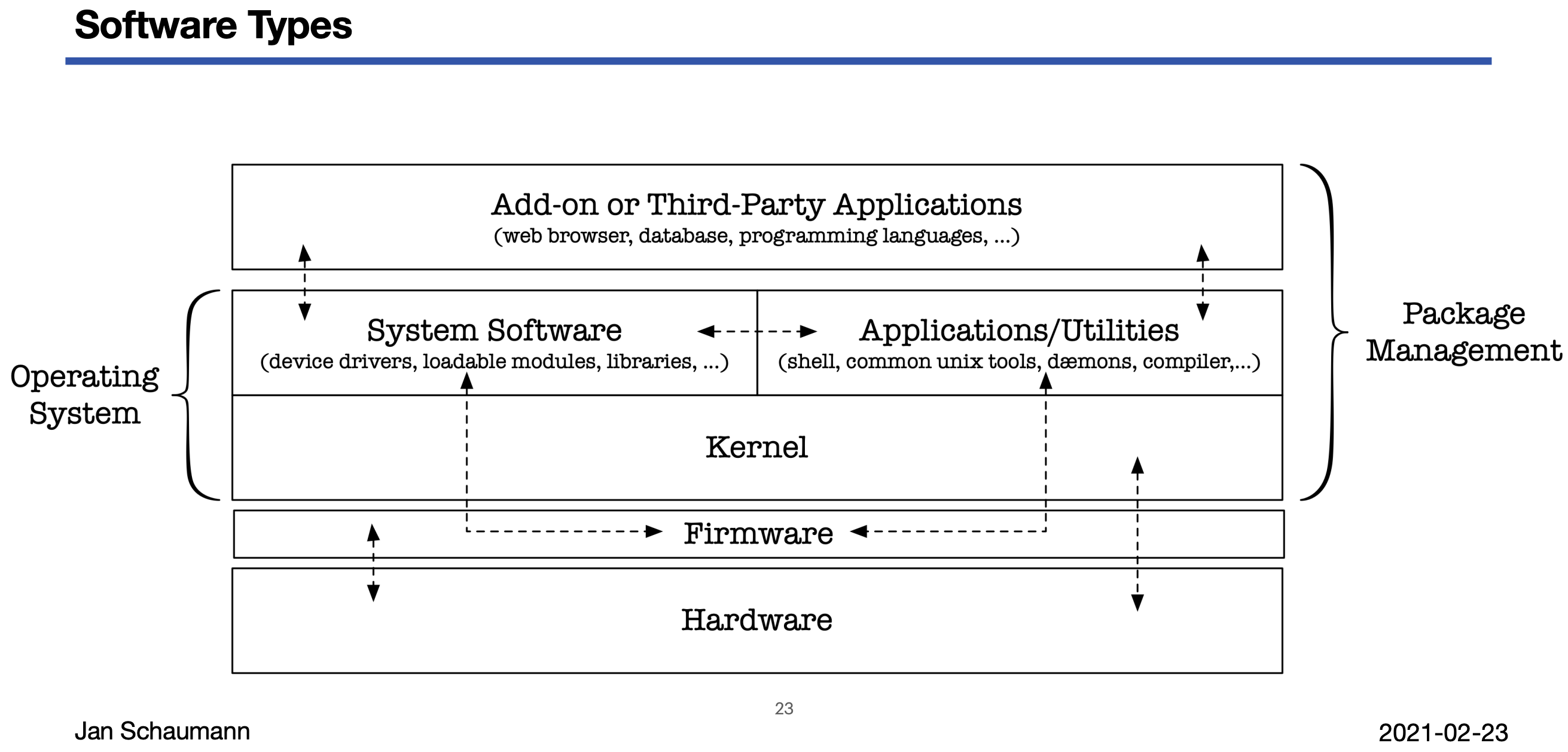
With this video, we begin our Week 04 topic of "software": what types of software there are, how they fit together, how to install software, and how to manage dependencies. We try to draw a terrible analogy to - what else - cars, and quickly realize that the distinctions between firmware, operating system, system software, add-on software are difficult to make.
-
System Administration: Week 4: Types of Software
With this video, we begin our Week 04 topic of "software": what types of software there are, how they fit together, how to install software, and how to manage dependencies. We try to draw a terrible analogy to - what else - cars, and quickly realize that the distinctions between firmware, operating system, system software, add-on software are difficult to make.
System Administration: Week 4: OS Installation
In this video, we perform a step-by-step manual installation of #NetBSD onto a virtual machine to illustrate the details of the process, including partitioning, boot loader installation, OS set extraction etc.
We also discuss planning of the OS installation by looking at data classification into shareable/non-shareable and static/variable data and think about how to scale this process.
-
System Administration: Week 4: OS Installation
In this video, we perform a step-by-step manual installation of #NetBSD onto a virtual machine to illustrate the details of the process, including partitioning, boot loader installation, OS set extraction etc.
We also discuss planning of the OS installation by looking at data classification into shareable/non-shareable and static/variable data and think about how to scale this process.
System Administration: Week 4: Package Management
In this video, we continue our discussion of the difference and relationship between the operating system and so-called "add-on software". We conclude that in order to install and maintain all such software, we want to use a package manager, and illustrate common features by example of the 'dpkg', 'rpm', and #NetBSD's #pkgsrc tools.
-
System Administration: Week 4: Package Management
In this video, we continue our discussion of the difference and relationship between the operating system and so-called "add-on software". We conclude that in order to install and maintain all such software, we want to use a package manager, and illustrate common features by example of the 'dpkg', 'rpm', and #NetBSD's #pkgsrc tools.
System Administration: Week 4: Package Management Pitfalls
In this video, we discuss some of the problems with package managers, native language packaging solutions, and the implications of their use on dependency resolution, package integrity, and trust. We revisit "left-pad" and "dependency confusion" to illustrate some of these problems.
-
System Administration: Week 4: Package Management Pitfalls
In this video, we discuss some of the problems with package managers, native language packaging solutions, and the implications of their use on dependency resolution, package integrity, and trust. We revisit "left-pad" and "dependency confusion" to illustrate some of these problems.
System Administration: Week 5: Networking I: Layers
In this video, we begin our longer discussion on the topic of "networking". We're using tcpdump(8) to capture a single TCP SYN packet and start looking at the MAC and IP information, teasing out each individual byte. And don't worry, we dunk on the OSI stack model as needed and popular these days.
-
System Administration: Week 5: Networking I: Layers
In this video, we begin our longer discussion on the topic of "networking". We're using tcpdump(8) to capture a single TCP SYN packet and start looking at the MAC and IP information, teasing out each individual byte. And don't worry, we dunk on the OSI stack model as needed and popular these days.
System Administration: Week 5: Networking I: IPv4 Basics & CIDR subnetting
In this video, we cover the basics of the 32-bit IPv4 address and how we organize networks using Classless Inter-Domain Routing or CIDR subnetting. (Don't worry, we'll get to #IPv6 in the next video.)
-
System Administration: Week 5: Networking I: IPv4 Basics & CIDR subnetting
In this video, we cover the basics of the 32-bit IPv4 address and how we organize networks using Classless Inter-Domain Routing or CIDR subnetting. (Don't worry, we'll get to #IPv6 in the next video.)
System Administration: Week 5: Networking I: IPv6 Basics
In this video, we get familiar with our Big Hero IPv6, looking at the structure of the IPv6 header and IPv6 address representations.
Since we're using AWS #EC2, remember that we have instructions for how to set up a dual-stack VPC and subnet to launch your instances in:

Creating AWS IPv4/IPv6 Dual Stack EC2 Instances
A quick summary of the AWS EC2 resources needed to create an IPv6-enabled or dualstack instance.
(www.netmeister.org)
-
System Administration: Week 5: Networking I: IPv6 Basics
In this video, we get familiar with our Big Hero IPv6, looking at the structure of the IPv6 header and IPv6 address representations.
Since we're using AWS #EC2, remember that we have instructions for how to set up a dual-stack VPC and subnet to launch your instances in:
Creating AWS IPv4/IPv6 Dual Stack EC2 Instances
A quick summary of the AWS EC2 resources needed to create an IPv6-enabled or dualstack instance.
(www.netmeister.org)
System Administration: Week 5: Networking I: IP Allocation & IPv4 Exhaustion
Mommy, where do IP addresses come from? In this video, we discuss how IANA allocates IP addresses to the Regional Internet Registries and try to illustrate just how large the #IPv6 address space is.
-
System Administration: Week 5: Networking I: IP Allocation & IPv4 Exhaustion
Mommy, where do IP addresses come from? In this video, we discuss how IANA allocates IP addresses to the Regional Internet Registries and try to illustrate just how large the #IPv6 address space is.
System Administration: Week 5: Networking I:The Physical Internet
In this video, we look at the physical structure of the internet, with a focus on submarine internet communications cables. Jumping from the bottom of the OSI stack all the way to Layer 9 ("political"), we then discuss how different countries use their political power to enforce internet blocks on their citizens, leading us to warrantless wiretapping in AT&T's room 641A.
-
System Administration: Week 5: Networking I:The Physical Internet
In this video, we look at the physical structure of the internet, with a focus on submarine internet communications cables. Jumping from the bottom of the OSI stack all the way to Layer 9 ("political"), we then discuss how different countries use their political power to enforce internet blocks on their citizens, leading us to warrantless wiretapping in AT&T's room 641A.
System Administration: Week 5: Networking I: A Network of Networks
In this video, we look at how independent networks connect to one another, how Autonomous Systems numbers allow us to identify network operators, and how peering between independent ASs works.