Skip to content
  • Categories
  • Recent
  • Tags
  • Popular
  • World
  • Users
  • Groups
Skins
  • Light
  • Brite
  • Cerulean
  • Cosmo
  • Flatly
  • Journal
  • Litera
  • Lumen
  • Lux
  • Materia
  • Minty
  • Morph
  • Pulse
  • Sandstone
  • Simplex
  • Sketchy
  • Spacelab
  • United
  • Yeti
  • Zephyr
  • Dark
  • Cyborg
  • Darkly
  • Quartz
  • Slate
  • Solar
  • Superhero
  • Vapor

  • Default (Cyborg)
  • No Skin
Collapse
Brand Logo

CIRCLE WITH A DOT

  1. Home
  2. Uncategorized
  3. This semester, I'm teaching my class on System Administration / Internet Operations once again.

This semester, I'm teaching my class on System Administration / Internet Operations once again.

Scheduled Pinned Locked Moved Uncategorized
sysadmindevopssre
32 Posts 2 Posters 0 Views
  • Oldest to Newest
  • Newest to Oldest
  • Most Votes
Reply
  • Reply as topic
Log in to reply
This topic has been deleted. Only users with topic management privileges can see it.
  • jschauma@mstdn.socialJ jschauma@mstdn.social

    This semester, I'm teaching my class on System Administration / Internet Operations once again.

    The syllabus and all course materials are available here:

    CS615 -- System Administration

    favicon

    (stevens.netmeister.org)

    All videos for the lectures and exercises are public and available for free on YouTube:

    https://www.youtube.com/c/cs615asa/videos

    If you want to follow along, I'll be posting lecture videos and related links in this thread throughout the semester.

    #sysadmin #devops #sre

    jschauma@mstdn.socialJ This user is from outside of this forum
    jschauma@mstdn.socialJ This user is from outside of this forum
    jschauma@mstdn.social
    wrote on last edited by
    #2

    System Administration, Week 1: Introduction

    In this video, we cover a number of administrative issues relating to our course: we discuss why and how System Administration is covered in an academic Computer Science curriculum and outline the course syllabus.

    https://youtu.be/QJL5cNv9dJs

    #sysadmin #devops #sre

    jschauma@mstdn.socialJ 1 Reply Last reply
    0
    • jschauma@mstdn.socialJ jschauma@mstdn.social

      System Administration, Week 1: Introduction

      In this video, we cover a number of administrative issues relating to our course: we discuss why and how System Administration is covered in an academic Computer Science curriculum and outline the course syllabus.

      https://youtu.be/QJL5cNv9dJs

      #sysadmin #devops #sre

      jschauma@mstdn.socialJ This user is from outside of this forum
      jschauma@mstdn.socialJ This user is from outside of this forum
      jschauma@mstdn.social
      wrote on last edited by
      #3

      System Administration, Week 1: The Job of a System Administrator

      In this video, we try to capture the job of a System Administrator. We show what things SysAdmins may encounter in their day to day routine, ranging from blade servers and routers to cable ties and power tools and everything in between. As we try to define the job, we find out it's not quite that easy...

      It's duct tape and WD40 all the way down.

      https://youtu.be/osIO9CbqHQo

      #sysadmin #devops #sre

      jschauma@mstdn.socialJ 1 Reply Last reply
      0
      • jschauma@mstdn.socialJ jschauma@mstdn.social

        System Administration, Week 1: The Job of a System Administrator

        In this video, we try to capture the job of a System Administrator. We show what things SysAdmins may encounter in their day to day routine, ranging from blade servers and routers to cable ties and power tools and everything in between. As we try to define the job, we find out it's not quite that easy...

        It's duct tape and WD40 all the way down.

        https://youtu.be/osIO9CbqHQo

        #sysadmin #devops #sre

        jschauma@mstdn.socialJ This user is from outside of this forum
        jschauma@mstdn.socialJ This user is from outside of this forum
        jschauma@mstdn.social
        wrote on last edited by
        #4

        System Administration, Week 1: Core Principles

        In this video, we present a few core principles that will guide us throughout the semester: Scalability, Security, and Simplicity. We'll also get to know a few basic "laws", well known by any System Administrator. If you're wondering what all this has to do with Legos, please tune in...

        https://youtu.be/bfqP6PlS6Og

        #SysAdmin #devops #sre

        jschauma@mstdn.socialJ 1 Reply Last reply
        0
        • jschauma@mstdn.socialJ jschauma@mstdn.social

          System Administration, Week 1: Core Principles

          In this video, we present a few core principles that will guide us throughout the semester: Scalability, Security, and Simplicity. We'll also get to know a few basic "laws", well known by any System Administrator. If you're wondering what all this has to do with Legos, please tune in...

          https://youtu.be/bfqP6PlS6Og

          #SysAdmin #devops #sre

          jschauma@mstdn.socialJ This user is from outside of this forum
          jschauma@mstdn.socialJ This user is from outside of this forum
          jschauma@mstdn.social
          wrote last edited by
          #5

          System Administration, Week 1: UNIX History

          We're borrowing this video from our "Advanced Programming in the UNIX Environment" class to give a brief summary of the history of the UNIX family of operating systems.

          https://youtu.be/3H7SQWTR6Dw

          #sysadmin #devops #sre #unix

          jschauma@mstdn.socialJ 1 Reply Last reply
          0
          • jschauma@mstdn.socialJ jschauma@mstdn.social

            System Administration, Week 1: UNIX History

            We're borrowing this video from our "Advanced Programming in the UNIX Environment" class to give a brief summary of the history of the UNIX family of operating systems.

            https://youtu.be/3H7SQWTR6Dw

            #sysadmin #devops #sre #unix

            jschauma@mstdn.socialJ This user is from outside of this forum
            jschauma@mstdn.socialJ This user is from outside of this forum
            jschauma@mstdn.social
            wrote last edited by
            #6

            System Administration, Week 1: Warming up to EC2

            In this short video, we prepare for our first homework assignment and demonstrate how to launch a #NetBSD instance in AWS EC2.

            - YouTube

            Auf YouTube findest du die angesagtesten Videos und Tracks. Außerdem kannst du eigene Inhalte hochladen und mit Freunden oder gleich der ganzen Welt teilen.

            favicon

            (www.youtube.com)

            Note: the AMI in the video is outdated; I have up to date images listed here:
            https://stevens.netmeister.org/615/netbsd-amis.html

            Or you can create your own:
            https://www.netmeister.org/blog/creating-netbsd-ec2-amis.html

            #sysadmin #devops #sre

            jschauma@mstdn.socialJ 1 Reply Last reply
            0
            • jschauma@mstdn.socialJ jschauma@mstdn.social

              System Administration, Week 1: Warming up to EC2

              In this short video, we prepare for our first homework assignment and demonstrate how to launch a #NetBSD instance in AWS EC2.

              - YouTube

              Auf YouTube findest du die angesagtesten Videos und Tracks. Außerdem kannst du eigene Inhalte hochladen und mit Freunden oder gleich der ganzen Welt teilen.

              favicon

              (www.youtube.com)

              Note: the AMI in the video is outdated; I have up to date images listed here:
              https://stevens.netmeister.org/615/netbsd-amis.html

              Or you can create your own:
              https://www.netmeister.org/blog/creating-netbsd-ec2-amis.html

              #sysadmin #devops #sre

              jschauma@mstdn.socialJ This user is from outside of this forum
              jschauma@mstdn.socialJ This user is from outside of this forum
              jschauma@mstdn.social
              wrote last edited by
              #7

              System Administration, Week 1: AWS Aliases

              System Administrators are notoriously lazy, and AWS commands a notoriously lengthy to type. In this video, we demonstrate the use of shell aliases and functions to save ourselves some typing whenever we run AWS EC2 commands.

              https://youtu.be/fnWdB20_OoY

              The aliases and shell functions we use are available here:
              https://github.com/jschauma/cloud-functions/blob/main/awsfuncs

              #sysadmin #devops #sre

              jschauma@mstdn.socialJ 1 Reply Last reply
              0
              • jschauma@mstdn.socialJ jschauma@mstdn.social

                System Administration, Week 1: AWS Aliases

                System Administrators are notoriously lazy, and AWS commands a notoriously lengthy to type. In this video, we demonstrate the use of shell aliases and functions to save ourselves some typing whenever we run AWS EC2 commands.

                https://youtu.be/fnWdB20_OoY

                The aliases and shell functions we use are available here:
                https://github.com/jschauma/cloud-functions/blob/main/awsfuncs

                #sysadmin #devops #sre

                jschauma@mstdn.socialJ This user is from outside of this forum
                jschauma@mstdn.socialJ This user is from outside of this forum
                jschauma@mstdn.social
                wrote last edited by
                #8

                System Administration, Week 1: Warmup Exercise 1 - No Space Left On Device

                In this video, we try to find out what happens when we run out of disk space as well as how the system behaves when use up all inodes. This is intended as a warmup exercise for our week 2 topic, introducing the concept of disk storage and filesystem behavior.

                https://youtu.be/eyRNL6fGDM8

                #sysadmin #devops #sre

                jschauma@mstdn.socialJ 1 Reply Last reply
                0
                • jschauma@mstdn.socialJ jschauma@mstdn.social

                  System Administration, Week 1: Warmup Exercise 1 - No Space Left On Device

                  In this video, we try to find out what happens when we run out of disk space as well as how the system behaves when use up all inodes. This is intended as a warmup exercise for our week 2 topic, introducing the concept of disk storage and filesystem behavior.

                  https://youtu.be/eyRNL6fGDM8

                  #sysadmin #devops #sre

                  jschauma@mstdn.socialJ This user is from outside of this forum
                  jschauma@mstdn.socialJ This user is from outside of this forum
                  jschauma@mstdn.social
                  wrote last edited by
                  #9

                  System Administration, Week 2: Storage Models and Disks

                  In this video, we'll introduce the larger topic of filesystems and storage. In particular, we'll discuss the conceptual storage models, such as Direct Attached Storage (DAS), Network Attached Storage (NAS), Storage Area Networks (SANs), and Cloud Storage.

                  https://youtu.be/w-wfCe7Yb68

                  #sysadmin #devops #sre

                  jschauma@mstdn.socialJ 1 Reply Last reply
                  0
                  • jschauma@mstdn.socialJ jschauma@mstdn.social

                    System Administration, Week 2: Storage Models and Disks

                    In this video, we'll introduce the larger topic of filesystems and storage. In particular, we'll discuss the conceptual storage models, such as Direct Attached Storage (DAS), Network Attached Storage (NAS), Storage Area Networks (SANs), and Cloud Storage.

                    https://youtu.be/w-wfCe7Yb68

                    #sysadmin #devops #sre

                    jschauma@mstdn.socialJ This user is from outside of this forum
                    jschauma@mstdn.socialJ This user is from outside of this forum
                    jschauma@mstdn.social
                    wrote last edited by
                    #10

                    System Administration, Week 2: Devices and Interfaces

                    This segment discusses common storage device interfaces, including SCSI, ATA, SSD, Fibre Channel, and hinting at storage configurations like JBOD and RAID, which we'll get back to in the next video. At this point, it feels a bit dated, and I may skip it going forward and perhaps expand more on enterprise storage, but then again, it's only 10 minutes of your time.

                    https://youtu.be/C5PXWFFP31A

                    #sysadmin #devops #sre

                    jschauma@mstdn.socialJ 1 Reply Last reply
                    0
                    • jschauma@mstdn.socialJ jschauma@mstdn.social

                      System Administration, Week 2: Devices and Interfaces

                      This segment discusses common storage device interfaces, including SCSI, ATA, SSD, Fibre Channel, and hinting at storage configurations like JBOD and RAID, which we'll get back to in the next video. At this point, it feels a bit dated, and I may skip it going forward and perhaps expand more on enterprise storage, but then again, it's only 10 minutes of your time.

                      https://youtu.be/C5PXWFFP31A

                      #sysadmin #devops #sre

                      jschauma@mstdn.socialJ This user is from outside of this forum
                      jschauma@mstdn.socialJ This user is from outside of this forum
                      jschauma@mstdn.social
                      wrote last edited by
                      #11

                      System Administration, Week 2: Storage Virtualization

                      In this video, we cover the concept of storage virtualization -- combining individual disks into larger storage pools and utilizing resources from such a pool. This includes a discussion of RAID and some of the different supported levels as well as Logical Volume Management (LVM). We further illustrate some of these properties by example of ZFS.

                      https://youtu.be/tw-QTAoYU9w

                      #sysadmin #devops #sre

                      jschauma@mstdn.socialJ 1 Reply Last reply
                      0
                      • jschauma@mstdn.socialJ jschauma@mstdn.social

                        System Administration, Week 2: Storage Virtualization

                        In this video, we cover the concept of storage virtualization -- combining individual disks into larger storage pools and utilizing resources from such a pool. This includes a discussion of RAID and some of the different supported levels as well as Logical Volume Management (LVM). We further illustrate some of these properties by example of ZFS.

                        https://youtu.be/tw-QTAoYU9w

                        #sysadmin #devops #sre

                        jschauma@mstdn.socialJ This user is from outside of this forum
                        jschauma@mstdn.socialJ This user is from outside of this forum
                        jschauma@mstdn.social
                        wrote last edited by
                        #12

                        System Administration, Week 2: Physical Disk Structure

                        We'll take a quick look at what a hard disk drive actually looks like. This helps us understand addressing schemes such as CHS and LBA, what physical aspects affect hard disk performance, as well as partitioning requirements. While a lot of this is tied to old magentic-spinning-platters drives, it explains a lot of assumptions partitions and file systems make even if using SSDs.

                        https://youtu.be/HqjxRrhspFo

                        #sysadmin #devops #sre

                        jschauma@mstdn.socialJ 1 Reply Last reply
                        0
                        • jschauma@mstdn.socialJ jschauma@mstdn.social

                          System Administration, Week 2: Physical Disk Structure

                          We'll take a quick look at what a hard disk drive actually looks like. This helps us understand addressing schemes such as CHS and LBA, what physical aspects affect hard disk performance, as well as partitioning requirements. While a lot of this is tied to old magentic-spinning-platters drives, it explains a lot of assumptions partitions and file systems make even if using SSDs.

                          https://youtu.be/HqjxRrhspFo

                          #sysadmin #devops #sre

                          jschauma@mstdn.socialJ This user is from outside of this forum
                          jschauma@mstdn.socialJ This user is from outside of this forum
                          jschauma@mstdn.social
                          wrote last edited by
                          #13

                          System Administration, Week 2: Partitions

                          In this video, we talk about how to divide a single disk -- physical or virtual -- and how the partitions relate to the physical structure of the disk. We show examples partitioning disks on NetBSD, OmniOS, and Linux using the disklabel, fdisk, and format tools.

                          https://youtu.be/vmL9ZUh_j2U

                          #sysadmin #devops #sre

                          jschauma@mstdn.socialJ 1 Reply Last reply
                          0
                          • jschauma@mstdn.socialJ jschauma@mstdn.social

                            System Administration, Week 2: Partitions

                            In this video, we talk about how to divide a single disk -- physical or virtual -- and how the partitions relate to the physical structure of the disk. We show examples partitioning disks on NetBSD, OmniOS, and Linux using the disklabel, fdisk, and format tools.

                            https://youtu.be/vmL9ZUh_j2U

                            #sysadmin #devops #sre

                            jschauma@mstdn.socialJ This user is from outside of this forum
                            jschauma@mstdn.socialJ This user is from outside of this forum
                            jschauma@mstdn.social
                            wrote last edited by
                            #14

                            System Administration, Week 2: Moving EC2 Volumes

                            We've talked about EC2 Elastic Block Storage volumes, and how we can treat them as if they were hard drives plugged into an instance. In this video, we run through one of our recommended exercises for Week 2 and show how to move an EBS volume across instances and operating systems from a NetBSD EC2 instance to one running Ubuntu Linux.

                            https://youtu.be/FxzANp8Z1FA

                            #sysadmin #devops #sre

                            jschauma@mstdn.socialJ 1 Reply Last reply
                            0
                            • jschauma@mstdn.socialJ jschauma@mstdn.social

                              System Administration, Week 2: Moving EC2 Volumes

                              We've talked about EC2 Elastic Block Storage volumes, and how we can treat them as if they were hard drives plugged into an instance. In this video, we run through one of our recommended exercises for Week 2 and show how to move an EBS volume across instances and operating systems from a NetBSD EC2 instance to one running Ubuntu Linux.

                              https://youtu.be/FxzANp8Z1FA

                              #sysadmin #devops #sre

                              jschauma@mstdn.socialJ This user is from outside of this forum
                              jschauma@mstdn.socialJ This user is from outside of this forum
                              jschauma@mstdn.social
                              wrote last edited by
                              #15

                              System Administration, Week 3: The Boot Process & the MBR

                              In this video, we discuss the boot process on a high level as well as take a fairly detailed look at the MBR. We'll create a suitable NetBSD BIOS partition by hand, utilizing the dd(1) command because using fdisk(8) would be just too easy. In the process, we learn a fair bit about the structure of the boot sector.

                              https://youtu.be/VHMkg3wlOSM

                              #sysadmin #devops #sre

                              jschauma@mstdn.socialJ 1 Reply Last reply
                              0
                              • jschauma@mstdn.socialJ jschauma@mstdn.social

                                System Administration, Week 3: The Boot Process & the MBR

                                In this video, we discuss the boot process on a high level as well as take a fairly detailed look at the MBR. We'll create a suitable NetBSD BIOS partition by hand, utilizing the dd(1) command because using fdisk(8) would be just too easy. In the process, we learn a fair bit about the structure of the boot sector.

                                https://youtu.be/VHMkg3wlOSM

                                #sysadmin #devops #sre

                                jschauma@mstdn.socialJ This user is from outside of this forum
                                jschauma@mstdn.socialJ This user is from outside of this forum
                                jschauma@mstdn.social
                                wrote last edited by
                                #16

                                System Administration: Week 3: File systems

                                In this video, we pretend to be a file system, trying to store all our cat photos in a reasonable manner on a raw disk. By manually writing data and metadata, we begin to understand what a file system has to do. We also show how the tar(1) utility creates output that very much resembles a filesystem format.

                                https://youtu.be/9MWeiuw8WHU

                                #sysadmin #devops #sre

                                jschauma@mstdn.socialJ 1 Reply Last reply
                                0
                                • jschauma@mstdn.socialJ jschauma@mstdn.social

                                  System Administration: Week 3: File systems

                                  In this video, we pretend to be a file system, trying to store all our cat photos in a reasonable manner on a raw disk. By manually writing data and metadata, we begin to understand what a file system has to do. We also show how the tar(1) utility creates output that very much resembles a filesystem format.

                                  https://youtu.be/9MWeiuw8WHU

                                  #sysadmin #devops #sre

                                  jschauma@mstdn.socialJ This user is from outside of this forum
                                  jschauma@mstdn.socialJ This user is from outside of this forum
                                  jschauma@mstdn.social
                                  wrote last edited by
                                  #17

                                  System Administration: Week 3: Files go hier(7)

                                  In this video, we're wrapping up our discussion of filesystems and partitions with a look at file types and partitions and filesystems mounted by default on #NetBSD, #FreeBSD, #OmniOS, and Fedora Linux. We close with a look at the filesystem hierarchy as defined in the hier(7) manual page.

                                  https://youtu.be/J0ontdqxpUg

                                  #sysadmin #devops #sre

                                  jschauma@mstdn.socialJ 1 Reply Last reply
                                  0
                                  • jschauma@mstdn.socialJ jschauma@mstdn.social

                                    System Administration: Week 3: Files go hier(7)

                                    In this video, we're wrapping up our discussion of filesystems and partitions with a look at file types and partitions and filesystems mounted by default on #NetBSD, #FreeBSD, #OmniOS, and Fedora Linux. We close with a look at the filesystem hierarchy as defined in the hier(7) manual page.

                                    https://youtu.be/J0ontdqxpUg

                                    #sysadmin #devops #sre

                                    jschauma@mstdn.socialJ This user is from outside of this forum
                                    jschauma@mstdn.socialJ This user is from outside of this forum
                                    jschauma@mstdn.social
                                    wrote last edited by
                                    #18

                                    System Administration: Week 3: Resizing a file system

                                    In these two videos, we show how to resize an existing filesystem. First on #NetBSD using the resize_ffs(8) tool, where we first increase the size of a 512MB partition to 1GB, then shrink it down to 256MB. Next we repeat the same exercise on #Debian Linux, using the resize2fs(8) tool.

                                    https://youtu.be/9l-g3keN48g

                                    https://youtu.be/4V15y5Klo9Y

                                    #sysadmin #devops #sre

                                    jschauma@mstdn.socialJ 1 Reply Last reply
                                    0
                                    • jschauma@mstdn.socialJ jschauma@mstdn.social

                                      System Administration: Week 3: Resizing a file system

                                      In these two videos, we show how to resize an existing filesystem. First on #NetBSD using the resize_ffs(8) tool, where we first increase the size of a 512MB partition to 1GB, then shrink it down to 256MB. Next we repeat the same exercise on #Debian Linux, using the resize2fs(8) tool.

                                      https://youtu.be/9l-g3keN48g

                                      https://youtu.be/4V15y5Klo9Y

                                      #sysadmin #devops #sre

                                      jschauma@mstdn.socialJ This user is from outside of this forum
                                      jschauma@mstdn.socialJ This user is from outside of this forum
                                      jschauma@mstdn.social
                                      wrote last edited by
                                      #19

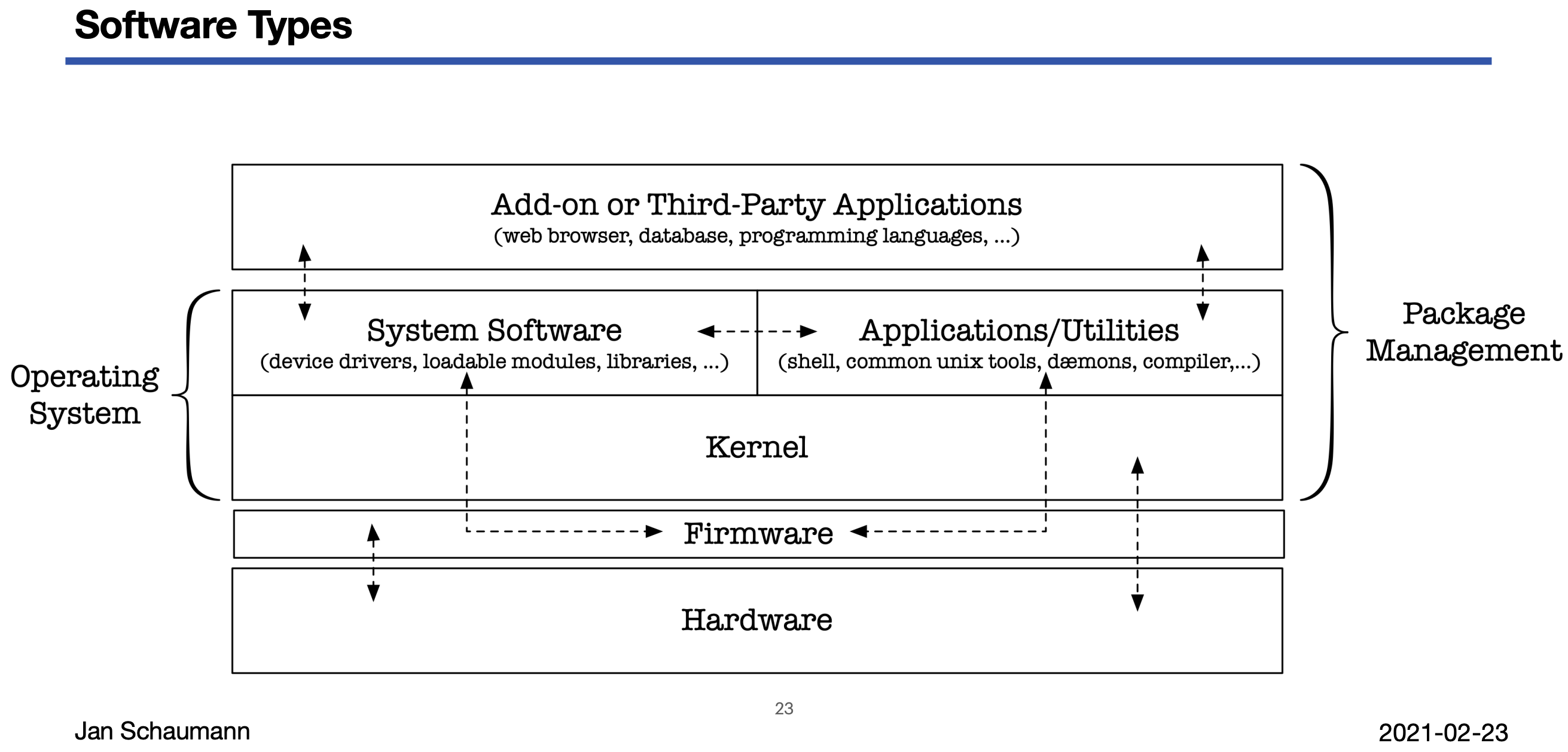
                                      System Administration: Week 4: Types of Software

                                      With this video, we begin our Week 04 topic of "software": what types of software there are, how they fit together, how to install software, and how to manage dependencies. We try to draw a terrible analogy to - what else - cars, and quickly realize that the distinctions between firmware, operating system, system software, add-on software are difficult to make.

                                      https://youtu.be/48HmSsqOfuE

                                      #sysadmin #devops #sre

                                      jschauma@mstdn.socialJ 1 Reply Last reply
                                      0
                                      • jschauma@mstdn.socialJ jschauma@mstdn.social

                                        System Administration: Week 4: Types of Software

                                        With this video, we begin our Week 04 topic of "software": what types of software there are, how they fit together, how to install software, and how to manage dependencies. We try to draw a terrible analogy to - what else - cars, and quickly realize that the distinctions between firmware, operating system, system software, add-on software are difficult to make.

                                        https://youtu.be/48HmSsqOfuE

                                        #sysadmin #devops #sre

                                        jschauma@mstdn.socialJ This user is from outside of this forum
                                        jschauma@mstdn.socialJ This user is from outside of this forum
                                        jschauma@mstdn.social
                                        wrote last edited by
                                        #20

                                        System Administration: Week 4: OS Installation

                                        In this video, we perform a step-by-step manual installation of #NetBSD onto a virtual machine to illustrate the details of the process, including partitioning, boot loader installation, OS set extraction etc.

                                        We also discuss planning of the OS installation by looking at data classification into shareable/non-shareable and static/variable data and think about how to scale this process.

                                        https://youtu.be/XRTDMgIpK68

                                        #sysadmin #devops #sre

                                        jschauma@mstdn.socialJ 1 Reply Last reply
                                        0
                                        • jschauma@mstdn.socialJ jschauma@mstdn.social

                                          System Administration: Week 4: OS Installation

                                          In this video, we perform a step-by-step manual installation of #NetBSD onto a virtual machine to illustrate the details of the process, including partitioning, boot loader installation, OS set extraction etc.

                                          We also discuss planning of the OS installation by looking at data classification into shareable/non-shareable and static/variable data and think about how to scale this process.

                                          https://youtu.be/XRTDMgIpK68

                                          #sysadmin #devops #sre

                                          jschauma@mstdn.socialJ This user is from outside of this forum
                                          jschauma@mstdn.socialJ This user is from outside of this forum
                                          jschauma@mstdn.social
                                          wrote last edited by
                                          #21

                                          System Administration: Week 4: Package Management

                                          In this video, we continue our discussion of the difference and relationship between the operating system and so-called "add-on software". We conclude that in order to install and maintain all such software, we want to use a package manager, and illustrate common features by example of the 'dpkg', 'rpm', and #NetBSD's #pkgsrc tools.

                                          https://youtu.be/dU66_sPjnXg

                                          #sysadmin #devops #sre

                                          Link Preview Image
                                          jschauma@mstdn.socialJ 1 Reply Last reply
                                          0
                                          Reply
                                          • Reply as topic
                                          Log in to reply
                                          • Oldest to Newest
                                          • Newest to Oldest
                                          • Most Votes


                                          • Login

                                          • Login or register to search.
                                          • First post
                                            Last post
                                          0
                                          • Categories
                                          • Recent
                                          • Tags
                                          • Popular
                                          • World
                                          • Users
                                          • Groups