Skip to content
  • Categories
  • Recent
  • Tags
  • Popular
  • World
  • Users
  • Groups
Skins
  • Light
  • Brite
  • Cerulean
  • Cosmo
  • Flatly
  • Journal
  • Litera
  • Lumen
  • Lux
  • Materia
  • Minty
  • Morph
  • Pulse
  • Sandstone
  • Simplex
  • Sketchy
  • Spacelab
  • United
  • Yeti
  • Zephyr
  • Dark
  • Cyborg
  • Darkly
  • Quartz
  • Slate
  • Solar
  • Superhero
  • Vapor

  • Default (Cyborg)
  • No Skin
Collapse
Brand Logo

CIRCLE WITH A DOT

  1. Home
  2. Uncategorized
  3. I got a label maker and had the strangest experience.

I got a label maker and had the strangest experience.

Scheduled Pinned Locked Moved Uncategorized
65 Posts 46 Posters 0 Views
  • Oldest to Newest
  • Newest to Oldest
  • Most Votes
Reply
  • Reply as topic
Log in to reply
This topic has been deleted. Only users with topic management privileges can see it.
  • malcircuit@thingy.socialM malcircuit@thingy.social

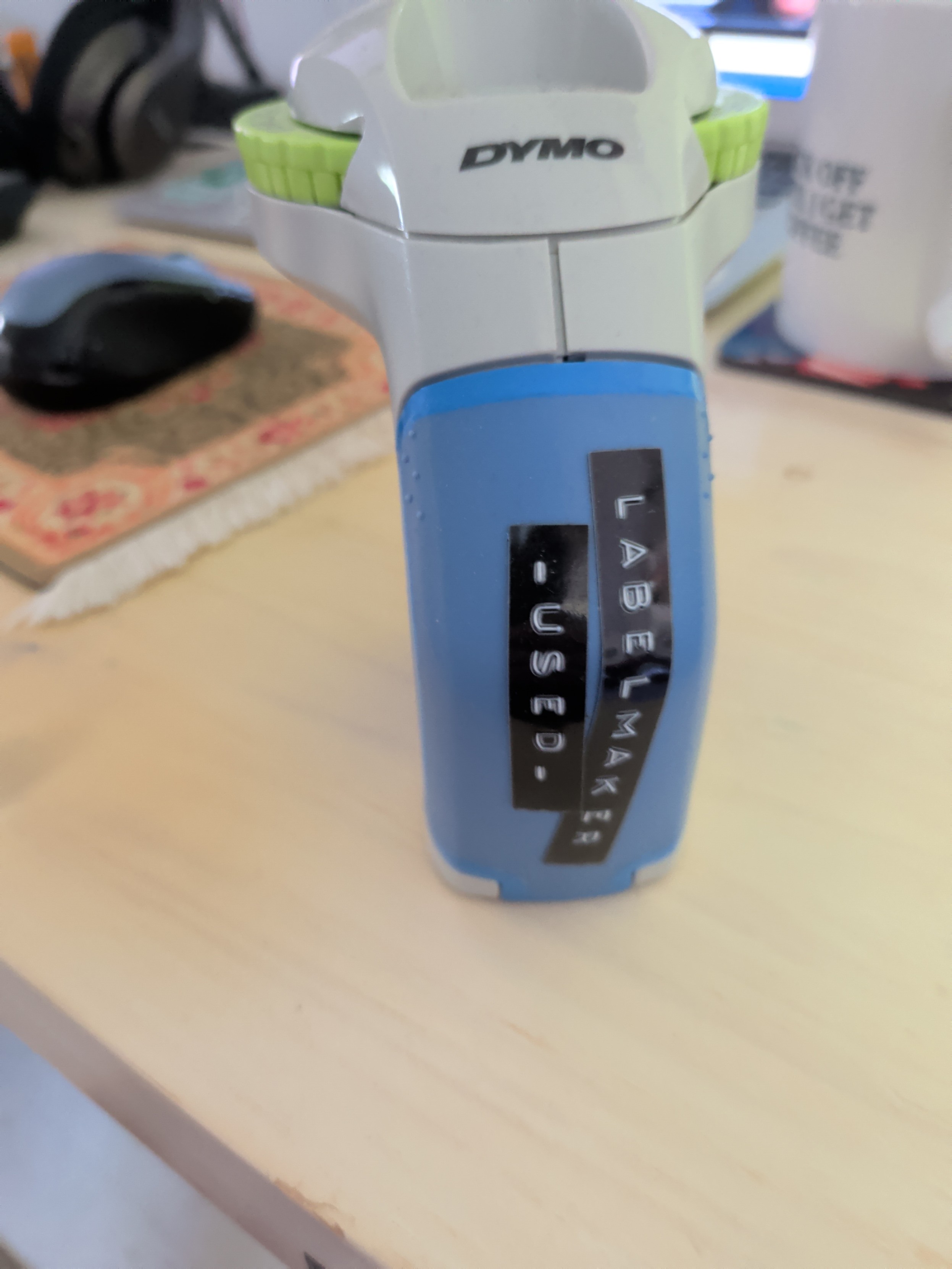
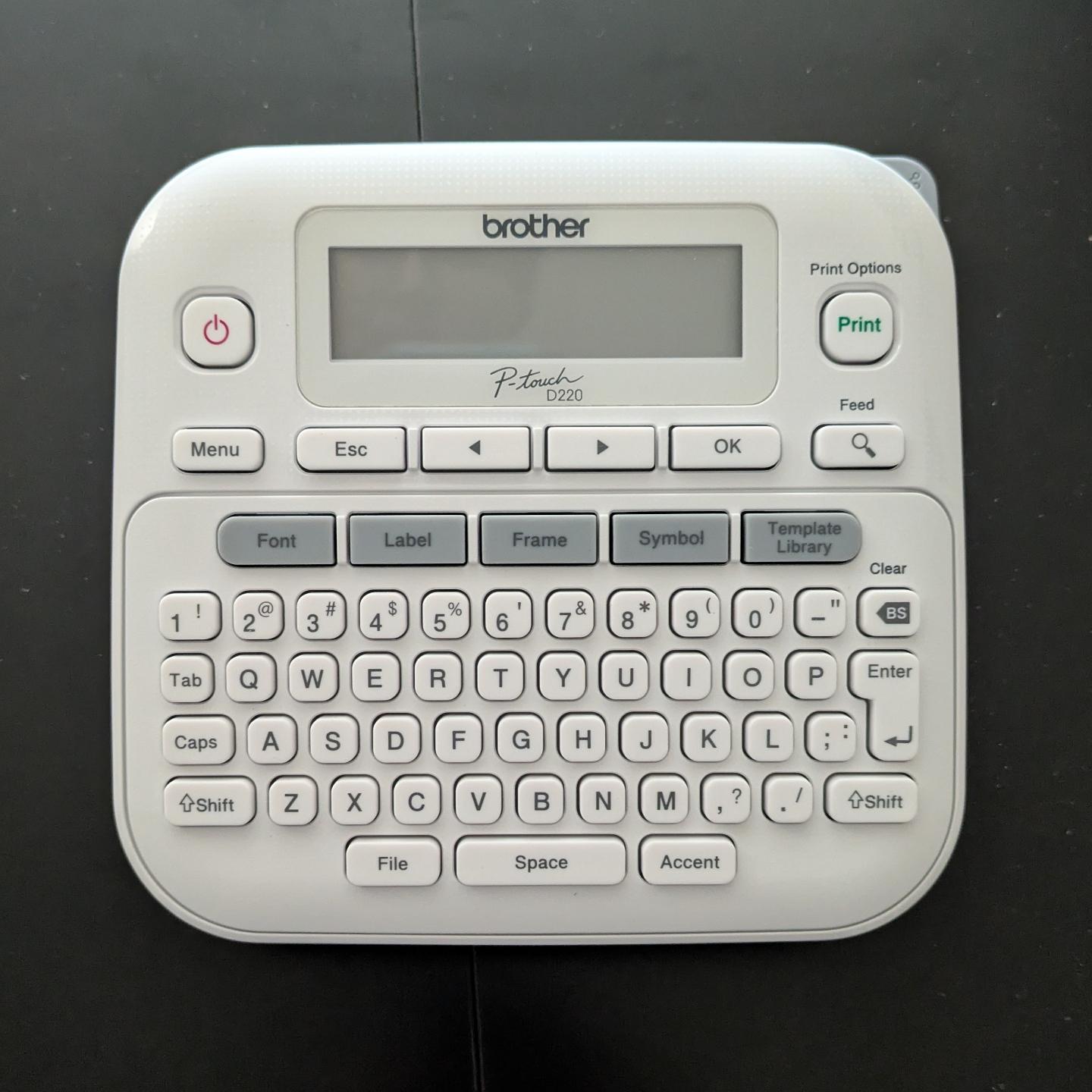
    I got a label maker and had the strangest experience. I opened the box, loaded the sample roll of label ribbon, inserted 6(!) AAA batteries, and it worked.

    No apps to download. No account to log into. No firmware updates. No pop-over "helpful tips" about how it's "now enabled with AI" or whatever.

    I just typed in the label I wanted and hit "print", and it did it. Astonishing. Nostalgic.
    Link Preview Image
    flashmobofone@mstdn.socialF This user is from outside of this forum
    flashmobofone@mstdn.socialF This user is from outside of this forum
    flashmobofone@mstdn.social
    wrote last edited by
    #2

    @malcircuit Glorious.

    1 Reply Last reply
    0
    • malcircuit@thingy.socialM malcircuit@thingy.social

      I got a label maker and had the strangest experience. I opened the box, loaded the sample roll of label ribbon, inserted 6(!) AAA batteries, and it worked.

      No apps to download. No account to log into. No firmware updates. No pop-over "helpful tips" about how it's "now enabled with AI" or whatever.

      I just typed in the label I wanted and hit "print", and it did it. Astonishing. Nostalgic.

      Link Preview Image
      tezoatlipoca@mas.toT This user is from outside of this forum
      tezoatlipoca@mas.toT This user is from outside of this forum
      tezoatlipoca@mas.to
      wrote last edited by
      #3

      @malcircuit

      Brother is one of the last "makes things that just _work_." companies. And I have a similar model of Brother label maker.++
      Their printers long were the holdouts vs. the HP style "disposable"/"subscription DRM ink" bullshit, though I've heard even Brother printers have gone that way.

      ++ have you got to the "making labels for everything just because you have a label maker" phase? including "Please stop wasting the tape, adding labels to everything" ON the label maker itself?

      malcircuit@thingy.socialM __j5s7__@mastodon.social_ 2 Replies Last reply
      0
      • tezoatlipoca@mas.toT tezoatlipoca@mas.to

        @malcircuit

        Brother is one of the last "makes things that just _work_." companies. And I have a similar model of Brother label maker.++
        Their printers long were the holdouts vs. the HP style "disposable"/"subscription DRM ink" bullshit, though I've heard even Brother printers have gone that way.

        ++ have you got to the "making labels for everything just because you have a label maker" phase? including "Please stop wasting the tape, adding labels to everything" ON the label maker itself?

        malcircuit@thingy.socialM This user is from outside of this forum
        malcircuit@thingy.socialM This user is from outside of this forum
        malcircuit@thingy.social
        wrote last edited by
        #4

        @tezoatlipoca I'm at the "got a label maker 6 months ago as a gift (that I asked for) and forgot about it until I encountered a situation that would benefit from a thing having a label" phase lol 😅

        I suspect now that I have it working, I might enter that "label everything unnecessarily, including the label maker itself" phase shortly lol

        tezoatlipoca@mas.toT fartnuggets@jorts.horseF danni_storm@hachyderm.ioD eestileib@tech.lgbtE 4 Replies Last reply
        0
        • malcircuit@thingy.socialM malcircuit@thingy.social

          I got a label maker and had the strangest experience. I opened the box, loaded the sample roll of label ribbon, inserted 6(!) AAA batteries, and it worked.

          No apps to download. No account to log into. No firmware updates. No pop-over "helpful tips" about how it's "now enabled with AI" or whatever.

          I just typed in the label I wanted and hit "print", and it did it. Astonishing. Nostalgic.

          Link Preview Image
          dennis5891@bardicperspiration.clubD This user is from outside of this forum
          dennis5891@bardicperspiration.clubD This user is from outside of this forum
          dennis5891@bardicperspiration.club
          wrote last edited by
          #5

          @malcircuit

          I love Brothers products. I have always used their printers because they still take 3rd party ink.
          How do you like the label printer so far?

          malcircuit@thingy.socialM 1 Reply Last reply
          0
          • malcircuit@thingy.socialM malcircuit@thingy.social

            @tezoatlipoca I'm at the "got a label maker 6 months ago as a gift (that I asked for) and forgot about it until I encountered a situation that would benefit from a thing having a label" phase lol 😅

            I suspect now that I have it working, I might enter that "label everything unnecessarily, including the label maker itself" phase shortly lol

            tezoatlipoca@mas.toT This user is from outside of this forum
            tezoatlipoca@mas.toT This user is from outside of this forum
            tezoatlipoca@mas.to
            wrote last edited by
            #6

            @malcircuit

            Same thing with air fryers. Once you get one you do this phase where you air-fryer everything. Hot dogs? Broccoli? cheese? Pickles? fuck yes.

            1 Reply Last reply
            0
            • malcircuit@thingy.socialM malcircuit@thingy.social

              I got a label maker and had the strangest experience. I opened the box, loaded the sample roll of label ribbon, inserted 6(!) AAA batteries, and it worked.

              No apps to download. No account to log into. No firmware updates. No pop-over "helpful tips" about how it's "now enabled with AI" or whatever.

              I just typed in the label I wanted and hit "print", and it did it. Astonishing. Nostalgic.

              Link Preview Image
              malcircuit@thingy.socialM This user is from outside of this forum
              malcircuit@thingy.socialM This user is from outside of this forum
              malcircuit@thingy.social
              wrote last edited by
              #7

              I like how I post about an unapologetically "dumb tech" device and everyone starts boosting it.

              RETVRN

              mpwg@hachyderm.ioM richlv@mastodon.socialR 2 Replies Last reply
              0
              • dennis5891@bardicperspiration.clubD dennis5891@bardicperspiration.club

                @malcircuit

                I love Brothers products. I have always used their printers because they still take 3rd party ink.
                How do you like the label printer so far?

                malcircuit@thingy.socialM This user is from outside of this forum
                malcircuit@thingy.socialM This user is from outside of this forum
                malcircuit@thingy.social
                wrote last edited by
                #8

                @Dennis5891 It does what it says on the box, so I can't complain lol

                Someday I will explore the different font and formatting options lol

                1 Reply Last reply
                0
                • malcircuit@thingy.socialM malcircuit@thingy.social

                  I got a label maker and had the strangest experience. I opened the box, loaded the sample roll of label ribbon, inserted 6(!) AAA batteries, and it worked.

                  No apps to download. No account to log into. No firmware updates. No pop-over "helpful tips" about how it's "now enabled with AI" or whatever.

                  I just typed in the label I wanted and hit "print", and it did it. Astonishing. Nostalgic.

                  Link Preview Image
                  kayperina@norden.socialK This user is from outside of this forum
                  kayperina@norden.socialK This user is from outside of this forum
                  kayperina@norden.social
                  wrote last edited by
                  #9

                  @malcircuit The lightsabber of organisation! I own one too and you can use third party tape.

                  1 Reply Last reply
                  0
                  • malcircuit@thingy.socialM malcircuit@thingy.social

                    I got a label maker and had the strangest experience. I opened the box, loaded the sample roll of label ribbon, inserted 6(!) AAA batteries, and it worked.

                    No apps to download. No account to log into. No firmware updates. No pop-over "helpful tips" about how it's "now enabled with AI" or whatever.

                    I just typed in the label I wanted and hit "print", and it did it. Astonishing. Nostalgic.

                    Link Preview Image
                    alexmilowski@sfba.socialA This user is from outside of this forum
                    alexmilowski@sfba.socialA This user is from outside of this forum
                    alexmilowski@sfba.social
                    wrote last edited by
                    #10

                    @malcircuit I also have one (also brother) and love it. Also great fun for putting a random “funny” label on things meant for others. Enjoy!

                    1 Reply Last reply
                    0
                    • malcircuit@thingy.socialM malcircuit@thingy.social

                      I got a label maker and had the strangest experience. I opened the box, loaded the sample roll of label ribbon, inserted 6(!) AAA batteries, and it worked.

                      No apps to download. No account to log into. No firmware updates. No pop-over "helpful tips" about how it's "now enabled with AI" or whatever.

                      I just typed in the label I wanted and hit "print", and it did it. Astonishing. Nostalgic.

                      Link Preview Image
                      stefan@stefanbohacek.onlineS This user is from outside of this forum
                      stefan@stefanbohacek.onlineS This user is from outside of this forum
                      stefan@stefanbohacek.online
                      wrote last edited by
                      #11

                      @malcircuit Wild. But surely you had to read and accept terms and conditions. Right?

                      malcircuit@thingy.socialM 1 Reply Last reply
                      0
                      • malcircuit@thingy.socialM malcircuit@thingy.social

                        I got a label maker and had the strangest experience. I opened the box, loaded the sample roll of label ribbon, inserted 6(!) AAA batteries, and it worked.

                        No apps to download. No account to log into. No firmware updates. No pop-over "helpful tips" about how it's "now enabled with AI" or whatever.

                        I just typed in the label I wanted and hit "print", and it did it. Astonishing. Nostalgic.

                        Link Preview Image
                        josh@appdot.netJ This user is from outside of this forum
                        josh@appdot.netJ This user is from outside of this forum
                        josh@appdot.net
                        wrote last edited by
                        #12

                        @malcircuit Weird. Did it at least offer to let you join their mailing list? 🧐

                        1 Reply Last reply
                        0
                        • malcircuit@thingy.socialM malcircuit@thingy.social

                          I got a label maker and had the strangest experience. I opened the box, loaded the sample roll of label ribbon, inserted 6(!) AAA batteries, and it worked.

                          No apps to download. No account to log into. No firmware updates. No pop-over "helpful tips" about how it's "now enabled with AI" or whatever.

                          I just typed in the label I wanted and hit "print", and it did it. Astonishing. Nostalgic.

                          Link Preview Image
                          theriac@plasmatrap.comT This user is from outside of this forum
                          theriac@plasmatrap.comT This user is from outside of this forum
                          theriac@plasmatrap.com
                          wrote last edited by
                          #13

                          @malcircuit@thingy.social
                          On the flip side I have a brother printer that doesn't understand colour profiles and only applies whatever one was loaded at the factory. For physical proofs I have to go back in time 30 - 40 years and make 2 versions of everything - a digital one in the colours I want and one so that hard copies are in the colours I want with heavy annotations in CYMK.

                          u0421793@toot.pikopublish.ingU 1 Reply Last reply
                          0
                          • stefan@stefanbohacek.onlineS stefan@stefanbohacek.online

                            @malcircuit Wild. But surely you had to read and accept terms and conditions. Right?

                            malcircuit@thingy.socialM This user is from outside of this forum
                            malcircuit@thingy.socialM This user is from outside of this forum
                            malcircuit@thingy.social
                            wrote last edited by
                            #14

                            @stefan Uh... I didn't even notice, but no. I powered it on and it was ready to print labels without it forcing me to accept a questionably binding legal contract. Something must be wrong with it.

                            1 Reply Last reply
                            0
                            • malcircuit@thingy.socialM malcircuit@thingy.social

                              I got a label maker and had the strangest experience. I opened the box, loaded the sample roll of label ribbon, inserted 6(!) AAA batteries, and it worked.

                              No apps to download. No account to log into. No firmware updates. No pop-over "helpful tips" about how it's "now enabled with AI" or whatever.

                              I just typed in the label I wanted and hit "print", and it did it. Astonishing. Nostalgic.

                              Link Preview Image
                              furrybeta@shark.communityF This user is from outside of this forum
                              furrybeta@shark.communityF This user is from outside of this forum
                              furrybeta@shark.community
                              wrote last edited by
                              #15

                              @malcircuit Had a technician’s label maker from them at work. Worked great. Should’ve kept it when I quit, because they don’t make that model any more

                              1 Reply Last reply
                              0
                              • malcircuit@thingy.socialM malcircuit@thingy.social

                                I got a label maker and had the strangest experience. I opened the box, loaded the sample roll of label ribbon, inserted 6(!) AAA batteries, and it worked.

                                No apps to download. No account to log into. No firmware updates. No pop-over "helpful tips" about how it's "now enabled with AI" or whatever.

                                I just typed in the label I wanted and hit "print", and it did it. Astonishing. Nostalgic.

                                Link Preview Image
                                christineburns@mastodon.greenC This user is from outside of this forum
                                christineburns@mastodon.greenC This user is from outside of this forum
                                christineburns@mastodon.green
                                wrote last edited by
                                #16

                                @malcircuit I’ve had my P-touch for a good twenty years or more. It was one of the most useful Christmas presents my parents ever got me. It still works well and I had it out yesterday to label some suspended files.

                                1 Reply Last reply
                                0
                                • malcircuit@thingy.socialM malcircuit@thingy.social

                                  I got a label maker and had the strangest experience. I opened the box, loaded the sample roll of label ribbon, inserted 6(!) AAA batteries, and it worked.

                                  No apps to download. No account to log into. No firmware updates. No pop-over "helpful tips" about how it's "now enabled with AI" or whatever.

                                  I just typed in the label I wanted and hit "print", and it did it. Astonishing. Nostalgic.

                                  Link Preview Image
                                  danni_storm@hachyderm.ioD This user is from outside of this forum
                                  danni_storm@hachyderm.ioD This user is from outside of this forum
                                  danni_storm@hachyderm.io
                                  wrote last edited by
                                  #17

                                  @malcircuit Pretty sure we have the same label maker. My only complaint is the battery life. I use high capacity AAA rechargeable batteries and still it burns through juice. Otherwise yeah, it's dead simple and just works. Brother makes a companion computer app a friend insisted on trying. It was interesting but not worth the headache of introducing modern enshittification into something as simple as printing labels. Labels are my safe space to let my organization compulsion to run free. Not another thing to troubleshoot.

                                  malcircuit@thingy.socialM richlv@mastodon.socialR lilfluff@mastodon.artL 3 Replies Last reply
                                  0
                                  • danni_storm@hachyderm.ioD danni_storm@hachyderm.io

                                    @malcircuit Pretty sure we have the same label maker. My only complaint is the battery life. I use high capacity AAA rechargeable batteries and still it burns through juice. Otherwise yeah, it's dead simple and just works. Brother makes a companion computer app a friend insisted on trying. It was interesting but not worth the headache of introducing modern enshittification into something as simple as printing labels. Labels are my safe space to let my organization compulsion to run free. Not another thing to troubleshoot.

                                    malcircuit@thingy.socialM This user is from outside of this forum
                                    malcircuit@thingy.socialM This user is from outside of this forum
                                    malcircuit@thingy.social
                                    wrote last edited by
                                    #18

                                    @danni_storm Yeah, I definitely have mixed feelings about using AAA batteries. Thanks for letting me know it burns through them quickly. I'll have to make sure to buy a bunch of rechargeable ones.

                                    danni_storm@hachyderm.ioD soozcat@vmst.ioS 2 Replies Last reply
                                    0
                                    • malcircuit@thingy.socialM malcircuit@thingy.social

                                      @tezoatlipoca I'm at the "got a label maker 6 months ago as a gift (that I asked for) and forgot about it until I encountered a situation that would benefit from a thing having a label" phase lol 😅

                                      I suspect now that I have it working, I might enter that "label everything unnecessarily, including the label maker itself" phase shortly lol

                                      fartnuggets@jorts.horseF This user is from outside of this forum
                                      fartnuggets@jorts.horseF This user is from outside of this forum
                                      fartnuggets@jorts.horse
                                      wrote last edited by
                                      #19

                                      @malcircuit @tezoatlipoca

                                      Link Preview Image
                                      tubemeister@mstdn.socialT 1 Reply Last reply
                                      0
                                      • malcircuit@thingy.socialM malcircuit@thingy.social

                                        @danni_storm Yeah, I definitely have mixed feelings about using AAA batteries. Thanks for letting me know it burns through them quickly. I'll have to make sure to buy a bunch of rechargeable ones.

                                        danni_storm@hachyderm.ioD This user is from outside of this forum
                                        danni_storm@hachyderm.ioD This user is from outside of this forum
                                        danni_storm@hachyderm.io
                                        wrote last edited by
                                        #20

                                        @malcircuit On closer look I think yours is a slightly different model. I am not surprised it goes through batteries quickly as it's doing quite a bit for AAAs. I prefer easily replaceable options though so I'll live with the AAA experience. Do note that when the battery dies, your current text/font settings are lost. Happened a couple of times to me before I realized what was going on.

                                        1 Reply Last reply
                                        0
                                        • malcircuit@thingy.socialM malcircuit@thingy.social

                                          I got a label maker and had the strangest experience. I opened the box, loaded the sample roll of label ribbon, inserted 6(!) AAA batteries, and it worked.

                                          No apps to download. No account to log into. No firmware updates. No pop-over "helpful tips" about how it's "now enabled with AI" or whatever.

                                          I just typed in the label I wanted and hit "print", and it did it. Astonishing. Nostalgic.

                                          Link Preview Image
                                          brouhaha@mastodon.socialB This user is from outside of this forum
                                          brouhaha@mastodon.socialB This user is from outside of this forum
                                          brouhaha@mastodon.social
                                          wrote last edited by
                                          #21

                                          @malcircuit
                                          They'll fix that in the next model.

                                          1 Reply Last reply
                                          0
                                          Reply
                                          • Reply as topic
                                          Log in to reply
                                          • Oldest to Newest
                                          • Newest to Oldest
                                          • Most Votes


                                          • Login

                                          • Login or register to search.
                                          • First post
                                            Last post
                                          0
                                          • Categories
                                          • Recent
                                          • Tags
                                          • Popular
                                          • World
                                          • Users
                                          • Groups