With Bitwarden, you can store your SSH keys and use the desktop app to expose a SSH agent socket
-
With Bitwarden, you can store your SSH keys and use the desktop app to expose a SSH agent socket.
Some SSH servers have a MaxAuthTries configured with a low value.
If you use a SSH agent loaded with more keys that the MaxAuthTries value, and the required key is not in the MaxAuthTries first tried keys, you get an authentication error.
In CLI, you just pop a new SSH agent, load it with the "only key you need" and off you go.
With Bitwarden, you cannot do that (I think).I have been thinking about implementing a SSH agent proxy that connects to Bitwarden, lists the keys available, and create a new agent per listed key, answering only for that key.
You could then configure SSH to use that SSH agent socket or that other SSH agent socket depending on the host you connect to, with IdentitiesOnly and an IdentityAgent pointing to the right SSH agent socket.What do you think? Would you use that proxy?
-
With Bitwarden, you can store your SSH keys and use the desktop app to expose a SSH agent socket.
Some SSH servers have a MaxAuthTries configured with a low value.
If you use a SSH agent loaded with more keys that the MaxAuthTries value, and the required key is not in the MaxAuthTries first tried keys, you get an authentication error.
In CLI, you just pop a new SSH agent, load it with the "only key you need" and off you go.
With Bitwarden, you cannot do that (I think).I have been thinking about implementing a SSH agent proxy that connects to Bitwarden, lists the keys available, and create a new agent per listed key, answering only for that key.
You could then configure SSH to use that SSH agent socket or that other SSH agent socket depending on the host you connect to, with IdentitiesOnly and an IdentityAgent pointing to the right SSH agent socket.What do you think? Would you use that proxy?
@x_cli Have you considered reporting the issue to Bitwarden (even though I suppose it's already known), and why not contributing to it to fix it?
-
@x_cli Have you considered reporting the issue to Bitwarden (even though I suppose it's already known), and why not contributing to it to fix it?
@Skyper I feel like Bitwarden is not the issue here. It feels legitimate for a SSH agent to hold many keys.
Even OpenSSH planned/did a protocol extension for this: https://www.openssh.org/agent-restrict.html
My proxy proposal would not require a protocol extension.
-
@Skyper I feel like Bitwarden is not the issue here. It feels legitimate for a SSH agent to hold many keys.
Even OpenSSH planned/did a protocol extension for this: https://www.openssh.org/agent-restrict.html
My proxy proposal would not require a protocol extension.
@x_cli From what I understood, the issue is that the built-in Bitwarden SSH agent loads all the available keys at once, potentially triggering the server-side max limit.
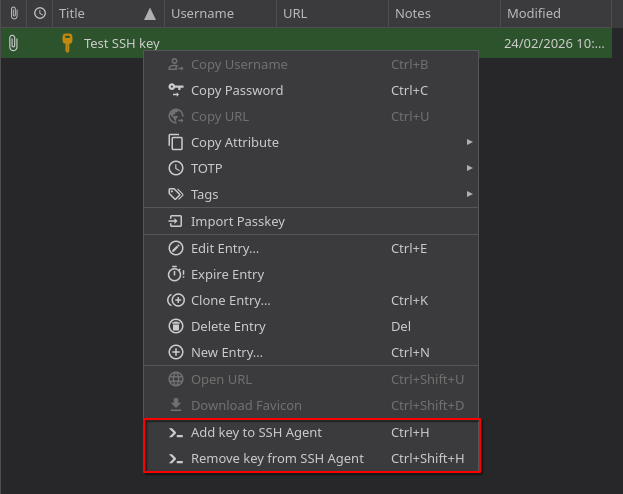
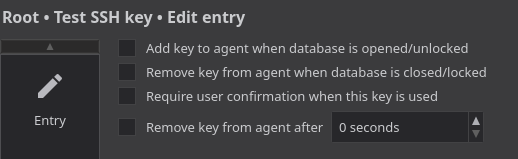
The approach I was considering is to add the possibility to load only specific keys into the Bitwarden built-in agent. It's exactly what I do with KeePassXC and its SSH agent.
-
@x_cli From what I understood, the issue is that the built-in Bitwarden SSH agent loads all the available keys at once, potentially triggering the server-side max limit.
The approach I was considering is to add the possibility to load only specific keys into the Bitwarden built-in agent. It's exactly what I do with KeePassXC and its SSH agent.
@x_cli To give you more context, here are some screenshots of how KeePassXC implements things.
I use KeePassXC inside an off-the-grid VM on @QubesOS. It's a great way the keep all my secrets and the ones of my clients at @SkypLabs safe.
The communication with the SSH agent that actually handles the connection is made via qrexec, in internal Qubes OS RPC mechanism (see https://forum.qubes-os.org/t/split-ssh/19060).
-
R relay@relay.infosec.exchange shared this topic