Skip to content
  • Categories
  • Recent
  • Tags
  • Popular
  • World
  • Users
  • Groups
Skins
  • Light
  • Brite
  • Cerulean
  • Cosmo
  • Flatly
  • Journal
  • Litera
  • Lumen
  • Lux
  • Materia
  • Minty
  • Morph
  • Pulse
  • Sandstone
  • Simplex
  • Sketchy
  • Spacelab
  • United
  • Yeti
  • Zephyr
  • Dark
  • Cyborg
  • Darkly
  • Quartz
  • Slate
  • Solar
  • Superhero
  • Vapor

  • Default (Cyborg)
  • No Skin
Collapse
Brand Logo

CIRCLE WITH A DOT

  1. Home
  2. Uncategorized
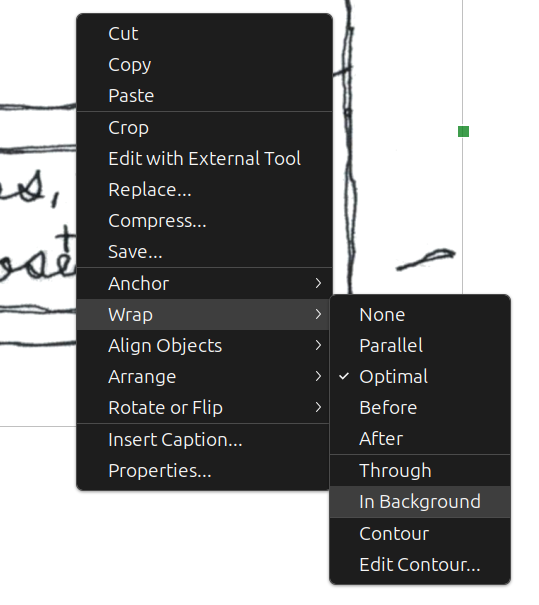
  3. Little unsolicited tip from my zine-making: if you want to add an image in a word processor without moving the existing content, set the image options to Wrap > In Background.

Little unsolicited tip from my zine-making: if you want to add an image in a word processor without moving the existing content, set the image options to Wrap > In Background.

Scheduled Pinned Locked Moved Uncategorized
zines
3 Posts 2 Posters 0 Views
  • Oldest to Newest
  • Newest to Oldest
  • Most Votes
Reply
  • Reply as topic
Log in to reply
This topic has been deleted. Only users with topic management privileges can see it.
  • beandreams@friendhole.socialB This user is from outside of this forum
    beandreams@friendhole.socialB This user is from outside of this forum
    beandreams@friendhole.social
    wrote last edited by
    #1

    Little unsolicited tip from my zine-making: if you want to add an image in a word processor without moving the existing content, set the image options to Wrap > In Background.

    This screenshot is LibreOffice Writer, which can also auto-paginate booklets for printing 😘

    #zines

    Link Preview Image
    beandreams@friendhole.socialB idren@mstdn.caI 2 Replies Last reply
    0
    • beandreams@friendhole.socialB beandreams@friendhole.social

      Little unsolicited tip from my zine-making: if you want to add an image in a word processor without moving the existing content, set the image options to Wrap > In Background.

      This screenshot is LibreOffice Writer, which can also auto-paginate booklets for printing 😘
      #zines

      Link Preview Image
      beandreams@friendhole.socialB This user is from outside of this forum
      beandreams@friendhole.socialB This user is from outside of this forum
      beandreams@friendhole.social
      wrote last edited by
      #2

      I was reminded by @mayintoronto 's hilarious video of the day

      Link Preview Image
      Friend Hole

      favicon

      (friendhole.social)

      1 Reply Last reply
      0
      • beandreams@friendhole.socialB beandreams@friendhole.social

        Little unsolicited tip from my zine-making: if you want to add an image in a word processor without moving the existing content, set the image options to Wrap > In Background.

        This screenshot is LibreOffice Writer, which can also auto-paginate booklets for printing 😘

        #zines

        Link Preview Image
        idren@mstdn.caI This user is from outside of this forum
        idren@mstdn.caI This user is from outside of this forum
        idren@mstdn.ca
        wrote last edited by
        #3

        @beandreams thank you Sarah. I love what I’m finding that libre office can do and this is just another helpful tip.

        1 Reply Last reply
        2
        0
        • R relay@relay.mycrowd.ca shared this topic
          R relay@relay.infosec.exchange shared this topic
        Reply
        • Reply as topic
        Log in to reply
        • Oldest to Newest
        • Newest to Oldest
        • Most Votes


        • Login

        • Login or register to search.
        • First post
          Last post
        0
        • Categories
        • Recent
        • Tags
        • Popular
        • World
        • Users
        • Groups