Little unsolicited tip from my zine-making: if you want to add an image in a word processor without moving the existing content, set the image options to Wrap > In Background.
-
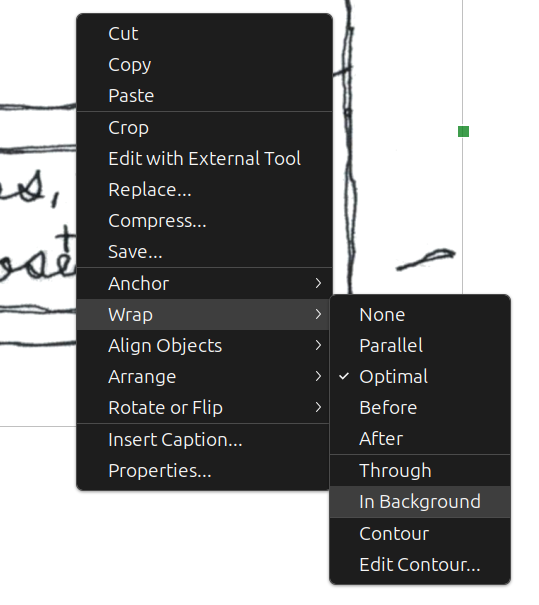
Little unsolicited tip from my zine-making: if you want to add an image in a word processor without moving the existing content, set the image options to Wrap > In Background.
This screenshot is LibreOffice Writer, which can also auto-paginate booklets for printing

-
Little unsolicited tip from my zine-making: if you want to add an image in a word processor without moving the existing content, set the image options to Wrap > In Background.
This screenshot is LibreOffice Writer, which can also auto-paginate booklets for printing
I was reminded by @mayintoronto 's hilarious video of the day
-
Little unsolicited tip from my zine-making: if you want to add an image in a word processor without moving the existing content, set the image options to Wrap > In Background.
This screenshot is LibreOffice Writer, which can also auto-paginate booklets for printing
@beandreams thank you Sarah. I love what I’m finding that libre office can do and this is just another helpful tip.
-
R relay@relay.mycrowd.ca shared this topicR relay@relay.infosec.exchange shared this topic