Skip to content
  • Categories
  • Recent
  • Tags
  • Popular
  • World
  • Users
  • Groups
Skins
  • Light
  • Brite
  • Cerulean
  • Cosmo
  • Flatly
  • Journal
  • Litera
  • Lumen
  • Lux
  • Materia
  • Minty
  • Morph
  • Pulse
  • Sandstone
  • Simplex
  • Sketchy
  • Spacelab
  • United
  • Yeti
  • Zephyr
  • Dark
  • Cyborg
  • Darkly
  • Quartz
  • Slate
  • Solar
  • Superhero
  • Vapor

  • Default (Cyborg)
  • No Skin
Collapse
Brand Logo

CIRCLE WITH A DOT

  1. Home
  2. Uncategorized
  3. how to switch to noai.duckduckgo.com on firefox without installing any extensions or plugins:

how to switch to noai.duckduckgo.com on firefox without installing any extensions or plugins:
Scheduled Pinned Locked Moved Uncategorized
44 Posts 28 Posters 80 Views
  • Oldest to Newest
  • Newest to Oldest
  • Most Votes
Reply
  • Reply as topic
Log in to reply
This topic has been deleted. Only users with topic management privileges can see it.
  • eniko@mastodon.gamedev.placeE This user is from outside of this forum
    eniko@mastodon.gamedev.placeE This user is from outside of this forum
    eniko@mastodon.gamedev.place
    wrote last edited by
    #1

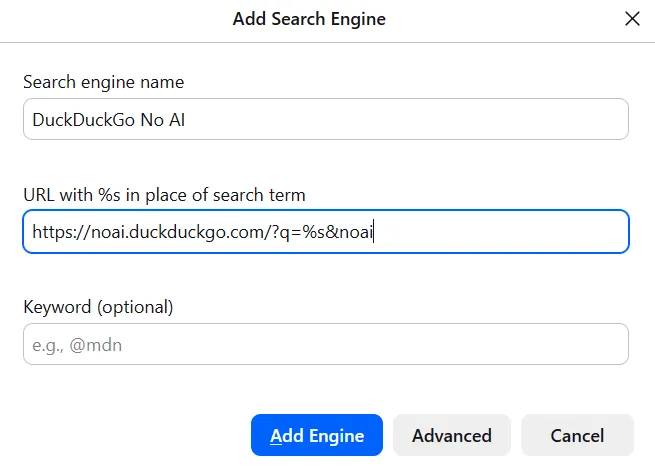
    how to switch to noai.duckduckgo.com on firefox without installing any extensions or plugins:

    • open settings > search
    • scroll down to search shortcuts and click add
    • fill out according to the image below (text in alt text)
    • click add engine
    • scroll back up and select "DuckDuckGo No AI" under "default search engine"

    sudocat@mastodon.gamedev.placeS jedimb@mastodon.gamedev.placeJ thechimpyman@mastodon.socialT maqy@fedifreu.deM pibert@bertha.socialP 22 Replies Last reply
    3
    0
    • R relay@relay.infosec.exchange shared this topic
    • eniko@mastodon.gamedev.placeE eniko@mastodon.gamedev.place

      how to switch to noai.duckduckgo.com on firefox without installing any extensions or plugins:

      • open settings > search
      • scroll down to search shortcuts and click add
      • fill out according to the image below (text in alt text)
      • click add engine
      • scroll back up and select "DuckDuckGo No AI" under "default search engine"

      sudocat@mastodon.gamedev.placeS This user is from outside of this forum
      sudocat@mastodon.gamedev.placeS This user is from outside of this forum
      sudocat@mastodon.gamedev.place
      wrote last edited by
      #2

      @eniko There's actually an even easier way - any properly implemented search form can be added to your browser with just a right click

      machinelordzero@mastodon.socialM regendans@todon.euR 2 Replies Last reply
      0
      • eniko@mastodon.gamedev.placeE eniko@mastodon.gamedev.place

        how to switch to noai.duckduckgo.com on firefox without installing any extensions or plugins:

        • open settings > search
        • scroll down to search shortcuts and click add
        • fill out according to the image below (text in alt text)
        • click add engine
        • scroll back up and select "DuckDuckGo No AI" under "default search engine"

        jedimb@mastodon.gamedev.placeJ This user is from outside of this forum
        jedimb@mastodon.gamedev.placeJ This user is from outside of this forum
        jedimb@mastodon.gamedev.place
        wrote last edited by
        #3

        @eniko What does the &noai parameter do? (Other than that, it's identical to what I added a few days ago.)

        eniko@mastodon.gamedev.placeE epd5qrxx@mastodon.onlineE 2 Replies Last reply
        0
        • jedimb@mastodon.gamedev.placeJ jedimb@mastodon.gamedev.place

          @eniko What does the &noai parameter do? (Other than that, it's identical to what I added a few days ago.)

          eniko@mastodon.gamedev.placeE This user is from outside of this forum
          eniko@mastodon.gamedev.placeE This user is from outside of this forum
          eniko@mastodon.gamedev.place
          wrote last edited by
          #4

          @jedimb i cannot remember >_>

          jedimb@mastodon.gamedev.placeJ 1 Reply Last reply
          0
          • eniko@mastodon.gamedev.placeE eniko@mastodon.gamedev.place

            @jedimb i cannot remember >_>

            jedimb@mastodon.gamedev.placeJ This user is from outside of this forum
            jedimb@mastodon.gamedev.placeJ This user is from outside of this forum
            jedimb@mastodon.gamedev.place
            wrote last edited by
            #5

            @eniko Oh well. I suppose adding it couldn't hurt, at least...

            eniko@mastodon.gamedev.placeE 1 Reply Last reply
            0
            • jedimb@mastodon.gamedev.placeJ jedimb@mastodon.gamedev.place

              @eniko Oh well. I suppose adding it couldn't hurt, at least...

              eniko@mastodon.gamedev.placeE This user is from outside of this forum
              eniko@mastodon.gamedev.placeE This user is from outside of this forum
              eniko@mastodon.gamedev.place
              wrote last edited by
              #6

              @jedimb i think its what you used on regular duckduckgo to disable ai features before they rolled out the subdomain

              and i just added it just in case

              N 1 Reply Last reply
              0
              • eniko@mastodon.gamedev.placeE eniko@mastodon.gamedev.place

                how to switch to noai.duckduckgo.com on firefox without installing any extensions or plugins:

                • open settings > search
                • scroll down to search shortcuts and click add
                • fill out according to the image below (text in alt text)
                • click add engine
                • scroll back up and select "DuckDuckGo No AI" under "default search engine"

                thechimpyman@mastodon.socialT This user is from outside of this forum
                thechimpyman@mastodon.socialT This user is from outside of this forum
                thechimpyman@mastodon.social
                wrote last edited by
                #7

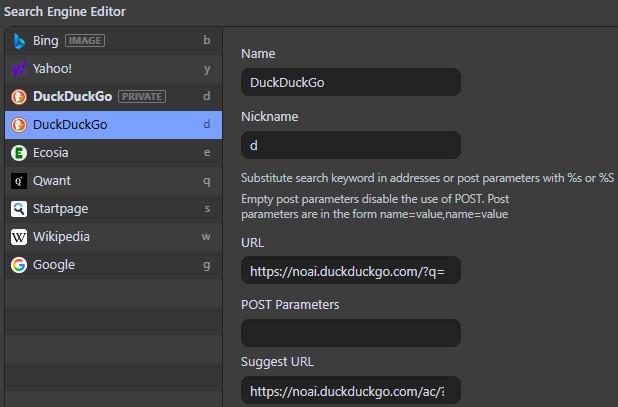
                @eniko Just tried adding noAI to its default URL on Vivaldi and that too works without fuss. Handy, that.
                Link Preview Image
                1 Reply Last reply
                0
                • eniko@mastodon.gamedev.placeE eniko@mastodon.gamedev.place

                  how to switch to noai.duckduckgo.com on firefox without installing any extensions or plugins:

                  • open settings > search
                  • scroll down to search shortcuts and click add
                  • fill out according to the image below (text in alt text)
                  • click add engine
                  • scroll back up and select "DuckDuckGo No AI" under "default search engine"

                  maqy@fedifreu.deM This user is from outside of this forum
                  maqy@fedifreu.deM This user is from outside of this forum
                  maqy@fedifreu.de
                  wrote last edited by
                  #8

                  @eniko Thanks!

                  1 Reply Last reply
                  0
                  • eniko@mastodon.gamedev.placeE eniko@mastodon.gamedev.place

                    how to switch to noai.duckduckgo.com on firefox without installing any extensions or plugins:

                    • open settings > search
                    • scroll down to search shortcuts and click add
                    • fill out according to the image below (text in alt text)
                    • click add engine
                    • scroll back up and select "DuckDuckGo No AI" under "default search engine"

                    pibert@bertha.socialP This user is from outside of this forum
                    pibert@bertha.socialP This user is from outside of this forum
                    pibert@bertha.social
                    wrote last edited by
                    #9

                    @eniko

                    Im a lil skeptical of DuckDuckGo

                    eniko@mastodon.gamedev.placeE 1 Reply Last reply
                    0
                    • eniko@mastodon.gamedev.placeE eniko@mastodon.gamedev.place

                      @jedimb i think its what you used on regular duckduckgo to disable ai features before they rolled out the subdomain

                      and i just added it just in case

                      N This user is from outside of this forum
                      N This user is from outside of this forum
                      neutronstar@infosec.exchange
                      wrote last edited by
                      #10

                      @eniko @jedimb
                      That’s just how they format their urls it seems. I’ve seen it before with the ddg html and lite variants where they redirect to html.duckduckgo.com/html when you append the html part. (The same for lite).

                      I don’t know why they do it, but I have a theory. I think it’s a choice to allow people to navigate to their urls in two different ways. Either by prefixing ”html.” Or by suffixing ”/html/”. Maybe some people are more used to prefixing/suffixing?

                      But that’s just a theory! A prefix and suffix search engine url theory! And cut! 😄

                      1 Reply Last reply
                      0
                      • eniko@mastodon.gamedev.placeE eniko@mastodon.gamedev.place

                        how to switch to noai.duckduckgo.com on firefox without installing any extensions or plugins:

                        • open settings > search
                        • scroll down to search shortcuts and click add
                        • fill out according to the image below (text in alt text)
                        • click add engine
                        • scroll back up and select "DuckDuckGo No AI" under "default search engine"

                        leonardof@bertha.socialL This user is from outside of this forum
                        leonardof@bertha.socialL This user is from outside of this forum
                        leonardof@bertha.social
                        wrote last edited by
                        #11

                        @eniko For historical reasons, I have noAI DDG on one device/computer, and regular DDG set up to be just the same (no AI summaries, remove AI media from results, something else I forgot) on another

                        1 Reply Last reply
                        0
                        • pibert@bertha.socialP pibert@bertha.social

                          @eniko

                          Im a lil skeptical of DuckDuckGo

                          eniko@mastodon.gamedev.placeE This user is from outside of this forum
                          eniko@mastodon.gamedev.placeE This user is from outside of this forum
                          eniko@mastodon.gamedev.place
                          wrote last edited by
                          #12

                          @Pibert you should be, but it beats google

                          pibert@bertha.socialP 2 Replies Last reply
                          0
                          • R relay@relay.publicsquare.global shared this topic
                          • sudocat@mastodon.gamedev.placeS sudocat@mastodon.gamedev.place

                            @eniko There's actually an even easier way - any properly implemented search form can be added to your browser with just a right click

                            machinelordzero@mastodon.socialM This user is from outside of this forum
                            machinelordzero@mastodon.socialM This user is from outside of this forum
                            machinelordzero@mastodon.social
                            wrote last edited by
                            #13

                            @SudoCat @eniko "Ask an AI Chatbot" >:|

                            sudocat@mastodon.gamedev.placeS 1 Reply Last reply
                            0
                            • eniko@mastodon.gamedev.placeE eniko@mastodon.gamedev.place

                              @Pibert you should be, but it beats google

                              pibert@bertha.socialP This user is from outside of this forum
                              pibert@bertha.socialP This user is from outside of this forum
                              pibert@bertha.social
                              wrote last edited by
                              #14

                              @eniko I use Kagi btw

                              1 Reply Last reply
                              0
                              • machinelordzero@mastodon.socialM machinelordzero@mastodon.social

                                @SudoCat @eniko "Ask an AI Chatbot" >:|

                                sudocat@mastodon.gamedev.placeS This user is from outside of this forum
                                sudocat@mastodon.gamedev.placeS This user is from outside of this forum
                                sudocat@mastodon.gamedev.place
                                wrote last edited by
                                #15

                                @MachineLordZero honestly I hadn't even registered that until you pointed it out. Luckily it turns out that drop down has a "remove ai chat bot" option, so now it is gone from my life 😌

                                machinelordzero@mastodon.socialM 1 Reply Last reply
                                0
                                • sudocat@mastodon.gamedev.placeS sudocat@mastodon.gamedev.place

                                  @MachineLordZero honestly I hadn't even registered that until you pointed it out. Luckily it turns out that drop down has a "remove ai chat bot" option, so now it is gone from my life 😌

                                  machinelordzero@mastodon.socialM This user is from outside of this forum
                                  machinelordzero@mastodon.socialM This user is from outside of this forum
                                  machinelordzero@mastodon.social
                                  wrote last edited by
                                  #16

                                  @SudoCat yaaay

                                  1 Reply Last reply
                                  0
                                  • eniko@mastodon.gamedev.placeE eniko@mastodon.gamedev.place

                                    @Pibert you should be, but it beats google

                                    pibert@bertha.socialP This user is from outside of this forum
                                    pibert@bertha.socialP This user is from outside of this forum
                                    pibert@bertha.social
                                    wrote last edited by
                                    #17

                                    @eniko

                                    Like, nowadays google is the worse search engine because it joins metadata from the website and it usually recommends trashy “saas products” that don’t help you and usually need a “fee” to use the product properly.

                                    Dude, I just need to make my fake png into a transparent background png without needing to download an app to do this what the heck or paying a “fee”

                                    1 Reply Last reply
                                    0
                                    • eniko@mastodon.gamedev.placeE eniko@mastodon.gamedev.place

                                      how to switch to noai.duckduckgo.com on firefox without installing any extensions or plugins:

                                      • open settings > search
                                      • scroll down to search shortcuts and click add
                                      • fill out according to the image below (text in alt text)
                                      • click add engine
                                      • scroll back up and select "DuckDuckGo No AI" under "default search engine"

                                      jstolte@social.vivaldi.netJ This user is from outside of this forum
                                      jstolte@social.vivaldi.netJ This user is from outside of this forum
                                      jstolte@social.vivaldi.net
                                      wrote last edited by
                                      #18

                                      @eniko
                                      Thank you! Just did the right click method on Librewolf and then made it the default.

                                      1 Reply Last reply
                                      0
                                      • eniko@mastodon.gamedev.placeE eniko@mastodon.gamedev.place

                                        how to switch to noai.duckduckgo.com on firefox without installing any extensions or plugins:

                                        • open settings > search
                                        • scroll down to search shortcuts and click add
                                        • fill out according to the image below (text in alt text)
                                        • click add engine
                                        • scroll back up and select "DuckDuckGo No AI" under "default search engine"

                                        freddy@social.security.plumbingF This user is from outside of this forum
                                        freddy@social.security.plumbingF This user is from outside of this forum
                                        freddy@social.security.plumbing
                                        wrote last edited by
                                        #19

                                        @eniko you can do that to almost any input search field, including wikipedia, dictionaries and your fedi instance 🙂

                                        1 Reply Last reply
                                        0
                                        • eniko@mastodon.gamedev.placeE eniko@mastodon.gamedev.place

                                          how to switch to noai.duckduckgo.com on firefox without installing any extensions or plugins:

                                          • open settings > search
                                          • scroll down to search shortcuts and click add
                                          • fill out according to the image below (text in alt text)
                                          • click add engine
                                          • scroll back up and select "DuckDuckGo No AI" under "default search engine"

                                          rocketsoup@mastodon.socialR This user is from outside of this forum
                                          rocketsoup@mastodon.socialR This user is from outside of this forum
                                          rocketsoup@mastodon.social
                                          wrote last edited by
                                          #20

                                          @eniko I never see anyone mention that you can just change your site preferences too. DDG actually has meaningful site settings saved as a cookie, no account necessary. You can disable AI features as well as lots of other options, including disabling ads.


                                          Link Preview Image
                                          officeplant@mastodon.socialO 1 Reply Last reply
                                          0
                                          Reply
                                          • Reply as topic
                                          Log in to reply
                                          • Oldest to Newest
                                          • Newest to Oldest
                                          • Most Votes


                                          • Login

                                          • Login or register to search.
                                          • First post
                                            Last post
                                          0
                                          • Categories
                                          • Recent
                                          • Tags
                                          • Popular
                                          • World
                                          • Users
                                          • Groups