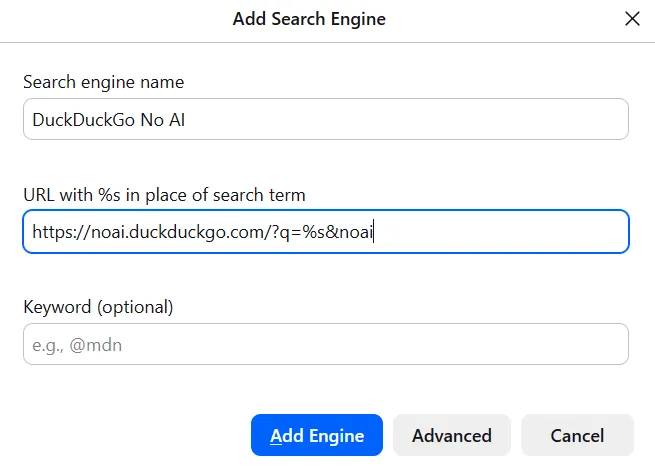
how to switch to noai.duckduckgo.com on firefox without installing any extensions or plugins:
-
how to switch to noai.duckduckgo.com on firefox without installing any extensions or plugins:
• open settings > search
• scroll down to search shortcuts and click add
• fill out according to the image below (text in alt text)
• click add engine
• scroll back up and select "DuckDuckGo No AI" under "default search engine" -
R relay@relay.infosec.exchange shared this topic
-
how to switch to noai.duckduckgo.com on firefox without installing any extensions or plugins:
• open settings > search
• scroll down to search shortcuts and click add
• fill out according to the image below (text in alt text)
• click add engine
• scroll back up and select "DuckDuckGo No AI" under "default search engine"@eniko There's actually an even easier way - any properly implemented search form can be added to your browser with just a right click
-
how to switch to noai.duckduckgo.com on firefox without installing any extensions or plugins:
• open settings > search
• scroll down to search shortcuts and click add
• fill out according to the image below (text in alt text)
• click add engine
• scroll back up and select "DuckDuckGo No AI" under "default search engine"@eniko What does the &noai parameter do? (Other than that, it's identical to what I added a few days ago.)
-
@eniko What does the &noai parameter do? (Other than that, it's identical to what I added a few days ago.)
@jedimb i cannot remember >_>
-
@jedimb i cannot remember >_>
@eniko Oh well. I suppose adding it couldn't hurt, at least...
-
@eniko Oh well. I suppose adding it couldn't hurt, at least...
@jedimb i think its what you used on regular duckduckgo to disable ai features before they rolled out the subdomain
and i just added it just in case
-
how to switch to noai.duckduckgo.com on firefox without installing any extensions or plugins:
• open settings > search
• scroll down to search shortcuts and click add
• fill out according to the image below (text in alt text)
• click add engine
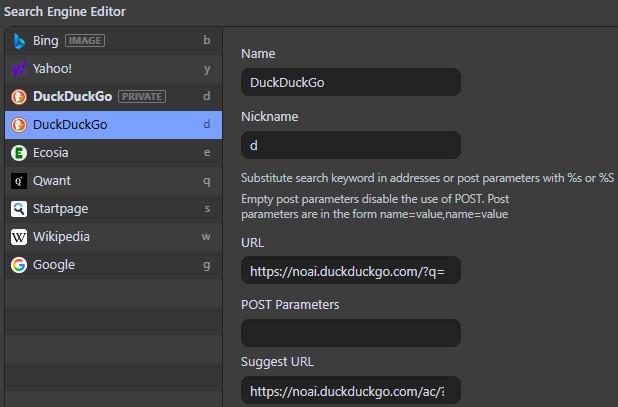
• scroll back up and select "DuckDuckGo No AI" under "default search engine"@eniko Just tried adding noAI to its default URL on Vivaldi and that too works without fuss. Handy, that.
-
how to switch to noai.duckduckgo.com on firefox without installing any extensions or plugins:
• open settings > search
• scroll down to search shortcuts and click add
• fill out according to the image below (text in alt text)
• click add engine
• scroll back up and select "DuckDuckGo No AI" under "default search engine"@eniko Thanks!
-
how to switch to noai.duckduckgo.com on firefox without installing any extensions or plugins:
• open settings > search
• scroll down to search shortcuts and click add
• fill out according to the image below (text in alt text)
• click add engine
• scroll back up and select "DuckDuckGo No AI" under "default search engine"Im a lil skeptical of DuckDuckGo
-
@jedimb i think its what you used on regular duckduckgo to disable ai features before they rolled out the subdomain
and i just added it just in case
@eniko @jedimb
That’s just how they format their urls it seems. I’ve seen it before with the ddg html and lite variants where they redirect to html.duckduckgo.com/html when you append the html part. (The same for lite).I don’t know why they do it, but I have a theory. I think it’s a choice to allow people to navigate to their urls in two different ways. Either by prefixing ”html.” Or by suffixing ”/html/”. Maybe some people are more used to prefixing/suffixing?
But that’s just a theory! A prefix and suffix search engine url theory! And cut!

-
how to switch to noai.duckduckgo.com on firefox without installing any extensions or plugins:
• open settings > search
• scroll down to search shortcuts and click add
• fill out according to the image below (text in alt text)
• click add engine
• scroll back up and select "DuckDuckGo No AI" under "default search engine"@eniko For historical reasons, I have noAI DDG on one device/computer, and regular DDG set up to be just the same (no AI summaries, remove AI media from results, something else I forgot) on another
-
Im a lil skeptical of DuckDuckGo
@Pibert you should be, but it beats google
-
R relay@relay.publicsquare.global shared this topic
-
@eniko There's actually an even easier way - any properly implemented search form can be added to your browser with just a right click
-
@Pibert you should be, but it beats google
@eniko I use Kagi btw
-
@MachineLordZero honestly I hadn't even registered that until you pointed it out. Luckily it turns out that drop down has a "remove ai chat bot" option, so now it is gone from my life

-
@MachineLordZero honestly I hadn't even registered that until you pointed it out. Luckily it turns out that drop down has a "remove ai chat bot" option, so now it is gone from my life
@SudoCat yaaay
-
@Pibert you should be, but it beats google
Like, nowadays google is the worse search engine because it joins metadata from the website and it usually recommends trashy “saas products” that don’t help you and usually need a “fee” to use the product properly.
Dude, I just need to make my fake png into a transparent background png without needing to download an app to do this what the heck or paying a “fee”
-
how to switch to noai.duckduckgo.com on firefox without installing any extensions or plugins:
• open settings > search
• scroll down to search shortcuts and click add
• fill out according to the image below (text in alt text)
• click add engine
• scroll back up and select "DuckDuckGo No AI" under "default search engine"@eniko
Thank you! Just did the right click method on Librewolf and then made it the default. -
how to switch to noai.duckduckgo.com on firefox without installing any extensions or plugins:
• open settings > search
• scroll down to search shortcuts and click add
• fill out according to the image below (text in alt text)
• click add engine
• scroll back up and select "DuckDuckGo No AI" under "default search engine"@eniko you can do that to almost any input search field, including wikipedia, dictionaries and your fedi instance

-
how to switch to noai.duckduckgo.com on firefox without installing any extensions or plugins:
• open settings > search
• scroll down to search shortcuts and click add
• fill out according to the image below (text in alt text)
• click add engine
• scroll back up and select "DuckDuckGo No AI" under "default search engine"@eniko I never see anyone mention that you can just change your site preferences too. DDG actually has meaningful site settings saved as a cookie, no account necessary. You can disable AI features as well as lots of other options, including disabling ads.