Skip to content
  • Categories
  • Recent
  • Tags
  • Popular
  • World
  • Users
  • Groups
Skins
  • Light
  • Brite
  • Cerulean
  • Cosmo
  • Flatly
  • Journal
  • Litera
  • Lumen
  • Lux
  • Materia
  • Minty
  • Morph
  • Pulse
  • Sandstone
  • Simplex
  • Sketchy
  • Spacelab
  • United
  • Yeti
  • Zephyr
  • Dark
  • Cyborg
  • Darkly
  • Quartz
  • Slate
  • Solar
  • Superhero
  • Vapor

  • Default (Cyborg)
  • No Skin
Collapse
Brand Logo

CIRCLE WITH A DOT

  1. Home
  2. Uncategorized
  3. Anyone an idea how to fix/get around this mess?

Anyone an idea how to fix/get around this mess?

Scheduled Pinned Locked Moved Uncategorized
fedorafedora41fedora42dnfduckduckfedi
6 Posts 3 Posters 11 Views
  • Oldest to Newest
  • Newest to Oldest
  • Most Votes
Reply
  • Reply as topic
Log in to reply
This topic has been deleted. Only users with topic management privileges can see it.
  • 9lukas5@mastodontech.de9 This user is from outside of this forum
    9lukas5@mastodontech.de9 This user is from outside of this forum
    9lukas5@mastodontech.de
    wrote last edited by
    #1

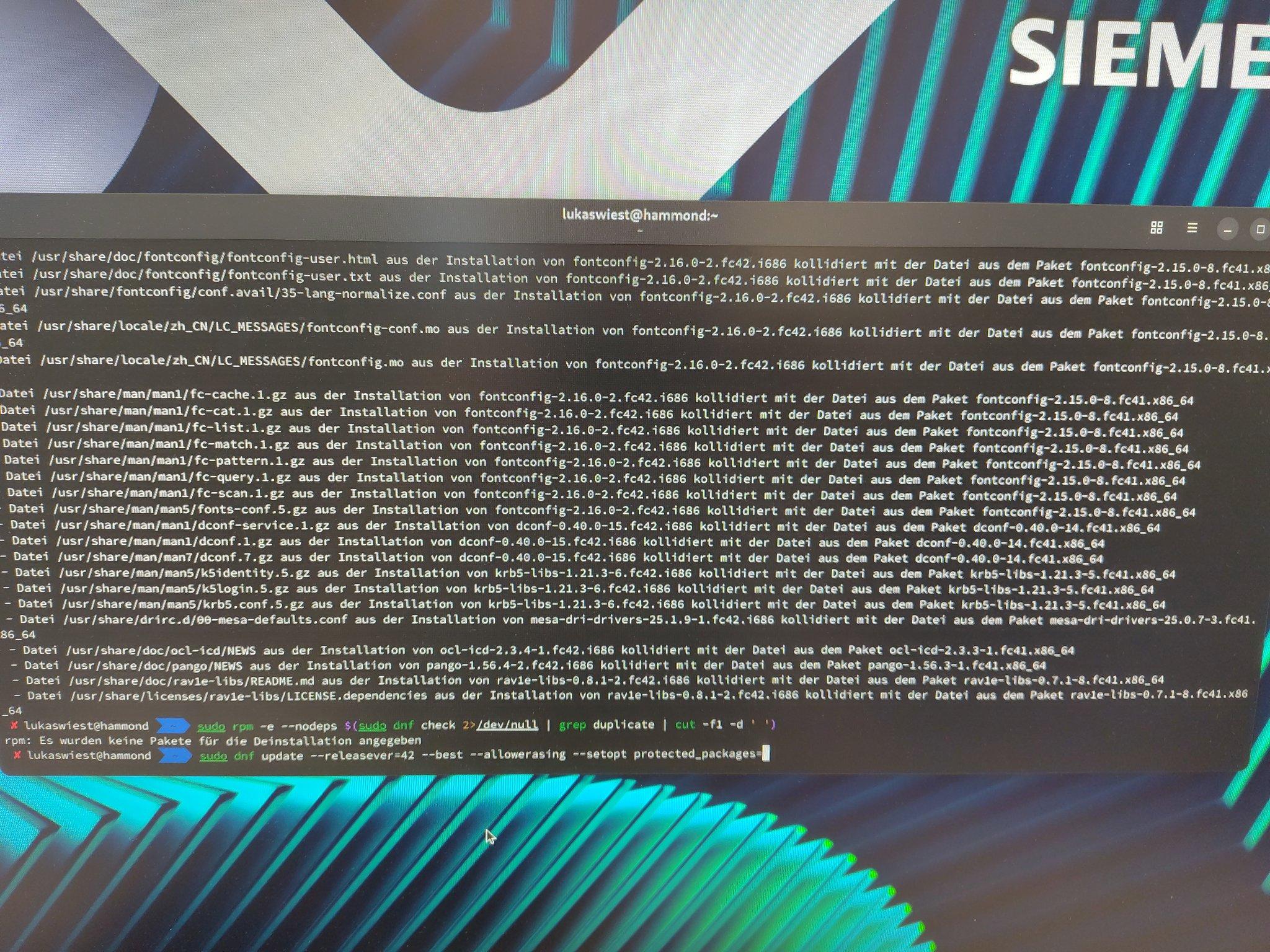
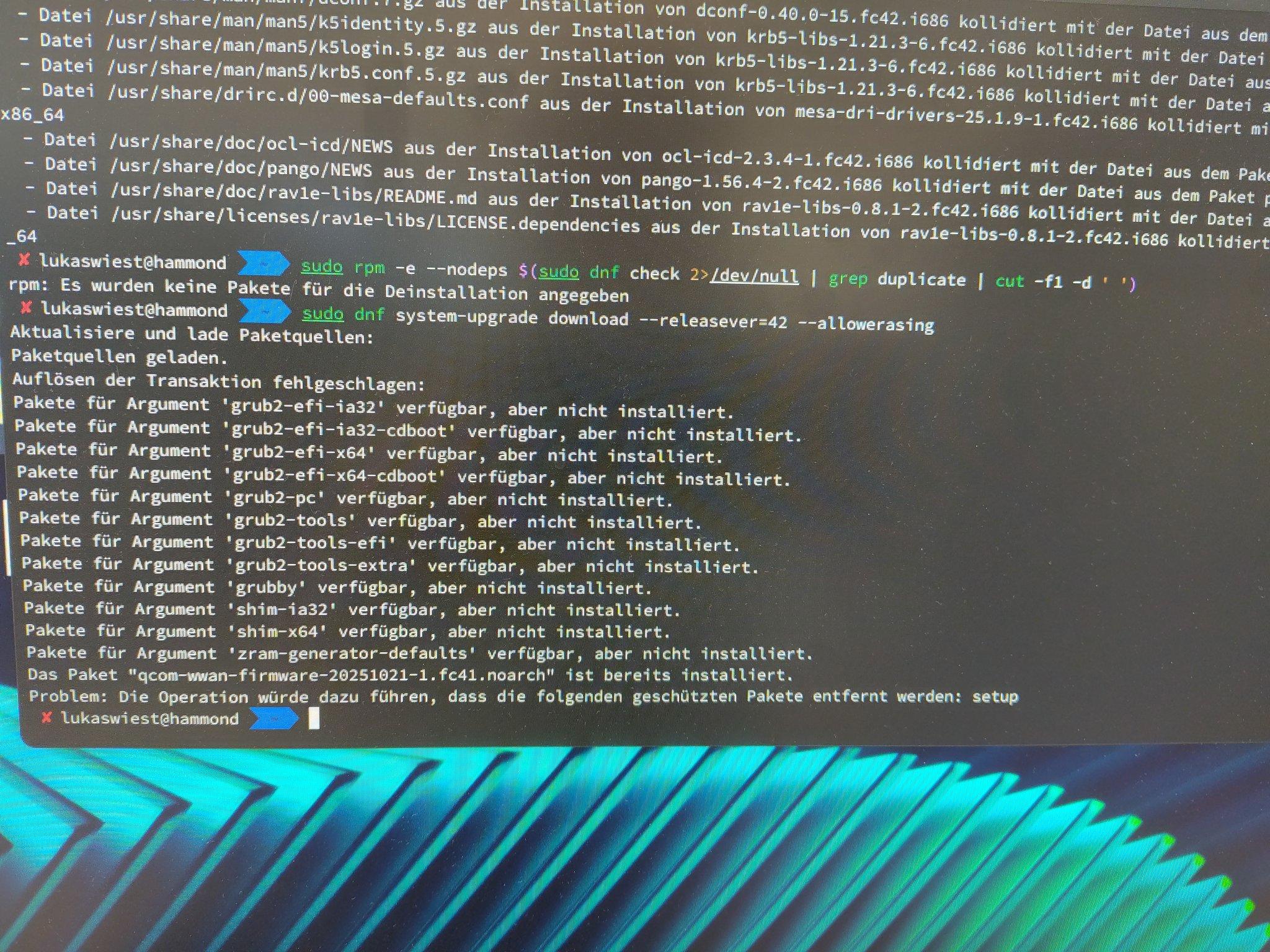
    Anyone an idea how to fix/get around this mess?

    I have a system that says its Fedora 42 in /etc/os-release
    But it has still the fc41 packages installed and tries to use these repos with dnf update.

    Trying again to run the system upgrade errors out as seen in the second screenshot, and doing a normal dnf update with forcing the releasever variable to 42 fails because of all these conflicting files between the fc41 and fc42 packages πŸ˜”

    #Fedora #Fedora41 #Fedora42 #DNF #DuckDuckFedi
    Link Preview ImageLink Preview Image
    ril100@zug.networkR bekopharm@indieweb.socialB 2 Replies Last reply
    0
    • 9lukas5@mastodontech.de9 9lukas5@mastodontech.de

      Anyone an idea how to fix/get around this mess?

      I have a system that says its Fedora 42 in /etc/os-release
      But it has still the fc41 packages installed and tries to use these repos with dnf update.

      Trying again to run the system upgrade errors out as seen in the second screenshot, and doing a normal dnf update with forcing the releasever variable to 42 fails because of all these conflicting files between the fc41 and fc42 packages πŸ˜”

      #Fedora #Fedora41 #Fedora42 #DNF #DuckDuckFedi
      Link Preview ImageLink Preview Image
      ril100@zug.networkR This user is from outside of this forum
      ril100@zug.networkR This user is from outside of this forum
      ril100@zug.network
      wrote last edited by
      #2

      @9Lukas5 DNF: Neugersdorf

      1 Reply Last reply
      0
      • 9lukas5@mastodontech.de9 9lukas5@mastodontech.de

        Anyone an idea how to fix/get around this mess?

        I have a system that says its Fedora 42 in /etc/os-release
        But it has still the fc41 packages installed and tries to use these repos with dnf update.

        Trying again to run the system upgrade errors out as seen in the second screenshot, and doing a normal dnf update with forcing the releasever variable to 42 fails because of all these conflicting files between the fc41 and fc42 packages πŸ˜”

        #Fedora #Fedora41 #Fedora42 #DNF #DuckDuckFedi

        Link Preview ImageLink Preview Image
        bekopharm@indieweb.socialB This user is from outside of this forum
        bekopharm@indieweb.socialB This user is from outside of this forum
        bekopharm@indieweb.social
        wrote last edited by
        #3

        @9Lukas5 is there still some older repo enabled in /etc/yum.repos.d/?

        https://docs.fedoraproject.org/en-US/quick-docs/upgrading-fedora-offline/ describes how the upgrade path on the cli looks and how to get rid of old packages. May help here.

        9lukas5@mastodontech.de9 1 Reply Last reply
        0
        • bekopharm@indieweb.socialB bekopharm@indieweb.social

          @9Lukas5 is there still some older repo enabled in /etc/yum.repos.d/?

          https://docs.fedoraproject.org/en-US/quick-docs/upgrading-fedora-offline/ describes how the upgrade path on the cli looks and how to get rid of old packages. May help here.

          9lukas5@mastodontech.de9 This user is from outside of this forum
          9lukas5@mastodontech.de9 This user is from outside of this forum
          9lukas5@mastodontech.de
          wrote last edited by
          #4

          @bekopharm nope, duplicates is not the problem.
          It's a weird inbetween state it seems.

          I now applied a regexp on all erroring packages where dnf didn't just swap the fc41 with the fc42 package by itself running this command:

          dnf -y --releasever=42 swap $fc41-pkg-name $fc42-pkg-name

          After this it seems to run the dnf update --releasever=42 just fine.

          Let's wait if it will then use the relasever 42 automatically without me telling it explicitly

          bekopharm@indieweb.socialB 1 Reply Last reply
          0
          • 9lukas5@mastodontech.de9 9lukas5@mastodontech.de

            @bekopharm nope, duplicates is not the problem.
            It's a weird inbetween state it seems.

            I now applied a regexp on all erroring packages where dnf didn't just swap the fc41 with the fc42 package by itself running this command:

            dnf -y --releasever=42 swap $fc41-pkg-name $fc42-pkg-name

            After this it seems to run the dnf update --releasever=42 just fine.

            Let's wait if it will then use the relasever 42 automatically without me telling it explicitly

            bekopharm@indieweb.socialB This user is from outside of this forum
            bekopharm@indieweb.socialB This user is from outside of this forum
            bekopharm@indieweb.social
            wrote last edited by
            #5

            @9Lukas5 sounds a lot like power was cut in the middle of a release update πŸ˜•

            9lukas5@mastodontech.de9 1 Reply Last reply
            0
            • bekopharm@indieweb.socialB bekopharm@indieweb.social

              @9Lukas5 sounds a lot like power was cut in the middle of a release update πŸ˜•

              9lukas5@mastodontech.de9 This user is from outside of this forum
              9lukas5@mastodontech.de9 This user is from outside of this forum
              9lukas5@mastodontech.de
              wrote last edited by
              #6

              @bekopharm honestly? No idea anymore.
              It's a VM not used productively, wasn't booted in weeks/months.
              So no big deal if I it would be broken beyond recovery.

              But I wanted to see if I can fix it, just in case I have something like it on a productive machine sometime πŸ™ƒ

              I didn't even immediately realize it is in an inbetween state, because the system info told me its a Fedora 42, so I thought thats fine. Only when I today tried to dnf update and saw it reach out for the F41 repos I got sceptic πŸ˜…

              1 Reply Last reply
              0
              Reply
              • Reply as topic
              Log in to reply
              • Oldest to Newest
              • Newest to Oldest
              • Most Votes


              • Login

              • Login or register to search.
              • First post
                Last post
              0
              • Categories
              • Recent
              • Tags
              • Popular
              • World
              • Users
              • Groups