Skip to content
  • Categories
  • Recent
  • Tags
  • Popular
  • World
  • Users
  • Groups
Skins
  • Light
  • Brite
  • Cerulean
  • Cosmo
  • Flatly
  • Journal
  • Litera
  • Lumen
  • Lux
  • Materia
  • Minty
  • Morph
  • Pulse
  • Sandstone
  • Simplex
  • Sketchy
  • Spacelab
  • United
  • Yeti
  • Zephyr
  • Dark
  • Cyborg
  • Darkly
  • Quartz
  • Slate
  • Solar
  • Superhero
  • Vapor

  • Default (Cyborg)
  • No Skin
Collapse
Brand Logo

CIRCLE WITH A DOT

  1. Home
  2. Uncategorized
  3. Useful preview of all G'Mic filters on selection of images... if you drill into an image than twiddle the little arrow it shows the CLI setting for the fx_ filter

Useful preview of all G'Mic filters on selection of images... if you drill into an image than twiddle the little arrow it shows the CLI setting for the fx_ filter

Scheduled Pinned Locked Moved Uncategorized
28 Posts 5 Posters 64 Views
  • Oldest to Newest
  • Newest to Oldest
  • Most Votes
Reply
  • Reply as topic
Log in to reply
This topic has been deleted. Only users with topic management privileges can see it.
  • limebar@mastodon.socialL limebar@mastodon.social

    forgot which filter is applied -- the original video was from pexels, btw

    limebar@mastodon.socialL This user is from outside of this forum
    limebar@mastodon.socialL This user is from outside of this forum
    limebar@mastodon.social
    wrote last edited by
    #4

    warhol filter flashing why tho

    limebar@mastodon.socialL 1 Reply Last reply
    0
    • limebar@mastodon.socialL limebar@mastodon.social

      warhol filter flashing why tho

      limebar@mastodon.socialL This user is from outside of this forum
      limebar@mastodon.socialL This user is from outside of this forum
      limebar@mastodon.social
      wrote last edited by
      #5

      normalize_tiles applied

      limebar@mastodon.socialL ccirco@ravenation.clubC 2 Replies Last reply
      0
      • limebar@mastodon.socialL limebar@mastodon.social

        normalize_tiles applied

        limebar@mastodon.socialL This user is from outside of this forum
        limebar@mastodon.socialL This user is from outside of this forum
        limebar@mastodon.social
        wrote last edited by
        #6

        btw, each of these filters have a number of parameters, these are just defaults taken from the link at top of thread - would be cool to be able to vary param values over time

        limebar@mastodon.socialL 1 Reply Last reply
        0
        • limebar@mastodon.socialL limebar@mastodon.social

          btw, each of these filters have a number of parameters, these are just defaults taken from the link at top of thread - would be cool to be able to vary param values over time

          limebar@mastodon.socialL This user is from outside of this forum
          limebar@mastodon.socialL This user is from outside of this forum
          limebar@mastodon.social
          wrote last edited by
          #7

          for example this is using
          -f "fx_parameterize_tiles 10,10,0"

          r_3_t_3_c_h@defcon.socialR limebar@mastodon.socialL 2 Replies Last reply
          0
          • limebar@mastodon.socialL limebar@mastodon.social

            got a bash script going that takes a video and rips it into frames, applies any number of effects filters to each frame, then reassembles the video... some examples

            russsharek@mastodon.artR This user is from outside of this forum
            russsharek@mastodon.artR This user is from outside of this forum
            russsharek@mastodon.art
            wrote last edited by
            #8

            @limebar

            Neat!

            Can you share the script?

            limebar@mastodon.socialL 1 Reply Last reply
            0
            • russsharek@mastodon.artR russsharek@mastodon.art

              @limebar

              Neat!

              Can you share the script?

              limebar@mastodon.socialL This user is from outside of this forum
              limebar@mastodon.socialL This user is from outside of this forum
              limebar@mastodon.social
              wrote last edited by
              #9

              @RussSharek for sure once I get it into good shape, still messing with it, watch this space

              limebar@mastodon.socialL 1 Reply Last reply
              0
              • limebar@mastodon.socialL limebar@mastodon.social

                normalize_tiles applied

                ccirco@ravenation.clubC This user is from outside of this forum
                ccirco@ravenation.clubC This user is from outside of this forum
                ccirco@ravenation.club
                wrote last edited by
                #10

                @limebar these would be some pretty awesome album art pieces as well.

                limebar@mastodon.socialL 1 Reply Last reply
                0
                • limebar@mastodon.socialL limebar@mastodon.social

                  Useful preview of all G'Mic filters on selection of images... if you drill into an image then twiddle the little arrow it shows the CLI setting for the fx_ filter

                  Link Preview Image
                  Demos for gmic-filters-overview

                  favicon

                  (jpfleury.github.io)

                  alisynthesis@io.waxandleather.comA This user is from outside of this forum
                  alisynthesis@io.waxandleather.comA This user is from outside of this forum
                  alisynthesis@io.waxandleather.com
                  wrote last edited by
                  #11

                  @limebar these are so fun

                  1 Reply Last reply
                  0
                  • limebar@mastodon.socialL limebar@mastodon.social

                    for example this is using
                    -f "fx_parameterize_tiles 10,10,0"

                    r_3_t_3_c_h@defcon.socialR This user is from outside of this forum
                    r_3_t_3_c_h@defcon.socialR This user is from outside of this forum
                    r_3_t_3_c_h@defcon.social
                    wrote last edited by
                    #12

                    @limebar Oooh I've got an idea. Using either a 5x5 or 10x10 pixel layout of the image, every other grid square is inverted, or B&W, and then reverse that pattern every frame.

                    A variant may be to use that same grid breakdown but use it in a vert. column 3-5 squares wide, have a sort of wave fliping to b/w that washes from L>R.

                    1 Reply Last reply
                    0
                    • limebar@mastodon.socialL limebar@mastodon.social

                      for example this is using
                      -f "fx_parameterize_tiles 10,10,0"

                      limebar@mastodon.socialL This user is from outside of this forum
                      limebar@mastodon.socialL This user is from outside of this forum
                      limebar@mastodon.social
                      wrote last edited by
                      #13

                      repeat with
                      -f "fx_parameterize_tiles 30,30,0"

                      limebar@mastodon.socialL 1 Reply Last reply
                      0
                      • limebar@mastodon.socialL limebar@mastodon.social

                        repeat with
                        -f "fx_parameterize_tiles 30,30,0"

                        limebar@mastodon.socialL This user is from outside of this forum
                        limebar@mastodon.socialL This user is from outside of this forum
                        limebar@mastodon.social
                        wrote last edited by
                        #14

                        so varying these parameter values could be nice over time

                        limebar@mastodon.socialL 1 Reply Last reply
                        0
                        • limebar@mastodon.socialL limebar@mastodon.social

                          so varying these parameter values could be nice over time

                          limebar@mastodon.socialL This user is from outside of this forum
                          limebar@mastodon.socialL This user is from outside of this forum
                          limebar@mastodon.social
                          wrote last edited by
                          #15

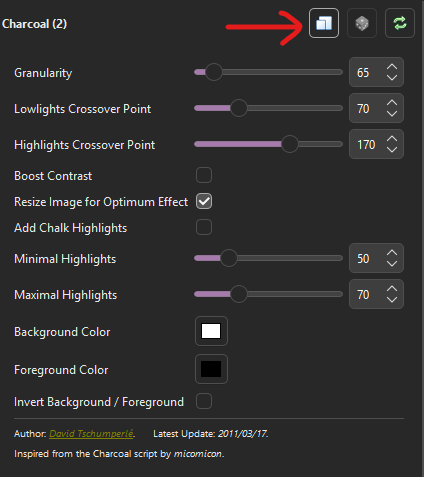
                          using digikam (and maybe other image s/w with gmic plugin) you can set params for a filter and click this button to copy the settings to the clipboard

                          for example these settings yield this filter input

                          -f "fx_charcoal 65,70,170,0,1,0,50,70,255,255,255,0,0,0,0"
                          Link Preview Image
                          limebar@mastodon.socialL 1 Reply Last reply
                          0
                          • limebar@mastodon.socialL limebar@mastodon.social

                            using digikam (and maybe other image s/w with gmic plugin) you can set params for a filter and click this button to copy the settings to the clipboard

                            for example these settings yield this filter input

                            -f "fx_charcoal 65,70,170,0,1,0,50,70,255,255,255,0,0,0,0"

                            Link Preview Image
                            limebar@mastodon.socialL This user is from outside of this forum
                            limebar@mastodon.socialL This user is from outside of this forum
                            limebar@mastodon.social
                            wrote last edited by
                            #16

                            here is what the previous charcoal filter yields

                            limebar@mastodon.socialL 1 Reply Last reply
                            0
                            • limebar@mastodon.socialL limebar@mastodon.social

                              here is what the previous charcoal filter yields

                              limebar@mastodon.socialL This user is from outside of this forum
                              limebar@mastodon.socialL This user is from outside of this forum
                              limebar@mastodon.social
                              wrote last edited by
                              #17

                              i feel sure that gmic has a way to do this to video directly from CLI but can't find it yet hence the script

                              limebar@mastodon.socialL 1 Reply Last reply
                              0
                              • limebar@mastodon.socialL limebar@mastodon.social

                                i feel sure that gmic has a way to do this to video directly from CLI but can't find it yet hence the script

                                limebar@mastodon.socialL This user is from outside of this forum
                                limebar@mastodon.socialL This user is from outside of this forum
                                limebar@mastodon.social
                                wrote last edited by
                                #18

                                fx_rotate_tiles 5,5,15,3,3,1.8

                                limebar@mastodon.socialL 1 Reply Last reply
                                0
                                • limebar@mastodon.socialL limebar@mastodon.social

                                  fx_rotate_tiles 5,5,15,3,3,1.8

                                  limebar@mastodon.socialL This user is from outside of this forum
                                  limebar@mastodon.socialL This user is from outside of this forum
                                  limebar@mastodon.social
                                  wrote last edited by
                                  #19

                                  one more

                                  fx_diffusiontensors 10,50,50,5,3,1,0.15,1,0,3,0

                                  for the record this is really slow on my crap PC and some filters are more time intensive than others -- definitely want to scale video to desired output size first

                                  limebar@mastodon.socialL 1 Reply Last reply
                                  0
                                  • limebar@mastodon.socialL limebar@mastodon.social

                                    one more

                                    fx_diffusiontensors 10,50,50,5,3,1,0.15,1,0,3,0

                                    for the record this is really slow on my crap PC and some filters are more time intensive than others -- definitely want to scale video to desired output size first

                                    limebar@mastodon.socialL This user is from outside of this forum
                                    limebar@mastodon.socialL This user is from outside of this forum
                                    limebar@mastodon.social
                                    wrote last edited by
                                    #20

                                    the script currently let's you specify mutiple filters and then stacks them in series... would be interesting to allow for a blending... so apply each filter to the source then blend the outcome using some ratio (which is probably just another gmic filter) -- but *that* would take a long time... worth it?🤔

                                    limebar@mastodon.socialL 1 Reply Last reply
                                    0
                                    • limebar@mastodon.socialL limebar@mastodon.social

                                      the script currently let's you specify mutiple filters and then stacks them in series... would be interesting to allow for a blending... so apply each filter to the source then blend the outcome using some ratio (which is probably just another gmic filter) -- but *that* would take a long time... worth it?🤔

                                      limebar@mastodon.socialL This user is from outside of this forum
                                      limebar@mastodon.socialL This user is from outside of this forum
                                      limebar@mastodon.social
                                      wrote last edited by
                                      #21

                                      oops one more... charcoal then rotate tiles for an example of "in series"

                                      limebar@mastodon.socialL 1 Reply Last reply
                                      0
                                      • limebar@mastodon.socialL limebar@mastodon.social

                                        oops one more... charcoal then rotate tiles for an example of "in series"

                                        limebar@mastodon.socialL This user is from outside of this forum
                                        limebar@mastodon.socialL This user is from outside of this forum
                                        limebar@mastodon.social
                                        wrote last edited by
                                        #22

                                        fwiw that command line looked like this:

                                        gmic_video.sh -i pexelsInput.mp4 -o processed.mp4 -f "fx_charcoal 65,70,170,0,1,0,50,70,255,255,255,0,0,0,0" -f "fx_rotate_tiles 5,5,15,3,3,1.8"

                                        limebar@mastodon.socialL 1 Reply Last reply
                                        0
                                        • limebar@mastodon.socialL limebar@mastodon.social

                                          fwiw that command line looked like this:

                                          gmic_video.sh -i pexelsInput.mp4 -o processed.mp4 -f "fx_charcoal 65,70,170,0,1,0,50,70,255,255,255,0,0,0,0" -f "fx_rotate_tiles 5,5,15,3,3,1.8"

                                          limebar@mastodon.socialL This user is from outside of this forum
                                          limebar@mastodon.socialL This user is from outside of this forum
                                          limebar@mastodon.social
                                          wrote last edited by
                                          #23

                                          that was fun, i'll write it up and post a link to the script here soon

                                          limebar@mastodon.socialL 1 Reply Last reply
                                          0
                                          Reply
                                          • Reply as topic
                                          Log in to reply
                                          • Oldest to Newest
                                          • Newest to Oldest
                                          • Most Votes


                                          • Login

                                          • Login or register to search.
                                          • First post
                                            Last post
                                          0
                                          • Categories
                                          • Recent
                                          • Tags
                                          • Popular
                                          • World
                                          • Users
                                          • Groups