Useful preview of all G'Mic filters on selection of images... if you drill into an image than twiddle the little arrow it shows the CLI setting for the fx_ filter
-
Useful preview of all G'Mic filters on selection of images... if you drill into an image then twiddle the little arrow it shows the CLI setting for the fx_ filter
-
Useful preview of all G'Mic filters on selection of images... if you drill into an image then twiddle the little arrow it shows the CLI setting for the fx_ filter
got a bash script going that takes a video and rips it into frames, applies any number of effects filters to each frame, then reassembles the video... some examples
-
got a bash script going that takes a video and rips it into frames, applies any number of effects filters to each frame, then reassembles the video... some examples
forgot which filter is applied -- the original video was from pexels, btw
-
forgot which filter is applied -- the original video was from pexels, btw
warhol filter flashing why tho
-
warhol filter flashing why tho
normalize_tiles applied
-
normalize_tiles applied
btw, each of these filters have a number of parameters, these are just defaults taken from the link at top of thread - would be cool to be able to vary param values over time
-
btw, each of these filters have a number of parameters, these are just defaults taken from the link at top of thread - would be cool to be able to vary param values over time
for example this is using
-f "fx_parameterize_tiles 10,10,0" -
got a bash script going that takes a video and rips it into frames, applies any number of effects filters to each frame, then reassembles the video... some examples
-
@RussSharek for sure once I get it into good shape, still messing with it, watch this space
-
normalize_tiles applied
@limebar these would be some pretty awesome album art pieces as well.
-
Useful preview of all G'Mic filters on selection of images... if you drill into an image then twiddle the little arrow it shows the CLI setting for the fx_ filter
@limebar these are so fun
-
for example this is using
-f "fx_parameterize_tiles 10,10,0"@limebar Oooh I've got an idea. Using either a 5x5 or 10x10 pixel layout of the image, every other grid square is inverted, or B&W, and then reverse that pattern every frame.
A variant may be to use that same grid breakdown but use it in a vert. column 3-5 squares wide, have a sort of wave fliping to b/w that washes from L>R.
-
for example this is using
-f "fx_parameterize_tiles 10,10,0"repeat with
-f "fx_parameterize_tiles 30,30,0" -
repeat with
-f "fx_parameterize_tiles 30,30,0"so varying these parameter values could be nice over time
-
so varying these parameter values could be nice over time
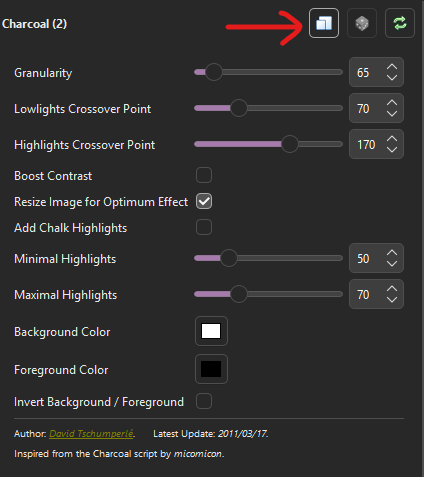
using digikam (and maybe other image s/w with gmic plugin) you can set params for a filter and click this button to copy the settings to the clipboard
for example these settings yield this filter input
-f "fx_charcoal 65,70,170,0,1,0,50,70,255,255,255,0,0,0,0"
-
using digikam (and maybe other image s/w with gmic plugin) you can set params for a filter and click this button to copy the settings to the clipboard
for example these settings yield this filter input
-f "fx_charcoal 65,70,170,0,1,0,50,70,255,255,255,0,0,0,0"
here is what the previous charcoal filter yields
-
here is what the previous charcoal filter yields
i feel sure that gmic has a way to do this to video directly from CLI but can't find it yet hence the script
-
i feel sure that gmic has a way to do this to video directly from CLI but can't find it yet hence the script
fx_rotate_tiles 5,5,15,3,3,1.8
-
fx_rotate_tiles 5,5,15,3,3,1.8
one more
fx_diffusiontensors 10,50,50,5,3,1,0.15,1,0,3,0
for the record this is really slow on my crap PC and some filters are more time intensive than others -- definitely want to scale video to desired output size first
-
one more
fx_diffusiontensors 10,50,50,5,3,1,0.15,1,0,3,0
for the record this is really slow on my crap PC and some filters are more time intensive than others -- definitely want to scale video to desired output size first
the script currently let's you specify mutiple filters and then stacks them in series... would be interesting to allow for a blending... so apply each filter to the source then blend the outcome using some ratio (which is probably just another gmic filter) -- but *that* would take a long time... worth it?