There’s a vulnerability with Proton VPN on macOS.
-
There’s a vulnerability with Proton VPN on macOS. The kill switch leaks your real IP between connections.
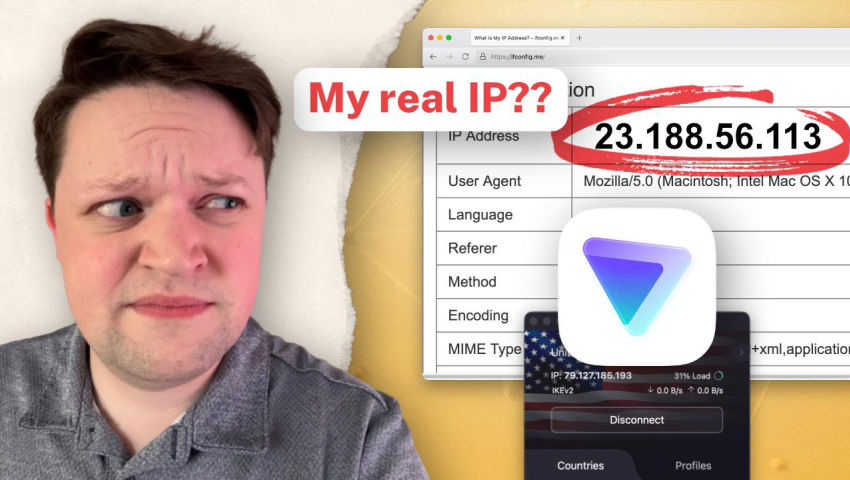
Proton VPN needs to fix this.
ProtonVPN's kill switch is leaking your IP address on macOS. Despite Proton's false claim that the regular kill switch protects you when switching servers, it's trivial to see this isn't the case. ...

Neat.Tube (neat.tube)
@markwyner this is true. Been dealing with this problem for a few months now… ugh. Super annoying.
-
There’s a vulnerability with Proton VPN on macOS. The kill switch leaks your real IP between connections.
Proton VPN needs to fix this.
ProtonVPN's kill switch is leaking your IP address on macOS. Despite Proton's false claim that the regular kill switch protects you when switching servers, it's trivial to see this isn't the case. ...
Neat.Tube (neat.tube)
@markwyner I did some testing with Proton Mail this week and think their Mail application can also leak your IP to some trackers, too.
-
 B britt@mstdn.games shared this topic
-
There’s a vulnerability with Proton VPN on macOS. The kill switch leaks your real IP between connections.
Proton VPN needs to fix this.
ProtonVPN's kill switch is leaking your IP address on macOS. Despite Proton's false claim that the regular kill switch protects you when switching servers, it's trivial to see this isn't the case. ...
Neat.Tube (neat.tube)
-
@markwyner this is true. Been dealing with this problem for a few months now… ugh. Super annoying.
@britt I’m sorry to hear that. If it helps, I use Mullvad and love it.
-
@britt I’m sorry to hear that. If it helps, I use Mullvad and love it.
@markwyner I’ve been considering venturing outside of the two that I use… I may have to give them a go.

-
@markwyner this is true. Been dealing with this problem for a few months now… ugh. Super annoying.
@britt @markwyner I use VPN cascading to mitigate this (VPN running both at the router and client level). It slows the connection, but it works.
-
@britt @markwyner I use VPN cascading to mitigate this (VPN running both at the router and client level). It slows the connection, but it works.
@Em0nM4stodon @markwyner genius. Thank you!!!
-
@britt @markwyner I use VPN cascading to mitigate this (VPN running both at the router and client level). It slows the connection, but it works.
Rad. Is there a fave technique or tool for this that you wanna share? I can research, but I thought if you had the goods.

-
Rad. Is there a fave technique or tool for this that you wanna share? I can research, but I thought if you had the goods.
Depending on your router model, it can be quite simple if you know how to set up a VPN at the router level.
1- You can follow these instructions from Proton VPN and download a few WireGuard configurations files, then set them up on your router and activate one. It's good to test the servers you choose first at the client level for speed: https://protonvpn.com/support/openwrt-wireguard
2- Check that the server is well setup using something like Speedtest.
3- Enable a regular Proton VPN connection from the client app. Verify that the IP shows as the client's server one using something like Speedtest.
4- If there is an IP leak at the client level, the connection should fall back on the router's VPN server and protect your real IP. To make sure of this, your router configuration might also have a killswitch you can enable.
5- Additionally, if your router has a customizable physical switch like mine, you can set it up to turn your router VPN on and off. This allows you to turn off your router-level VPN quickly in situations where you need speed and don't mind possible IP leaks.
6- Voilà! VPN Cascading accomplished!

-
Depending on your router model, it can be quite simple if you know how to set up a VPN at the router level.
1- You can follow these instructions from Proton VPN and download a few WireGuard configurations files, then set them up on your router and activate one. It's good to test the servers you choose first at the client level for speed: https://protonvpn.com/support/openwrt-wireguard
2- Check that the server is well setup using something like Speedtest.
3- Enable a regular Proton VPN connection from the client app. Verify that the IP shows as the client's server one using something like Speedtest.
4- If there is an IP leak at the client level, the connection should fall back on the router's VPN server and protect your real IP. To make sure of this, your router configuration might also have a killswitch you can enable.
5- Additionally, if your router has a customizable physical switch like mine, you can set it up to turn your router VPN on and off. This allows you to turn off your router-level VPN quickly in situations where you need speed and don't mind possible IP leaks.
6- Voilà! VPN Cascading accomplished!
-