Post fan/GPU upgrade, and some additional fan RPM tuning via IPMI: VM server is running a lot cooler, for the most part.
-
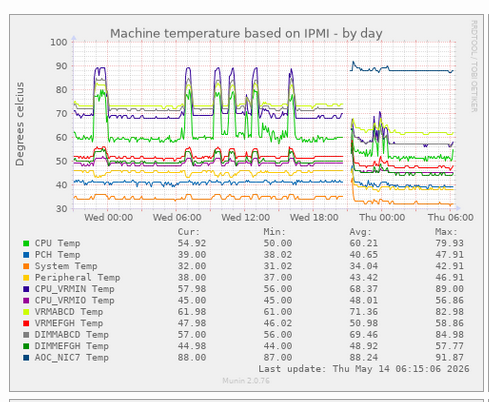
Post fan/GPU upgrade, and some additional fan RPM tuning via IPMI: VM server is running a lot cooler, for the most part. CPU VRM temperatures during a big compile job are less than the *idle* temps previously.
But I'm now seeing NIC temperature and it's concerningly hot. I'm not sure why it wasn't showing up before so I have no idea how toasty it was.
I'm also seeing what appears to be poor / unstable network performance.
The ConnectX6 is passively air cooled and sits just to the right of the new 80mm fans (as seen from the rear panel), and I suspect what is happening is that the negative pressure from the new fans is drawing front-to-back airflow slightly to the left and reducing airflow over its heatsink. Thermal engineering is hard.
I have another PCIe slot exhaust fan on order coming tomorrow so hopefully things are tolerable between now and then.
-
R relay@relay.infosec.exchange shared this topic
-
Post fan/GPU upgrade, and some additional fan RPM tuning via IPMI: VM server is running a lot cooler, for the most part. CPU VRM temperatures during a big compile job are less than the *idle* temps previously.
But I'm now seeing NIC temperature and it's concerningly hot. I'm not sure why it wasn't showing up before so I have no idea how toasty it was.
I'm also seeing what appears to be poor / unstable network performance.
The ConnectX6 is passively air cooled and sits just to the right of the new 80mm fans (as seen from the rear panel), and I suspect what is happening is that the negative pressure from the new fans is drawing front-to-back airflow slightly to the left and reducing airflow over its heatsink. Thermal engineering is hard.
I have another PCIe slot exhaust fan on order coming tomorrow so hopefully things are tolerable between now and then.
@azonenberg I recently upgraded the firmware on twelve ConnectX-6 Dx cards, took something like 5 minutes per card (including one reboot), that 5 minutes was enough to make the heatsink too hot to touch. This was on a box with decent airflow too
-
Post fan/GPU upgrade, and some additional fan RPM tuning via IPMI: VM server is running a lot cooler, for the most part. CPU VRM temperatures during a big compile job are less than the *idle* temps previously.
But I'm now seeing NIC temperature and it's concerningly hot. I'm not sure why it wasn't showing up before so I have no idea how toasty it was.
I'm also seeing what appears to be poor / unstable network performance.
The ConnectX6 is passively air cooled and sits just to the right of the new 80mm fans (as seen from the rear panel), and I suspect what is happening is that the negative pressure from the new fans is drawing front-to-back airflow slightly to the left and reducing airflow over its heatsink. Thermal engineering is hard.
I have another PCIe slot exhaust fan on order coming tomorrow so hopefully things are tolerable between now and then.
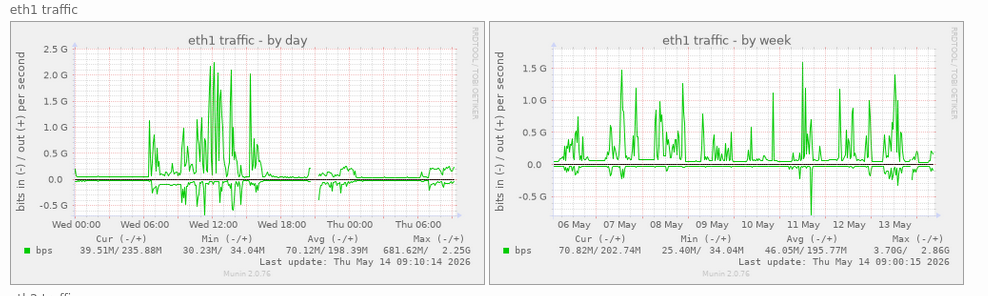
Historical network traffic before and after the recent reconfiguration.
I wonder why all my virtual desktops are so slow?
-
Historical network traffic before and after the recent reconfiguration.
I wonder why all my virtual desktops are so slow?
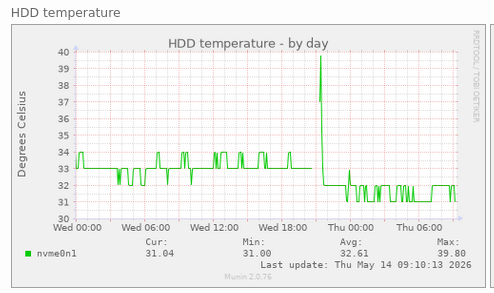
The SSD is slightly cooler, other than a short spike right after boot that might be before the fans spun up fully or something
-
The SSD is slightly cooler, other than a short spike right after boot that might be before the fans spun up fully or something
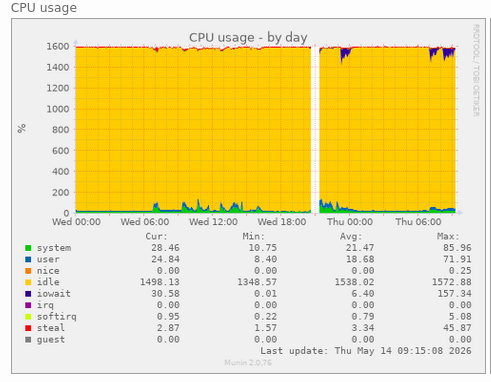
We can also see the bad network performance in the CPU usage charts, showing up as increased dom0 iowait time due to CephFS operations lagging