Advice I was given in my youth:
-
RE: https://oldbytes.space/@feoh/116687129039392818
Advice I was given in my youth:
Print your slide on a full piece of paper. Put the paper on the ground. Stand on a chair.
If you can’t easily read your slide, neither can the person at the back of the room.
It flummoxes me that 30 years into using computers to show slides, tiny fonts in slide is *still* widespread practice.
@freakboy3742 Personally I blame the prelevalence of online presentations. Small fonts are more acceptable in such a setting because all attendees have a high resolution screen directly in front of them.
Pesenting an in person training, let alone a talk at a conference in a long shoebox shaped room - minimal text, super large fonts.
As a trainer I've worked with companies whose presentation template was created by a design company. Cool, but only aimed at online presentations, so unusable for training.
And no, slide content is neither 'the talk', nor is it reference reading for the attendees. A violin is important in a concerto, but it's not about the violin, but about its effect on those listening, a means to an end.
If you disagree, feel free to use minute fonts and add lots of preferably unrelated clipart, or super complicated ai generated infographics. Wingdings, anyone?
-
When I served in the Army, there was a minimum font size for PPT presentations. I want to say 18pt?
@chessert I’m pretty sure 24pt was the value I was told… but either way, a lot more than 12.
-
RE: https://oldbytes.space/@feoh/116687129039392818
Advice I was given in my youth:
Print your slide on a full piece of paper. Put the paper on the ground. Stand on a chair.
If you can’t easily read your slide, neither can the person at the back of the room.
It flummoxes me that 30 years into using computers to show slides, tiny fonts in slide is *still* widespread practice.
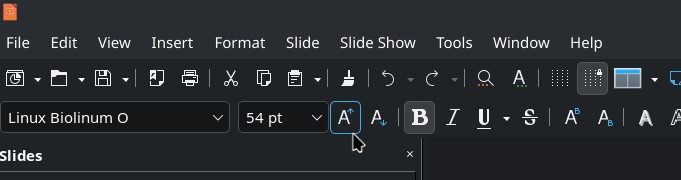
@freakboy3742 The font "size-up" button is right there. Smash it! Lots of times!
Shown is the "Increase Font Size" button in #LibreOffice. Shortcut is Ctrl + ]
-
It flummoxes me that 30 years into using computers to show slides, tiny fonts in slide is still widespread practice.
25+ years ago, PowerPoint shipped a misfeature where, if you typed more text into a text box, it would automatically shrink the text to fit.
When Keynote shipped, it did not have this misfeature. I believe this is 90% of the reason that early Keynote presentations looked better than PowerPoint presentations of the same era: If you typed too much text into a box in PowerPoint, it would make it unreadable for people in the audience, if you did the same in Keynote you had to manually reduce the size and that felt wrong.
Some time around Keynote 3ish, they also added this misfeature.
@david_chisnall @freakboy3742
 I hate autofit!
 -
RE: https://oldbytes.space/@feoh/116687129039392818
Advice I was given in my youth:
Print your slide on a full piece of paper. Put the paper on the ground. Stand on a chair.
If you can’t easily read your slide, neither can the person at the back of the room.
It flummoxes me that 30 years into using computers to show slides, tiny fonts in slide is *still* widespread practice.
@freakboy3742 and it would be nice if conference organizers would advise the projector's resolutions, because it's not the same to write slides in an 8k screen and then project in a 1080p projector.
-
RE: https://oldbytes.space/@feoh/116687129039392818
Advice I was given in my youth:
Print your slide on a full piece of paper. Put the paper on the ground. Stand on a chair.
If you can’t easily read your slide, neither can the person at the back of the room.
It flummoxes me that 30 years into using computers to show slides, tiny fonts in slide is *still* widespread practice.
@freakboy3742
That’s a perfect idea for proofreading! I try to adjust font size so others can see, but depending on the projector and room size it’s hard to judge with a laptop screen. Making sure the font is contrasting well with the background helps ( i .e. background is a picture and font is white, the picture has to be dim so the font stands out) but this makes so much more sense! -
RE: https://oldbytes.space/@feoh/116687129039392818
Advice I was given in my youth:
Print your slide on a full piece of paper. Put the paper on the ground. Stand on a chair.
If you can’t easily read your slide, neither can the person at the back of the room.
It flummoxes me that 30 years into using computers to show slides, tiny fonts in slide is *still* widespread practice.
@freakboy3742 I'm trying SO FUCKING HARD to teach my students how to do a good presentation.
Your presentation should be readable. Your presentation should add to what you're saying (visuals) and support it (key points). If your presentation is 1:1 what you're saying, then one of you is unnecessary. -
@freakboy3742 Personally I blame the prelevalence of online presentations. Small fonts are more acceptable in such a setting because all attendees have a high resolution screen directly in front of them.
Pesenting an in person training, let alone a talk at a conference in a long shoebox shaped room - minimal text, super large fonts.
As a trainer I've worked with companies whose presentation template was created by a design company. Cool, but only aimed at online presentations, so unusable for training.
And no, slide content is neither 'the talk', nor is it reference reading for the attendees. A violin is important in a concerto, but it's not about the violin, but about its effect on those listening, a means to an end.
If you disagree, feel free to use minute fonts and add lots of preferably unrelated clipart, or super complicated ai generated infographics. Wingdings, anyone?
@renespronk @freakboy3742 The problem is older than online presentations. Lots of people just use the slideshow as a bad teleprompter instead of learning how to use it to complement as presentation. Way too many people don't even know how to put their presentation into fullscreen.
Source: I was at uni form 2004 to 2008. Good profs used presentations to complement lectures. Bad profs used it as the lecture.
-
@freakboy3742 and it would be nice if conference organizers would advise the projector's resolutions, because it's not the same to write slides in an 8k screen and then project in a 1080p projector.
@mdione If that matters, you’re doing it wrong.
A person in the back row can’t tell the difference between 8k and a potato. Assume it’s being projected at 640x480. If it’s not legible at that resolution, it’s not legible *at all*.
-
@mdione If that matters, you’re doing it wrong.
A person in the back row can’t tell the difference between 8k and a potato. Assume it’s being projected at 640x480. If it’s not legible at that resolution, it’s not legible *at all*.
@freakboy3742 320x200, 4 colors (CGA

-
RE: https://oldbytes.space/@feoh/116687129039392818
Advice I was given in my youth:
Print your slide on a full piece of paper. Put the paper on the ground. Stand on a chair.
If you can’t easily read your slide, neither can the person at the back of the room.
It flummoxes me that 30 years into using computers to show slides, tiny fonts in slide is *still* widespread practice.
@freakboy3742 happens on road signs too.
-
@renespronk @freakboy3742 The problem is older than online presentations. Lots of people just use the slideshow as a bad teleprompter instead of learning how to use it to complement as presentation. Way too many people don't even know how to put their presentation into fullscreen.
Source: I was at uni form 2004 to 2008. Good profs used presentations to complement lectures. Bad profs used it as the lecture.
@Infrapink @freakboy3742 True, the problem has existed for ages.. IMHO it has been exacerbated by increased use of online meetings since COVID-19. (Certainly in Europe that was a game changer when it comes to the acceptance of online meetings)
-
RE: https://oldbytes.space/@feoh/116687129039392818
Advice I was given in my youth:
Print your slide on a full piece of paper. Put the paper on the ground. Stand on a chair.
If you can’t easily read your slide, neither can the person at the back of the room.
It flummoxes me that 30 years into using computers to show slides, tiny fonts in slide is *still* widespread practice.
@freakboy3742 at work only about half of us were issued email addresses so the main mode of communication from HR to all staff is via the TVs in the break room
They will just copypaste a whole page letter from the president of the company onto a PowerPoint slide and call that communication
-
RE: https://oldbytes.space/@feoh/116687129039392818
Advice I was given in my youth:
Print your slide on a full piece of paper. Put the paper on the ground. Stand on a chair.
If you can’t easily read your slide, neither can the person at the back of the room.
It flummoxes me that 30 years into using computers to show slides, tiny fonts in slide is *still* widespread practice.
My absolute favorite in the Army were the 35+ slide presentations which the presenter read to you verbatim off the screen, with few or no illustrations. Always time well spent. /s
 🫡
🫡 -
@freakboy3742 I'm trying SO FUCKING HARD to teach my students how to do a good presentation.
Your presentation should be readable. Your presentation should add to what you're saying (visuals) and support it (key points). If your presentation is 1:1 what you're saying, then one of you is unnecessary. This!!
 -
RE: https://oldbytes.space/@feoh/116687129039392818
Advice I was given in my youth:
Print your slide on a full piece of paper. Put the paper on the ground. Stand on a chair.
If you can’t easily read your slide, neither can the person at the back of the room.
It flummoxes me that 30 years into using computers to show slides, tiny fonts in slide is *still* widespread practice.
@freakboy3742 A little while back, three candidates gave us presentations.
The first talked about how good a communicator they were, using text too small to read on a regular screen, much less in a slide deck.
The second talked about how good a communicator they were, using an unreadable font where every character resembled the Threads logo.
The third just had a clear presentation.
We picked the third.
-
RE: https://oldbytes.space/@feoh/116687129039392818
Advice I was given in my youth:
Print your slide on a full piece of paper. Put the paper on the ground. Stand on a chair.
If you can’t easily read your slide, neither can the person at the back of the room.
It flummoxes me that 30 years into using computers to show slides, tiny fonts in slide is *still* widespread practice.
@freakboy3742 Our strategy was to type your text in pica on a 3” x 5” index card and photograph the card. The goal was large font, but also less text. Ensure that any text is useful for the audience, not just to cue you. Don’t use your image text to cue yourself.
-
EXACTLY. If your audience is reading everything you plan to say, then why are you there?
@killick
> If your audience is reading everything you plan to say, then why are you there?Umm, a popular blogger much-sought post ad-0driven income is now in the $10 ranges. Per annum.
The same knowledge at the conference pays around $10 too. Per minute.
-
@nedbat @freakboy3742 … with poor contrast because some people think colors that look great on their hi-dpi monitor looks great on a projector too. And I mean both classic light/dark contrast AND color contrast.
@hynek @nedbat @freakboy3742 Related - some of the best presentation prep info I was taught was in a class (long ago) on how to use flip charts! Those basics still apply.
-
It flummoxes me that 30 years into using computers to show slides, tiny fonts in slide is still widespread practice.
25+ years ago, PowerPoint shipped a misfeature where, if you typed more text into a text box, it would automatically shrink the text to fit.
When Keynote shipped, it did not have this misfeature. I believe this is 90% of the reason that early Keynote presentations looked better than PowerPoint presentations of the same era: If you typed too much text into a box in PowerPoint, it would make it unreadable for people in the audience, if you did the same in Keynote you had to manually reduce the size and that felt wrong.
Some time around Keynote 3ish, they also added this misfeature.
@david_chisnall @freakboy3742 i worked in consulting for a while. more than half the powerpoints we made were never shown on a projector, they were just an alternative document format for conveying information, to be read on ur laptop.