I know #Signal is very popular, but at least for me, using NVDA, the desktop client is far less screen reader friendly than the mobile clients.
-
I know #Signal is very popular, but at least for me, using NVDA, the desktop client is far less screen reader friendly than the mobile clients. The mobile clients work far better for me, but I honestly don't use my phone for much these days outside of being a media player that can make phone calls, so, as of right now, I'd recommend Delta Chat instead https://delta.chat/en/ #DeltaChat
-
I know #Signal is very popular, but at least for me, using NVDA, the desktop client is far less screen reader friendly than the mobile clients. The mobile clients work far better for me, but I honestly don't use my phone for much these days outside of being a media player that can make phone calls, so, as of right now, I'd recommend Delta Chat instead https://delta.chat/en/ #DeltaChat
@WeirdWriter The desktop client is a bit of a faff with NVDA, but it's navigable with some practice. If you want, I can give you a hand with it. I use it every day on Win11 with NVDA
-
@WeirdWriter The desktop client is a bit of a faff with NVDA, but it's navigable with some practice. If you want, I can give you a hand with it. I use it every day on Win11 with NVDA
@PepperTheVixen That would be fantastic! I am an advanced screen reader user so I probably need to just take some time with it, but is navigating by object Nav a tad overkill? Or is there anything I must absolutely know? I only tried it for about 20 minutes or so and was hungry and not impressed, so I am sure some general hints and or knowings will get me going when I try it again.
-
@WeirdWriter The desktop client is a bit of a faff with NVDA, but it's navigable with some practice. If you want, I can give you a hand with it. I use it every day on Win11 with NVDA
@PepperTheVixen @WeirdWriter
There's a reason for that I think. It's because of Microsoft recall. in order to block microsoft recall from taking a screenshot of Signal it does something that unfortunately blocks screenreaders.There is a setting you can turn off to disable the feature and allow screenreaders to work. the downside is that Microsoft recall and hence, embedded AI will be able to access your messages. in essence subverting End to end encryption, in a way.
-
@PepperTheVixen @WeirdWriter
There's a reason for that I think. It's because of Microsoft recall. in order to block microsoft recall from taking a screenshot of Signal it does something that unfortunately blocks screenreaders.There is a setting you can turn off to disable the feature and allow screenreaders to work. the downside is that Microsoft recall and hence, embedded AI will be able to access your messages. in essence subverting End to end encryption, in a way.
@PepperTheVixen @WeirdWriter
The first five minutes of this talk that Signal President gave @Mer__edith explains the issue with NVDA. Deltachat works because it doesn't do this blocking of embedded AI.Edit: It is 12 minutes in. this is a timestamped link:
https://media.ccc.de/v/39c3-ai-agent-ai-spy#t=731 -
@PepperTheVixen @WeirdWriter
There's a reason for that I think. It's because of Microsoft recall. in order to block microsoft recall from taking a screenshot of Signal it does something that unfortunately blocks screenreaders.There is a setting you can turn off to disable the feature and allow screenreaders to work. the downside is that Microsoft recall and hence, embedded AI will be able to access your messages. in essence subverting End to end encryption, in a way.
What is the setting? @OliviaVespera @PepperTheVixen
-
@PepperTheVixen That would be fantastic! I am an advanced screen reader user so I probably need to just take some time with it, but is navigating by object Nav a tad overkill? Or is there anything I must absolutely know? I only tried it for about 20 minutes or so and was hungry and not impressed, so I am sure some general hints and or knowings will get me going when I try it again.
@WeirdWriter Quick guide for using Signal on windows with NVDA: So the two big things are the table of chats and the list items which contain chat messages within each chat. There are two text fields. The first one near the top is a search field. This one is finnicky. Sometimes I can get it to play nice, but most of the time it frustrates me. The second one is a multiline field for sending messages to the selected chat. I have no idea what they're doing with whatever framework they built this app in, but you have to manually toggle focus mode to type. Once you do, it works as expected, though sometimes NVDA just can't read the contents of the field. I'll chalk this up to either the framework or NVDA because I experience something similar in discord. A quick reboot of NVDA and/or Signal will fix it. The whole app is divided into landmarks... except for the multiline field which is inside of a section. You can open the context menu on each message for various options. Some options are available only in the buttons immediately proceeding the chat message itself, still within that list item. I recommend you make a habit of tabbing away from the Signal window when you're not actively using it. NVDA has a habit of incessantly reading out timestamps ad nauseam at random intervals for no discernable reason. The app is unintuitive for screen reader users, but it's decent once you get a hang of the interface structure. Just stay in browse mode for most of it
-
What is the setting? @OliviaVespera @PepperTheVixen
@WeirdWriter @PepperTheVixen I'm not on windows so I don't have that setting myself.
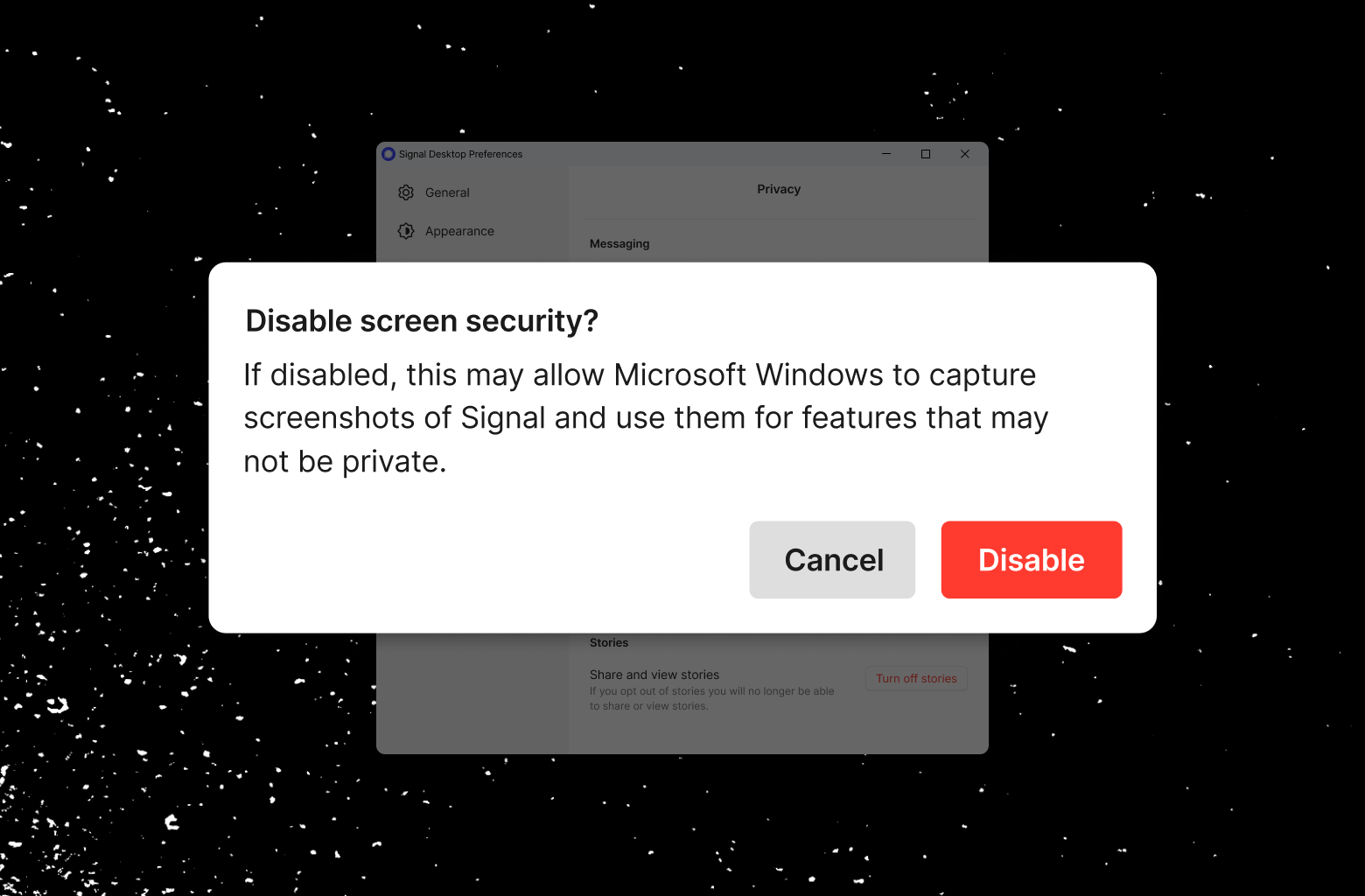
Instructions are listed here: https://signal.org/blog/signal-doesnt-recall/
To help mitigate this issue, we made the setting easy to disable (Signal Settings → Privacy → Screen security), but it’s difficult to accidentally disable. Turning off “Screen security” in Signal Desktop on Windows 11 will always display a warning and require confirmation in order to continue.
-
@PepperTheVixen @WeirdWriter
There's a reason for that I think. It's because of Microsoft recall. in order to block microsoft recall from taking a screenshot of Signal it does something that unfortunately blocks screenreaders.There is a setting you can turn off to disable the feature and allow screenreaders to work. the downside is that Microsoft recall and hence, embedded AI will be able to access your messages. in essence subverting End to end encryption, in a way.
@OliviaVespera @WeirdWriter I just checked my running copy on windows, and that setting isn't interfering with NVDA. I've been using the app fine for months with that option enabled
-
@OliviaVespera @WeirdWriter I just checked my running copy on windows, and that setting isn't interfering with NVDA. I've been using the app fine for months with that option enabled
@PepperTheVixen @WeirdWriter You have to disable it. Is that what you meant?
-
@WeirdWriter Quick guide for using Signal on windows with NVDA: So the two big things are the table of chats and the list items which contain chat messages within each chat. There are two text fields. The first one near the top is a search field. This one is finnicky. Sometimes I can get it to play nice, but most of the time it frustrates me. The second one is a multiline field for sending messages to the selected chat. I have no idea what they're doing with whatever framework they built this app in, but you have to manually toggle focus mode to type. Once you do, it works as expected, though sometimes NVDA just can't read the contents of the field. I'll chalk this up to either the framework or NVDA because I experience something similar in discord. A quick reboot of NVDA and/or Signal will fix it. The whole app is divided into landmarks... except for the multiline field which is inside of a section. You can open the context menu on each message for various options. Some options are available only in the buttons immediately proceeding the chat message itself, still within that list item. I recommend you make a habit of tabbing away from the Signal window when you're not actively using it. NVDA has a habit of incessantly reading out timestamps ad nauseam at random intervals for no discernable reason. The app is unintuitive for screen reader users, but it's decent once you get a hang of the interface structure. Just stay in browse mode for most of it
@PepperTheVixen Thank you so much! I bookmarked this!
-
@PepperTheVixen @WeirdWriter You have to disable it. Is that what you meant?
@PepperTheVixen @WeirdWriter You're more the expert on this than I am. I just know that Signal recognises there are issues with it.
-
@PepperTheVixen @WeirdWriter You're more the expert on this than I am. I just know that Signal recognises there are issues with it.
@PepperTheVixen @WeirdWriter Just going through Signal video on it. Udbhav Tiwari directly names NVDA as one of the legitimate services that this flag in siganl breaks. Here's the timestamp video where he talks about it directly. He could be wrong on it.
AI Agent, AI Spy
Agentic AI is the catch-all term for AI-enabled systems that propose to complete more or less complex tasks on their own, without stoppin...

(media.ccc.de)
-
@PepperTheVixen @WeirdWriter Just going through Signal video on it. Udbhav Tiwari directly names NVDA as one of the legitimate services that this flag in siganl breaks. Here's the timestamp video where he talks about it directly. He could be wrong on it.
AI Agent, AI Spy
Agentic AI is the catch-all term for AI-enabled systems that propose to complete more or less complex tasks on their own, without stoppin...
(media.ccc.de)
@OliviaVespera Hmm... okay now I need to do some testing on this. I might not be using the specific features that break with that option
-
@OliviaVespera Hmm... okay now I need to do some testing on this. I might not be using the specific features that break with that option
@PepperTheVixen I don't suppose you're on linux?
-
@PepperTheVixen I don't suppose you're on linux?
@OliviaVespera I'm not, but I can spin up a VM without too much trouble
-
@OliviaVespera I'm not, but I can spin up a VM without too much trouble
@PepperTheVixen No it's okay, I'm on linux. They haven't rolled out this setting on linux's version of Signal... and I'm not sure. does NVDA work on linux? I am sighted.
-
@PepperTheVixen No it's okay, I'm on linux. They haven't rolled out this setting on linux's version of Signal... and I'm not sure. does NVDA work on linux? I am sighted.
@OliviaVespera Sadly no. Linux has Speakup on the command line and Orca on the desktop. Orca is in rough shape and needs a lot of work on the package itself and the accessibility APIs it hooks into
-
@PepperTheVixen Thank you so much! I bookmarked this!
@WeirdWriter @PepperTheVixen In general, it would be really nice if @signalapp could have better accessibility support.
-
I know #Signal is very popular, but at least for me, using NVDA, the desktop client is far less screen reader friendly than the mobile clients. The mobile clients work far better for me, but I honestly don't use my phone for much these days outside of being a media player that can make phone calls, so, as of right now, I'd recommend Delta Chat instead https://delta.chat/en/ #DeltaChat
@signalapp important feedback here!