Skip to content
  • Categories
  • Recent
  • Tags
  • Popular
  • World
  • Users
  • Groups
Skins
  • Light
  • Brite
  • Cerulean
  • Cosmo
  • Flatly
  • Journal
  • Litera
  • Lumen
  • Lux
  • Materia
  • Minty
  • Morph
  • Pulse
  • Sandstone
  • Simplex
  • Sketchy
  • Spacelab
  • United
  • Yeti
  • Zephyr
  • Dark
  • Cyborg
  • Darkly
  • Quartz
  • Slate
  • Solar
  • Superhero
  • Vapor

  • Default (Cyborg)
  • No Skin
Collapse
Brand Logo

CIRCLE WITH A DOT

ajcxz0@fosstodon.orgA

ajcxz0@fosstodon.org

@ajcxz0@fosstodon.org
About
Posts
5
Topics
0
Shares
0
Groups
0
Followers
0
Following
0

View Original

Posts

Recent Best Controversial

  • The Linux desktop has a maintenance problem due to the lack of volunteer contributors.
    ajcxz0@fosstodon.orgA ajcxz0@fosstodon.org

    Me end user.
    Me install software.
    Software do bad.
    Me look in package metadata for support instructions.

    Today:

    Me find nothing.
    Me read page in manual... [Just kidding]
    Me search interwebs for software.
    Me find project.
    Me post message to forum / issue tracker / etc. saying, "It not work. You fix."
    Unpaid dev move to island, learn to fish.

    Today in other universe:

    Me follow support instructions.
    Me submit detailed report with right tool to right place based on who packaged the software.

    Uncategorized maintainerlife foss opensource freesoftware development

  • Instagram suspended our account, one we've never posted from, just added a link to https://pixelfed.org in the bio.
    ajcxz0@fosstodon.orgA ajcxz0@fosstodon.org

    @pixelfed This is exactly how a good phish would appear.

    Uncategorized

  • Proton Mail now supports post-quantum encryption.
    ajcxz0@fosstodon.orgA ajcxz0@fosstodon.org

    @hacknorris

    - YouTube

    Auf YouTube findest du die angesagtesten Videos und Tracks. Außerdem kannst du eigene Inhalte hochladen und mit Freunden oder gleich der ganzen Welt teilen.

    favicon

    (www.youtube.com)

    Uncategorized

  • Proton Mail now supports post-quantum encryption.
    ajcxz0@fosstodon.orgA ajcxz0@fosstodon.org

    @protonprivacy

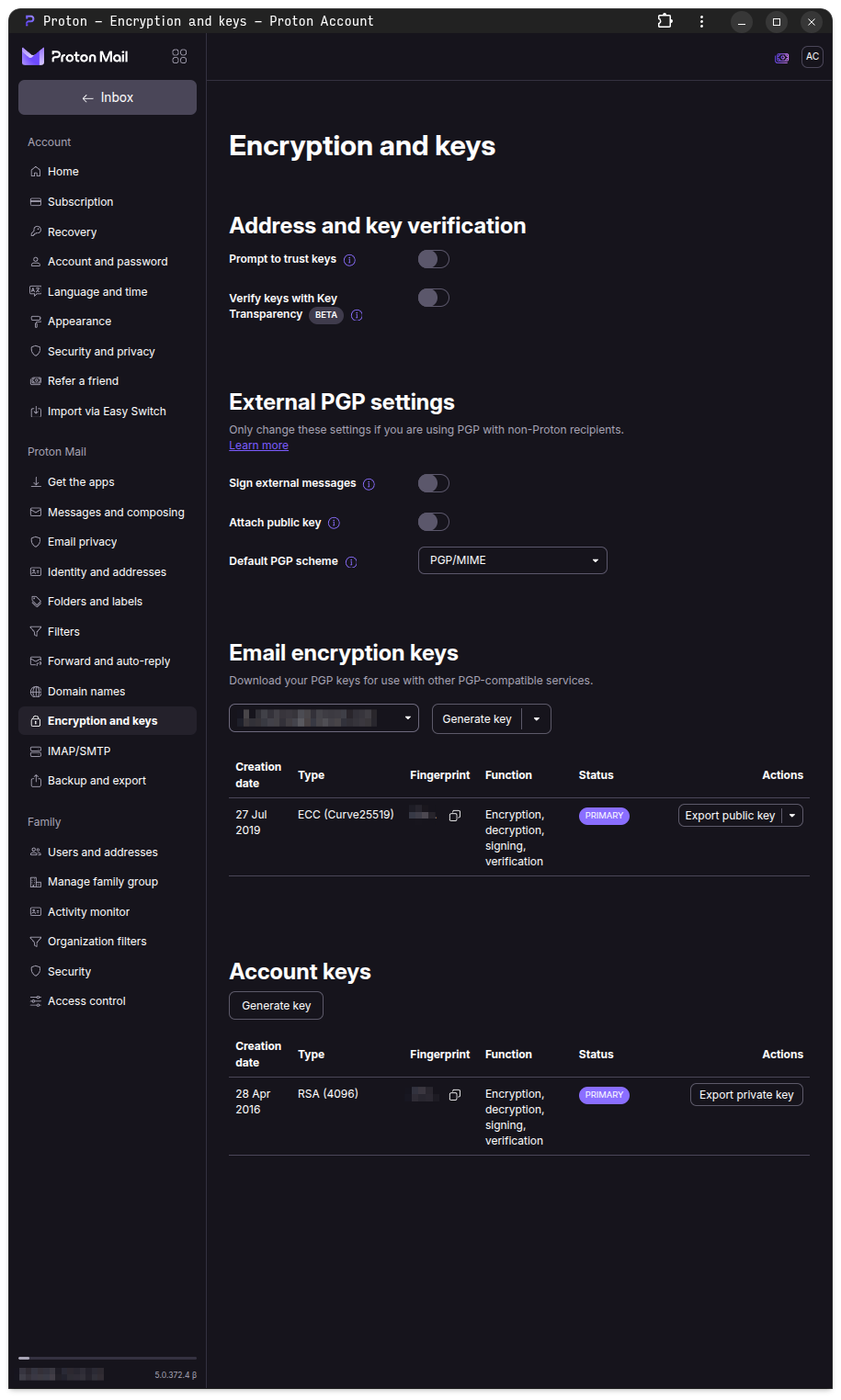
    From "How to enable post-quantum protection in Proton Mail"[1]

    > Enable post-quantum protection
    > 1. Sign in to account.proton.me and open your account settings.
    > 2. Select Encryption and keys from the sidebar.
    > 3. Under Post-quantum protection, click Enable post-quantum protection.

    Where is the Post-quantum protection section?

    [1] https://proton.me/support/mail-post-quantum-protection

    Link Preview Image
    Uncategorized

  • It's official!
    ajcxz0@fosstodon.orgA ajcxz0@fosstodon.org

    Standing by for action.

    #Stingray #GerryAnderson #SylviaAnderson #Supermarionation #WorldAquanautSecurityPatrol

    Uncategorized
  • Login

  • Login or register to search.
  • First post
    Last post
0
  • Categories
  • Recent
  • Tags
  • Popular
  • World
  • Users
  • Groups