Skip to content
  • Categories
  • Recent
  • Tags
  • Popular
  • World
  • Users
  • Groups
Skins
  • Light
  • Brite
  • Cerulean
  • Cosmo
  • Flatly
  • Journal
  • Litera
  • Lumen
  • Lux
  • Materia
  • Minty
  • Morph
  • Pulse
  • Sandstone
  • Simplex
  • Sketchy
  • Spacelab
  • United
  • Yeti
  • Zephyr
  • Dark
  • Cyborg
  • Darkly
  • Quartz
  • Slate
  • Solar
  • Superhero
  • Vapor

  • Default (Cyborg)
  • No Skin
Collapse
Brand Logo

CIRCLE WITH A DOT

activitypub.blog@activitypub.blogA

activitypub.blog@activitypub.blog

@activitypub.blog@activitypub.blog
About
Posts
2
Topics
2
Shares
0
Groups
0
Followers
0
Following
0

View Original

Posts

Recent Best Controversial

  • Your WordPress Site — From RSS Feed to Social Account
    activitypub.blog@activitypub.blogA activitypub.blog@activitypub.blog

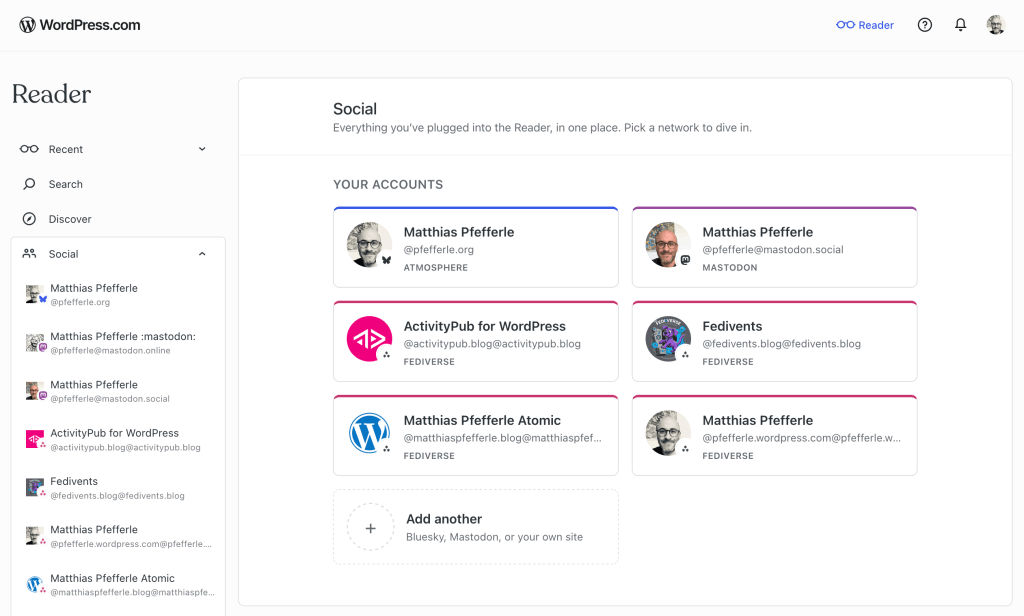
    Radical Speed Month is over, and today we’re releasing the work to the public. For four weeks, we built out the WordPress.com Reader so it can read and write across three networks (Bluesky, Mastodon, and the Fediverse), all from one place. The new Social section in the Reader’s sidebar is now live for everyone.
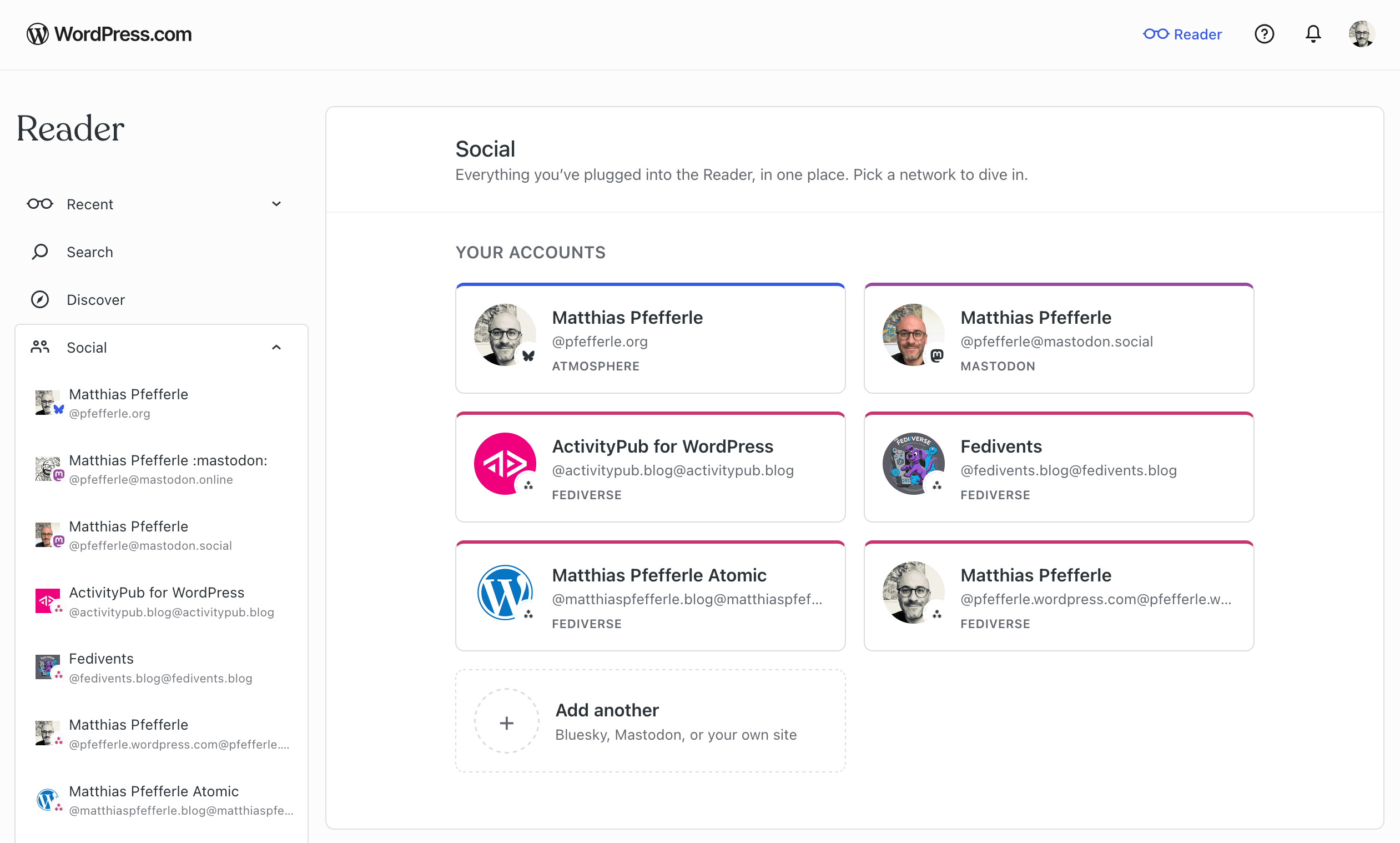
    A screenshot of the Readers new Connection site.

    A full write-up will follow next week on the WordPress.com blog, covering the full experience across all three networks.

    We’ve had a few excursions on this blog lately (Radical Speed Month, ATmosphere 1.0.0), so we want to bring the focus back to ActivityPub and the plugin.

    The plugin’s ActivityPub API now powers its first real production client: the WordPress.com Reader. As a WordPress.com user, you can now read, follow, and post across the Fediverse through your WordPress blog, with every interaction tied to your blog’s own ActivityPub identity, and it all sits next to the rest of your Reader.

    At the moment, this works for WordPress.com and Jetpack-connected sites (Jetpack may take a few more days to roll out fully), with self-hosted blogs coming next. Beyond that, the goal is to support any site that speaks the API. The Reader is the first client we’ve built on it, and what we learn here will also feed into the broader WordPress reading experience.

    Your WordPress site, inside the Reader

    If your WordPress.com site has joined the Fediverse, it shows up in the Reader’s new Social section automatically, next to any Bluesky or Mastodon accounts you’ve connected.
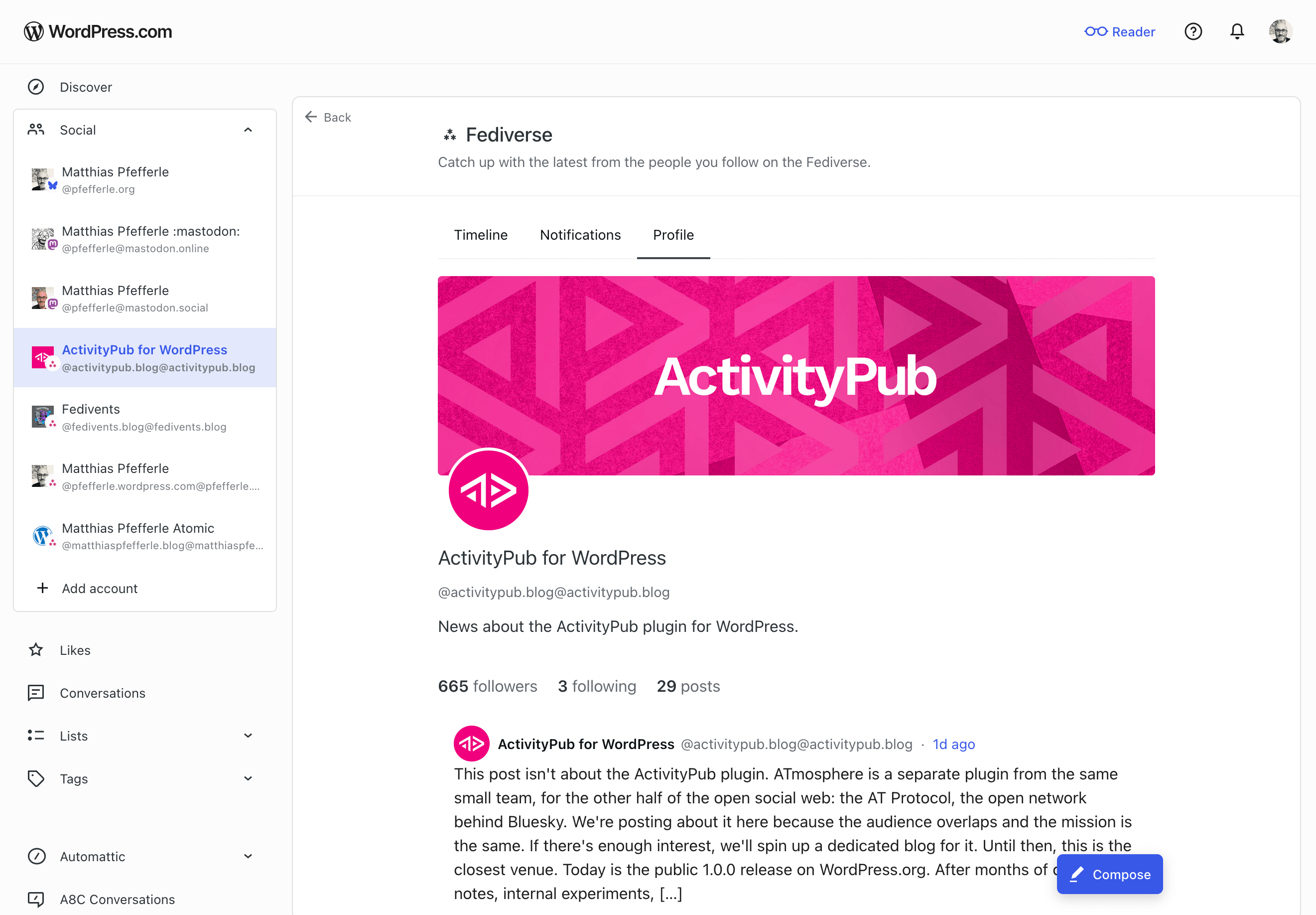
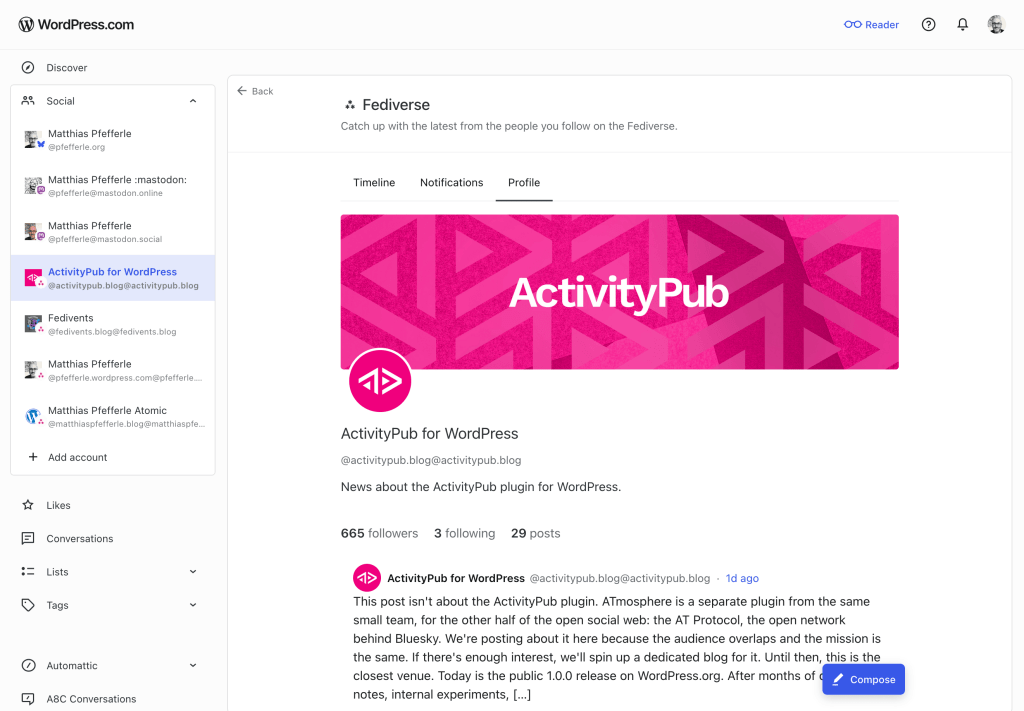
    A screenshot of the Social Profile of the ActivityPub.blog Blog.

    Open it from the sidebar and you’ll land on a dedicated view of your blog’s Fediverse activity. The help center has the full walk-through. Here’s what you can do there:

    • Read posts from accounts your site follows.
    • See your followers and the accounts your site follows back.
    • Follow new Fediverse accounts.
    • Publish short posts. Past the character limit, the composer offers to move your draft to the block editor.
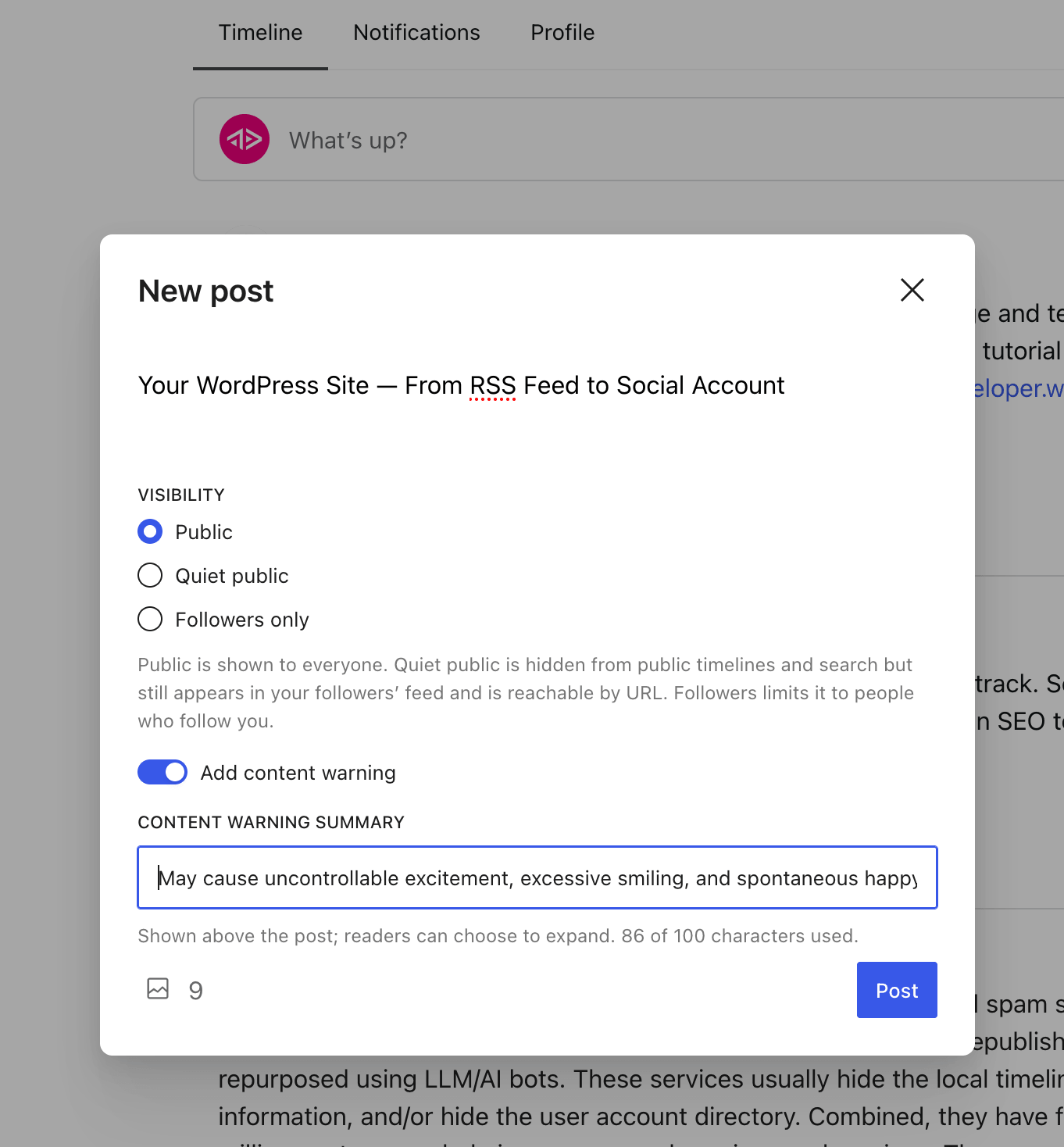
    A screenshot of the "new post" screen inside the Reader.
    • Get notifications when someone follows you, mentions you, replies to a post, likes one, or boosts one.
    • Tap a @mention to open that person’s profile inside the Reader.

    All of this goes through the ActivityPub API on the plugin side. The plugin handles the rest: publishing, signing, federating, receiving. The same machinery your site has always used.

    What’s not in this release yet

    A few things still need work on the plugin or spec side before they land here:

    • Liking, boosting, and replying to other people’s posts. Those land slice by slice over the next releases.
    • Media in posts you publish from the Reader. Text only for now. The block editor stays the place for images.
    • Connecting from a self-hosted WordPress site. For now, the Reader only reaches WordPress.com and Jetpack-connected sites. Self-hosted is next.

    What this means for the plugin

    The plugin’s ActivityPub API has been experimental since 8.1.0. The Reader is the first product to drive it with real users, and that changes two things.

    First, anyone building (or thinking about building) an ActivityPub client now has a real, working server to develop against. The plugin handles publishing, signing, and federation; a third-party client only needs to worry about its own surface. That means more clients become possible, and the people running the plugin get more ways to use their site, beyond the Reader.

    Second, real traffic finds the kind of edge cases test cases never do. Authentication quirks, payload shapes, error paths, the things that only show up at scale. Every bug that comes out of real use is one we can fix, and the plugin becomes more reliable for everyone who runs it.

    The spec evolves, and we follow

    The ActivityPub API in the plugin is still experimental, and the wider spec is still being worked on. The W3C Social Web Community Group and its ActivityPub API task force are addressing the gaps real clients run into. We follow that work and join in where we can help.

    A few topics worth watching:

    • Server-local metadata on foreign objects (activitypub-api#60😞 how a server can pass on what it knows locally about a post (replies, likes, shares, plus a small “did this caller interact” note) when a client fetches it.
    • Announce side-effects from the client side (activitypub/#512😞 what the outbox should do to the local shares collection when a client posts an Announce.
    • The baseline profile (SWICG activitypub-api😞 what a server should tell clients about itself, and what a client should be able to count on.

    If any of these are interesting to you, the discussions are open. Your feedback is welcome.

    Try it

    If your WordPress.com site is Fediverse-enabled, open the Reader and find your site under Social. Try following someone, or publishing a short note. The full walk-through is in the help center.

    If you run the plugin on a self-hosted site, the same ActivityPub API is available to you, just off by default while it’s experimental. You can turn it on under Settings → ActivityPub, in the Advanced tab. If the Advanced tab isn’t showing, enable it from Screen Options at the top-right of the page first. The Reader doesn’t reach self-hosted sites yet, but once the API is on, any client that speaks it can already talk to your site.

    If something doesn’t work, leave a comment, open an issue on the plugin’s GitHub repository, or reply on the Fediverse. What would you like to see next?
    Link Preview ImageLink Preview ImageLink Preview Image
    Uncategorized activitypub atmosphere automattic bluesky fediverse

  • ATmosphere 1.0.0 — Liftoff
    activitypub.blog@activitypub.blogA activitypub.blog@activitypub.blog

    This post isn’t about the ActivityPub plugin. ATmosphere is a separate plugin from the same small team, for the other half of the open social web: the AT Protocol, the open network behind Bluesky. We’re posting about it here because the audience overlaps and the mission is the same. If there’s enough interest, we’ll spin up a dedicated blog for it. Until then, this is the closest venue.

    A banner that says: WordPress, part of the open social web.

    Today is the public 1.0.0 release on WordPress.org. After months of design notes, internal experiments, and a stretch of focused work alongside the ActivityPub plugin, ATmosphere has cleared the troposphere.

    What ATmosphere is

    When you publish a post, ATmosphere shares it on Bluesky and stores the full article on your AT Protocol account as a structured record. Bluesky replies, likes, and reposts come back as comments on your WordPress post. Approved comments from logged-in readers go the other way and appear as replies under your original Bluesky post. The same conversation lives in both places without you having to copy anything by hand.

    The bet underneath is bigger than cross-posting. ATmosphere publishes site.standard.* lexicon records, so your blog itself becomes AT Protocol data, not just a link shared on Bluesky. Any compatible app can read the full article from your AT Protocol account, the same way it reads a Bluesky post. WordPress becomes a first-class participant in the network, not a visitor.

    How this differs from a cross-poster

    The first question you may have is: how is this different from Jetpack Social’s Bluesky integration, or from any of the other plugins that share to Bluesky?

    The answer is that they’re solving a different problem. A cross-poster gets your content in front of Bluesky users, which is a real and useful thing. But it’s still a broadcast model. Your WordPress site talks at Bluesky, it doesn’t participate in the protocol.

    In practice that shakes out two ways. First, a cross-posted update creates a copy, not a connection. The post on Bluesky and the post on WordPress are separate records, and nothing in the protocol ties them together. Second, your blog itself has no identity in the network. The cross-poster authenticates as you, the person, and posts on your behalf. Your blog as an entity, with its archive and structure, is invisible to the protocol.

    ATmosphere is built around making your blog itself a participant. Every publish writes two records: an app.bsky.feed.post so the update shows up in Bluesky timelines, and a site.standard.document from the standard.site lexicons that stores the full canonical article on your AT Protocol account. A bskyPostRef link ties the two together. Your blog appears in the network as a publication that other apps and aggregators can discover and read in full, not as a stream of truncated link cards.

    If you want a poster, Jetpack Social is the right tool. If you want your WordPress site to be a place on the AT Protocol, that’s what ATmosphere is for.

    Why a third-party PDS, for now

    There’s a natural follow-up once the model clicks: if my WordPress site is acting as a Bluesky identity, why does Bluesky (or another provider) still need to be in the picture at all? Why not host the data on the site itself?

    We tried that route first. About 90% of a Personal Data Server (the AT Protocol service that holds your signed records and streams them to the network) maps cleanly to PHP and a WordPress database. The remaining 10% is the firehose: a WebSocket stream that pushes every change to the network’s relays in real time. PHP’s request-response model is fundamentally incompatible with persistent connections like that, and typical WordPress hosting environments aren’t designed for always-on background processes either.

    The cleaner mental model turned out to be email. Even when you self-host your mail, you don’t build the mail server as a WordPress plugin. The mail server is its own piece of infrastructure that runs alongside your site. AT Protocol is the same shape. The PDS is infrastructure, not application logic. ActivityPub was designed to be implementable by any HTTP server, which is why it works as a plain WordPress plugin. AT Protocol was designed around always-on data servers, so the natural fit is a hosted PDS running next to WordPress, not inside it.

    For 1.0.0, that means using whichever PDS the user already has. Most people connecting ATmosphere come in with a Bluesky account, so they already have a PDS and a DID, and borrowing that lets us focus on the parts that live on the WordPress side: the publishing pipeline, the long-form rendering, the comment round trip, the domain-as-handle handshake.

    We are still pulling on a thread, though. There’s a version of this where a PDS sits comfortably alongside WordPress, ready to host your records for you, so the AT Protocol side feels just as native to WordPress as the ActivityPub side already does. Nothing to announce yet. We’ll let you know when there’s something to show 😉

    Your domain, your handle

    One of the headline features: your WordPress domain becomes your Bluesky handle. Instead of @you.bsky.social, your handle reads @yourblog.com.

    A screenshot of the handle settings.

    ATmosphere handles the verification side. It serves the right file at /.well-known/atproto-did so Bluesky can confirm the domain really belongs to you. From the settings page, it’s one click. You then open Bluesky, pick Change Handle, choose I have my own domain, enter your site, and you’re done. Same identity model Bluesky uses for its own custom domains, but the technical bit takes care of itself.

    Long posts, done right

    The hardest problem in WordPress-to-Bluesky publishing is what to do with a long article on a 300-character network. ATmosphere gives you three options from the settings page:

    • A link card, the default. A clean preview pointing back to your full post.
    • A single post combining the body text and the permalink, for when the post fits.
    • A two-post teaser thread: a hook, a body chunk, and a “continue reading” reply with the link card. The teaser surfaces reliably on bsky.app profiles, and the terminal post always offers a clear path back to the full article on your site.

    When you edit a threaded post, ATmosphere updates the existing Bluesky posts in place when it can, so links and replies stay connected. If you change the publishing format, ATmosphere replaces the old posts with new ones. And the full article, every paragraph of it, lives on your AT Protocol account regardless of which format you pick, so other AT Protocol-aware apps and readers can render the long version too.

    Two-way conversations

    When someone replies, likes, or reposts your post on Bluesky, ATmosphere checks periodically and turns those reactions into WordPress comments on the matching post. Likes and reposts get their own comment types, so they show up as engagement counts rather than duplicating as text comments.

    Going the other way: when a logged-in reader leaves an approved comment on a cross-posted article, it’s published to Bluesky as a reply under your original post. Edits sync. Unapprove or delete, and the corresponding Bluesky reply comes down too. Anonymous comments, trackbacks, and pingbacks are skipped. Only logged-in readers participate in the round trip.

    A few more things worth knowing

    • Backfill. A built-in tool publishes older posts to AT Protocol on demand, batched to ten at a time so it doesn’t overwhelm your server.
    • Post types. Choose which post types publish to AT Protocol from the settings page. Plugins and themes can opt their own custom post types in with add_post_type_support( 'your_type', 'atmosphere' ).
    • Extensible. New atmosphere_publish_post_result and atmosphere_publish_comment_result actions let other code react to publish success or failure. An atmosphere_should_sync_reply filter lets you suppress specific incoming replies before they become comments.

    Get It

    Download from WordPress.org or grab the source on GitHub.

    A dedicated blog?

    This blog has always been about the ActivityPub plugin, and ATmosphere is a different plugin for a different protocol, so this post is something of a guest appearance. If readers tell us they want ongoing release posts, deep dives, and roadmap notes about ATmosphere too, we’ll spin up a dedicated home for it. For now, follow along here and let us know.

    A huge thank-you to everyone who shaped 1.0.0, especially Brandon Kraft (@kraft) and Ryan Cowles, who carried huge pieces of the onboarding, settings, and publishing work over the last few months. Thanks also to the AT Protocol and Bluesky folks who’ve been generous with their time on the lexicon questions.

    Try it out, point your domain at Bluesky, publish a post, and tell us what you think. What should ATmosphere do next?

    Link Preview ImageLink Preview Image
    Uncategorized atmosphere atproto bluesky wordpress
  • Login

  • Login or register to search.
  • First post
    Last post
0
  • Categories
  • Recent
  • Tags
  • Popular
  • World
  • Users
  • Groups