May 11, 2026: The Red Sun still prevails.
-
@christopherkunz @wdormann @jhr77 do you have cloud protection turned on?
@GossiTheDog @christopherkunz @jhr77
Cloud-delivered protection?
If so, then yeah, it's on.
It's the same stock Win11 VM that worked in April. Just with Defender updates installed.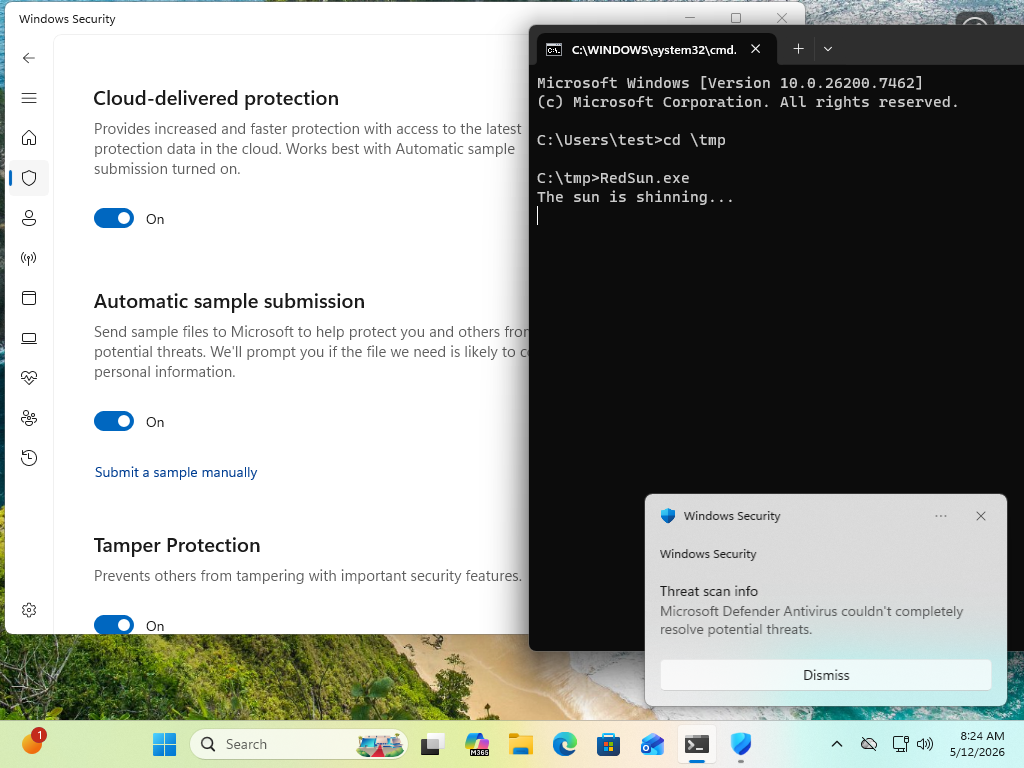
-
@christopherkunz @wdormann @jhr77 do you have cloud protection turned on?
@GossiTheDog @wdormann @jhr77 Yes, cloud protection is on. This is a German Win11 Home, I think. After updating to today's definitions and a reboot, RedSun.exe doesn't seem to win the RC anymore, so the reboot was likely necessary to apply the Defender mitigation.
I don't think this is merely a signature update, from what I understood the mitigation requires a core update to Defender. -
@GossiTheDog @wdormann @jhr77 Yes, cloud protection is on. This is a German Win11 Home, I think. After updating to today's definitions and a reboot, RedSun.exe doesn't seem to win the RC anymore, so the reboot was likely necessary to apply the Defender mitigation.
I don't think this is merely a signature update, from what I understood the mitigation requires a core update to Defender.@christopherkunz @GossiTheDog @jhr77
The executable bits for Defender are updated along with sigs. -
@christopherkunz @GossiTheDog @jhr77
The executable bits for Defender are updated along with sigs.@wdormann @GossiTheDog @jhr77 On second attempt, the exploit worked. So whatever MS did, is still not a 100% mitigation. I''ll try again to reproduce what happened.
-
@wdormann @GossiTheDog @jhr77 On second attempt, the exploit worked. So whatever MS did, is still not a 100% mitigation. I''ll try again to reproduce what happened.
@christopherkunz @GossiTheDog @jhr77
When it succeeds, does it happen relatively quickly?I've tried both waiting 10 minutes and have also tried 10 times in a row, and neither strategy is successful on my Win11 VM.
-
@GossiTheDog @christopherkunz @jhr77
Cloud-delivered protection?
If so, then yeah, it's on.
It's the same stock Win11 VM that worked in April. Just with Defender updates installed.@wdormann @GossiTheDog @jhr77 Reboot, log in, win-r, cmd, cd \temp, RedSun.exe, worked on first attempt.
In my last attempt, I had opened the Defender warning popup "defender has found a threat" and I thought I'd triggered some condition for the exploit to work. Seems not, I can still run it.
It succeeds after about 10 seconds. -
@wdormann @GossiTheDog @jhr77 Reboot, log in, win-r, cmd, cd \temp, RedSun.exe, worked on first attempt.
In my last attempt, I had opened the Defender warning popup "defender has found a threat" and I thought I'd triggered some condition for the exploit to work. Seems not, I can still run it.
It succeeds after about 10 seconds.@christopherkunz @GossiTheDog @jhr77
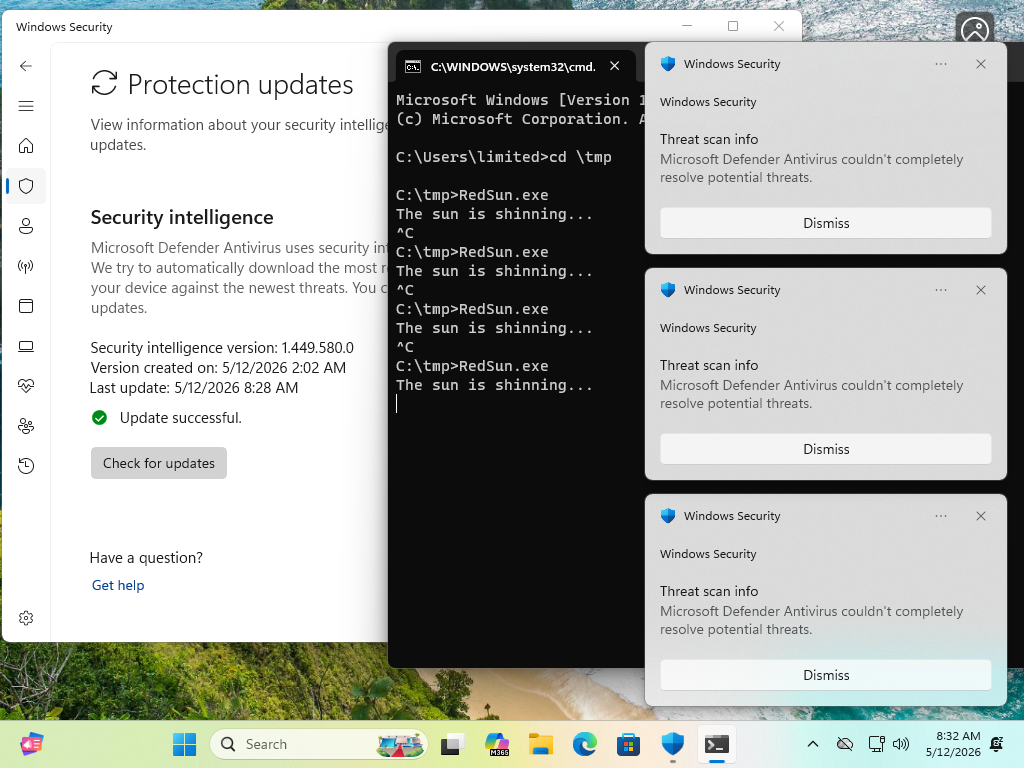
The dialog is the detection of the EICARTieringEngineService.exeand is definitely a part of the successful exploit flow.It's just that at least for me, it never succeeds with updated defs.

 ️
️
-
@christopherkunz @GossiTheDog @jhr77
The dialog is the detection of the EICARTieringEngineService.exeand is definitely a part of the successful exploit flow.It's just that at least for me, it never succeeds with updated defs.
️@wdormann @GossiTheDog @jhr77 Yeah, the first dialog is the detection of EICAR, the second one is the admission of defeat. I get both, and a NT_AUTHORITY shell, on running RedSun.exe.
This is weird, but I suspect we're basically arguing against a ticking clock here. Patch day will land soon and with it, undoubtedly a RedSun mitigation. Actually, let me milk this opportunity for a meme.
-
@christopherkunz @GossiTheDog @jhr77
The dialog is the detection of the EICARTieringEngineService.exeand is definitely a part of the successful exploit flow.It's just that at least for me, it never succeeds with updated defs.
️@wdormann @GossiTheDog @jhr77 I think my TieringEngineService.exe might be permanently patched/replaced with the RedSun copy and none of the definitions updates have cleaned it up.
-
@wdormann @GossiTheDog @jhr77 I think my TieringEngineService.exe might be permanently patched/replaced with the RedSun copy and none of the definitions updates have cleaned it up.
@christopherkunz @GossiTheDog @jhr77
Well yep, if you're testing on an already-popped machine, that's an invalid test.That is, if
C:\Windows\system32\TieringEngineService.exehas already been replaced, then the exploit might appear to "work" even when it doesn't.TieringEngineService.exeis a Windows component. It has nothing to do with Defender, and no Defender update will restore it to its pristine state. -
@christopherkunz @GossiTheDog @jhr77
Well yep, if you're testing on an already-popped machine, that's an invalid test.That is, if
C:\Windows\system32\TieringEngineService.exehas already been replaced, then the exploit might appear to "work" even when it doesn't.TieringEngineService.exeis a Windows component. It has nothing to do with Defender, and no Defender update will restore it to its pristine state.@christopherkunz @GossiTheDog @jhr77
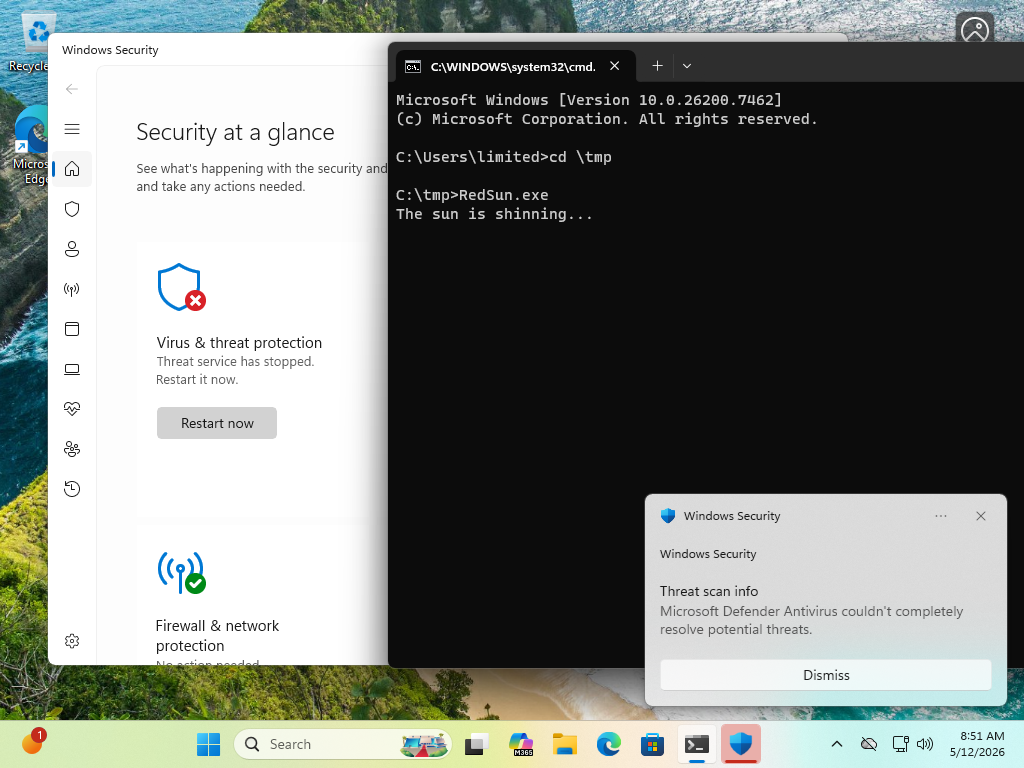
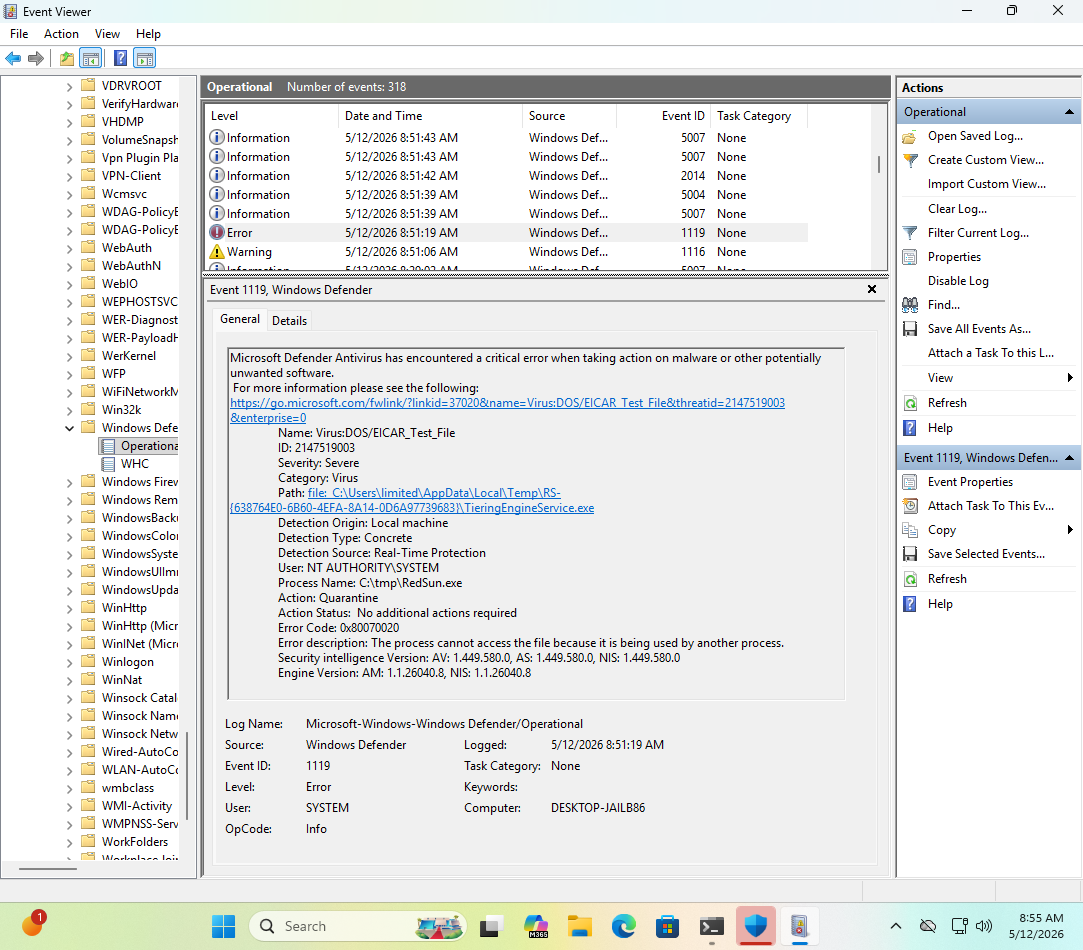
Though I'll also admit that having
Windows Securityopen seems to indicate that Windows Defender stops when RedSun is attempted.From the GUI it's merely
Threat service has stopped, but in Event viewer we can get more info in that it'sMicrosoft Defender Antivirus has encountered a critical error when taking action on malware or other potentially unwanted software.It restarts automatically.
If this is an intentional RedSun fix, I'll say that it's less than ideal.

-
@christopherkunz @GossiTheDog @jhr77
Though I'll also admit that having
Windows Securityopen seems to indicate that Windows Defender stops when RedSun is attempted.From the GUI it's merely
Threat service has stopped, but in Event viewer we can get more info in that it'sMicrosoft Defender Antivirus has encountered a critical error when taking action on malware or other potentially unwanted software.It restarts automatically.
If this is an intentional RedSun fix, I'll say that it's less than ideal.
@wdormann @christopherkunz @GossiTheDog Hi, today at the first try I had a shell with system rights. So i assume that it worked successfully.
-
@wdormann @christopherkunz @GossiTheDog Hi, today at the first try I had a shell with system rights. So i assume that it worked successfully.
@jhr77 @christopherkunz @GossiTheDog
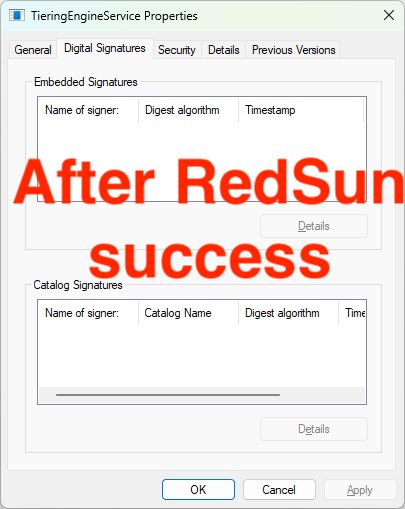
Just to be clear, before you attempted the exploit, your
C:\Windows\system32\TieringEngineService.exefile had a valid signature?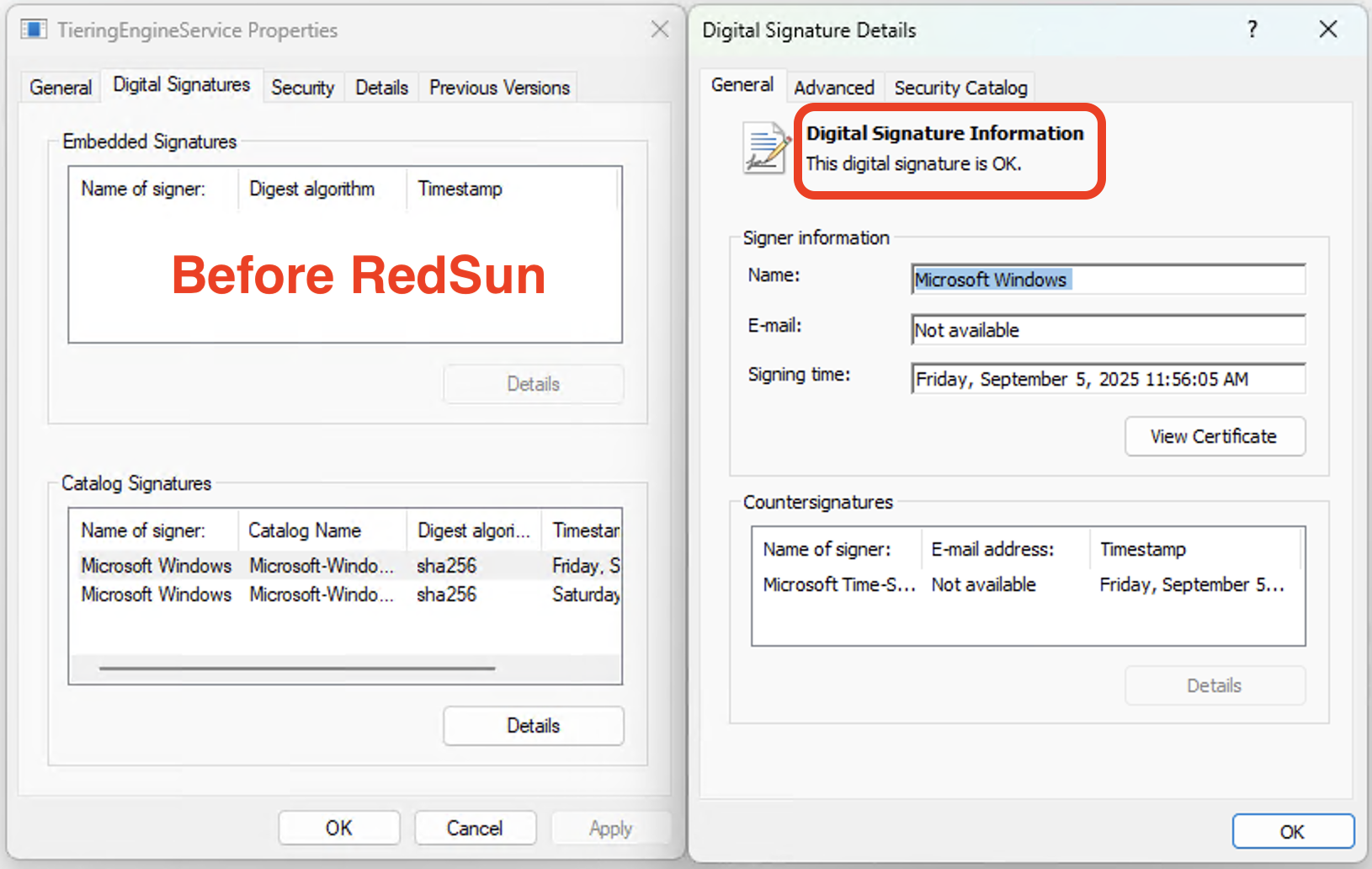
-
@jhr77 @christopherkunz @GossiTheDog
Just to be clear, before you attempted the exploit, your
C:\Windows\system32\TieringEngineService.exefile had a valid signature?@wdormann @christopherkunz @GossiTheDog So this is even worse as this is persistent
-
@jhr77 @christopherkunz @GossiTheDog
Just to be clear, before you attempted the exploit, your
C:\Windows\system32\TieringEngineService.exefile had a valid signature?@wdormann @jhr77 @GossiTheDog Yeah, mine is unsigned, so I'm doing the whole dism & sfc routine now to presumably fix it.
I'm a little surprised though: Is this normal behavior that unsigned corrupted executables remain indefinitely in \system32 and aren't detected or removed? Is this something I would have to trigger manually, like an offline scan of sorts? -
@wdormann @jhr77 @GossiTheDog Yeah, mine is unsigned, so I'm doing the whole dism & sfc routine now to presumably fix it.
I'm a little surprised though: Is this normal behavior that unsigned corrupted executables remain indefinitely in \system32 and aren't detected or removed? Is this something I would have to trigger manually, like an offline scan of sorts?@christopherkunz @wdormann @GossiTheDog same same here. It's getting worse when asking more questions. But it was possible to replace with the original version. Hopefully the system is clean now. Maybe making a scan with the defender...

-
@wdormann @christopherkunz @GossiTheDog So this is even worse as this is persistent
@jhr77 @christopherkunz @GossiTheDog
The exploit made no claims about being temporary. -
@wdormann @jhr77 @GossiTheDog Yeah, mine is unsigned, so I'm doing the whole dism & sfc routine now to presumably fix it.
I'm a little surprised though: Is this normal behavior that unsigned corrupted executables remain indefinitely in \system32 and aren't detected or removed? Is this something I would have to trigger manually, like an offline scan of sorts?@christopherkunz @jhr77 @GossiTheDog
No, Windows does not do periodic filesystem checks to ensure that files have not been corrupted.It's up to you to run
sfc /scannowand associated tools if you think your Windows installation is corrupt.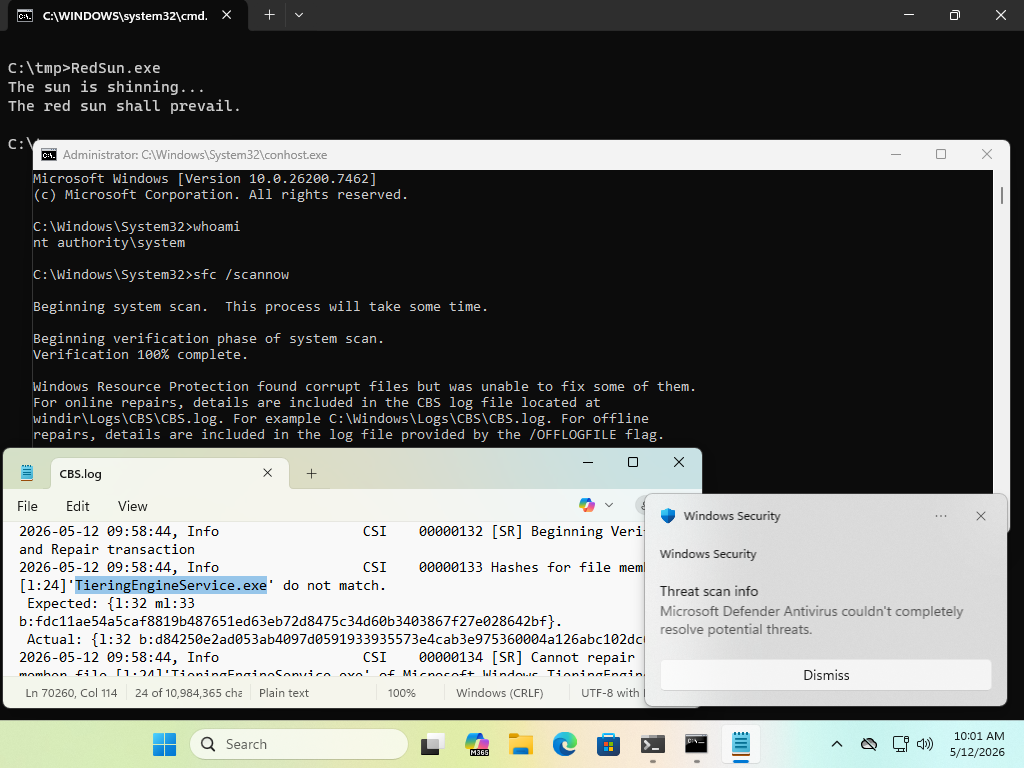
-
@christopherkunz @wdormann @GossiTheDog same same here. It's getting worse when asking more questions. But it was possible to replace with the original version. Hopefully the system is clean now. Maybe making a scan with the defender...
@jhr77 @christopherkunz @GossiTheDog
Always revert your VM to a clean state before (and after) testing an exploit. -
@jhr77 @christopherkunz @GossiTheDog
Always revert your VM to a clean state before (and after) testing an exploit.@wdormann @jhr77 @GossiTheDog OK, I don't get this. I did the following:
1. DISM /Online /Cleanup-Image /RestoreHealth
2. sfc /scannow
3. Checked that the TieringEngineService.exe has two signatures (like in your screenshot) and got replaced properly (as per the log).
4. Rebooted and re-checked if the .exe is still properly signed.
5. Re-Ran RedSun.exe
6. Popped a shell again.
I'm going to boot a clean Win11 VM again.