Skip to content
  • Categories
  • Recent
  • Tags
  • Popular
  • World
  • Users
  • Groups
Skins
  • Light
  • Brite
  • Cerulean
  • Cosmo
  • Flatly
  • Journal
  • Litera
  • Lumen
  • Lux
  • Materia
  • Minty
  • Morph
  • Pulse
  • Sandstone
  • Simplex
  • Sketchy
  • Spacelab
  • United
  • Yeti
  • Zephyr
  • Dark
  • Cyborg
  • Darkly
  • Quartz
  • Slate
  • Solar
  • Superhero
  • Vapor

  • Default (Cyborg)
  • No Skin
Collapse
Brand Logo

CIRCLE WITH A DOT

  1. Home
  2. Development & Open Source
  3. FOSS
  4. New features are coming in #LibreOffice 26.8, our next major release!

New features are coming in #LibreOffice 26.8, our next major release!

Scheduled Pinned Locked Moved FOSS
libreofficefossopensourcefreesoftware
16 Posts 9 Posters 31 Views
  • Oldest to Newest
  • Newest to Oldest
  • Most Votes
Reply
  • Reply as topic
Log in to reply
This topic has been deleted. Only users with topic management privileges can see it.
  • libreoffice@fosstodon.orgL libreoffice@fosstodon.org

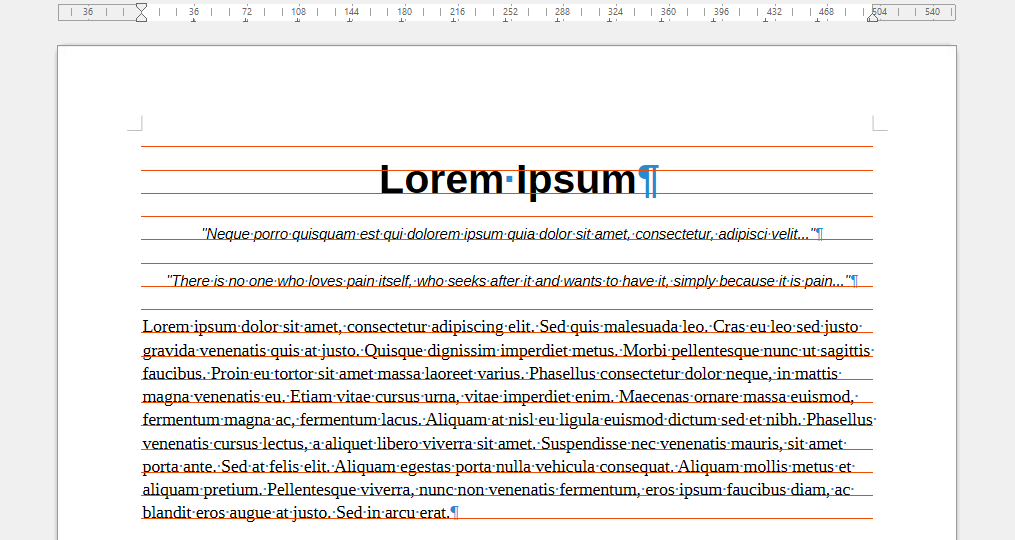
    New features are coming in #LibreOffice 26.8, our next major release! Tamás Zolnai has added an option to display the baseline grid for page line-spacing in Writer, and the colour is customisable: https://wiki.documentfoundation.org/ReleaseNotes/26.8#Writer #foss #opensource #freesoftware
    Link Preview Image
    andrewblasco@masto.esA This user is from outside of this forum
    andrewblasco@masto.esA This user is from outside of this forum
    andrewblasco@masto.es
    wrote last edited by
    #5

    @libreoffice Maybe a dumb question but... Why Libreoffice don't follow de white/dark theme in Gnome, even with automatic theme in appearance? 😅

    libreoffice@fosstodon.orgL axelenabril@mastodon.greenA 2 Replies Last reply
    0
    • andrewblasco@masto.esA andrewblasco@masto.es

      @libreoffice Maybe a dumb question but... Why Libreoffice don't follow de white/dark theme in Gnome, even with automatic theme in appearance? 😅

      libreoffice@fosstodon.orgL This user is from outside of this forum
      libreoffice@fosstodon.orgL This user is from outside of this forum
      libreoffice@fosstodon.org
      wrote last edited by
      #6

      @andrewblasco Hi! Without details (LibreOffice version, Gnome version etc.) it's hard to say. Try asking on https://ask.libreoffice.org with details about your setup, and maybe someone in the community there has an idea!

      1 Reply Last reply
      0
      • bjarne@social.bvoigtlaender.deB bjarne@social.bvoigtlaender.de

        @libreoffice Yea, but what about less features? 🤔

        Love LibreOffice btw. keep up the good work.

        libreoffice@fosstodon.orgL This user is from outside of this forum
        libreoffice@fosstodon.orgL This user is from outside of this forum
        libreoffice@fosstodon.org
        wrote last edited by
        #7

        @bjarne Not sure what you mean, sorry! You want LibreOffice to remove features?

        chuff@bark.wolp.chatC 1 Reply Last reply
        0
        • andrewblasco@masto.esA andrewblasco@masto.es

          @libreoffice Maybe a dumb question but... Why Libreoffice don't follow de white/dark theme in Gnome, even with automatic theme in appearance? 😅

          axelenabril@mastodon.greenA This user is from outside of this forum
          axelenabril@mastodon.greenA This user is from outside of this forum
          axelenabril@mastodon.green
          wrote last edited by
          #8

          @andrewblasco @libreoffice qué raro, tienes algún tema puesto? A mí con Adwaita y con adw-gtk3 me va bien el cambio, pero no he probado nada fuera de eso

          andrewblasco@masto.esA 1 Reply Last reply
          0
          • axelenabril@mastodon.greenA axelenabril@mastodon.green

            @andrewblasco @libreoffice qué raro, tienes algún tema puesto? A mí con Adwaita y con adw-gtk3 me va bien el cambio, pero no he probado nada fuera de eso

            andrewblasco@masto.esA This user is from outside of this forum
            andrewblasco@masto.esA This user is from outside of this forum
            andrewblasco@masto.es
            wrote last edited by
            #9

            @AxelEnAbril Ummm, pero cuando le das al modo oscuro, con Libreoffice abierto, se te cambia a oscuro Libreoffice? 🤔

            Toquetearé, pero diría que no tengo ningún tema, no.

            axelenabril@mastodon.greenA manum@masto.esM 2 Replies Last reply
            0
            • andrewblasco@masto.esA andrewblasco@masto.es

              @AxelEnAbril Ummm, pero cuando le das al modo oscuro, con Libreoffice abierto, se te cambia a oscuro Libreoffice? 🤔

              Toquetearé, pero diría que no tengo ningún tema, no.

              axelenabril@mastodon.greenA This user is from outside of this forum
              axelenabril@mastodon.greenA This user is from outside of this forum
              axelenabril@mastodon.green
              wrote last edited by
              #10

              @andrewblasco Sí, sí, ahí lo he rechequeado, con ambos temas. Estoy ahora con gnome 51* porque estoy con GNOME OS, pero en OpenSUSE también me iba fetén (y juraría que otrora cuando usaba Fedora, también).

              ¿Llevas mucho tiempo con la misma /home? Quizás tengas algún ajuste raruno heredado de alguna vez...

              andrewblasco@masto.esA 1 Reply Last reply
              0
              • axelenabril@mastodon.greenA axelenabril@mastodon.green

                @andrewblasco Sí, sí, ahí lo he rechequeado, con ambos temas. Estoy ahora con gnome 51* porque estoy con GNOME OS, pero en OpenSUSE también me iba fetén (y juraría que otrora cuando usaba Fedora, también).

                ¿Llevas mucho tiempo con la misma /home? Quizás tengas algún ajuste raruno heredado de alguna vez...

                andrewblasco@masto.esA This user is from outside of this forum
                andrewblasco@masto.esA This user is from outside of this forum
                andrewblasco@masto.es
                wrote last edited by
                #11

                @AxelEnAbril Ummm, lo miro luego en el ordenador. Mi instalación es relativamente nueva 🤔

                Gracias por el vídeo! 🙂🙂

                axelenabril@mastodon.greenA 1 Reply Last reply
                0
                • andrewblasco@masto.esA andrewblasco@masto.es

                  @AxelEnAbril Ummm, pero cuando le das al modo oscuro, con Libreoffice abierto, se te cambia a oscuro Libreoffice? 🤔

                  Toquetearé, pero diría que no tengo ningún tema, no.

                  manum@masto.esM This user is from outside of this forum
                  manum@masto.esM This user is from outside of this forum
                  manum@masto.es
                  wrote last edited by
                  #12

                  @andrewblasco @AxelEnAbril Yo solo por añadirme: en KDE me funciona también bien.

                  1 Reply Last reply
                  0
                  • andrewblasco@masto.esA andrewblasco@masto.es

                    @AxelEnAbril Ummm, lo miro luego en el ordenador. Mi instalación es relativamente nueva 🤔

                    Gracias por el vídeo! 🙂🙂

                    axelenabril@mastodon.greenA This user is from outside of this forum
                    axelenabril@mastodon.greenA This user is from outside of this forum
                    axelenabril@mastodon.green
                    wrote last edited by
                    #13

                    @andrewblasco no hay de qué! Yo uso el paquete de flatpak si te sirve como referencia

                    1 Reply Last reply
                    0
                    • libreoffice@fosstodon.orgL libreoffice@fosstodon.org

                      New features are coming in #LibreOffice 26.8, our next major release! Tamás Zolnai has added an option to display the baseline grid for page line-spacing in Writer, and the colour is customisable: https://wiki.documentfoundation.org/ReleaseNotes/26.8#Writer #foss #opensource #freesoftware

                      Link Preview Image
                      allende1973@todon.nlA This user is from outside of this forum
                      allende1973@todon.nlA This user is from outside of this forum
                      allende1973@todon.nl
                      wrote last edited by
                      #14

                      @libreoffice

                      nice

                      1 Reply Last reply
                      0
                      • libreoffice@fosstodon.orgL libreoffice@fosstodon.org

                        @bjarne Not sure what you mean, sorry! You want LibreOffice to remove features?

                        chuff@bark.wolp.chatC This user is from outside of this forum
                        chuff@bark.wolp.chatC This user is from outside of this forum
                        chuff@bark.wolp.chat
                        wrote last edited by
                        #15

                        @bjarne@social.bvoigtlaender.de @libreoffice@fosstodon.org

                        Maybe offer a lite version, sorta like the difference between Microsoft Office and Microsoft Works back in the day? Professional and homeowner versions basically. I use Calc for a number of things m'self, and find it annoying to find and set things sometimes because there's so very many features that for someone like me are utterly useless.


                        libreoffice@fosstodon.orgL 1 Reply Last reply
                        0
                        • chuff@bark.wolp.chatC chuff@bark.wolp.chat

                          @bjarne@social.bvoigtlaender.de @libreoffice@fosstodon.org

                          Maybe offer a lite version, sorta like the difference between Microsoft Office and Microsoft Works back in the day? Professional and homeowner versions basically. I use Calc for a number of things m'self, and find it annoying to find and set things sometimes because there's so very many features that for someone like me are utterly useless.

                          libreoffice@fosstodon.orgL This user is from outside of this forum
                          libreoffice@fosstodon.orgL This user is from outside of this forum
                          libreoffice@fosstodon.org
                          wrote last edited by
                          #16

                          @chuff @bjarne Well, there's a single toolbar mode that provides a simpler user interface, at least. But in terms of maintaining two versions – the full and a hypothetical "light" variant of the suite – that would require quite a few extra resources...

                          1 Reply Last reply
                          0
                          Reply
                          • Reply as topic
                          Log in to reply
                          • Oldest to Newest
                          • Newest to Oldest
                          • Most Votes


                          • Login

                          • Login or register to search.
                          • First post
                            Last post
                          0
                          • Categories
                          • Recent
                          • Tags
                          • Popular
                          • World
                          • Users
                          • Groups