As I wrote before (https://mastodon.bsd.cafe/@evgandr/115912395421390028) I tried to use TURN server for communication with my relatives, but failed to setup secure enough solution.
-
As I wrote before (https://mastodon.bsd.cafe/@evgandr/115912395421390028) I tried to use TURN server for communication with my relatives, but failed to setup secure enough solution. So, I decided to try an old and reliable solution — Asterisk. With the help of a book "Asterisk: The Definitive Guide" from J.V. Meggelen & R. Bryant & L. Madsen, of course.
First, I was forced to build the asterisk package by myself (from ports, ofc), since the binary version from NetBSD repository compiled with the all DB support, except my favourite PostgreSQL database.
By the way, adding users and writing dialplan with the help of aforementioned book was not so hard as I expected
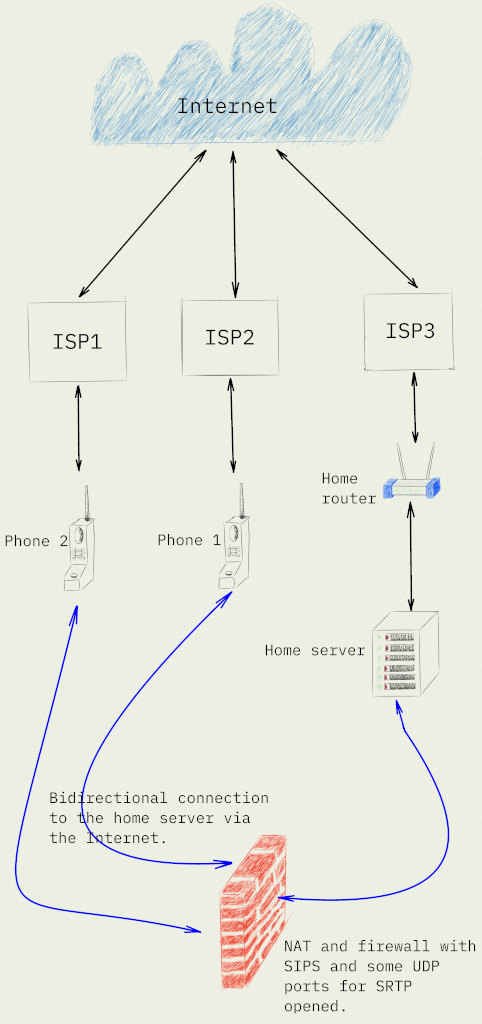
 . Same for network setup. Since, I'm using PJSIP I just opened SIPS port and a range of UDP ports for RTP protocol on the my firewall. Despite, my home network hidden behind NAT on the router, there are no big problems with networking — end-user devices and an Asterisk server connected with use of simple star topology.
Surpisingly, the quality of the voice call is excellent comparing with service, provided by local cellular network operators. I suppose, that the secret in used codecs, or it is because there are not so much users (only 2) of my service.
-
As I wrote before (https://mastodon.bsd.cafe/@evgandr/115912395421390028) I tried to use TURN server for communication with my relatives, but failed to setup secure enough solution. So, I decided to try an old and reliable solution — Asterisk. With the help of a book "Asterisk: The Definitive Guide" from J.V. Meggelen & R. Bryant & L. Madsen, of course.
First, I was forced to build the asterisk package by myself (from ports, ofc), since the binary version from NetBSD repository compiled with the all DB support, except my favourite PostgreSQL database.
By the way, adding users and writing dialplan with the help of aforementioned book was not so hard as I expected
. Same for network setup. Since, I'm using PJSIP I just opened SIPS port and a range of UDP ports for RTP protocol on the my firewall. Despite, my home network hidden behind NAT on the router, there are no big problems with networking — end-user devices and an Asterisk server connected with use of simple star topology.Surpisingly, the quality of the voice call is excellent comparing with service, provided by local cellular network operators. I suppose, that the secret in used codecs, or it is because there are not so much users (only 2) of my service.
@evgandr this graph implies that the devices can communicate through a non-ISP channel

-
As I wrote before (https://mastodon.bsd.cafe/@evgandr/115912395421390028) I tried to use TURN server for communication with my relatives, but failed to setup secure enough solution. So, I decided to try an old and reliable solution — Asterisk. With the help of a book "Asterisk: The Definitive Guide" from J.V. Meggelen & R. Bryant & L. Madsen, of course.
First, I was forced to build the asterisk package by myself (from ports, ofc), since the binary version from NetBSD repository compiled with the all DB support, except my favourite PostgreSQL database.
By the way, adding users and writing dialplan with the help of aforementioned book was not so hard as I expected
. Same for network setup. Since, I'm using PJSIP I just opened SIPS port and a range of UDP ports for RTP protocol on the my firewall. Despite, my home network hidden behind NAT on the router, there are no big problems with networking — end-user devices and an Asterisk server connected with use of simple star topology.Surpisingly, the quality of the voice call is excellent comparing with service, provided by local cellular network operators. I suppose, that the secret in used codecs, or it is because there are not so much users (only 2) of my service.
@evgandr good job! I used to have a job doing tech support for asterisk and you have done better than 90% of Digium customers in 2013.
-
@evgandr this graph implies that the devices can communicate through a non-ISP channel
@iquitsmoking Huh, I forgot to draw a legend (as usual, lol). The black arrows are for physical connections between devices and the blue arrows are for logical connections.
-
@evgandr good job! I used to have a job doing tech support for asterisk and you have done better than 90% of Digium customers in 2013.
-
@iquitsmoking Huh, I forgot to draw a legend (as usual, lol). The black arrows are for physical connections between devices and the blue arrows are for logical connections.
@evgandr ohhhh ahahahah makes sense
-
As I wrote before (https://mastodon.bsd.cafe/@evgandr/115912395421390028) I tried to use TURN server for communication with my relatives, but failed to setup secure enough solution. So, I decided to try an old and reliable solution — Asterisk. With the help of a book "Asterisk: The Definitive Guide" from J.V. Meggelen & R. Bryant & L. Madsen, of course.
First, I was forced to build the asterisk package by myself (from ports, ofc), since the binary version from NetBSD repository compiled with the all DB support, except my favourite PostgreSQL database.
By the way, adding users and writing dialplan with the help of aforementioned book was not so hard as I expected
. Same for network setup. Since, I'm using PJSIP I just opened SIPS port and a range of UDP ports for RTP protocol on the my firewall. Despite, my home network hidden behind NAT on the router, there are no big problems with networking — end-user devices and an Asterisk server connected with use of simple star topology.Surpisingly, the quality of the voice call is excellent comparing with service, provided by local cellular network operators. I suppose, that the secret in used codecs, or it is because there are not so much users (only 2) of my service.
@evgandr Nice setup! I'm interested to build something similar with a VoIP adapter to use old analog phones, but I have a question while reading your schematics : the phone 1 and 2 are connected through others ISPs, but are they directly connected to the ISP box or to a small computer that can connect to Asterisk ?
I'm a newbie in this field, so I might miss something
-
@evgandr Nice setup! I'm interested to build something similar with a VoIP adapter to use old analog phones, but I have a question while reading your schematics : the phone 1 and 2 are connected through others ISPs, but are they directly connected to the ISP box or to a small computer that can connect to Asterisk ?
I'm a newbie in this field, so I might miss something
@vinishor I'm a newbie too, so I have a limited knowledge of these things. As I know, to connect old analog phones to the Asterisk you need some kind of telephony interface card in the server (e.g. some equipment from the Digium, mentioned in some comment here).
In my case, these two phones are smartphones, so they have installed SIP-clients, which connects to the my Asterisk instance via the network, as any SIP-phone, like real phones used in offices.
-
@h4890 On the PC — baresip (mostly for testing). Both phones are using Linphone (https://www.linphone.org/en/homepage-linphone/) application.
-
@vinishor I'm a newbie too, so I have a limited knowledge of these things. As I know, to connect old analog phones to the Asterisk you need some kind of telephony interface card in the server (e.g. some equipment from the Digium, mentioned in some comment here).
In my case, these two phones are smartphones, so they have installed SIP-clients, which connects to the my Asterisk instance via the network, as any SIP-phone, like real phones used in offices.
@evgandr Makes sense now! I thought you used wired phones, but it's because of the icons of the schematics. But, yeah, with smartphones, it's easier!
I saw some Digium cards on the equivalent of ebay in France, but I wanted to try an ATA first (sadly, it's locked as often for Cisco / Linksys SPA2102....). Thanks for the feedback

-
R relay@relay.mycrowd.ca shared this topic