Sadly, the new design^Wabomination from #Mozilla landed to the new release of #IronFox (148.0.1) on the Android

-
Sadly, the new design^Wabomination from #Mozilla landed to the new release of #IronFox (148.0.1) on the Android

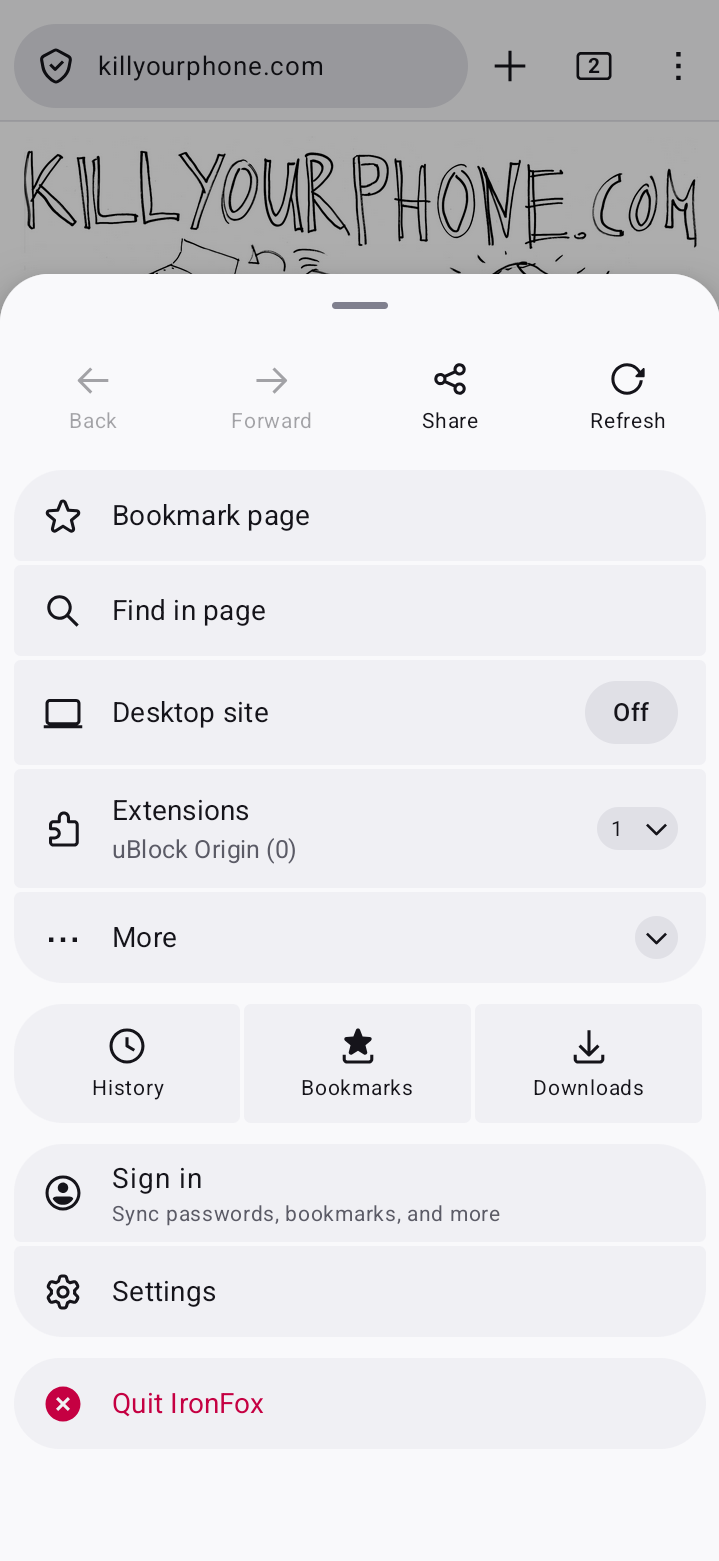
Instead of damn simple and concise main menu, I forced to see a gigantic panel now. Like I don't have fingers — I have a ten sausages instead.
And rounded things, rounded things everywhere! Because this is a redesign in sake of redesign — it is not customizable and I can't switch back to rectangular things in the settings

Luckily, at least for now, I'm still able to revert this shitty designer vomit. Because you know, I'm not so young dragon, so I remember the eons when it was valuable — do not break user habits by constantly changing the UI layout and UI elements (read the fucking Palm Design Guidelines, for example).
The recipe:
1) Go to: IronFox main menu — Settings — About IronFox
2) Tap a lot of times to the big IronFox logo. The text "Debug menu enabled" should appear on the screen for a few seconds
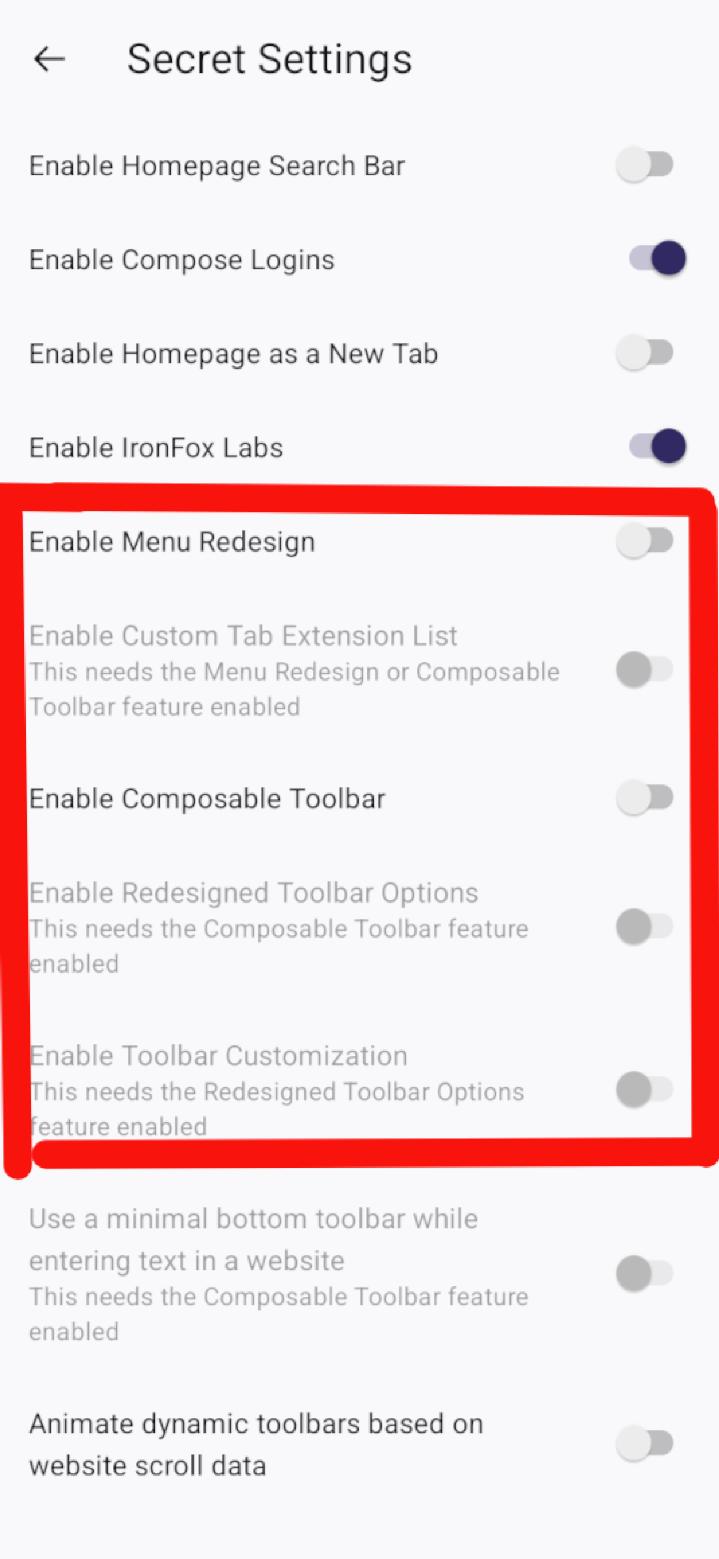
3) Go to: IronFox main menu — Settings — Secret Settings
4) Disable the next items: "Enable Menu Redesign", "Enable Composable Toolbar"Done! You are free from "new UI", which forcefeeded to users of Firefox (and forks) by Mozilla (again)

-
Sadly, the new design^Wabomination from #Mozilla landed to the new release of #IronFox (148.0.1) on the Android
Instead of damn simple and concise main menu, I forced to see a gigantic panel now. Like I don't have fingers — I have a ten sausages instead.
And rounded things, rounded things everywhere! Because this is a redesign in sake of redesign — it is not customizable and I can't switch back to rectangular things in the settings
Luckily, at least for now, I'm still able to revert this shitty designer vomit. Because you know, I'm not so young dragon, so I remember the eons when it was valuable — do not break user habits by constantly changing the UI layout and UI elements (read the fucking Palm Design Guidelines, for example).
The recipe:
1) Go to: IronFox main menu — Settings — About IronFox
2) Tap a lot of times to the big IronFox logo. The text "Debug menu enabled" should appear on the screen for a few seconds
3) Go to: IronFox main menu — Settings — Secret Settings
4) Disable the next items: "Enable Menu Redesign", "Enable Composable Toolbar"Done! You are free from "new UI", which forcefeeded to users of Firefox (and forks) by Mozilla (again)
The result:
-
Sadly, the new design^Wabomination from #Mozilla landed to the new release of #IronFox (148.0.1) on the Android
Instead of damn simple and concise main menu, I forced to see a gigantic panel now. Like I don't have fingers — I have a ten sausages instead.
And rounded things, rounded things everywhere! Because this is a redesign in sake of redesign — it is not customizable and I can't switch back to rectangular things in the settings
Luckily, at least for now, I'm still able to revert this shitty designer vomit. Because you know, I'm not so young dragon, so I remember the eons when it was valuable — do not break user habits by constantly changing the UI layout and UI elements (read the fucking Palm Design Guidelines, for example).
The recipe:
1) Go to: IronFox main menu — Settings — About IronFox
2) Tap a lot of times to the big IronFox logo. The text "Debug menu enabled" should appear on the screen for a few seconds
3) Go to: IronFox main menu — Settings — Secret Settings
4) Disable the next items: "Enable Menu Redesign", "Enable Composable Toolbar"Done! You are free from "new UI", which forcefeeded to users of Firefox (and forks) by Mozilla (again)
@evgandr Thanks for teaching me about the secret settings!
-
@evgandr Thanks for teaching me about the secret settings!
@psf You're welcome!

-
Sadly, the new design^Wabomination from #Mozilla landed to the new release of #IronFox (148.0.1) on the Android
Instead of damn simple and concise main menu, I forced to see a gigantic panel now. Like I don't have fingers — I have a ten sausages instead.
And rounded things, rounded things everywhere! Because this is a redesign in sake of redesign — it is not customizable and I can't switch back to rectangular things in the settings
Luckily, at least for now, I'm still able to revert this shitty designer vomit. Because you know, I'm not so young dragon, so I remember the eons when it was valuable — do not break user habits by constantly changing the UI layout and UI elements (read the fucking Palm Design Guidelines, for example).
The recipe:
1) Go to: IronFox main menu — Settings — About IronFox
2) Tap a lot of times to the big IronFox logo. The text "Debug menu enabled" should appear on the screen for a few seconds
3) Go to: IronFox main menu — Settings — Secret Settings
4) Disable the next items: "Enable Menu Redesign", "Enable Composable Toolbar"Done! You are free from "new UI", which forcefeeded to users of Firefox (and forks) by Mozilla (again)
@evgandr@bsd.cafe
I kinda like the simplicity — I was the one who enabled the damn thing voluntarily before it became the default, but yeah everything being huge makes it meh.
I specifically set font scaling to 125% because I want captions to be readable at arm's length, but not everything else — phone screens are huge these days, who the hell needs big buttons?
-
R relay@relay.an.exchange shared this topic