Skip to content
  • Categories
  • Recent
  • Tags
  • Popular
  • World
  • Users
  • Groups
Skins
  • Light
  • Brite
  • Cerulean
  • Cosmo
  • Flatly
  • Journal
  • Litera
  • Lumen
  • Lux
  • Materia
  • Minty
  • Morph
  • Pulse
  • Sandstone
  • Simplex
  • Sketchy
  • Spacelab
  • United
  • Yeti
  • Zephyr
  • Dark
  • Cyborg
  • Darkly
  • Quartz
  • Slate
  • Solar
  • Superhero
  • Vapor

  • Default (Cyborg)
  • No Skin
Collapse
Brand Logo

CIRCLE WITH A DOT

  1. Home
  2. Uncategorized
  3. I have a bunch of DVDs and I'd like to rip them to a hard drive, connect it to my TV and watch them without using a DVD player.

I have a bunch of DVDs and I'd like to rip them to a hard drive, connect it to my TV and watch them without using a DVD player.

Scheduled Pinned Locked Moved Uncategorized
televisionphysicalmediadvds
8 Posts 5 Posters 0 Views
  • Oldest to Newest
  • Newest to Oldest
  • Most Votes
Reply
  • Reply as topic
Log in to reply
This topic has been deleted. Only users with topic management privileges can see it.
  • desertgoalie@mastodon.socialD This user is from outside of this forum
    desertgoalie@mastodon.socialD This user is from outside of this forum
    desertgoalie@mastodon.social
    wrote last edited by
    #1

    I have a bunch of DVDs and I'd like to rip them to a hard drive, connect it to my TV and watch them without using a DVD player. Any of you have tutorials, suggestions, warnings, etc.? #television #physicalmedia #dvds

    terryhancock@realsocial.lifeT petes_bread_eqn_xls@mastodo.neoliber.alP bradley@techhub.socialB jchaven@social.sdf.orgJ 4 Replies Last reply
    0
    • desertgoalie@mastodon.socialD desertgoalie@mastodon.social

      I have a bunch of DVDs and I'd like to rip them to a hard drive, connect it to my TV and watch them without using a DVD player. Any of you have tutorials, suggestions, warnings, etc.? #television #physicalmedia #dvds

      terryhancock@realsocial.lifeT This user is from outside of this forum
      terryhancock@realsocial.lifeT This user is from outside of this forum
      terryhancock@realsocial.life
      wrote last edited by
      #2

      @desertgoalie
      On Linux, I just use dvdbackup for copying and VLC for playback (although there are other options). Videolan maintains the libraries needed.

      desertgoalie@mastodon.socialD 1 Reply Last reply
      0
      • desertgoalie@mastodon.socialD desertgoalie@mastodon.social

        I have a bunch of DVDs and I'd like to rip them to a hard drive, connect it to my TV and watch them without using a DVD player. Any of you have tutorials, suggestions, warnings, etc.? #television #physicalmedia #dvds

        petes_bread_eqn_xls@mastodo.neoliber.alP This user is from outside of this forum
        petes_bread_eqn_xls@mastodo.neoliber.alP This user is from outside of this forum
        petes_bread_eqn_xls@mastodo.neoliber.al
        wrote last edited by
        #3

        @desertgoalie HandBrake

        desertgoalie@mastodon.socialD 1 Reply Last reply
        0
        • petes_bread_eqn_xls@mastodo.neoliber.alP petes_bread_eqn_xls@mastodo.neoliber.al

          @desertgoalie HandBrake

          desertgoalie@mastodon.socialD This user is from outside of this forum
          desertgoalie@mastodon.socialD This user is from outside of this forum
          desertgoalie@mastodon.social
          wrote last edited by
          #4

          @petes_bread_eqn_xls I'll check it out. Thanks!

          1 Reply Last reply
          0
          • terryhancock@realsocial.lifeT terryhancock@realsocial.life

            @desertgoalie
            On Linux, I just use dvdbackup for copying and VLC for playback (although there are other options). Videolan maintains the libraries needed.

            desertgoalie@mastodon.socialD This user is from outside of this forum
            desertgoalie@mastodon.socialD This user is from outside of this forum
            desertgoalie@mastodon.social
            wrote last edited by
            #5

            @TerryHancock I unfortunately don't have a Linux device at the moment. I keep waiting for my wife to get frustrated with her Windows laptop so I can put a mint distro on it. But she swats me with a rolled-up magazine every time I get too close to it!

            1 Reply Last reply
            0
            • desertgoalie@mastodon.socialD desertgoalie@mastodon.social

              I have a bunch of DVDs and I'd like to rip them to a hard drive, connect it to my TV and watch them without using a DVD player. Any of you have tutorials, suggestions, warnings, etc.? #television #physicalmedia #dvds

              bradley@techhub.socialB This user is from outside of this forum
              bradley@techhub.socialB This user is from outside of this forum
              bradley@techhub.social
              wrote last edited by
              #6

              @desertgoalie MakeMKV can rip DVDs on Windows.

              How to play them on your TV - I am no help with that.

              It is free to use with a beta code that changes every now and then so you have to locate that from the forums and update it when prompted.
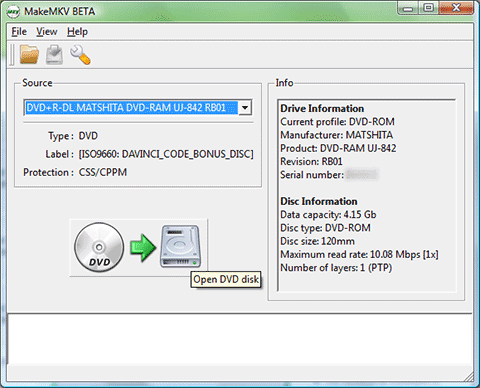
              Link Preview Image
              MakeMKV - Make MKV from Blu-ray and DVD

              MakeMKV - software to convert blu-ray and dvd to mkv

              favicon

              (www.makemkv.com)

              Edit: handbrake can convert the mkv file to a smaller format to save on storage if needed.

              desertgoalie@mastodon.socialD 1 Reply Last reply
              0
              • bradley@techhub.socialB bradley@techhub.social

                @desertgoalie MakeMKV can rip DVDs on Windows.

                How to play them on your TV - I am no help with that.

                It is free to use with a beta code that changes every now and then so you have to locate that from the forums and update it when prompted.

                Link Preview Image
                MakeMKV - Make MKV from Blu-ray and DVD

                MakeMKV - software to convert blu-ray and dvd to mkv

                favicon

                (www.makemkv.com)

                Edit: handbrake can convert the mkv file to a smaller format to save on storage if needed.

                desertgoalie@mastodon.socialD This user is from outside of this forum
                desertgoalie@mastodon.socialD This user is from outside of this forum
                desertgoalie@mastodon.social
                wrote last edited by
                #7

                @bradley Awesome, thanks!

                1 Reply Last reply
                0
                • desertgoalie@mastodon.socialD desertgoalie@mastodon.social

                  I have a bunch of DVDs and I'd like to rip them to a hard drive, connect it to my TV and watch them without using a DVD player. Any of you have tutorials, suggestions, warnings, etc.? #television #physicalmedia #dvds

                  jchaven@social.sdf.orgJ This user is from outside of this forum
                  jchaven@social.sdf.orgJ This user is from outside of this forum
                  jchaven@social.sdf.org
                  wrote last edited by
                  #8

                  @desertgoalie

                  Quick Overview:
                  1. rip movies from disc
                  2. transcode to acceptable size/quality
                  3. store media somewhere
                  4. install Kodi on cheap mini-pc
                  5. connect Kodi box to TV and enjoy

                  I can help.
                  https://tech.duncarin.com/kodi/

                  1 Reply Last reply
                  1
                  0
                  • R relay@relay.infosec.exchange shared this topic

                  Reply
                  • Reply as topic
                  Log in to reply
                  • Oldest to Newest
                  • Newest to Oldest
                  • Most Votes


                  • Login

                  • Login or register to search.
                  • First post
                    Last post
                  0
                  • Categories
                  • Recent
                  • Tags
                  • Popular
                  • World
                  • Users
                  • Groups