Skip to content
  • Categories
  • Recent
  • Tags
  • Popular
  • World
  • Users
  • Groups
Skins
  • Light
  • Brite
  • Cerulean
  • Cosmo
  • Flatly
  • Journal
  • Litera
  • Lumen
  • Lux
  • Materia
  • Minty
  • Morph
  • Pulse
  • Sandstone
  • Simplex
  • Sketchy
  • Spacelab
  • United
  • Yeti
  • Zephyr
  • Dark
  • Cyborg
  • Darkly
  • Quartz
  • Slate
  • Solar
  • Superhero
  • Vapor

  • Default (Cyborg)
  • No Skin
Collapse
Brand Logo

CIRCLE WITH A DOT

  1. Home
  2. Uncategorized
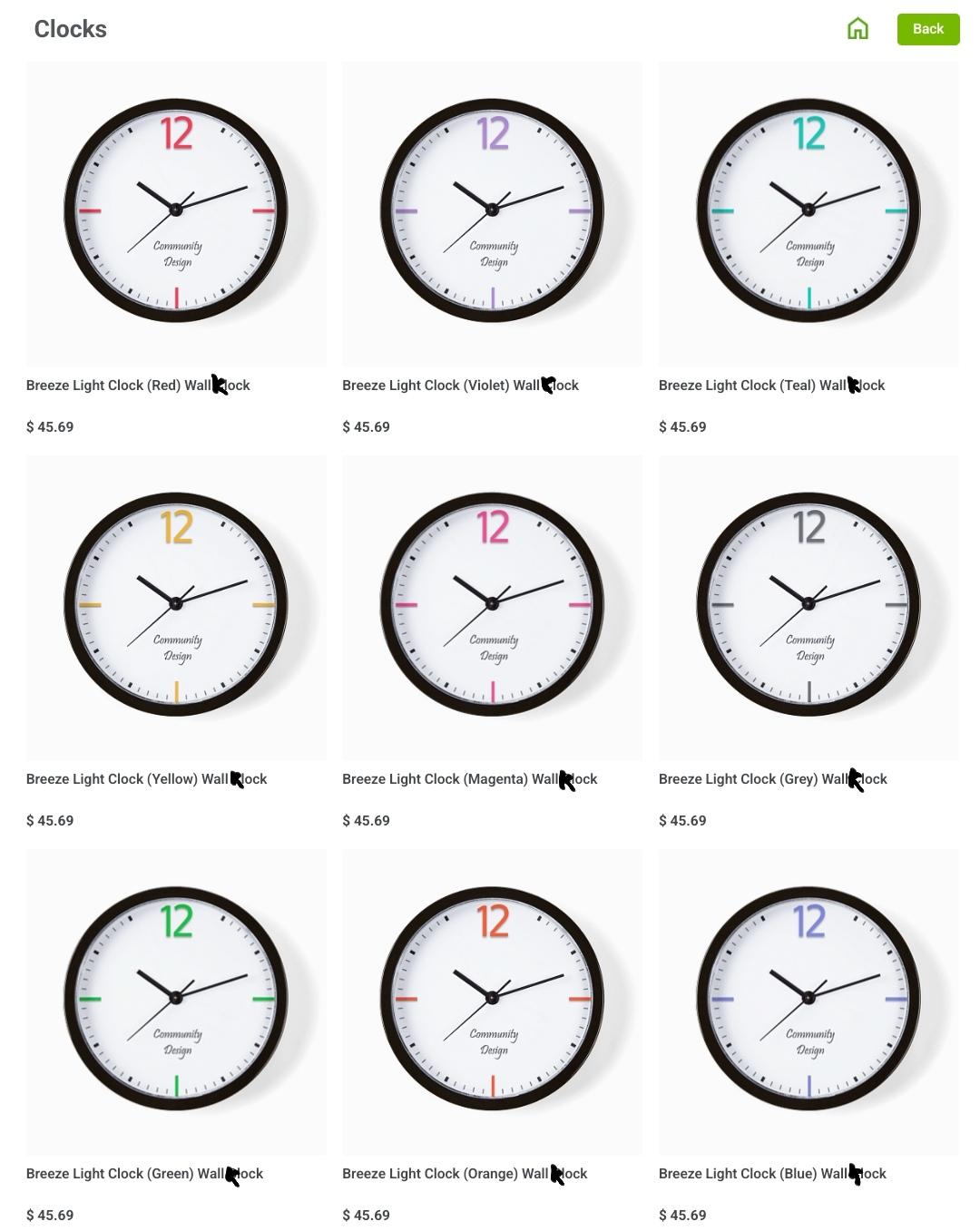
  3. We might not have frozen kizza in the store, but we have a lot of fancy accessories and clocks 😍

We might not have frozen kizza in the store, but we have a lot of fancy accessories and clocks 😍

Scheduled Pinned Locked Moved Uncategorized
20 Posts 13 Posters 0 Views
  • Oldest to Newest
  • Newest to Oldest
  • Most Votes
Reply
  • Reply as topic
Log in to reply
This topic has been deleted. Only users with topic management privileges can see it.
  • bubu@chaos.socialB bubu@chaos.social

    @carl Klocks, surely.

    carl@kde.socialC This user is from outside of this forum
    carl@kde.socialC This user is from outside of this forum
    carl@kde.social
    wrote last edited by
    #9

    @Bubu right, sorry for the typo. I meant klocks 🀣

    Link Preview Image
    1 Reply Last reply
    0
    • carl@kde.socialC carl@kde.social

      Even with the KDE pride logo β€οΈπŸ§‘πŸ’›πŸ’šπŸ©΅πŸ’™πŸ’œ

      nilsding@pounced-on.meN This user is from outside of this forum
      nilsding@pounced-on.meN This user is from outside of this forum
      nilsding@pounced-on.me
      wrote last edited by
      #10

      @carl oh hecc i need one of those πŸ‘€

      1 Reply Last reply
      0
      • carl@kde.socialC carl@kde.social

        Even with the KDE pride logo β€οΈπŸ§‘πŸ’›πŸ’šπŸ©΅πŸ’™πŸ’œ

        eldersea@expressional.socialE This user is from outside of this forum
        eldersea@expressional.socialE This user is from outside of this forum
        eldersea@expressional.social
        wrote last edited by
        #11

        @carl
        Is there no PriDE yet? It feels like there should be.

        1 Reply Last reply
        0
        • carl@kde.socialC carl@kde.social

          RE: https://meow.social/@chirpbirb/116014711339837040

          We might not have frozen kizza in the store, but we have a lot of fancy accessories and clocks 😍

          favicon

          (www.cafepress.com)

          E This user is from outside of this forum
          E This user is from outside of this forum
          erwin_iosef@fosstodon.org
          wrote last edited by
          #12

          @carl how about ike kreams?

          1 Reply Last reply
          0
          • carl@kde.socialC carl@kde.social

            Even with the KDE pride logo β€οΈπŸ§‘πŸ’›πŸ’šπŸ©΅πŸ’™πŸ’œ

            eldersea@expressional.socialE This user is from outside of this forum
            eldersea@expressional.socialE This user is from outside of this forum
            eldersea@expressional.social
            wrote last edited by
            #13

            @carl @kde It'd be pretty dang cool if I could make my application launcher icon (on Fedora) this logo. I didn't find it by searching "pride" or "kde" so I assume it's not there.

            kde@floss.socialK 1 Reply Last reply
            1
            0
            • R relay@relay.infosec.exchange shared this topic
            • eldersea@expressional.socialE eldersea@expressional.social

              @carl @kde It'd be pretty dang cool if I could make my application launcher icon (on Fedora) this logo. I didn't find it by searching "pride" or "kde" so I assume it's not there.

              kde@floss.socialK This user is from outside of this forum
              kde@floss.socialK This user is from outside of this forum
              kde@floss.social
              wrote last edited by
              #14

              @eldersea @carl

              We have attached to this post a high res PNG of the Pride logo. Save it on your hard disk.

              Right click on your menu launcher and choose "Configure Application Launcher".

              Click on the button with the current icon in the dialog that opens. You will be given the option to "Choose..." a new icon.

              In the next dialog, click on the "Browse" button in the bottom left hand corner and navigate to where you saved the PNG and select it.

              Click "Open" and then "Apply".

              Voila!

              guettisknippse@federation.networkG eldersea@expressional.socialE 3 Replies Last reply
              0
              • kde@floss.socialK kde@floss.social

                @eldersea @carl

                We have attached to this post a high res PNG of the Pride logo. Save it on your hard disk.

                Right click on your menu launcher and choose "Configure Application Launcher".

                Click on the button with the current icon in the dialog that opens. You will be given the option to "Choose..." a new icon.

                In the next dialog, click on the "Browse" button in the bottom left hand corner and navigate to where you saved the PNG and select it.

                Click "Open" and then "Apply".

                Voila!

                guettisknippse@federation.networkG This user is from outside of this forum
                guettisknippse@federation.networkG This user is from outside of this forum
                guettisknippse@federation.network
                wrote last edited by
                #15

                @kde@floss.social
                ⬆️ This is one of the thousand reasons, why I love #linux! 😍 ​​

                @eldersea@expressional.social @carl@kde.social

                bro666@social.tchncs.deB 1 Reply Last reply
                0
                • guettisknippse@federation.networkG guettisknippse@federation.network

                  @kde@floss.social
                  ⬆️ This is one of the thousand reasons, why I love #linux! 😍 ​​
                  @eldersea@expressional.social @carl@kde.social

                  bro666@social.tchncs.deB This user is from outside of this forum
                  bro666@social.tchncs.deB This user is from outside of this forum
                  bro666@social.tchncs.de
                  wrote last edited by
                  #16

                  @GuettisKnippse @kde @carl @eldersea

                  Only a thousand? Pfft! 😜

                  guettisknippse@federation.networkG 1 Reply Last reply
                  0
                  • bro666@social.tchncs.deB bro666@social.tchncs.de

                    @GuettisKnippse @kde @carl @eldersea

                    Only a thousand? Pfft! 😜

                    guettisknippse@federation.networkG This user is from outside of this forum
                    guettisknippse@federation.networkG This user is from outside of this forum
                    guettisknippse@federation.network
                    wrote last edited by
                    #17

                    @Bro666@social.tchncs.de
                    Okay... So make it n+1
                    😁
                    @kde@floss.social @carl@kde.social @eldersea@expressional.social

                    1 Reply Last reply
                    0
                    • kde@floss.socialK kde@floss.social

                      @eldersea @carl

                      We have attached to this post a high res PNG of the Pride logo. Save it on your hard disk.

                      Right click on your menu launcher and choose "Configure Application Launcher".

                      Click on the button with the current icon in the dialog that opens. You will be given the option to "Choose..." a new icon.

                      In the next dialog, click on the "Browse" button in the bottom left hand corner and navigate to where you saved the PNG and select it.

                      Click "Open" and then "Apply".

                      Voila!

                      eldersea@expressional.socialE This user is from outside of this forum
                      eldersea@expressional.socialE This user is from outside of this forum
                      eldersea@expressional.social
                      wrote last edited by
                      #18

                      @kde Do you have one with the gear in white? And can this be pushed out in an update so everyone can access it? Thanks and much love to the team!

                      kde@floss.socialK 1 Reply Last reply
                      0
                      • kde@floss.socialK kde@floss.social

                        @eldersea @carl

                        We have attached to this post a high res PNG of the Pride logo. Save it on your hard disk.

                        Right click on your menu launcher and choose "Configure Application Launcher".

                        Click on the button with the current icon in the dialog that opens. You will be given the option to "Choose..." a new icon.

                        In the next dialog, click on the "Browse" button in the bottom left hand corner and navigate to where you saved the PNG and select it.

                        Click "Open" and then "Apply".

                        Voila!

                        eldersea@expressional.socialE This user is from outside of this forum
                        eldersea@expressional.socialE This user is from outside of this forum
                        eldersea@expressional.social
                        wrote last edited by
                        #19

                        @kde @carl

                        Link Preview Image
                        1 Reply Last reply
                        0
                        • eldersea@expressional.socialE eldersea@expressional.social

                          @kde Do you have one with the gear in white? And can this be pushed out in an update so everyone can access it? Thanks and much love to the team!

                          kde@floss.socialK This user is from outside of this forum
                          kde@floss.socialK This user is from outside of this forum
                          kde@floss.social
                          wrote last edited by
                          #20

                          @eldersea

                          Here you go:

                          1 Reply Last reply
                          0
                          Reply
                          • Reply as topic
                          Log in to reply
                          • Oldest to Newest
                          • Newest to Oldest
                          • Most Votes


                          • Login

                          • Login or register to search.
                          • First post
                            Last post
                          0
                          • Categories
                          • Recent
                          • Tags
                          • Popular
                          • World
                          • Users
                          • Groups