Skip to content
  • Categories
  • Recent
  • Tags
  • Popular
  • World
  • Users
  • Groups
Skins
  • Light
  • Brite
  • Cerulean
  • Cosmo
  • Flatly
  • Journal
  • Litera
  • Lumen
  • Lux
  • Materia
  • Minty
  • Morph
  • Pulse
  • Sandstone
  • Simplex
  • Sketchy
  • Spacelab
  • United
  • Yeti
  • Zephyr
  • Dark
  • Cyborg
  • Darkly
  • Quartz
  • Slate
  • Solar
  • Superhero
  • Vapor

  • Default (Cyborg)
  • No Skin
Collapse
Brand Logo

CIRCLE WITH A DOT

  1. Home
  2. Uncategorized
  3. my roommate's new Microsoft Surface Hub is running a wacky version of Windows 10 that popped up a "You need to download something from the store to support this file!" message when I tried to run a win64 exe.

my roommate's new Microsoft Surface Hub is running a wacky version of Windows 10 that popped up a "You need to download something from the store to support this file!" message when I tried to run a win64 exe.

Scheduled Pinned Locked Moved Uncategorized
96 Posts 3 Posters 62 Views
  • Oldest to Newest
  • Newest to Oldest
  • Most Votes
Reply
  • Reply as topic
Log in to reply
This topic has been deleted. Only users with topic management privileges can see it.
  • foone@digipres.clubF foone@digipres.club

    It just showed that it was logging into a user account named "Skype"

    foone@digipres.clubF This user is from outside of this forum
    foone@digipres.clubF This user is from outside of this forum
    foone@digipres.club
    wrote last edited by
    #68

    Yeah I can't get past the setup. It gives me two accounts, Skype and Administrator, and the latter is passworded, and the former doesn't work because I can't login to a Skype account

    foone@digipres.clubF 1 Reply Last reply
    0
    • foone@digipres.clubF foone@digipres.club

      Yeah I can't get past the setup. It gives me two accounts, Skype and Administrator, and the latter is passworded, and the former doesn't work because I can't login to a Skype account

      foone@digipres.clubF This user is from outside of this forum
      foone@digipres.clubF This user is from outside of this forum
      foone@digipres.club
      wrote last edited by
      #69

      This machine is a fractal paperweight

      foone@digipres.clubF 1 Reply Last reply
      1
      0
      • foone@digipres.clubF foone@digipres.club

        This machine is a fractal paperweight

        foone@digipres.clubF This user is from outside of this forum
        foone@digipres.clubF This user is from outside of this forum
        foone@digipres.club
        wrote last edited by
        #70

        There are two recovery images I have that work. One of them boots to an environment that can't use the store and can't run software until it gets to the store.
        The other can't log in because Skype is gone

        foone@digipres.clubF 1 Reply Last reply
        0
        • R relay@relay.infosec.exchange shared this topic
        • foone@digipres.clubF foone@digipres.club

          There are two recovery images I have that work. One of them boots to an environment that can't use the store and can't run software until it gets to the store.
          The other can't log in because Skype is gone

          foone@digipres.clubF This user is from outside of this forum
          foone@digipres.clubF This user is from outside of this forum
          foone@digipres.club
          wrote last edited by
          #71

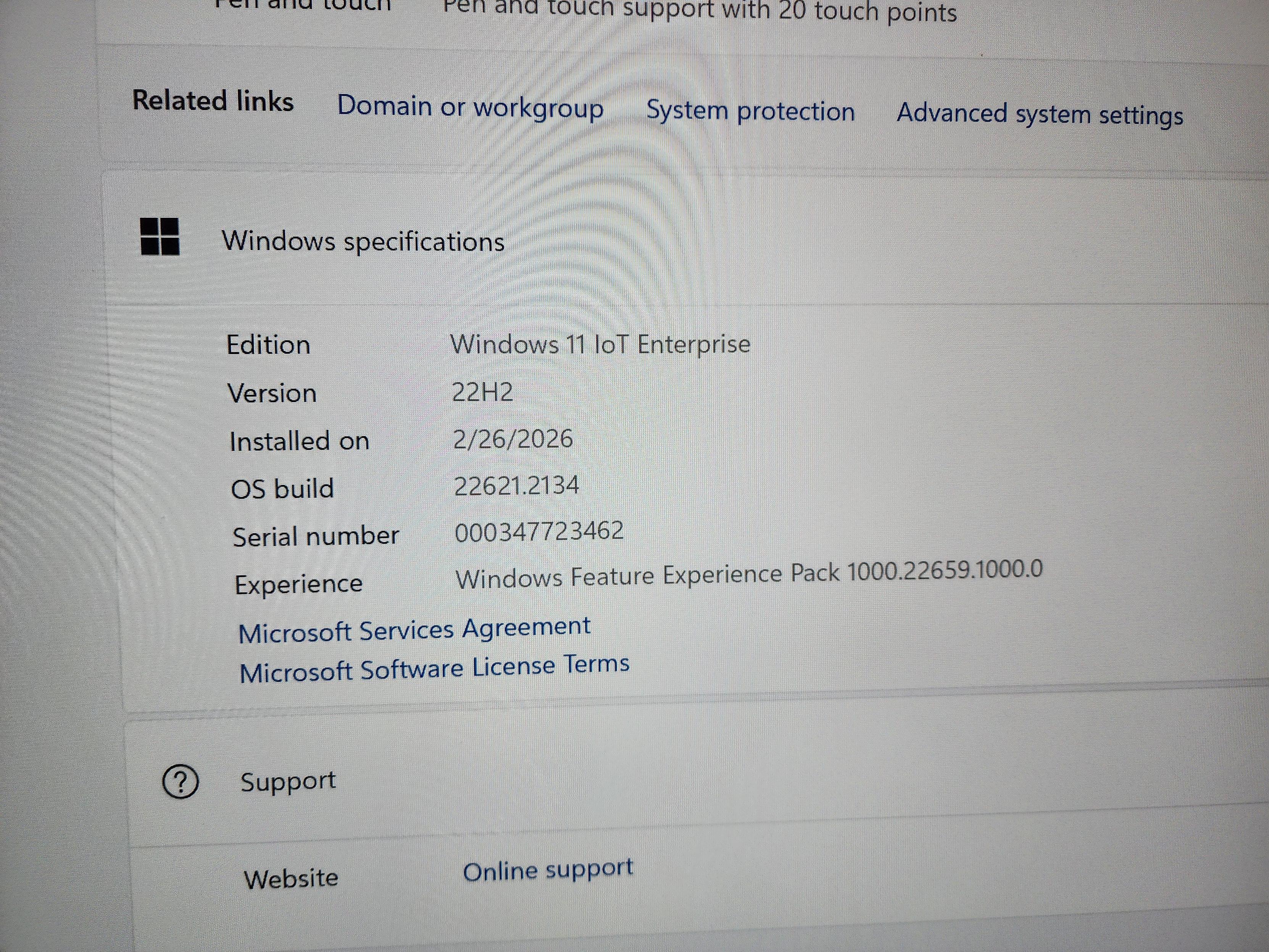
          IT LIVES! AND WE HAVE UNKIOSKED WINDOWS 11 IoT!
          Link Preview Image
          foone@digipres.clubF 1 Reply Last reply
          0
          • foone@digipres.clubF foone@digipres.club

            IT LIVES! AND WE HAVE UNKIOSKED WINDOWS 11 IoT!

            Link Preview Image
            foone@digipres.clubF This user is from outside of this forum
            foone@digipres.clubF This user is from outside of this forum
            foone@digipres.club
            wrote last edited by
            #72

            The trick was installing MTR (Microsoft Teams for Rooms) and then logging into the passworded Administrator account ("sfb": "Skype For Business") and deleting the Skype account. Now it boots to 11 IoT and I can run updates

            foone@digipres.clubF 1 Reply Last reply
            0
            • foone@digipres.clubF foone@digipres.club

              The trick was installing MTR (Microsoft Teams for Rooms) and then logging into the passworded Administrator account ("sfb": "Skype For Business") and deleting the Skype account. Now it boots to 11 IoT and I can run updates

              foone@digipres.clubF This user is from outside of this forum
              foone@digipres.clubF This user is from outside of this forum
              foone@digipres.club
              wrote last edited by
              #73

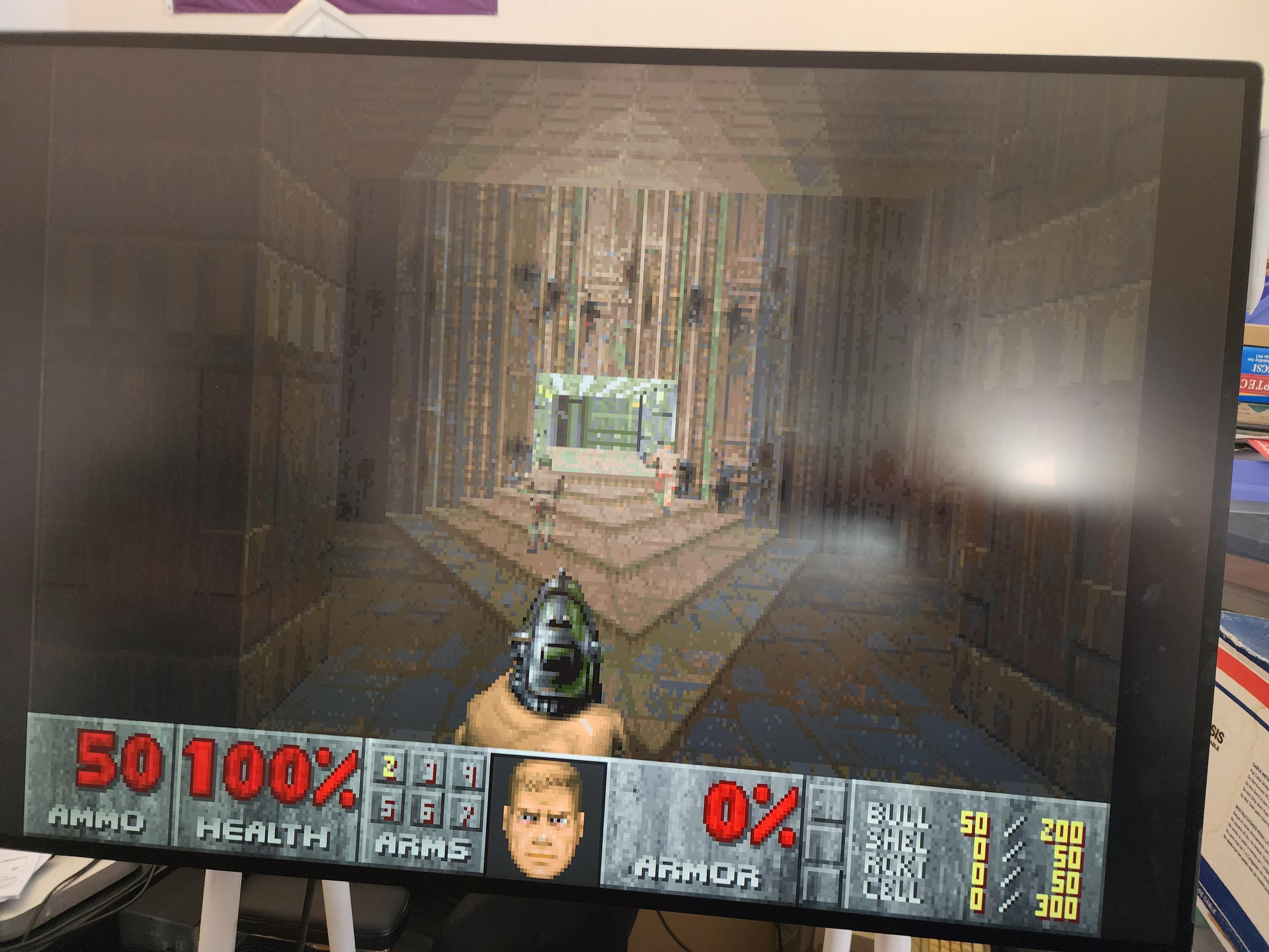
              And the machine can finally, FINALLY after 4 days become useful and a real computer:
              Link Preview Image
              foone@digipres.clubF 1 Reply Last reply
              0
              • foone@digipres.clubF foone@digipres.club

                And the machine can finally, FINALLY after 4 days become useful and a real computer:

                Link Preview Image
                foone@digipres.clubF This user is from outside of this forum
                foone@digipres.clubF This user is from outside of this forum
                foone@digipres.club
                wrote last edited by
                #74

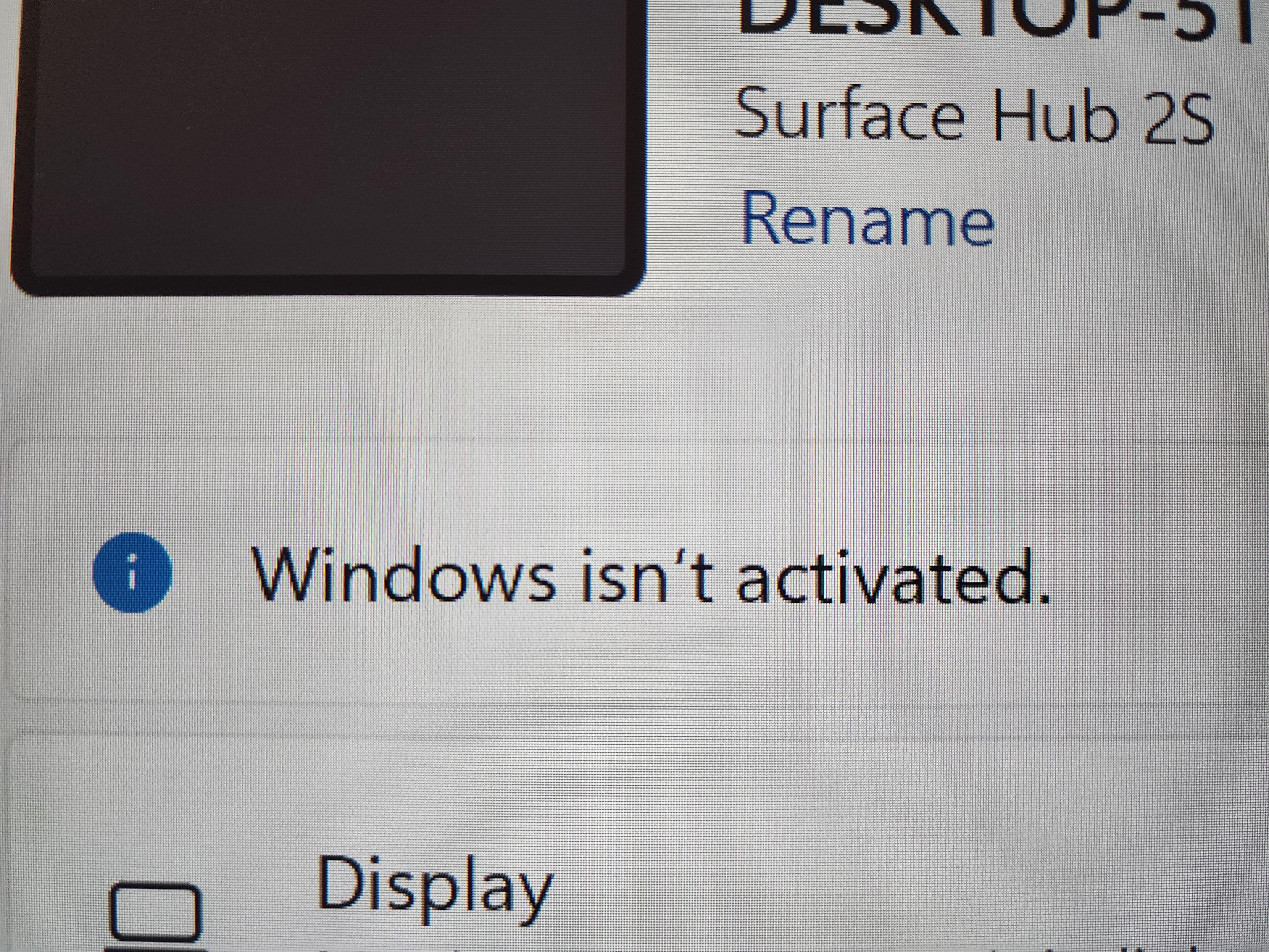
                Windows if you fuck me here after all I've been through, I swear to god...
                Link Preview Image
                foone@digipres.clubF 1 Reply Last reply
                0
                • foone@digipres.clubF foone@digipres.club

                  Windows if you fuck me here after all I've been through, I swear to god...

                  Link Preview Image
                  foone@digipres.clubF This user is from outside of this forum
                  foone@digipres.clubF This user is from outside of this forum
                  foone@digipres.club
                  wrote last edited by
                  #75

                  okay so if you are unfortunate enough to get a Surface Hub 2S and want to make it run Useful Windows (linux would be nice but I haven't figured out how to boot it) instead of Broken Windows, you need to:
                  1. Get the Surface IT Tools
                  2. Go through the whole SEMM mode enrollment with the private key and such
                  3. Try to create a Surface 2S MTR 22H2 recovery disk. The download will fail
                  3a. MITM Surface IT Tools to get the URL of the 22gb file you need.

                  foone@digipres.clubF 1 Reply Last reply
                  0
                  • foone@digipres.clubF foone@digipres.club

                    okay so if you are unfortunate enough to get a Surface Hub 2S and want to make it run Useful Windows (linux would be nice but I haven't figured out how to boot it) instead of Broken Windows, you need to:
                    1. Get the Surface IT Tools
                    2. Go through the whole SEMM mode enrollment with the private key and such
                    3. Try to create a Surface 2S MTR 22H2 recovery disk. The download will fail
                    3a. MITM Surface IT Tools to get the URL of the 22gb file you need.

                    foone@digipres.clubF This user is from outside of this forum
                    foone@digipres.clubF This user is from outside of this forum
                    foone@digipres.club
                    wrote last edited by
                    #76

                    3b. write an addon for mitmproxy to redirect Surface IT Tools to a local server you control
                    4. actually make the recovery disk
                    5. Recover the Surface Hub 2.
                    6. It boots into Skype setup
                    7. Exit and log into administrator, password is "sfb"
                    8. Delete the Skype account and uninstall Microsoft Teams Rooms
                    9. Run Win11 updates

                    foone@digipres.clubF 1 Reply Last reply
                    0
                    • foone@digipres.clubF foone@digipres.club

                      3b. write an addon for mitmproxy to redirect Surface IT Tools to a local server you control
                      4. actually make the recovery disk
                      5. Recover the Surface Hub 2.
                      6. It boots into Skype setup
                      7. Exit and log into administrator, password is "sfb"
                      8. Delete the Skype account and uninstall Microsoft Teams Rooms
                      9. Run Win11 updates

                      foone@digipres.clubF This user is from outside of this forum
                      foone@digipres.clubF This user is from outside of this forum
                      foone@digipres.club
                      wrote last edited by
                      #77

                      I think the fundamental problem with this device is that they ship it in a super-locked-down mode that can't do anything unless you install more software from the Microsoft Store... and as of last December it can't talk to the Microsoft Store anymore.

                      foone@digipres.clubF 1 Reply Last reply
                      0
                      • foone@digipres.clubF foone@digipres.club

                        I think the fundamental problem with this device is that they ship it in a super-locked-down mode that can't do anything unless you install more software from the Microsoft Store... and as of last December it can't talk to the Microsoft Store anymore.

                        foone@digipres.clubF This user is from outside of this forum
                        foone@digipres.clubF This user is from outside of this forum
                        foone@digipres.club
                        wrote last edited by
                        #78

                        so the easy migration tool they had available can't be installed and even if you could install it, it wouldn't work

                        foone@digipres.clubF 1 Reply Last reply
                        0
                        • foone@digipres.clubF foone@digipres.club

                          so the easy migration tool they had available can't be installed and even if you could install it, it wouldn't work

                          foone@digipres.clubF This user is from outside of this forum
                          foone@digipres.clubF This user is from outside of this forum
                          foone@digipres.club
                          wrote last edited by
                          #79

                          So instead you've got these instructions, which do not work:

                          Link Preview Image
                          Migrate Surface Hub 2S to Windows 11 via USB - Surface Hub

                          This guide provides IT admins with detailed instructions on how to software-migrate a Surface Hub 2S to the Microsoft Teams Rooms on Windows (MTR-W) experience or Windows 11 using a USB drive.

                          favicon

                          (learn.microsoft.com)

                          foone@digipres.clubF 1 Reply Last reply
                          0
                          • foone@digipres.clubF foone@digipres.club

                            So instead you've got these instructions, which do not work:

                            Link Preview Image
                            Migrate Surface Hub 2S to Windows 11 via USB - Surface Hub

                            This guide provides IT admins with detailed instructions on how to software-migrate a Surface Hub 2S to the Microsoft Teams Rooms on Windows (MTR-W) experience or Windows 11 using a USB drive.

                            favicon

                            (learn.microsoft.com)

                            foone@digipres.clubF This user is from outside of this forum
                            foone@digipres.clubF This user is from outside of this forum
                            foone@digipres.club
                            wrote last edited by
                            #80

                            because the way it suggests to make a recovery image doesn't create a recovery image this locked-down fucker will boot.

                            Only the Surface IT Tools recovery images will boot, and Surface IT Tools can't download files worth shit, so good fucking luck getting that 22gb image

                            foone@digipres.clubF 1 Reply Last reply
                            0
                            • foone@digipres.clubF foone@digipres.club

                              because the way it suggests to make a recovery image doesn't create a recovery image this locked-down fucker will boot.

                              Only the Surface IT Tools recovery images will boot, and Surface IT Tools can't download files worth shit, so good fucking luck getting that 22gb image

                              foone@digipres.clubF This user is from outside of this forum
                              foone@digipres.clubF This user is from outside of this forum
                              foone@digipres.club
                              wrote last edited by
                              #81

                              also the Surface IT Tool verifies _something_ (I wasn't able to confirm what) with the microsoft servers before it'll write you an image, even if you have the image already downloaded.

                              So I highly suspect this method will break in the future

                              foone@digipres.clubF 1 Reply Last reply
                              0
                              • foone@digipres.clubF foone@digipres.club

                                also the Surface IT Tool verifies _something_ (I wasn't able to confirm what) with the microsoft servers before it'll write you an image, even if you have the image already downloaded.

                                So I highly suspect this method will break in the future

                                foone@digipres.clubF This user is from outside of this forum
                                foone@digipres.clubF This user is from outside of this forum
                                foone@digipres.club
                                wrote last edited by
                                #82

                                I should just make an image of the final recovery drive it creates, and stick that on the internet archive. DD it to your own 32gb drive and bypass all the nonsense

                                foone@digipres.clubF 1 Reply Last reply
                                0
                                • foone@digipres.clubF foone@digipres.club

                                  I should just make an image of the final recovery drive it creates, and stick that on the internet archive. DD it to your own 32gb drive and bypass all the nonsense

                                  foone@digipres.clubF This user is from outside of this forum
                                  foone@digipres.clubF This user is from outside of this forum
                                  foone@digipres.club
                                  wrote last edited by
                                  #83

                                  BTW this is one of my favorite kinds of projects.
                                  You pick a shiny computer out of the garbage saying "why would anyone throw away this expensive fancy new computer?" and then slowly over the course of multiple days you Learn Why

                                  foone@digipres.clubF 1 Reply Last reply
                                  1
                                  0
                                  • foone@digipres.clubF foone@digipres.club

                                    BTW this is one of my favorite kinds of projects.
                                    You pick a shiny computer out of the garbage saying "why would anyone throw away this expensive fancy new computer?" and then slowly over the course of multiple days you Learn Why

                                    foone@digipres.clubF This user is from outside of this forum
                                    foone@digipres.clubF This user is from outside of this forum
                                    foone@digipres.club
                                    wrote last edited by
                                    #84

                                    I don't think I ever really explained why this is such a pain: The boot is locked down, and it's a real idiot-light kind of system. By default the UEFI does not allow changing the OS. It boots off the internal HD or not at all (although I think if you have an external drive the right signatures that's running the same OS, it doesn't consider it a problem and will boot it? No way to check that)

                                    foone@digipres.clubF 1 Reply Last reply
                                    0
                                    • foone@digipres.clubF foone@digipres.club

                                      I don't think I ever really explained why this is such a pain: The boot is locked down, and it's a real idiot-light kind of system. By default the UEFI does not allow changing the OS. It boots off the internal HD or not at all (although I think if you have an external drive the right signatures that's running the same OS, it doesn't consider it a problem and will boot it? No way to check that)

                                      foone@digipres.clubF This user is from outside of this forum
                                      foone@digipres.clubF This user is from outside of this forum
                                      foone@digipres.club
                                      wrote last edited by
                                      #85

                                      You can use the Surface IT Tool (on a different machine) to make a special USB key that will reconfigure the system, based on a private key you generate, and this enables "AllowOSMigration" in the EUFI config. Basically all other UEFI options are locked down even in the special SEMM mode tool.

                                      foone@digipres.clubF 1 Reply Last reply
                                      0
                                      • foone@digipres.clubF foone@digipres.club

                                        You can use the Surface IT Tool (on a different machine) to make a special USB key that will reconfigure the system, based on a private key you generate, and this enables "AllowOSMigration" in the EUFI config. Basically all other UEFI options are locked down even in the special SEMM mode tool.

                                        foone@digipres.clubF This user is from outside of this forum
                                        foone@digipres.clubF This user is from outside of this forum
                                        foone@digipres.club
                                        wrote last edited by
                                        #86

                                        And once you've got SEMM mode (I don't remember what it stands for, I'm too tired to look it up, and I'm pretty sure the last M is "mode" anyway so this is a case of RAS Syndrome) it supposedly will boot from USB devices

                                        foone@digipres.clubF 1 Reply Last reply
                                        0
                                        • foone@digipres.clubF foone@digipres.club

                                          And once you've got SEMM mode (I don't remember what it stands for, I'm too tired to look it up, and I'm pretty sure the last M is "mode" anyway so this is a case of RAS Syndrome) it supposedly will boot from USB devices

                                          foone@digipres.clubF This user is from outside of this forum
                                          foone@digipres.clubF This user is from outside of this forum
                                          foone@digipres.club
                                          wrote last edited by
                                          #87

                                          however I was only able to find two images that it would boot from, despite what the doc pages say.
                                          Those two recovery images are the Win10 Teams Edition image and the Win 11 IoT Microsoft Teams For Rooms "Skype for Business" abomination.

                                          foone@digipres.clubF 1 Reply Last reply
                                          0
                                          Reply
                                          • Reply as topic
                                          Log in to reply
                                          • Oldest to Newest
                                          • Newest to Oldest
                                          • Most Votes


                                          • Login

                                          • Login or register to search.
                                          • First post
                                            Last post
                                          0
                                          • Categories
                                          • Recent
                                          • Tags
                                          • Popular
                                          • World
                                          • Users
                                          • Groups