Skip to content
  • Categories
  • Recent
  • Tags
  • Popular
  • World
  • Users
  • Groups
Skins
  • Light
  • Brite
  • Cerulean
  • Cosmo
  • Flatly
  • Journal
  • Litera
  • Lumen
  • Lux
  • Materia
  • Minty
  • Morph
  • Pulse
  • Sandstone
  • Simplex
  • Sketchy
  • Spacelab
  • United
  • Yeti
  • Zephyr
  • Dark
  • Cyborg
  • Darkly
  • Quartz
  • Slate
  • Solar
  • Superhero
  • Vapor

  • Default (Cyborg)
  • No Skin
Collapse
Brand Logo

CIRCLE WITH A DOT

  1. Home
  2. Uncategorized
  3. Little Snitch for Linux https://obdev.at/products/littlesnitch-linux/index.html Every time an application on your computer opens a network connection, it does so quietly, without asking.

Little Snitch for Linux https://obdev.at/products/littlesnitch-linux/index.html Every time an application on your computer opens a network connection, it does so quietly, without asking.

Scheduled Pinned Locked Moved Uncategorized
26 Posts 19 Posters 15 Views
  • Oldest to Newest
  • Newest to Oldest
  • Most Votes
Reply
  • Reply as topic
Log in to reply
This topic has been deleted. Only users with topic management privileges can see it.
  • x@niwego.comX x@niwego.com
    I bought a license for a MacBook many years ago, but I no longer use it. Now I only use Ubuntu. I wonder if the license is compatible with Little Snitch for Linux.
    squaloujenkins@fosstodon.orgS This user is from outside of this forum
    squaloujenkins@fosstodon.orgS This user is from outside of this forum
    squaloujenkins@fosstodon.org
    wrote last edited by
    #14

    @x or you can use little snitch to forbid access to its own license-check server. Used to work on macos 🙂

    dmtomas@mastodon.socialD 1 Reply Last reply
    0
    • nixcraft@mastodon.socialN nixcraft@mastodon.social

      Little Snitch for Linux https://obdev.at/products/littlesnitch-linux/index.html Every time an application on your computer opens a network connection, it does so quietly, without asking. Little Snitch for Linux makes that activity visible and gives you the option to do something about it. You can see exactly which applications are talking to which servers, block the ones you didn't invite, and keep an eye on traffic history and data volumes over time https://github.com/obdev/littlesnitch-linux

      Link Preview Image
      ten15bit@mastodon.socialT This user is from outside of this forum
      ten15bit@mastodon.socialT This user is from outside of this forum
      ten15bit@mastodon.social
      wrote last edited by
      #15

      @nixCraft Instead of adding a small comment that most people probably won't see, the original post should include a big warning that this app is not open-source and so there is no way of knowing what it will do on your system.

      albirew@soshar.dess.gaA 1 Reply Last reply
      0
      • nixcraft@mastodon.socialN nixcraft@mastodon.social

        Little Snitch for Linux https://obdev.at/products/littlesnitch-linux/index.html Every time an application on your computer opens a network connection, it does so quietly, without asking. Little Snitch for Linux makes that activity visible and gives you the option to do something about it. You can see exactly which applications are talking to which servers, block the ones you didn't invite, and keep an eye on traffic history and data volumes over time https://github.com/obdev/littlesnitch-linux

        Link Preview Image
        esp32@mastodon.socialE This user is from outside of this forum
        esp32@mastodon.socialE This user is from outside of this forum
        esp32@mastodon.social
        wrote last edited by
        #16

        @nixCraft it killed my openSuse 😞

        1 Reply Last reply
        0
        • nixcraft@mastodon.socialN nixcraft@mastodon.social

          Little Snitch for Linux https://obdev.at/products/littlesnitch-linux/index.html Every time an application on your computer opens a network connection, it does so quietly, without asking. Little Snitch for Linux makes that activity visible and gives you the option to do something about it. You can see exactly which applications are talking to which servers, block the ones you didn't invite, and keep an eye on traffic history and data volumes over time https://github.com/obdev/littlesnitch-linux

          Link Preview Image
          jerrej@mastodon.socialJ This user is from outside of this forum
          jerrej@mastodon.socialJ This user is from outside of this forum
          jerrej@mastodon.social
          wrote last edited by
          #17

          @nixCraft

          And you can get started right there and immediately block #claude and #anthropic !

          *plonk*

          1 Reply Last reply
          0
          • ten15bit@mastodon.socialT ten15bit@mastodon.social

            @nixCraft Instead of adding a small comment that most people probably won't see, the original post should include a big warning that this app is not open-source and so there is no way of knowing what it will do on your system.

            albirew@soshar.dess.gaA This user is from outside of this forum
            albirew@soshar.dess.gaA This user is from outside of this forum
            albirew@soshar.dess.ga
            wrote last edited by
            #18
            @ten15bit@mastodon.social
            @nixCraft@mastodon.social
            OpenSnitch is open source iirc...
            ten15bit@mastodon.socialT 1 Reply Last reply
            0
            • albirew@soshar.dess.gaA albirew@soshar.dess.ga
              @ten15bit@mastodon.social
              @nixCraft@mastodon.social
              OpenSnitch is open source iirc...
              ten15bit@mastodon.socialT This user is from outside of this forum
              ten15bit@mastodon.socialT This user is from outside of this forum
              ten15bit@mastodon.social
              wrote last edited by
              #19

              @Albirew Yes, I was referring to the original post, which was about Little Snitch.

              1 Reply Last reply
              0
              • nixcraft@mastodon.socialN nixcraft@mastodon.social

                Little Snitch for Linux https://obdev.at/products/littlesnitch-linux/index.html Every time an application on your computer opens a network connection, it does so quietly, without asking. Little Snitch for Linux makes that activity visible and gives you the option to do something about it. You can see exactly which applications are talking to which servers, block the ones you didn't invite, and keep an eye on traffic history and data volumes over time https://github.com/obdev/littlesnitch-linux

                Link Preview Image
                daailouwou@mas.toD This user is from outside of this forum
                daailouwou@mas.toD This user is from outside of this forum
                daailouwou@mas.to
                wrote last edited by
                #20

                @nixCraft OpenSnitch FTW

                1 Reply Last reply
                0
                • p3ter@mastodon.socialP p3ter@mastodon.social

                  @nixCraft Finally!

                  I miss that see-which-app-opens-which-connection-when and filter it on Linux.
                  (I remember having a program on Windows 2000 which did exactly that: a personal firewall with a GUI).

                  user47@vmst.ioU This user is from outside of this forum
                  user47@vmst.ioU This user is from outside of this forum
                  user47@vmst.io
                  wrote last edited by
                  #21

                  @p3ter @nixCraft I bet that app was Zone Alarm? IFLd that and honestly that era might have been peak Windows

                  randomdaz@infosec.exchangeR 1 Reply Last reply
                  0
                  • nixcraft@mastodon.socialN nixcraft@mastodon.social

                    Little Snitch for Linux https://obdev.at/products/littlesnitch-linux/index.html Every time an application on your computer opens a network connection, it does so quietly, without asking. Little Snitch for Linux makes that activity visible and gives you the option to do something about it. You can see exactly which applications are talking to which servers, block the ones you didn't invite, and keep an eye on traffic history and data volumes over time https://github.com/obdev/littlesnitch-linux

                    Link Preview Image
                    nazokiyoubinbou@urusai.socialN This user is from outside of this forum
                    nazokiyoubinbou@urusai.socialN This user is from outside of this forum
                    nazokiyoubinbou@urusai.social
                    wrote last edited by
                    #22

                    @nixCraft And OpenSnitch makes things actually have to get permission to do it. (You can set it to always allow/reject/drop or to do so for an interval.)

                    I've found a surprising number of things making connections they really shouldn't be. One that scares me is many thumbnail engines will open URLs inside things... (They're not browsers. They're not up on the latest security issues/etc, they don't have ad blockers or privacy guards, etc etc. They should not be allowed to go online ever!)

                    Kind of bugs me how many things just don't even try to hide telemetries that the user doesn't get to opt out of. Many game engines are bad about this for example. They just phone home and there is no setting in the game to turn it off.

                    1 Reply Last reply
                    0
                    • squaloujenkins@fosstodon.orgS squaloujenkins@fosstodon.org

                      @x or you can use little snitch to forbid access to its own license-check server. Used to work on macos 🙂

                      dmtomas@mastodon.socialD This user is from outside of this forum
                      dmtomas@mastodon.socialD This user is from outside of this forum
                      dmtomas@mastodon.social
                      wrote last edited by
                      #23

                      @squalouJenkins @x trying that now;) it’s in demo mode though at the moment, think that’s how they fixed it now, but will see;)

                      1 Reply Last reply
                      0
                      • user47@vmst.ioU user47@vmst.io

                        @p3ter @nixCraft I bet that app was Zone Alarm? IFLd that and honestly that era might have been peak Windows

                        randomdaz@infosec.exchangeR This user is from outside of this forum
                        randomdaz@infosec.exchangeR This user is from outside of this forum
                        randomdaz@infosec.exchange
                        wrote last edited by
                        #24

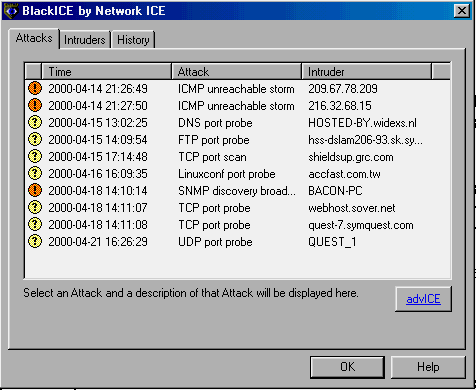
                        @User47 @p3ter @nixCraft Blackice Defender was a good option back then

                        user47@vmst.ioU 1 Reply Last reply
                        1
                        0
                        • randomdaz@infosec.exchangeR randomdaz@infosec.exchange

                          @User47 @p3ter @nixCraft Blackice Defender was a good option back then

                          user47@vmst.ioU This user is from outside of this forum
                          user47@vmst.ioU This user is from outside of this forum
                          user47@vmst.io
                          wrote last edited by
                          #25

                          @randomdaz @p3ter @nixCraft is that the thing that you could install stuff and do whatever you wanted and upon restart it was back to pristine install? I remember folks losing their minds when AOL instant messenger disappeared on high school computer lab PC restarts. Also, remember computer labs? Ha!


                          randomdaz@infosec.exchangeR 1 Reply Last reply
                          0
                          • user47@vmst.ioU user47@vmst.io

                            @randomdaz @p3ter @nixCraft is that the thing that you could install stuff and do whatever you wanted and upon restart it was back to pristine install? I remember folks losing their minds when AOL instant messenger disappeared on high school computer lab PC restarts. Also, remember computer labs? Ha!

                            randomdaz@infosec.exchangeR This user is from outside of this forum
                            randomdaz@infosec.exchangeR This user is from outside of this forum
                            randomdaz@infosec.exchange
                            wrote last edited by
                            #26

                            @User47 @p3ter @nixCraft

                            Actually it looks like my memory is failing. It was an inbound firewall that allowed you to easily block based on events

                            Link Preview Image
                            1 Reply Last reply
                            1
                            0
                            Reply
                            • Reply as topic
                            Log in to reply
                            • Oldest to Newest
                            • Newest to Oldest
                            • Most Votes


                            • Login

                            • Login or register to search.
                            • First post
                              Last post
                            0
                            • Categories
                            • Recent
                            • Tags
                            • Popular
                            • World
                            • Users
                            • Groups