Skip to content
  • Categories
  • Recent
  • Tags
  • Popular
  • World
  • Users
  • Groups
Skins
  • Light
  • Brite
  • Cerulean
  • Cosmo
  • Flatly
  • Journal
  • Litera
  • Lumen
  • Lux
  • Materia
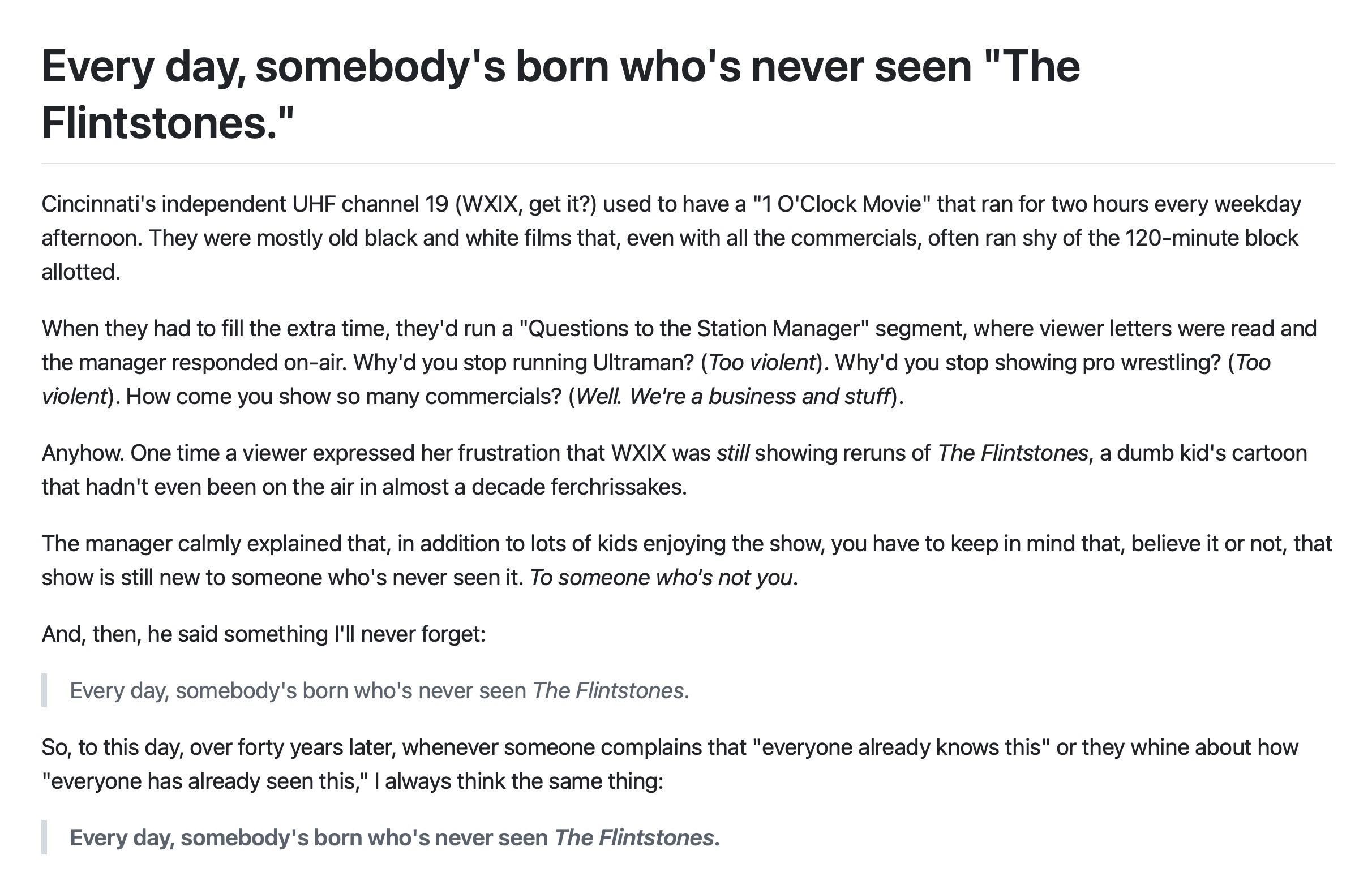
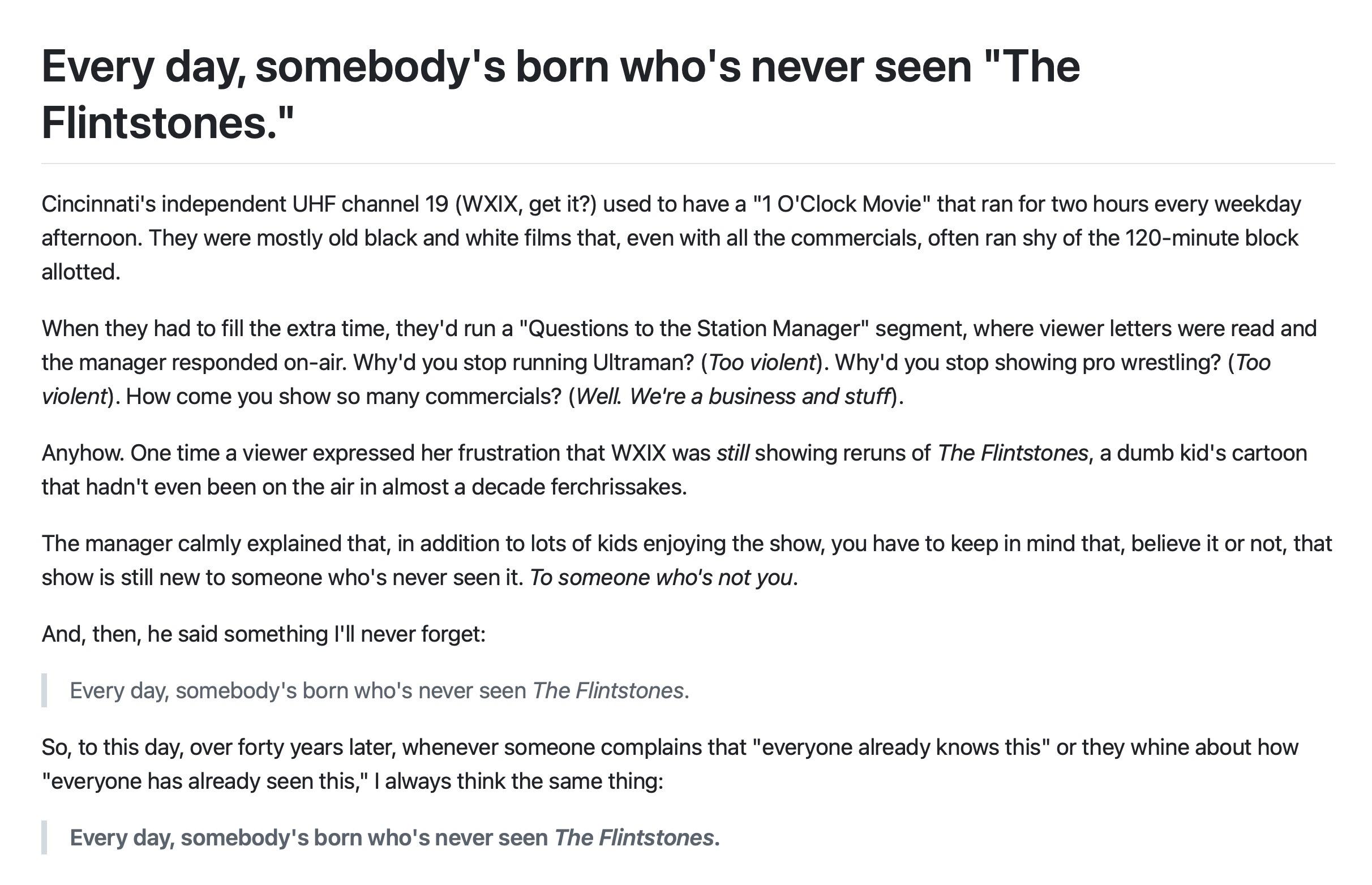
  • Minty
  • Morph
  • Pulse
  • Sandstone
  • Simplex
  • Sketchy
  • Spacelab
  • United
  • Yeti
  • Zephyr
  • Dark
  • Cyborg
  • Darkly
  • Quartz
  • Slate
  • Solar
  • Superhero
  • Vapor

  • Default (Cyborg)
  • No Skin
Collapse
Brand Logo

CIRCLE WITH A DOT

  1. Home
  2. Uncategorized
  3. In most Mac apps, `CTRL-T` swaps the characters on either side of the cursor location.

In most Mac apps, `CTRL-T` swaps the characters on either side of the cursor location.

Scheduled Pinned Locked Moved Uncategorized
doingbettertoge
27 Posts 20 Posters 65 Views
  • Oldest to Newest
  • Newest to Oldest
  • Most Votes
Reply
  • Reply as topic
Log in to reply
This topic has been deleted. Only users with topic management privileges can see it.
  • hotdogsladies@mastodon.socialH This user is from outside of this forum
    hotdogsladies@mastodon.socialH This user is from outside of this forum
    hotdogsladies@mastodon.social
    wrote last edited by
    #1

    In most Mac apps, `CTRL-T` swaps the characters on either side of the cursor location.

    I learned this on TextMate approximately one hundred years ago, and it's still so satisfyingly useful every time I remember it.

    #DoingBetterTogether

    Link Preview Image
    Mac keyboard shortcuts - Apple Support

    By pressing certain key combinations, you can do things that normally need a mouse, trackpad, or other input device.

    favicon

    Apple Support (support.apple.com)

    dgriffinjones@tech.lgbtD beep@follow.ethanmarcotte.comB starfia@mastodon.socialS erikvorhes@typo.socialE rpsu@mas.toR 14 Replies Last reply
    0
    • hotdogsladies@mastodon.socialH hotdogsladies@mastodon.social

      In most Mac apps, `CTRL-T` swaps the characters on either side of the cursor location.

      I learned this on TextMate approximately one hundred years ago, and it's still so satisfyingly useful every time I remember it.

      #DoingBetterTogether

      Link Preview Image
      Mac keyboard shortcuts - Apple Support

      By pressing certain key combinations, you can do things that normally need a mouse, trackpad, or other input device.

      favicon

      Apple Support (support.apple.com)

      dgriffinjones@tech.lgbtD This user is from outside of this forum
      dgriffinjones@tech.lgbtD This user is from outside of this forum
      dgriffinjones@tech.lgbt
      wrote last edited by
      #2

      @hotdogsladies WHA?T

      1 Reply Last reply
      0
      • hotdogsladies@mastodon.socialH hotdogsladies@mastodon.social

        In most Mac apps, `CTRL-T` swaps the characters on either side of the cursor location.

        I learned this on TextMate approximately one hundred years ago, and it's still so satisfyingly useful every time I remember it.

        #DoingBetterTogether

        Link Preview Image
        Mac keyboard shortcuts - Apple Support

        By pressing certain key combinations, you can do things that normally need a mouse, trackpad, or other input device.

        favicon

        Apple Support (support.apple.com)

        beep@follow.ethanmarcotte.comB This user is from outside of this forum
        beep@follow.ethanmarcotte.comB This user is from outside of this forum
        beep@follow.ethanmarcotte.com
        wrote last edited by
        #3

        @hotdogsladies —WHAT

        1 Reply Last reply
        0
        • hotdogsladies@mastodon.socialH hotdogsladies@mastodon.social

          In most Mac apps, `CTRL-T` swaps the characters on either side of the cursor location.

          I learned this on TextMate approximately one hundred years ago, and it's still so satisfyingly useful every time I remember it.

          #DoingBetterTogether

          Link Preview Image
          Mac keyboard shortcuts - Apple Support

          By pressing certain key combinations, you can do things that normally need a mouse, trackpad, or other input device.

          favicon

          Apple Support (support.apple.com)

          starfia@mastodon.socialS This user is from outside of this forum
          starfia@mastodon.socialS This user is from outside of this forum
          starfia@mastodon.social
          wrote last edited by
          #4

          @hotdogsladies –

          Holy shift! It's like learning about en passant all over again!

          1 Reply Last reply
          0
          • hotdogsladies@mastodon.socialH hotdogsladies@mastodon.social

            In most Mac apps, `CTRL-T` swaps the characters on either side of the cursor location.

            I learned this on TextMate approximately one hundred years ago, and it's still so satisfyingly useful every time I remember it.

            #DoingBetterTogether

            Link Preview Image
            Mac keyboard shortcuts - Apple Support

            By pressing certain key combinations, you can do things that normally need a mouse, trackpad, or other input device.

            favicon

            Apple Support (support.apple.com)

            erikvorhes@typo.socialE This user is from outside of this forum
            erikvorhes@typo.socialE This user is from outside of this forum
            erikvorhes@typo.social
            wrote last edited by
            #5

            @hotdogsladies — this is huge!

            1 Reply Last reply
            0
            • hotdogsladies@mastodon.socialH hotdogsladies@mastodon.social

              In most Mac apps, `CTRL-T` swaps the characters on either side of the cursor location.

              I learned this on TextMate approximately one hundred years ago, and it's still so satisfyingly useful every time I remember it.

              #DoingBetterTogether

              Link Preview Image
              Mac keyboard shortcuts - Apple Support

              By pressing certain key combinations, you can do things that normally need a mouse, trackpad, or other input device.

              favicon

              Apple Support (support.apple.com)

              rpsu@mas.toR This user is from outside of this forum
              rpsu@mas.toR This user is from outside of this forum
              rpsu@mas.to
              wrote last edited by
              #6

              @hotdogsladies What, seriously? 🤩

              1 Reply Last reply
              0
              • hotdogsladies@mastodon.socialH hotdogsladies@mastodon.social

                In most Mac apps, `CTRL-T` swaps the characters on either side of the cursor location.

                I learned this on TextMate approximately one hundred years ago, and it's still so satisfyingly useful every time I remember it.

                #DoingBetterTogether

                Link Preview Image
                Mac keyboard shortcuts - Apple Support

                By pressing certain key combinations, you can do things that normally need a mouse, trackpad, or other input device.

                favicon

                Apple Support (support.apple.com)

                jspath55@chaos.socialJ This user is from outside of this forum
                jspath55@chaos.socialJ This user is from outside of this forum
                jspath55@chaos.social
                wrote last edited by
                #7

                @hotdogsladies Ah, the 'transpose' function. Also available in vi by typing "xp" (cut-paste-one-character).

                1 Reply Last reply
                0
                • hotdogsladies@mastodon.socialH hotdogsladies@mastodon.social

                  In most Mac apps, `CTRL-T` swaps the characters on either side of the cursor location.

                  I learned this on TextMate approximately one hundred years ago, and it's still so satisfyingly useful every time I remember it.

                  #DoingBetterTogether

                  Link Preview Image
                  Mac keyboard shortcuts - Apple Support

                  By pressing certain key combinations, you can do things that normally need a mouse, trackpad, or other input device.

                  favicon

                  Apple Support (support.apple.com)

                  cms@fed.beatworm.co.ukC This user is from outside of this forum
                  cms@fed.beatworm.co.ukC This user is from outside of this forum
                  cms@fed.beatworm.co.uk
                  wrote last edited by
                  #8

                  @hotdogsladies these are EMACS keybindings - years ago, NEXTSTEP (which must have had a bunch of UNIX nerds in their UI team) implemented common emacs keybindings in the NS text system defaults. Ctrl-t is transpose letters, and Meta-t would be transpose words (might be bound to option t on OS X, no idea)

                  More awesomely, this used to be _fully_ customisable by dropping plists into  `~/Library/KeyBindings/` - you can just add keysequences and map them onto objective C selectors that the text API responds to - https://developer.apple.com/library/archive/documentation/Cocoa/Conceptual/EventOverview/TextDefaultsBindings/TextDefaultsBindings.html

                  I doubt if this still works, and I've not used a Mac seriously for about ten years at this point.

                  1 Reply Last reply
                  0
                  • hotdogsladies@mastodon.socialH hotdogsladies@mastodon.social

                    In most Mac apps, `CTRL-T` swaps the characters on either side of the cursor location.

                    I learned this on TextMate approximately one hundred years ago, and it's still so satisfyingly useful every time I remember it.

                    #DoingBetterTogether

                    Link Preview Image
                    Mac keyboard shortcuts - Apple Support

                    By pressing certain key combinations, you can do things that normally need a mouse, trackpad, or other input device.

                    favicon

                    Apple Support (support.apple.com)

                    sgharms@techhub.socialS This user is from outside of this forum
                    sgharms@techhub.socialS This user is from outside of this forum
                    sgharms@techhub.social
                    wrote last edited by
                    #9

                    @hotdogsladies control T comes from gnu readline library and is a hard core emacsism

                    masto@masto.masto.comM 1 Reply Last reply
                    0
                    • hotdogsladies@mastodon.socialH hotdogsladies@mastodon.social

                      In most Mac apps, `CTRL-T` swaps the characters on either side of the cursor location.

                      I learned this on TextMate approximately one hundred years ago, and it's still so satisfyingly useful every time I remember it.

                      #DoingBetterTogether

                      Link Preview Image
                      Mac keyboard shortcuts - Apple Support

                      By pressing certain key combinations, you can do things that normally need a mouse, trackpad, or other input device.

                      favicon

                      Apple Support (support.apple.com)

                      hotdogsladies@mastodon.socialH This user is from outside of this forum
                      hotdogsladies@mastodon.socialH This user is from outside of this forum
                      hotdogsladies@mastodon.social
                      wrote last edited by
                      #10

                      Everyday somebody's born who's never seen The Flintstones!

                      linnefaulk@mastodon.socialL hotdogsladies@mastodon.socialH 2 Replies Last reply
                      0
                      • hotdogsladies@mastodon.socialH hotdogsladies@mastodon.social

                        In most Mac apps, `CTRL-T` swaps the characters on either side of the cursor location.

                        I learned this on TextMate approximately one hundred years ago, and it's still so satisfyingly useful every time I remember it.

                        #DoingBetterTogether

                        Link Preview Image
                        Mac keyboard shortcuts - Apple Support

                        By pressing certain key combinations, you can do things that normally need a mouse, trackpad, or other input device.

                        favicon

                        Apple Support (support.apple.com)

                        wklj@mastodon.socialW This user is from outside of this forum
                        wklj@mastodon.socialW This user is from outside of this forum
                        wklj@mastodon.social
                        wrote last edited by
                        #11

                        @hotdogsladies #TIFL!

                        1 Reply Last reply
                        0
                        • sgharms@techhub.socialS sgharms@techhub.social

                          @hotdogsladies control T comes from gnu readline library and is a hard core emacsism

                          masto@masto.masto.comM This user is from outside of this forum
                          masto@masto.masto.comM This user is from outside of this forum
                          masto@masto.masto.com
                          wrote last edited by
                          #12

                          @sgharms @hotdogsladies I posit that a hard core emacsism would not leave 8 fingers and all 10 toes unutilized.

                          sgharms@techhub.socialS 1 Reply Last reply
                          0
                          • masto@masto.masto.comM masto@masto.masto.com

                            @sgharms @hotdogsladies I posit that a hard core emacsism would not leave 8 fingers and all 10 toes unutilized.

                            sgharms@techhub.socialS This user is from outside of this forum
                            sgharms@techhub.socialS This user is from outside of this forum
                            sgharms@techhub.social
                            wrote last edited by
                            #13

                            @masto @hotdogsladies after the RSI damage from years of use you’ll be lucky to have 2 usable fingers.

                            kbob@chaos.socialK 1 Reply Last reply
                            0
                            • hotdogsladies@mastodon.socialH hotdogsladies@mastodon.social

                              In most Mac apps, `CTRL-T` swaps the characters on either side of the cursor location.

                              I learned this on TextMate approximately one hundred years ago, and it's still so satisfyingly useful every time I remember it.

                              #DoingBetterTogether

                              Link Preview Image
                              Mac keyboard shortcuts - Apple Support

                              By pressing certain key combinations, you can do things that normally need a mouse, trackpad, or other input device.

                              favicon

                              Apple Support (support.apple.com)

                              njpozner@mastodon.socialN This user is from outside of this forum
                              njpozner@mastodon.socialN This user is from outside of this forum
                              njpozner@mastodon.social
                              wrote last edited by
                              #14

                              @hotdogsladies I've been a Mac user for 35 years, and am just now learning this?!

                              1 Reply Last reply
                              0
                              • hotdogsladies@mastodon.socialH hotdogsladies@mastodon.social

                                Everyday somebody's born who's never seen The Flintstones!

                                linnefaulk@mastodon.socialL This user is from outside of this forum
                                linnefaulk@mastodon.socialL This user is from outside of this forum
                                linnefaulk@mastodon.social
                                wrote last edited by
                                #15

                                @hotdogsladies Did Bobby Jr cancel the mandatory screening right after birth?

                                1 Reply Last reply
                                0
                                • hotdogsladies@mastodon.socialH hotdogsladies@mastodon.social

                                  In most Mac apps, `CTRL-T` swaps the characters on either side of the cursor location.

                                  I learned this on TextMate approximately one hundred years ago, and it's still so satisfyingly useful every time I remember it.

                                  #DoingBetterTogether

                                  Link Preview Image
                                  Mac keyboard shortcuts - Apple Support

                                  By pressing certain key combinations, you can do things that normally need a mouse, trackpad, or other input device.

                                  favicon

                                  Apple Support (support.apple.com)

                                  drumsensei@mstdn.socialD This user is from outside of this forum
                                  drumsensei@mstdn.socialD This user is from outside of this forum
                                  drumsensei@mstdn.social
                                  wrote last edited by
                                  #16

                                  @hotdogsladies

                                  Merlin continues to teach me so much

                                  1 Reply Last reply
                                  0
                                  • hotdogsladies@mastodon.socialH hotdogsladies@mastodon.social

                                    In most Mac apps, `CTRL-T` swaps the characters on either side of the cursor location.

                                    I learned this on TextMate approximately one hundred years ago, and it's still so satisfyingly useful every time I remember it.

                                    #DoingBetterTogether

                                    Link Preview Image
                                    Mac keyboard shortcuts - Apple Support

                                    By pressing certain key combinations, you can do things that normally need a mouse, trackpad, or other input device.

                                    favicon

                                    Apple Support (support.apple.com)

                                    gilboy@mastodon.socialG This user is from outside of this forum
                                    gilboy@mastodon.socialG This user is from outside of this forum
                                    gilboy@mastodon.social
                                    wrote last edited by
                                    #17

                                    @hotdogsladies

                                    hTis will come in so hand!y

                                    1 Reply Last reply
                                    0
                                    • hotdogsladies@mastodon.socialH hotdogsladies@mastodon.social

                                      In most Mac apps, `CTRL-T` swaps the characters on either side of the cursor location.

                                      I learned this on TextMate approximately one hundred years ago, and it's still so satisfyingly useful every time I remember it.

                                      #DoingBetterTogether

                                      Link Preview Image
                                      Mac keyboard shortcuts - Apple Support

                                      By pressing certain key combinations, you can do things that normally need a mouse, trackpad, or other input device.

                                      favicon

                                      Apple Support (support.apple.com)

                                      chrisipedia@mastodon.socialC This user is from outside of this forum
                                      chrisipedia@mastodon.socialC This user is from outside of this forum
                                      chrisipedia@mastodon.social
                                      wrote last edited by
                                      #18

                                      @hotdogsladies One of my favorite keyboard shortcuts! very useful when accidentally transposing characters when typing commands into terminal.

                                      1 Reply Last reply
                                      0
                                      • hotdogsladies@mastodon.socialH hotdogsladies@mastodon.social

                                        Everyday somebody's born who's never seen The Flintstones!

                                        hotdogsladies@mastodon.socialH This user is from outside of this forum
                                        hotdogsladies@mastodon.socialH This user is from outside of this forum
                                        hotdogsladies@mastodon.social
                                        wrote last edited by
                                        #19

                                        “Every day, somebody's born who's never seen The Flintstones.“

                                        Link Preview Image
                                        Every day, somebody's born who's never seen "The Flintstones."

                                        Every day, somebody's born who's never seen "The Flintstones." - flintstones.md

                                        favicon

                                        Gist (gist.github.com)

                                        Link Preview Image
                                        hotdogsladies@mastodon.socialH danmorgan@vmst.ioD 2 Replies Last reply
                                        0
                                        • hotdogsladies@mastodon.socialH hotdogsladies@mastodon.social

                                          “Every day, somebody's born who's never seen The Flintstones.“

                                          Link Preview Image
                                          Every day, somebody's born who's never seen "The Flintstones."

                                          Every day, somebody's born who's never seen "The Flintstones." - flintstones.md

                                          favicon

                                          Gist (gist.github.com)

                                          Link Preview Image
                                          hotdogsladies@mastodon.socialH This user is from outside of this forum
                                          hotdogsladies@mastodon.socialH This user is from outside of this forum
                                          hotdogsladies@mastodon.social
                                          wrote last edited by
                                          #20

                                          As you know, the important line is "To someone who's not you."
                                          Link Preview Image
                                          salty@mastodon.nzS nathanking@mastodon.socialN 2 Replies Last reply
                                          0
                                          Reply
                                          • Reply as topic
                                          Log in to reply
                                          • Oldest to Newest
                                          • Newest to Oldest
                                          • Most Votes


                                          • Login

                                          • Login or register to search.
                                          • First post
                                            Last post
                                          0
                                          • Categories
                                          • Recent
                                          • Tags
                                          • Popular
                                          • World
                                          • Users
                                          • Groups