Skip to content
  • Categories
  • Recent
  • Tags
  • Popular
  • World
  • Users
  • Groups
Skins
  • Light
  • Brite
  • Cerulean
  • Cosmo
  • Flatly
  • Journal
  • Litera
  • Lumen
  • Lux
  • Materia
  • Minty
  • Morph
  • Pulse
  • Sandstone
  • Simplex
  • Sketchy
  • Spacelab
  • United
  • Yeti
  • Zephyr
  • Dark
  • Cyborg
  • Darkly
  • Quartz
  • Slate
  • Solar
  • Superhero
  • Vapor

  • Default (Cyborg)
  • No Skin
Collapse
Brand Logo

CIRCLE WITH A DOT

  1. Home
  2. Uncategorized
  3. Ich male gerade mögliche Netzwerkstrukturen für mein Heimnetzwerk auf

Ich male gerade mögliche Netzwerkstrukturen für mein Heimnetzwerk auf

Scheduled Pinned Locked Moved Uncategorized
netzwerkexperte
19 Posts 5 Posters 0 Views
  • Oldest to Newest
  • Newest to Oldest
  • Most Votes
Reply
  • Reply as topic
Log in to reply
This topic has been deleted. Only users with topic management privileges can see it.
  • mc@toot.houbahouba.deM This user is from outside of this forum
    mc@toot.houbahouba.deM This user is from outside of this forum
    mc@toot.houbahouba.de
    wrote on last edited by
    #6

    @helpsterTee @AlienJay vor allem lässt sich so der China-Traffic sauber blocken.

    1 Reply Last reply
    0
    • mc@toot.houbahouba.deM mc@toot.houbahouba.de

      @AlienJay Variante 2 (alles separiert). musst nur dran denken, auf dem Router nen mDNS-Reflektor zu haben, weil Sonos quasi alles über multicast erledigt. das ein oder andere IOT Dings auch. und das geht normalerweise nicht über verschiedene VLANs. Gibt dazu aber ausreichend Lektüre im Zwischennetz.

      alienjay@burningboard.netA This user is from outside of this forum
      alienjay@burningboard.netA This user is from outside of this forum
      alienjay@burningboard.net
      wrote on last edited by
      #7

      @mc Was ist ein mDNS Reflektor? Das mit dem Sonos würde ich weg lassen, wenn es zu kompliziert wird

      Ich habe im Bild noch meinen PiHole vergessen. Der soll auch für alle Netzwerke als DNS Resolver dienen. Aber das geht dann ja über entsprechende Regeln im Routing.

      1 Reply Last reply
      0
      • helpstertee@social.helpsterte.euH helpstertee@social.helpsterte.eu

        @mc@toot.houbahouba.de @AlienJay@burningboard.net Jup, Variante zwei. Bisschen frickeliger und musst mehr mit Firewall rumhantieren, aber dann ist es richtig separiert.

        alienjay@burningboard.netA This user is from outside of this forum
        alienjay@burningboard.netA This user is from outside of this forum
        alienjay@burningboard.net
        wrote on last edited by
        #8

        @helpsterTee Variante 2 war auch meine Priorität. Da ich sowas noch nie gemacht habe dachte ich mir, dass ich mal nachfrage.
        Was noch mit dazu kommt (Fehlt im Bild) ist mein PiHole. Den würde ich in die gleiche Zone wie den Router packen und der würde da als DNS Resolver für alle VLANS laufen. Sollte über Routing Regeln so einstellbar sein.
        @mc

        1 Reply Last reply
        0
        • mc@toot.houbahouba.deM This user is from outside of this forum
          mc@toot.houbahouba.deM This user is from outside of this forum
          mc@toot.houbahouba.de
          wrote on last edited by
          #9

          @AlienJay guckst Du hier: https://openwrt.org/docs/guide-developer/mdns

          alienjay@burningboard.netA 1 Reply Last reply
          0
          • mc@toot.houbahouba.deM This user is from outside of this forum
            mc@toot.houbahouba.deM This user is from outside of this forum
            mc@toot.houbahouba.de
            wrote on last edited by
            #10

            @AlienJay pihole ins interne VLAN und dann Regeln, die DNS auf den pihole aus den anderen VLANs erlauben. mehr aber auch nicht. das ist easy peasy.

            alienjay@burningboard.netA 1 Reply Last reply
            0
            • mc@toot.houbahouba.deM This user is from outside of this forum
              mc@toot.houbahouba.deM This user is from outside of this forum
              mc@toot.houbahouba.de
              wrote on last edited by
              #11

              @AlienJay exakt so. @helpsterTee

              1 Reply Last reply
              0
              • lzog@social.tchncs.deL lzog@social.tchncs.de

                @AlienJay Ich habe eine relativ ähnliche Topologie zu Variante 2 im Einsatz. Der Router ist ja gewissermaßen in allen vier Zonen (als Gateway, DNS-Resolver und ggf. DHCP-Server). Man kann dann die Routings zwischen den Subnetzen mit der Firewall sehr gut steuern.

                alienjay@burningboard.netA This user is from outside of this forum
                alienjay@burningboard.netA This user is from outside of this forum
                alienjay@burningboard.net
                wrote on last edited by
                #12

                @lzog Ja, die Idee ist dahinter, dass jedes Netz sein eigenes Segment hat. In jedem Netz wäre der Router die 192.168.###.1 und damit das Gateway des VLANS. Der Router würde auch für jedes VLAN einen DHCP zur Verfügung stellen. Das deckt openWRT alles ab.
                Was ich im Bild vergessen habe, das ist mein PiHole. Das würde ich in die Zone mit dem Router stellen und die DHCP-Server liefern dess Adresse in dem Netz als DNS aus. Über entsprechende Routingeinträge ist das dann darstellbar

                lzog@social.tchncs.deL 1 Reply Last reply
                0
                • mc@toot.houbahouba.deM This user is from outside of this forum
                  mc@toot.houbahouba.deM This user is from outside of this forum
                  mc@toot.houbahouba.de
                  wrote on last edited by
                  #13

                  @AlienJay alternativ: https://forum.openwrt.org/t/bridging-mdns-between-networks/113840

                  1 Reply Last reply
                  0
                  • mc@toot.houbahouba.deM mc@toot.houbahouba.de

                    @AlienJay guckst Du hier: https://openwrt.org/docs/guide-developer/mdns

                    alienjay@burningboard.netA This user is from outside of this forum
                    alienjay@burningboard.netA This user is from outside of this forum
                    alienjay@burningboard.net
                    wrote on last edited by
                    #14

                    @mc Merci

                    1 Reply Last reply
                    0
                    • mc@toot.houbahouba.deM This user is from outside of this forum
                      mc@toot.houbahouba.deM This user is from outside of this forum
                      mc@toot.houbahouba.de
                      wrote on last edited by
                      #15

                      @AlienJay immer gerne 🙂

                      1 Reply Last reply
                      0
                      • alienjay@burningboard.netA alienjay@burningboard.net

                        @lzog Ja, die Idee ist dahinter, dass jedes Netz sein eigenes Segment hat. In jedem Netz wäre der Router die 192.168.###.1 und damit das Gateway des VLANS. Der Router würde auch für jedes VLAN einen DHCP zur Verfügung stellen. Das deckt openWRT alles ab.
                        Was ich im Bild vergessen habe, das ist mein PiHole. Das würde ich in die Zone mit dem Router stellen und die DHCP-Server liefern dess Adresse in dem Netz als DNS aus. Über entsprechende Routingeinträge ist das dann darstellbar

                        lzog@social.tchncs.deL This user is from outside of this forum
                        lzog@social.tchncs.deL This user is from outside of this forum
                        lzog@social.tchncs.de
                        wrote on last edited by
                        #16

                        @AlienJay klingt sinnvoll!

                        1 Reply Last reply
                        0
                        • mc@toot.houbahouba.deM mc@toot.houbahouba.de

                          @AlienJay pihole ins interne VLAN und dann Regeln, die DNS auf den pihole aus den anderen VLANs erlauben. mehr aber auch nicht. das ist easy peasy.

                          alienjay@burningboard.netA This user is from outside of this forum
                          alienjay@burningboard.netA This user is from outside of this forum
                          alienjay@burningboard.net
                          wrote on last edited by
                          #17

                          @mc Und mir ist gerade bewusst geworden, dass wenn ich in der Firewall alle DNS Anfragen aus den VLANS blocke, die nicht zum PiHole gehen, dann habe ich auch gleichzeitig Apps, die DNS-Server im Internet direkt abfragen um PiHoles zu umgehen abgeblockt. 😈

                          1 Reply Last reply
                          0
                          • mc@toot.houbahouba.deM This user is from outside of this forum
                            mc@toot.houbahouba.deM This user is from outside of this forum
                            mc@toot.houbahouba.de
                            wrote on last edited by
                            #18

                            @AlienJay easy...du blockst einfach alle DNS-Anfragen, die nicht auf den Pihole oder das Gateway gehen. Auf dem Gateway sollte natürlich auch der pihole als DNS-Server eingetragen sein.

                            1 Reply Last reply
                            0
                            • alienjay@burningboard.netA alienjay@burningboard.net

                              Ich brauche mal wieder eure #Followerpower.

                              Ich plane meine #Fritzbox gegen einen #openWRT #Router zu ersetzen.

                              Ich möchte 4 Netzwerkzonen haben.
                              VLAN1: Meine Homezone
                              VLAN2: IoT Geräte
                              VLAN3: Gastnetz
                              VLAN4: Über VPN mit UK verbunden

                              Geräte: 1 NAS und ein Sonos Soundsystem

                              Welche Verbindungen sollen möglich sein?
                              Aus der Homezone möchte ich die IoT Geräte erreichen
                              Aus der UK Zone möchte ich das NAS und das Sonos erreichen. Ggf. Sonos auch aus dem Gastnetz.

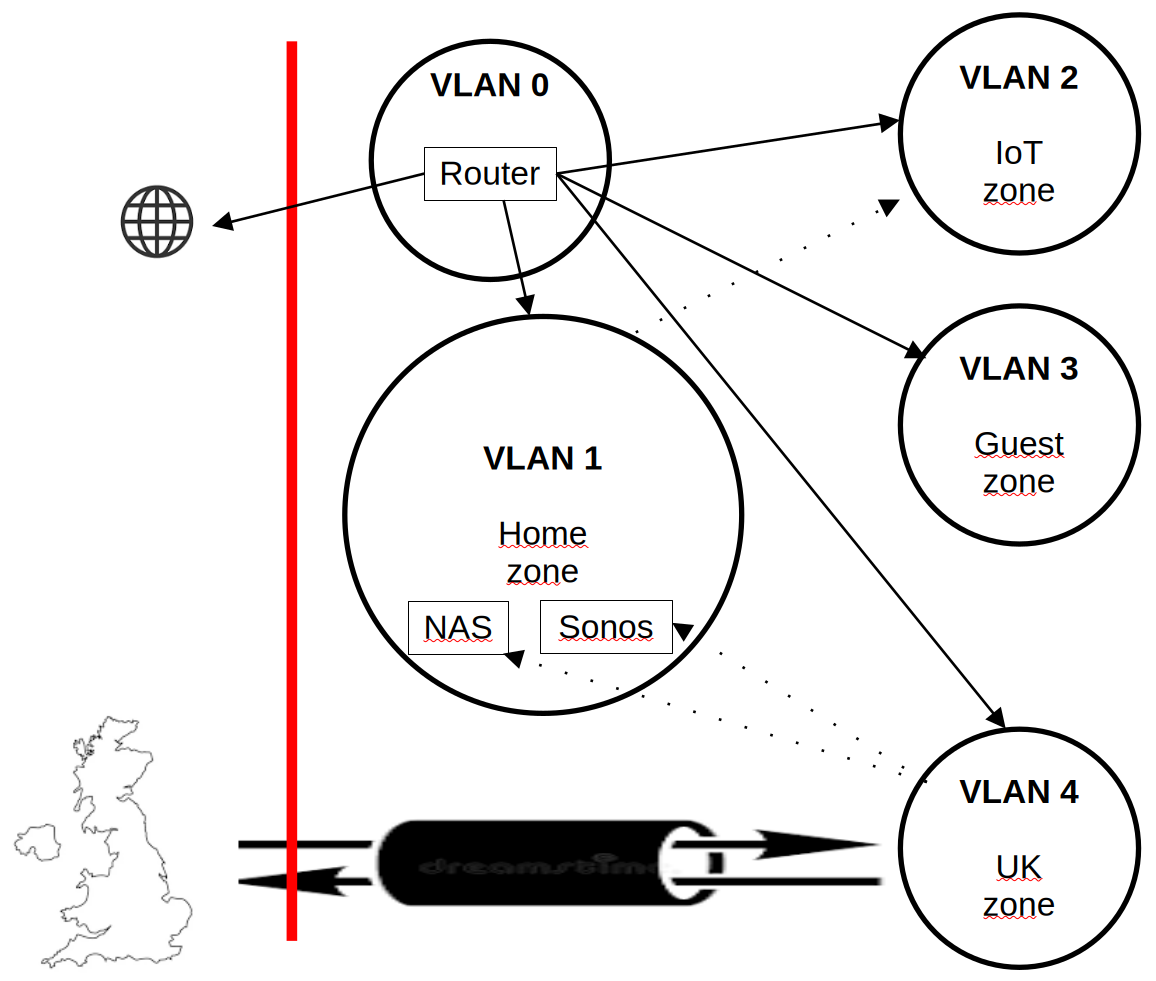
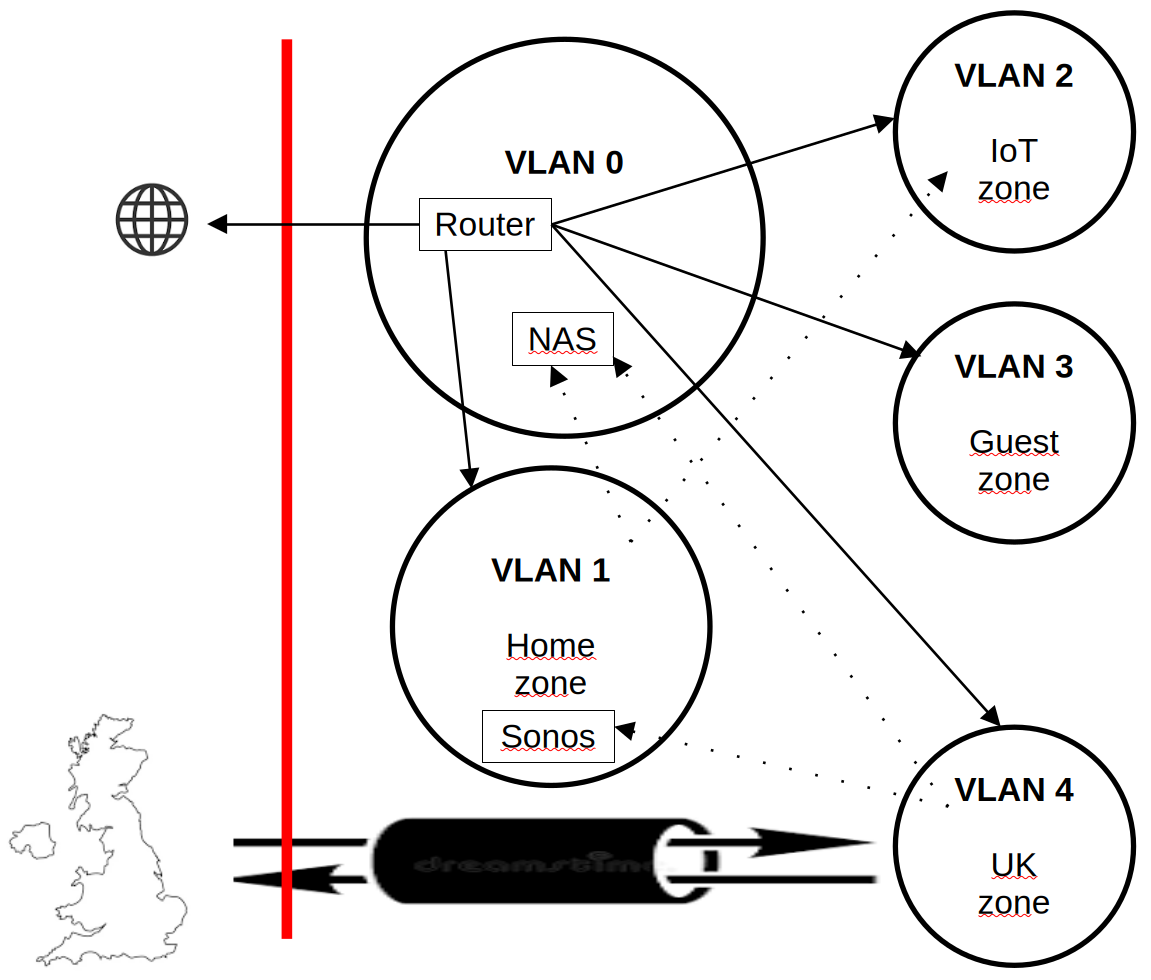
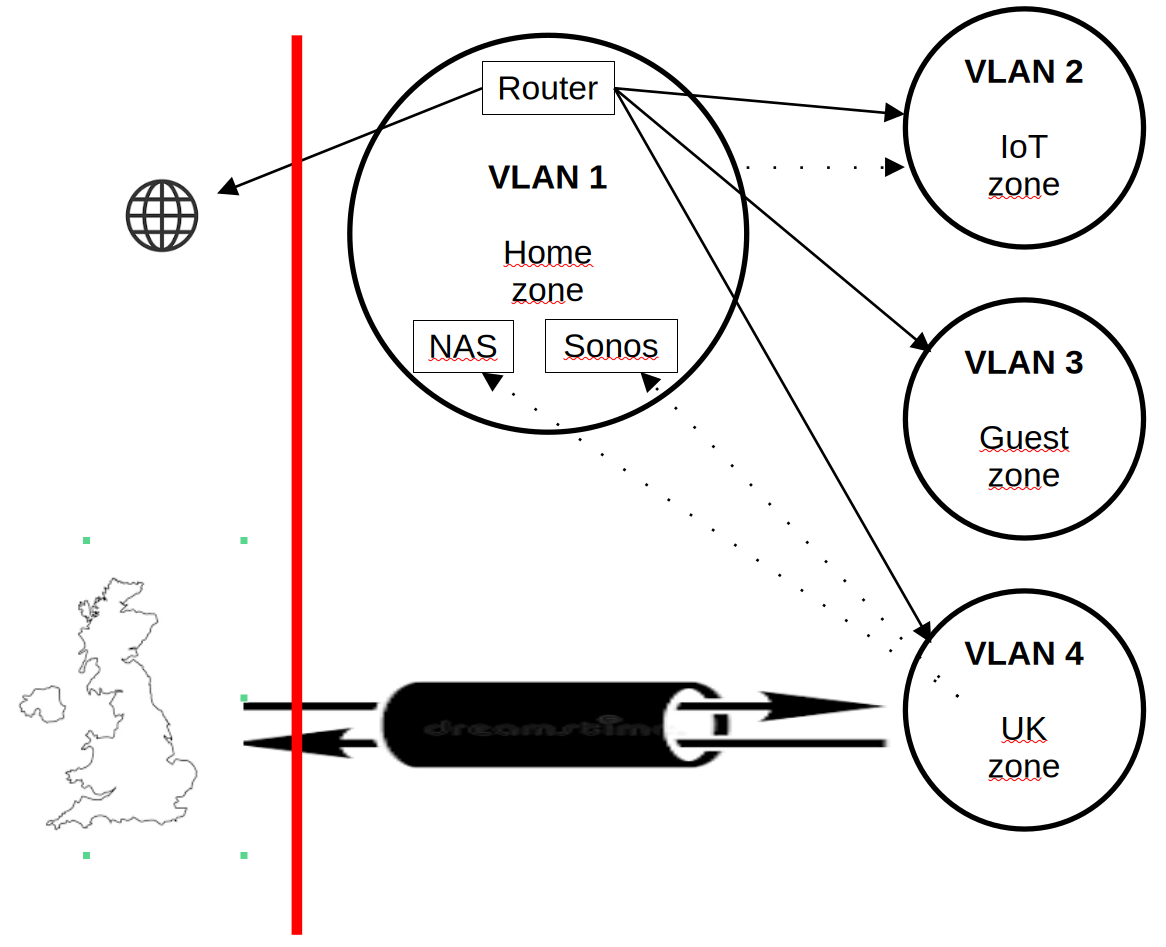
                              Mir fallen 3 mögliche Architekturen dafür ein, die ich mal bildlich dargestellt habe.

                              Bild 1:
                              4 Zonen. Der Router steht in der Homezone mit drin. Ebenso das NAS und das Sonos. Der ganze Internet-Verkehr aus den drei anderen VLANS würde dann quasi dort durchgeroutet werden.

                              Bild 2:
                              Der Router kommt in eine eigene Zone. Die 4 VLANS sind alle isoliert, so das der Internettraffik nicht durch eines der anderen läuft

                              Bild 3: In die Zone des Routers kommt zusätzlich das NAS mit rein.

                              Was würdet ihr machen? Vorschläge?
                              #fedihelp

                              Link Preview ImageLink Preview ImageLink Preview Image
                              proftech@social.tchncs.deP This user is from outside of this forum
                              proftech@social.tchncs.deP This user is from outside of this forum
                              proftech@social.tchncs.de
                              wrote last edited by
                              #19

                              @AlienJay
                              Wir wollen mehrere Fritzboxen in Serie schalten, um benachbarte Räume
                              einer Wohngemeinschaft mit Internet zu versorgen. Pro Raum eine Box mit
                              eigenem Subnetz für dort vorhandene IP-Geräte.

                              Verbindung jeweils über Menüpunkt Internet/Zugangsdaten (Wlan/Ethernet)

                              Bisher haben wir es mit vier unterschiedlichen Boxen geschafft.
                              Es funktioniert mit: 7320, 7390

                              Bei einigen Boxen klappt es, bei anderen vom gleichen Typ leider nicht.
                              Hat jemand Erfahrung, welche Einstellungen entscheidend sind ?

                              1 Reply Last reply
                              2
                              0
                              • R relay@relay.mycrowd.ca shared this topic
                                R relay@relay.an.exchange shared this topic

                              Reply
                              • Reply as topic
                              Log in to reply
                              • Oldest to Newest
                              • Newest to Oldest
                              • Most Votes


                              • Login

                              • Login or register to search.
                              • First post
                                Last post
                              0
                              • Categories
                              • Recent
                              • Tags
                              • Popular
                              • World
                              • Users
                              • Groups