Skip to content
  • Categories
  • Recent
  • Tags
  • Popular
  • World
  • Users
  • Groups
Skins
  • Light
  • Brite
  • Cerulean
  • Cosmo
  • Flatly
  • Journal
  • Litera
  • Lumen
  • Lux
  • Materia
  • Minty
  • Morph
  • Pulse
  • Sandstone
  • Simplex
  • Sketchy
  • Spacelab
  • United
  • Yeti
  • Zephyr
  • Dark
  • Cyborg
  • Darkly
  • Quartz
  • Slate
  • Solar
  • Superhero
  • Vapor

  • Default (Cyborg)
  • No Skin
Collapse
Brand Logo

CIRCLE WITH A DOT

  1. Home
  2. Uncategorized
  3. Oh no!

Oh no!

Scheduled Pinned Locked Moved Uncategorized
homeassistantsamsungopnsensefirewall
19 Posts 8 Posters 45 Views
  • Oldest to Newest
  • Newest to Oldest
  • Most Votes
Reply
  • Reply as topic
Log in to reply
This topic has been deleted. Only users with topic management privileges can see it.
  • matt@mastodon.knight.fyiM This user is from outside of this forum
    matt@mastodon.knight.fyiM This user is from outside of this forum
    matt@mastodon.knight.fyi
    wrote last edited by
    #1

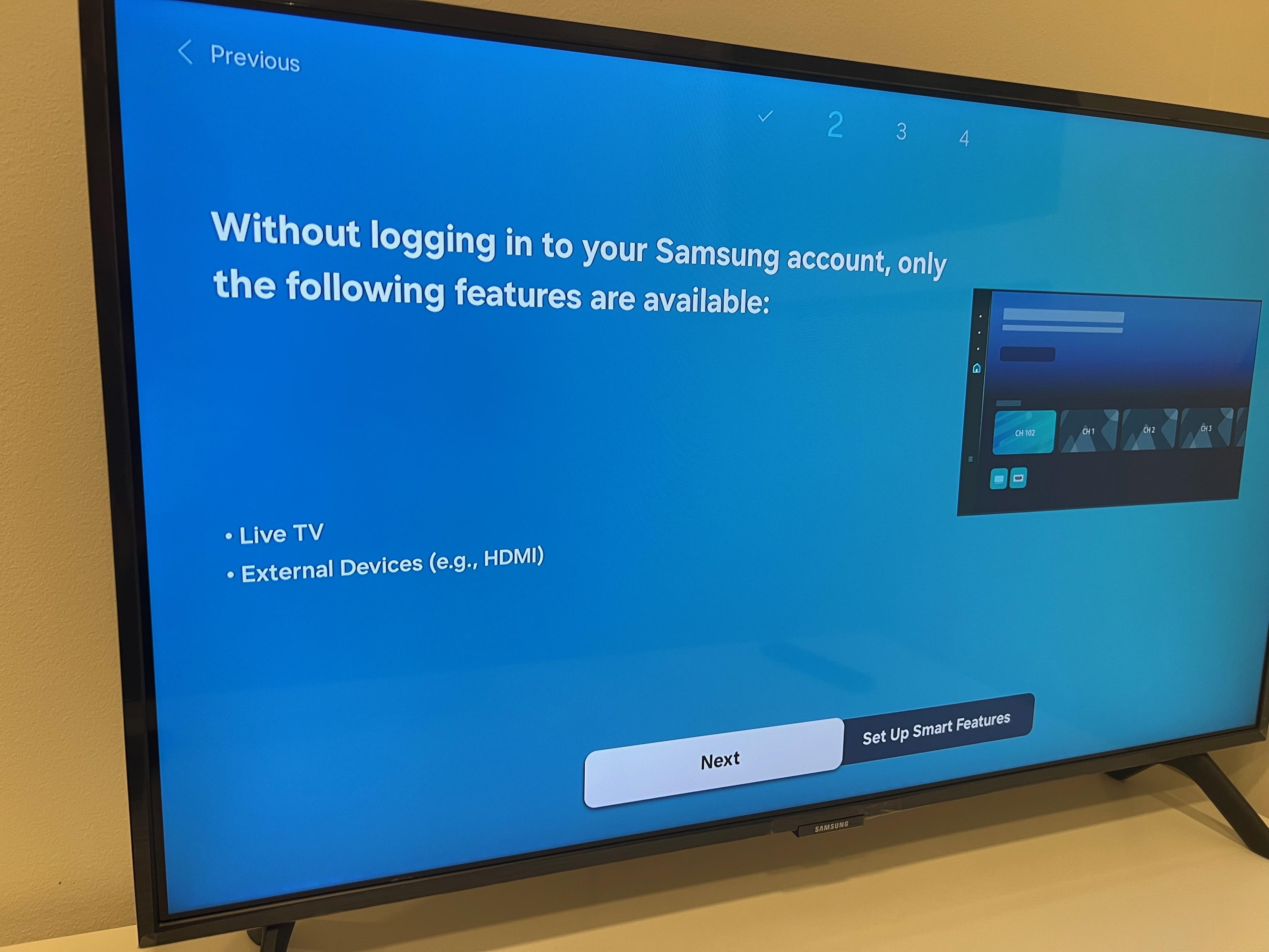
    Oh no! /s

    What a joyous sight! Our new Samsung TV will never see the outside world. It's connected to our network via ethernet, locked on a VLAN so Home Assistant can connect to it, but it can see nothing except my local DNS server (for now).

    I've preemptively blocked its WiFi MAC address in case anyone ever accidentally tries to "help" by connecting it to the WiFi.

    Fully working with Home Assistant. Dumb screen otherwise. Perfect.

    #homeassistant #samsung #tv #opnsense #firewall #privacy
    Link Preview Image
    matt@mastodon.knight.fyiM leffe@social.linux.pizzaL jcblubaugh@mastodon.socialJ mcr314@todon.nlM brouhaha@mastodon.socialB 7 Replies Last reply
    1
    0
    • System shared this topic
    • matt@mastodon.knight.fyiM matt@mastodon.knight.fyi

      Oh no! /s

      What a joyous sight! Our new Samsung TV will never see the outside world. It's connected to our network via ethernet, locked on a VLAN so Home Assistant can connect to it, but it can see nothing except my local DNS server (for now).

      I've preemptively blocked its WiFi MAC address in case anyone ever accidentally tries to "help" by connecting it to the WiFi.

      Fully working with Home Assistant. Dumb screen otherwise. Perfect.

      #homeassistant #samsung #tv #opnsense #firewall #privacy

      Link Preview Image
      matt@mastodon.knight.fyiM This user is from outside of this forum
      matt@mastodon.knight.fyiM This user is from outside of this forum
      matt@mastodon.knight.fyi
      wrote last edited by
      #2

      It's hitting my DNS server once every 2 seconds for a CDN domain, and every 12 seconds for a time domain. Before I blocked those DNS queries, it was attempting (and failing) to reach them on port 443.

      I wonder if this still works: https://syntaxslinger.com/posts/tricking-samsung-tvs-into-thinking-they-have-internet/ or if it will fail due to an invalid HTTPS certificate.... I've not seen it fall back to port 80.

      It's not really hurting anything the way it is though, so no big deal.

      #dns #mitm

      matt@mastodon.knight.fyiM 1 Reply Last reply
      1
      0
      • matt@mastodon.knight.fyiM matt@mastodon.knight.fyi

        It's hitting my DNS server once every 2 seconds for a CDN domain, and every 12 seconds for a time domain. Before I blocked those DNS queries, it was attempting (and failing) to reach them on port 443.

        I wonder if this still works: https://syntaxslinger.com/posts/tricking-samsung-tvs-into-thinking-they-have-internet/ or if it will fail due to an invalid HTTPS certificate.... I've not seen it fall back to port 80.

        It's not really hurting anything the way it is though, so no big deal.

        #dns #mitm

        matt@mastodon.knight.fyiM This user is from outside of this forum
        matt@mastodon.knight.fyiM This user is from outside of this forum
        matt@mastodon.knight.fyi
        wrote last edited by
        #3

        Oh, and in case anyone is interested in a TV that can be isolated from the internet yet integrated with Home Assistant, it's a Samsung QN32Q8FAAFXZA 32" TV.

        1 Reply Last reply
        1
        0
        • matt@mastodon.knight.fyiM matt@mastodon.knight.fyi

          Oh no! /s

          What a joyous sight! Our new Samsung TV will never see the outside world. It's connected to our network via ethernet, locked on a VLAN so Home Assistant can connect to it, but it can see nothing except my local DNS server (for now).

          I've preemptively blocked its WiFi MAC address in case anyone ever accidentally tries to "help" by connecting it to the WiFi.

          Fully working with Home Assistant. Dumb screen otherwise. Perfect.

          #homeassistant #samsung #tv #opnsense #firewall #privacy

          Link Preview Image
          leffe@social.linux.pizzaL This user is from outside of this forum
          leffe@social.linux.pizzaL This user is from outside of this forum
          leffe@social.linux.pizza
          wrote last edited by
          #4

          @matt

          Perfect. Another good way is if one can block the TV from accessing the internet in the router settings. Then it doesn't matter if it's wired or not. I do this for mine, and for various other iot devices that talk directly to Home Assistant.

          matt@mastodon.knight.fyiM 1 Reply Last reply
          0
          • matt@mastodon.knight.fyiM matt@mastodon.knight.fyi

            Oh no! /s

            What a joyous sight! Our new Samsung TV will never see the outside world. It's connected to our network via ethernet, locked on a VLAN so Home Assistant can connect to it, but it can see nothing except my local DNS server (for now).

            I've preemptively blocked its WiFi MAC address in case anyone ever accidentally tries to "help" by connecting it to the WiFi.

            Fully working with Home Assistant. Dumb screen otherwise. Perfect.

            #homeassistant #samsung #tv #opnsense #firewall #privacy

            Link Preview Image
            jcblubaugh@mastodon.socialJ This user is from outside of this forum
            jcblubaugh@mastodon.socialJ This user is from outside of this forum
            jcblubaugh@mastodon.social
            wrote last edited by
            #5

            @matt I am 67 y.o.
            I never had a TV that I hated until I bought an LG “smart “ television.

            matt@mastodon.knight.fyiM 1 Reply Last reply
            0
            • leffe@social.linux.pizzaL leffe@social.linux.pizza

              @matt

              Perfect. Another good way is if one can block the TV from accessing the internet in the router settings. Then it doesn't matter if it's wired or not. I do this for mine, and for various other iot devices that talk directly to Home Assistant.

              matt@mastodon.knight.fyiM This user is from outside of this forum
              matt@mastodon.knight.fyiM This user is from outside of this forum
              matt@mastodon.knight.fyi
              wrote last edited by
              #6

              @leffe that’s essentially what I’ve done. I use OPNsense as my router / firewall so the TV is configured on a VLAN that has no internet access.

              1 Reply Last reply
              1
              0
              • jcblubaugh@mastodon.socialJ jcblubaugh@mastodon.social

                @matt I am 67 y.o.
                I never had a TV that I hated until I bought an LG “smart “ television.

                matt@mastodon.knight.fyiM This user is from outside of this forum
                matt@mastodon.knight.fyiM This user is from outside of this forum
                matt@mastodon.knight.fyi
                wrote last edited by
                #7

                @JCBlubaugh I did quite a lot of research to find a TV that wouldn’t mind being dumb but that I could control via Home Assistant. It’s surprisingly hard!

                jrconlin@mindof.jrconlin.comJ 1 Reply Last reply
                1
                0
                • matt@mastodon.knight.fyiM matt@mastodon.knight.fyi

                  Oh no! /s

                  What a joyous sight! Our new Samsung TV will never see the outside world. It's connected to our network via ethernet, locked on a VLAN so Home Assistant can connect to it, but it can see nothing except my local DNS server (for now).

                  I've preemptively blocked its WiFi MAC address in case anyone ever accidentally tries to "help" by connecting it to the WiFi.

                  Fully working with Home Assistant. Dumb screen otherwise. Perfect.

                  #homeassistant #samsung #tv #opnsense #firewall #privacy

                  Link Preview Image
                  mcr314@todon.nlM This user is from outside of this forum
                  mcr314@todon.nlM This user is from outside of this forum
                  mcr314@todon.nl
                  wrote last edited by
                  #8

                  @matt What does/can your Home Assistant do with it?

                  matt@mastodon.knight.fyiM 1 Reply Last reply
                  0
                  • matt@mastodon.knight.fyiM matt@mastodon.knight.fyi

                    Oh no! /s

                    What a joyous sight! Our new Samsung TV will never see the outside world. It's connected to our network via ethernet, locked on a VLAN so Home Assistant can connect to it, but it can see nothing except my local DNS server (for now).

                    I've preemptively blocked its WiFi MAC address in case anyone ever accidentally tries to "help" by connecting it to the WiFi.

                    Fully working with Home Assistant. Dumb screen otherwise. Perfect.

                    #homeassistant #samsung #tv #opnsense #firewall #privacy

                    Link Preview Image
                    brouhaha@mastodon.socialB This user is from outside of this forum
                    brouhaha@mastodon.socialB This user is from outside of this forum
                    brouhaha@mastodon.social
                    wrote last edited by
                    #9

                    @matt
                    The last Samsung TV I purchased for my mother nagged her constantly about wanting to be connected, so she insisted that I let it connect.
                    😞

                    matt@mastodon.knight.fyiM 1 Reply Last reply
                    0
                    • matt@mastodon.knight.fyiM matt@mastodon.knight.fyi

                      @JCBlubaugh I did quite a lot of research to find a TV that wouldn’t mind being dumb but that I could control via Home Assistant. It’s surprisingly hard!

                      jrconlin@mindof.jrconlin.comJ This user is from outside of this forum
                      jrconlin@mindof.jrconlin.comJ This user is from outside of this forum
                      jrconlin@mindof.jrconlin.com
                      wrote last edited by
                      #10

                      @matt @JCBlubaugh

                      FWIW, I have an LG with a device attached to the HDMI ARC port. There are times I notice the "Please connect me to the internet", but mostly it just blows right past that.

                      I don't have it connected to my network, at all, mostly because I don't care if it's connected to my HomeAssistant, so probably different use cases.

                      matt@mastodon.knight.fyiM 1 Reply Last reply
                      0
                      • matt@mastodon.knight.fyiM matt@mastodon.knight.fyi

                        Oh no! /s

                        What a joyous sight! Our new Samsung TV will never see the outside world. It's connected to our network via ethernet, locked on a VLAN so Home Assistant can connect to it, but it can see nothing except my local DNS server (for now).

                        I've preemptively blocked its WiFi MAC address in case anyone ever accidentally tries to "help" by connecting it to the WiFi.

                        Fully working with Home Assistant. Dumb screen otherwise. Perfect.

                        #homeassistant #samsung #tv #opnsense #firewall #privacy

                        Link Preview Image
                        me_valentijn@m.ai6yr.orgM This user is from outside of this forum
                        me_valentijn@m.ai6yr.orgM This user is from outside of this forum
                        me_valentijn@m.ai6yr.org
                        wrote last edited by
                        #11

                        @matt
                        It's definitely necessary to keep the Samsungs isolated. In the process of scanning our IOT network WHILE TURNED OFF, it started fully turning itself on intermittently in the middle of the night. Which is how we discovered the scanning.

                        It's now plugged into a switch in the wall so we can turn off its power supply when not in use. Also controlled via Home Assistant 🤗

                        matt@mastodon.knight.fyiM 1 Reply Last reply
                        0
                        • matt@mastodon.knight.fyiM matt@mastodon.knight.fyi

                          Oh no! /s

                          What a joyous sight! Our new Samsung TV will never see the outside world. It's connected to our network via ethernet, locked on a VLAN so Home Assistant can connect to it, but it can see nothing except my local DNS server (for now).

                          I've preemptively blocked its WiFi MAC address in case anyone ever accidentally tries to "help" by connecting it to the WiFi.

                          Fully working with Home Assistant. Dumb screen otherwise. Perfect.

                          #homeassistant #samsung #tv #opnsense #firewall #privacy

                          Link Preview Image
                          michddev@mastodon.socialM This user is from outside of this forum
                          michddev@mastodon.socialM This user is from outside of this forum
                          michddev@mastodon.social
                          wrote last edited by
                          #12

                          @matt Frankly depressing that it's become hard to find a "dumb" TV and it requires this much work to stop it phoning home. That said, nice work!

                          matt@mastodon.knight.fyiM 1 Reply Last reply
                          0
                          • mcr314@todon.nlM mcr314@todon.nl

                            @matt What does/can your Home Assistant do with it?

                            matt@mastodon.knight.fyiM This user is from outside of this forum
                            matt@mastodon.knight.fyiM This user is from outside of this forum
                            matt@mastodon.knight.fyi
                            wrote last edited by
                            #13

                            @mcr314 at the moment just see the status of the TV (on / off), turn it on / off, adjust the volume. Once I plug in some HDMI sources, it might be able to switch between them, not sure.

                            Honestly, on / off status and switching is all I really need - I mean, it's about all the TV can actually do!

                            1 Reply Last reply
                            1
                            0
                            • brouhaha@mastodon.socialB brouhaha@mastodon.social

                              @matt
                              The last Samsung TV I purchased for my mother nagged her constantly about wanting to be connected, so she insisted that I let it connect.
                              😞

                              matt@mastodon.knight.fyiM This user is from outside of this forum
                              matt@mastodon.knight.fyiM This user is from outside of this forum
                              matt@mastodon.knight.fyi
                              wrote last edited by
                              #14

                              @brouhaha I'm really hoping that won't be the case. From the research I did, it shouldn't happen, but if it does I'll strongly consider returning the TV. Although I'm not sure I have many other options....

                              brouhaha@mastodon.socialB 1 Reply Last reply
                              1
                              0
                              • jrconlin@mindof.jrconlin.comJ jrconlin@mindof.jrconlin.com

                                @matt @JCBlubaugh

                                FWIW, I have an LG with a device attached to the HDMI ARC port. There are times I notice the "Please connect me to the internet", but mostly it just blows right past that.

                                I don't have it connected to my network, at all, mostly because I don't care if it's connected to my HomeAssistant, so probably different use cases.

                                matt@mastodon.knight.fyiM This user is from outside of this forum
                                matt@mastodon.knight.fyiM This user is from outside of this forum
                                matt@mastodon.knight.fyi
                                wrote last edited by
                                #15

                                @jrconlin @JCBlubaugh I do hope it won't do that. If it does, I'll have a look to see if I can do anything to stop it (e.g. spoofing some of its endpoints, or maybe giving it very restricted access), or perhaps even return the TV.

                                1 Reply Last reply
                                1
                                0
                                • me_valentijn@m.ai6yr.orgM me_valentijn@m.ai6yr.org

                                  @matt
                                  It's definitely necessary to keep the Samsungs isolated. In the process of scanning our IOT network WHILE TURNED OFF, it started fully turning itself on intermittently in the middle of the night. Which is how we discovered the scanning.

                                  It's now plugged into a switch in the wall so we can turn off its power supply when not in use. Also controlled via Home Assistant 🤗

                                  matt@mastodon.knight.fyiM This user is from outside of this forum
                                  matt@mastodon.knight.fyiM This user is from outside of this forum
                                  matt@mastodon.knight.fyi
                                  wrote last edited by
                                  #16

                                  @me_valentijn woah, that's insane! When you say it was scanning, what was it doing exactly? I should double check that my IoT network has device isolation on to stop it scanning even its own VLAN, although it's not going to find much (or be able to do anything with that information) if it does scan!

                                  1 Reply Last reply
                                  1
                                  0
                                  • matt@mastodon.knight.fyiM matt@mastodon.knight.fyi

                                    @brouhaha I'm really hoping that won't be the case. From the research I did, it shouldn't happen, but if it does I'll strongly consider returning the TV. Although I'm not sure I have many other options....

                                    brouhaha@mastodon.socialB This user is from outside of this forum
                                    brouhaha@mastodon.socialB This user is from outside of this forum
                                    brouhaha@mastodon.social
                                    wrote last edited by
                                    #17

                                    @matt
                                    Given that my mother's experience was some years back, it's possible that Samsung may since have caught enough flack about that misbehavior to fix it.

                                    matt@mastodon.knight.fyiM 1 Reply Last reply
                                    0
                                    • michddev@mastodon.socialM michddev@mastodon.social

                                      @matt Frankly depressing that it's become hard to find a "dumb" TV and it requires this much work to stop it phoning home. That said, nice work!

                                      matt@mastodon.knight.fyiM This user is from outside of this forum
                                      matt@mastodon.knight.fyiM This user is from outside of this forum
                                      matt@mastodon.knight.fyi
                                      wrote last edited by
                                      #18

                                      @MichDdev I feel like "it shouldn't be this hard" is a sentiment I've run into often during this house build. We want high quality appliances, and as much as possible we want them integrated into Home Assistant. But local access only - no cloud access.

                                      My only "failure" so far is my F-150 Lightning which uses its own cellular connection for the app. Although I did manage to get a spare key fob and hack it into an ESP32 to give me local-only lock, unlock and remote starting.

                                      1 Reply Last reply
                                      1
                                      0
                                      • brouhaha@mastodon.socialB brouhaha@mastodon.social

                                        @matt
                                        Given that my mother's experience was some years back, it's possible that Samsung may since have caught enough flack about that misbehavior to fix it.

                                        matt@mastodon.knight.fyiM This user is from outside of this forum
                                        matt@mastodon.knight.fyiM This user is from outside of this forum
                                        matt@mastodon.knight.fyi
                                        wrote last edited by
                                        #19

                                        @brouhaha or more worryingly, they decided that the technique worked (she allowed hers to connect eventually!) so they rolled it out more broadly.

                                        I really feel like a nag message like that should be grounds for a warranty claim or return.

                                        1 Reply Last reply
                                        1
                                        0
                                        Reply
                                        • Reply as topic
                                        Log in to reply
                                        • Oldest to Newest
                                        • Newest to Oldest
                                        • Most Votes


                                        • Login

                                        • Login or register to search.
                                        • First post
                                          Last post
                                        0
                                        • Categories
                                        • Recent
                                        • Tags
                                        • Popular
                                        • World
                                        • Users
                                        • Groups