Skip to content
  • Categories
  • Recent
  • Tags
  • Popular
  • World
  • Users
  • Groups
Skins
  • Light
  • Brite
  • Cerulean
  • Cosmo
  • Flatly
  • Journal
  • Litera
  • Lumen
  • Lux
  • Materia
  • Minty
  • Morph
  • Pulse
  • Sandstone
  • Simplex
  • Sketchy
  • Spacelab
  • United
  • Yeti
  • Zephyr
  • Dark
  • Cyborg
  • Darkly
  • Quartz
  • Slate
  • Solar
  • Superhero
  • Vapor

  • Default (Cyborg)
  • No Skin
Collapse
Brand Logo

CIRCLE WITH A DOT

  1. Home
  2. Uncategorized
  3. worked with the tcpdump folks on an updated set of examples for the tcpdump man page https://www.tcpdump.org/manpages/tcpdump.1.html#lbAF

worked with the tcpdump folks on an updated set of examples for the tcpdump man page https://www.tcpdump.org/manpages/tcpdump.1.html#lbAF

Scheduled Pinned Locked Moved Uncategorized
16 Posts 9 Posters 22 Views
  • Oldest to Newest
  • Newest to Oldest
  • Most Votes
Reply
  • Reply as topic
Log in to reply
This topic has been deleted. Only users with topic management privileges can see it.
  • b0rk@social.jvns.caB b0rk@social.jvns.ca

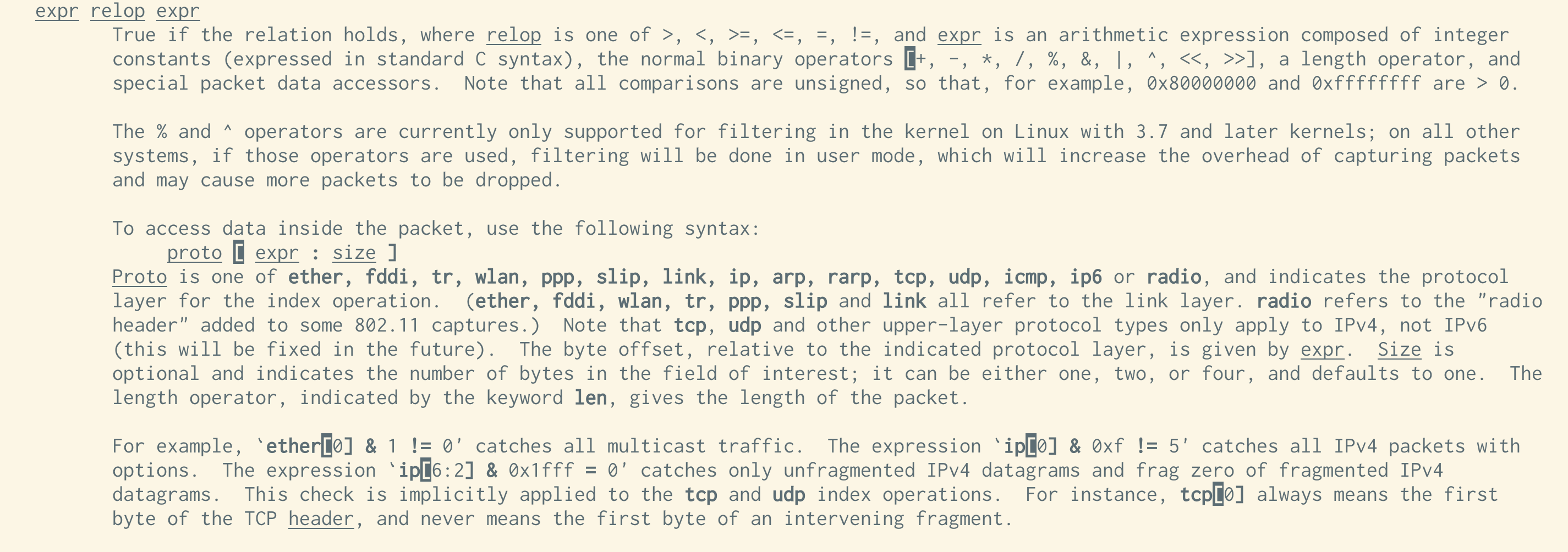
    @choomba i think this is it? from the 'pcap-filter' man page. from the ipv4 header format it looks like ip[2:2] is bytes 3 and 4 of the ip packet, which are teh length
    Link Preview Image
    choomba@social.tchncs.deC This user is from outside of this forum
    choomba@social.tchncs.deC This user is from outside of this forum
    choomba@social.tchncs.de
    wrote last edited by
    #7

    @b0rk Ah, that's something new, thanks! It does start to make sense. We get the total length of the IP packet, subtract the IP header length and then the TCP header length. Really clever. I haven't looked this deep into protocols since uni!

    taosecurity@infosec.exchangeT 1 Reply Last reply
    0
    • choomba@social.tchncs.deC choomba@social.tchncs.de

      @b0rk Ah, that's something new, thanks! It does start to make sense. We get the total length of the IP packet, subtract the IP header length and then the TCP header length. Really clever. I haven't looked this deep into protocols since uni!

      taosecurity@infosec.exchangeT This user is from outside of this forum
      taosecurity@infosec.exchangeT This user is from outside of this forum
      taosecurity@infosec.exchange
      wrote last edited by
      #8

      @choomba @b0rk When a filter is tough to understand, you can dump the filter with -d and step through the compiled packet-matching code to see what it does. See https://taosecurity.blogspot.com/2004/09/understanding-tcpdumps-d-option-have.html and https://taosecurity.blogspot.com/2004/12/understanding-tcpdumps-d-option-part-2.html

      1 Reply Last reply
      0
      • b0rk@social.jvns.caB b0rk@social.jvns.ca

        worked with the tcpdump folks on an updated set of examples for the tcpdump man page https://www.tcpdump.org/manpages/tcpdump.1.html#lbAF

        the idea is that if you've forgotten how tcpdump's basic flags work, you can find a quick reference in the man page!

        pizzaclick@hachyderm.ioP This user is from outside of this forum
        pizzaclick@hachyderm.ioP This user is from outside of this forum
        pizzaclick@hachyderm.io
        wrote last edited by
        #9

        @b0rk

        > worked with the tcpdump folks on an updated set of examples for the tcpdump man page

        Thank you!

        1 Reply Last reply
        0
        • b0rk@social.jvns.caB b0rk@social.jvns.ca

          worked with the tcpdump folks on an updated set of examples for the tcpdump man page https://www.tcpdump.org/manpages/tcpdump.1.html#lbAF

          the idea is that if you've forgotten how tcpdump's basic flags work, you can find a quick reference in the man page!

          pg@hci.socialP This user is from outside of this forum
          pg@hci.socialP This user is from outside of this forum
          pg@hci.social
          wrote last edited by
          #10

          @b0rk cool! what's the process you usually go thru to get a change made like this?

          b0rk@social.jvns.caB 1 Reply Last reply
          0
          • b0rk@social.jvns.caB b0rk@social.jvns.ca

            worked with the tcpdump folks on an updated set of examples for the tcpdump man page https://www.tcpdump.org/manpages/tcpdump.1.html#lbAF

            the idea is that if you've forgotten how tcpdump's basic flags work, you can find a quick reference in the man page!

            notsoloud@expressional.socialN This user is from outside of this forum
            notsoloud@expressional.socialN This user is from outside of this forum
            notsoloud@expressional.social
            wrote last edited by
            #11

            @b0rk
            Thanks a lot!

            man pages in general need more examples.

            1 Reply Last reply
            0
            • pg@hci.socialP pg@hci.social

              @b0rk cool! what's the process you usually go thru to get a change made like this?

              b0rk@social.jvns.caB This user is from outside of this forum
              b0rk@social.jvns.caB This user is from outside of this forum
              b0rk@social.jvns.ca
              wrote last edited by
              #12

              @pg for tcpdump and dig I just made a pull request and made the corrections the maintainers asked for. The maintainers were great and it was really straightforward.

              pg@hci.socialP 1 Reply Last reply
              0
              • b0rk@social.jvns.caB b0rk@social.jvns.ca

                @pg for tcpdump and dig I just made a pull request and made the corrections the maintainers asked for. The maintainers were great and it was really straightforward.

                pg@hci.socialP This user is from outside of this forum
                pg@hci.socialP This user is from outside of this forum
                pg@hci.social
                wrote last edited by
                #13

                @b0rk great! a process working the way it ought to, refreshing. i suppose that 'older', more niche, or less in-the-spotlight projects may have less-frequent and higher-quality PRs, so the maintainer experience is more pleasant

                b0rk@social.jvns.caB 1 Reply Last reply
                0
                • pg@hci.socialP pg@hci.social

                  @b0rk great! a process working the way it ought to, refreshing. i suppose that 'older', more niche, or less in-the-spotlight projects may have less-frequent and higher-quality PRs, so the maintainer experience is more pleasant

                  b0rk@social.jvns.caB This user is from outside of this forum
                  b0rk@social.jvns.caB This user is from outside of this forum
                  b0rk@social.jvns.ca
                  wrote last edited by
                  #14

                  @pg i hope so!

                  1 Reply Last reply
                  0
                  • choomba@social.tchncs.deC choomba@social.tchncs.de

                    @b0rk or others, is there a page that explains a filter like this: tcp port 80 and (((ip[2:2] - ((ip[0]&0xf)<<2)) - ((tcp[12]&0xf0)>>2)) != 0)

                    I have no idea what is going on here. This is from the pcap filter man page. Why the masking and shifting and what is up with ip[2:2]? This part of tcpdump has remained a mystery to me for decades.

                    ori@hj.9fs.netO This user is from outside of this forum
                    ori@hj.9fs.netO This user is from outside of this forum
                    ori@hj.9fs.net
                    wrote last edited by
                    #15
                    Checking Wikipedia https://en.wikipedia.org/wiki/IPv4#Header and
                    https://en.wikipedia.org/wiki/Transmission_Control_Protocol

                    • ip[2:2] is the size of the IP packet.
                    • ((ip[0]&0xf)<<2)) is the size of the IP header
                    • ((tcp[12]&0xf0)>>2) is the start of data in the tcp packets
                    So, this is filtering for tcp packets that have data (is, the TCP data offset is not equal to the end of the IP packet). This is a good example of inspecting packets directly, but definitely needs some additional explanation. Examples should probably not assume a fresh understanding of the protocol header structure.

                    CC: @b0rk@jvns.ca
                    choomba@social.tchncs.deC 1 Reply Last reply
                    0
                    • ori@hj.9fs.netO ori@hj.9fs.net
                      Checking Wikipedia https://en.wikipedia.org/wiki/IPv4#Header and
                      https://en.wikipedia.org/wiki/Transmission_Control_Protocol

                      • ip[2:2] is the size of the IP packet.
                      • ((ip[0]&0xf)<<2)) is the size of the IP header
                      • ((tcp[12]&0xf0)>>2) is the start of data in the tcp packets
                      So, this is filtering for tcp packets that have data (is, the TCP data offset is not equal to the end of the IP packet). This is a good example of inspecting packets directly, but definitely needs some additional explanation. Examples should probably not assume a fresh understanding of the protocol header structure.

                      CC: @b0rk@jvns.ca
                      choomba@social.tchncs.deC This user is from outside of this forum
                      choomba@social.tchncs.deC This user is from outside of this forum
                      choomba@social.tchncs.de
                      wrote last edited by
                      #16

                      @ori @b0rk Small correction. The last one is the size of the TCP header, encoded in the high nibble of byte 12. I dove into this last night and finally understood it. It takes the full length of the IP packet (which wraps the TCP packet) and subtracts the IP and TCP header lengths. If the result is zero, we have a packet without data.

                      1 Reply Last reply
                      0
                      • R relay@relay.infosec.exchange shared this topic

                      Reply
                      • Reply as topic
                      Log in to reply
                      • Oldest to Newest
                      • Newest to Oldest
                      • Most Votes


                      • Login

                      • Login or register to search.
                      • First post
                        Last post
                      0
                      • Categories
                      • Recent
                      • Tags
                      • Popular
                      • World
                      • Users
                      • Groups