Big news
-
@hellgy Trop contente que ça te plaise!
@nileane je crois que c'est le truc le plus utile que j'ai téléchargé récemment, franchement bravo !
-
Big news!
I'm launching a tiny Mac app 🥺 🤏
🤏 It's called TinyStart, and it's a lightweight Launcher and Emoji picker for macOS!
Unlike Spotlight, TinyStart is super fast at showing results and launching apps. It never becomes overcrowded with search results you don't need, and it lets you open URLs, perform web searches with custom search engines, and quickly open folders in Finder.
Oh and yes, I think the Emoji picker is pretty good too. It's everything the default macOS Emoji picker isn't: it's fast, it lets you insert Emojis in any text field, it isn't picky about keywords, and it learns your favorite Emojis over time.
Get TinyStart at https://tinystart.app: it's €5, you pay for it once and future updates are free!
also I made a lil' video to show you what it looks like:
@nileane They’ve ruined Spotlight now. It treats too many inputs as a potential web search!
-
@nileane je crois que c'est le truc le plus utile que j'ai téléchargé récemment, franchement bravo !
@hellgy Merciiii
-
@nileane They’ve ruined Spotlight now. It treats too many inputs as a potential web search!
@MisterMoo right??? it's a nightmare
-
@nileane this looks great!
@vmstan thanks

-
Big news!
I'm launching a tiny Mac app 🥺🤏 It's called TinyStart, and it's a lightweight Launcher and Emoji picker for macOS!Unlike Spotlight, TinyStart is super fast at showing results and launching apps. It never becomes overcrowded with search results you don't need, and it lets you open URLs, perform web searches with custom search engines, and quickly open folders in Finder.
Oh and yes, I think the Emoji picker is pretty good too. It's everything the default macOS Emoji picker isn't: it's fast, it lets you insert Emojis in any text field, it isn't picky about keywords, and it learns your favorite Emojis over time.
Get TinyStart at https://tinystart.app: it's €5, you pay for it once and future updates are free!
also I made a lil' video to show you what it looks like:
@nileane That's very cool!
I was an Alfred "user" for the longest time, but I never really used any advanced features, it just worked better than Spotlight.
With macOS 26 I gave Spotlight a try. It was not great, but just okay enough that I didn't bother re-installing Alfred.
Now this looks like it does everything I need: Quick, no unnecessary animations, looks nice and only has features that I'll actually use.Bought it, installed it, gonna use it the next little while and see whether it works well for me in praxis

-
Although I've experimented with Mac development for the past couple of years, this is the first time that I feel like I've made something that's actually pretty good. I hope you'll like it 🫶
+ if you know me, you know that I'm just a trans gal trying to make by with a few pennies in her bank account. So if you wanna help support me, feel free to share the above post and buy my tiny Mac app

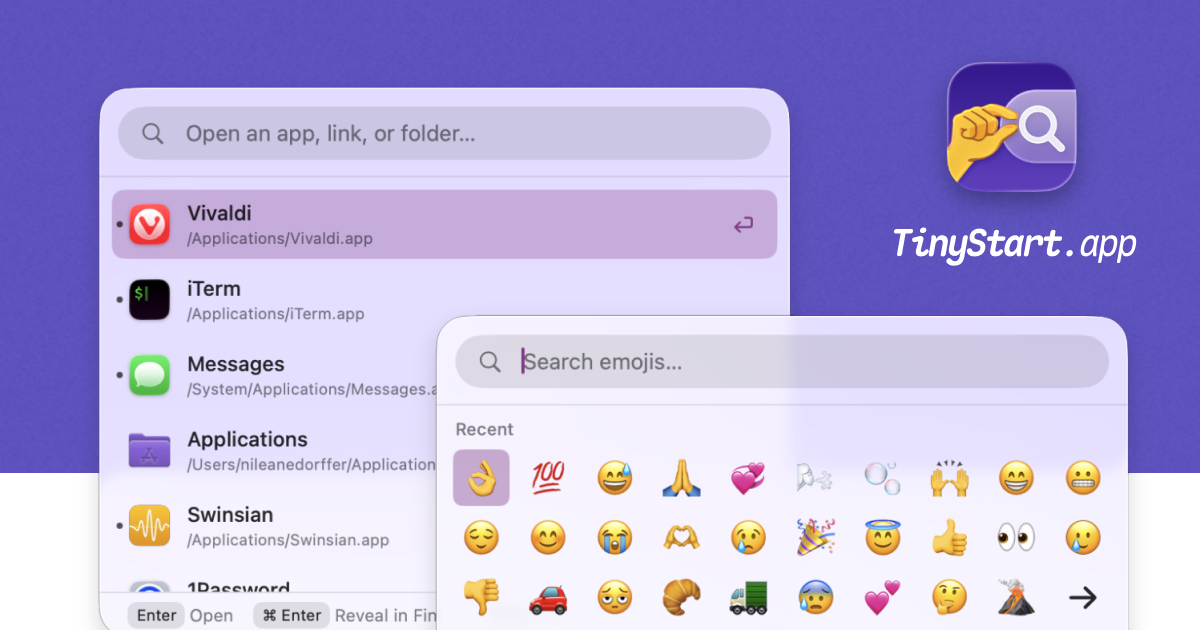
TinyStart, a Tiny Launcher and Emoji Picker for Your Mac
TinyStart, a tiny launcher for your Mac. Launch apps, insert Emoji, open Links and Folders, and more.

(tinystart.app)
@nileane oh wah, félicitations !!!
-
Big news!
I'm launching a tiny Mac app 🥺🤏 It's called TinyStart, and it's a lightweight Launcher and Emoji picker for macOS!Unlike Spotlight, TinyStart is super fast at showing results and launching apps. It never becomes overcrowded with search results you don't need, and it lets you open URLs, perform web searches with custom search engines, and quickly open folders in Finder.
Oh and yes, I think the Emoji picker is pretty good too. It's everything the default macOS Emoji picker isn't: it's fast, it lets you insert Emojis in any text field, it isn't picky about keywords, and it learns your favorite Emojis over time.
Get TinyStart at https://tinystart.app: it's €5, you pay for it once and future updates are free!
also I made a lil' video to show you what it looks like:
@nileane that looks like the best drop-in replacement for most of what I use #RayCast for - very well done!
At first while watching your video I was like "okay, that looks well made but I also need a symbol picker and sometimes like to do math / conversions quickly" -- imagine my gleeful smile when you listed those towards the end just like it's the easiest thing in the world to add those in!
-
@nileane that looks like the best drop-in replacement for most of what I use #RayCast for - very well done!
At first while watching your video I was like "okay, that looks well made but I also need a symbol picker and sometimes like to do math / conversions quickly" -- imagine my gleeful smile when you listed those towards the end just like it's the easiest thing in the world to add those in!
@heals hahaha yes! I'm terrible at math so it's a must-have for me
-
@cliffwade If you do the command line trick Forklift mentions on their website to make their app the default file viewer, it should work! Do let me know if you encounter issues on this front though

@nileane Hi again! Just purchased TinyStart. First let me say, thank you for such a great little app. Very fast and very handy.
I went through the process on ForkLift's site to set ForkLift as the default file manager(using the SetApp version), and it's now set as default. To verify, I right clicked a folder within ForkLift and selected Reveal In Finder, and it opened in ForkLift.
I then added a folder to TinyStart but when using TinyStart the folder still opens in Finder, not ForkLift.
Have you tested this by chance and just wondering if I'm doing something wrong somewhere.
I've tried adding different folders and still get the same result.
-
R relay@relay.infosec.exchange shared this topic