Skip to content
  • Categories
  • Recent
  • Tags
  • Popular
  • World
  • Users
  • Groups
Skins
  • Light
  • Brite
  • Cerulean
  • Cosmo
  • Flatly
  • Journal
  • Litera
  • Lumen
  • Lux
  • Materia
  • Minty
  • Morph
  • Pulse
  • Sandstone
  • Simplex
  • Sketchy
  • Spacelab
  • United
  • Yeti
  • Zephyr
  • Dark
  • Cyborg
  • Darkly
  • Quartz
  • Slate
  • Solar
  • Superhero
  • Vapor

  • Default (Cyborg)
  • No Skin
Collapse
Brand Logo

CIRCLE WITH A DOT

  1. Home
  2. Uncategorized
  3. Just built a home security gateway using a #RaspberryPi and #WireGuard (via ProtonVPN) 🛡️

Just built a home security gateway using a #RaspberryPi and #WireGuard (via ProtonVPN) 🛡️

Scheduled Pinned Locked Moved Uncategorized
raspberrypiwireguardiothtopselfhosted
14 Posts 4 Posters 0 Views
  • Oldest to Newest
  • Newest to Oldest
  • Most Votes
Reply
  • Reply as topic
Log in to reply
This topic has been deleted. Only users with topic management privileges can see it.
  • nickbearded@mastodon.socialN nickbearded@mastodon.social

    @dhry my Raspberry Pi 4 sips 5V DC via USB-C connector.

    dhry@mastodon.socialD This user is from outside of this forum
    dhry@mastodon.socialD This user is from outside of this forum
    dhry@mastodon.social
    wrote last edited by
    #4

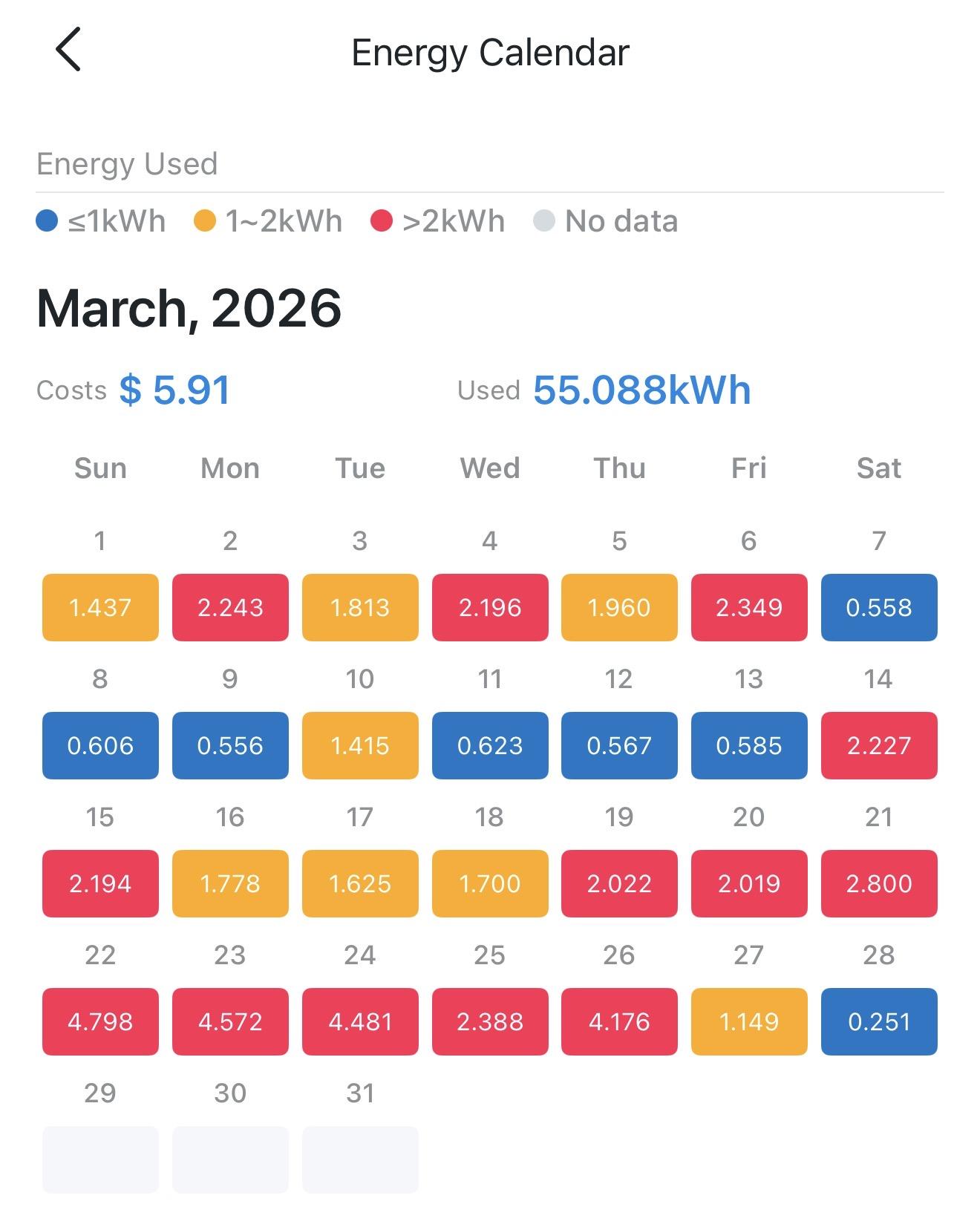
    @nickbearded I have three (gathering dust for years) and know that part - but how much energy does it use? kWh. Question might be unclear so attaching a screenshot showing energy usage for the month for my windows machines. Tapo P110M used. Hint - you can’t get this from htop.
    Link Preview Image
    nickbearded@mastodon.socialN 1 Reply Last reply
    0
    • dhry@mastodon.socialD dhry@mastodon.social

      @nickbearded I have three (gathering dust for years) and know that part - but how much energy does it use? kWh. Question might be unclear so attaching a screenshot showing energy usage for the month for my windows machines. Tapo P110M used. Hint - you can’t get this from htop.

      Link Preview Image
      nickbearded@mastodon.socialN This user is from outside of this forum
      nickbearded@mastodon.socialN This user is from outside of this forum
      nickbearded@mastodon.social
      wrote last edited by
      #5

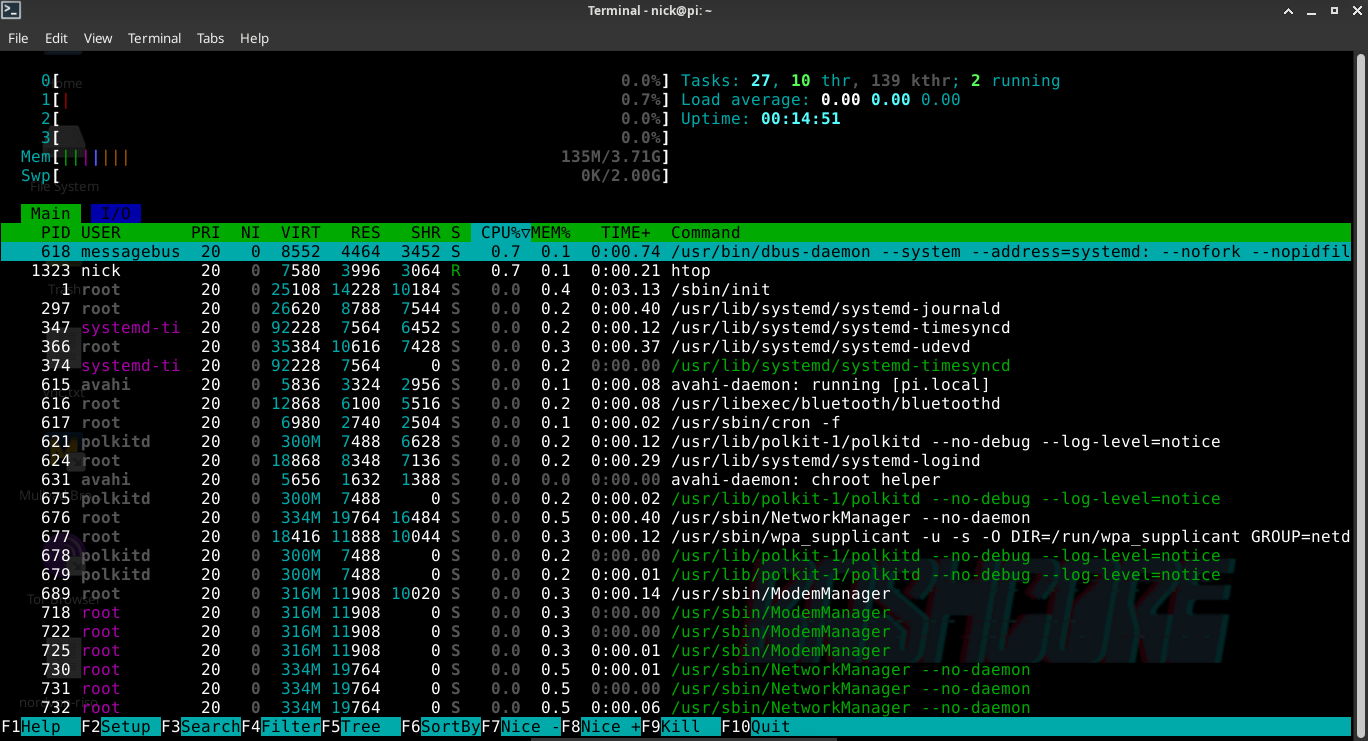
      @dhry Fair point! While htop doesn't show kWh, the physics of a Pi 4 are well-documented. At the idle state shown (near 0% CPU), it draws ~3W.
      ​Doing the math: 3W * 24h * 30 days = 2.16 kWh per month.
      ​Comparing that to your 55 kWh Windows setup? My gateway uses about 25 times less energy to do the same job 24/7. That’s the beauty of ARM vs x86 for simple networking tasks 😃

      dhry@mastodon.socialD 1 Reply Last reply
      0
      • nickbearded@mastodon.socialN nickbearded@mastodon.social

        @dhry Fair point! While htop doesn't show kWh, the physics of a Pi 4 are well-documented. At the idle state shown (near 0% CPU), it draws ~3W.
        ​Doing the math: 3W * 24h * 30 days = 2.16 kWh per month.
        ​Comparing that to your 55 kWh Windows setup? My gateway uses about 25 times less energy to do the same job 24/7. That’s the beauty of ARM vs x86 for simple networking tasks 😃

        dhry@mastodon.socialD This user is from outside of this forum
        dhry@mastodon.socialD This user is from outside of this forum
        dhry@mastodon.social
        wrote last edited by
        #6

        @nickbearded Ok I’ll retract the question. Not after theoreticals.

        nickbearded@mastodon.socialN 1 Reply Last reply
        0
        • dhry@mastodon.socialD dhry@mastodon.social

          @nickbearded Ok I’ll retract the question. Not after theoreticals.

          nickbearded@mastodon.socialN This user is from outside of this forum
          nickbearded@mastodon.socialN This user is from outside of this forum
          nickbearded@mastodon.social
          wrote last edited by
          #7

          @dhry Fair enough! Real-world data is king. Though at these power levels, buying a $20 energy monitor to measure a ~$10/year electricity bill feels like overkill.

          1 Reply Last reply
          0
          • nickbearded@mastodon.socialN nickbearded@mastodon.social

            Just built a home security gateway using a #RaspberryPi and #WireGuard (via ProtonVPN) 🛡️

            It provides a secure tunnel for all my devices, especially #IoT ones that can't run a VPN. Best part? Efficiency! As you can see in the #htop shot, it’s barely sipping power: only ~135MB of RAM and near 0% CPU. 🚀

            I can toggle the VPN to manage remote IoT access while keeping a solid layer of protection. Small, silent, and rock solid.

            #SelfHosted #Privacy #CyberSecurity #Linux #OpenSource #VPN
            Link Preview Image
            guillaumerossolini@infosec.exchangeG This user is from outside of this forum
            guillaumerossolini@infosec.exchangeG This user is from outside of this forum
            guillaumerossolini@infosec.exchange
            wrote last edited by
            #8

            @nickbearded could you try again with btop instead? It would give a better idea of the resources. Zero% seems unlikely

            nickbearded@mastodon.socialN 1 Reply Last reply
            0
            • guillaumerossolini@infosec.exchangeG guillaumerossolini@infosec.exchange

              @nickbearded could you try again with btop instead? It would give a better idea of the resources. Zero% seems unlikely

              nickbearded@mastodon.socialN This user is from outside of this forum
              nickbearded@mastodon.socialN This user is from outside of this forum
              nickbearded@mastodon.social
              wrote last edited by
              #9

              @GuillaumeRossolini I get why 0.00 load seems 'unlikely', but that’s just a well-optimized headless RPi4.
              ​WireGuard runs in kernel space: it's invisible to the scheduler unless there's heavy traffic.
              ​Load measures the queue: on 4 cores with no tasks waiting, 0.00 is a perfect score.
              ​Irony: btop uses more CPU just to draw its UI than the VPN itself! I'd rather save those cycles for my data than for eye-candy 😆
              ​#RaspberryPi #WireGuard #SelfHosted #Linux #Networking

              guillaumerossolini@infosec.exchangeG newsgroup@social.vir.groupN 2 Replies Last reply
              0
              • nickbearded@mastodon.socialN nickbearded@mastodon.social

                @GuillaumeRossolini I get why 0.00 load seems 'unlikely', but that’s just a well-optimized headless RPi4.
                ​WireGuard runs in kernel space: it's invisible to the scheduler unless there's heavy traffic.
                ​Load measures the queue: on 4 cores with no tasks waiting, 0.00 is a perfect score.
                ​Irony: btop uses more CPU just to draw its UI than the VPN itself! I'd rather save those cycles for my data than for eye-candy 😆
                ​#RaspberryPi #WireGuard #SelfHosted #Linux #Networking

                guillaumerossolini@infosec.exchangeG This user is from outside of this forum
                guillaumerossolini@infosec.exchangeG This user is from outside of this forum
                guillaumerossolini@infosec.exchange
                wrote last edited by
                #10

                @nickbearded fair enough for the UI, and thanks for the details of why the tools show no activity

                guillaumerossolini@infosec.exchangeG 1 Reply Last reply
                0
                • guillaumerossolini@infosec.exchangeG guillaumerossolini@infosec.exchange

                  @nickbearded fair enough for the UI, and thanks for the details of why the tools show no activity

                  guillaumerossolini@infosec.exchangeG This user is from outside of this forum
                  guillaumerossolini@infosec.exchangeG This user is from outside of this forum
                  guillaumerossolini@infosec.exchange
                  wrote last edited by
                  #11

                  @nickbearded by the way all your messages show up as Italian, so it may confuse people trying to translate them 😅

                  1 Reply Last reply
                  0
                  • nickbearded@mastodon.socialN nickbearded@mastodon.social

                    @GuillaumeRossolini I get why 0.00 load seems 'unlikely', but that’s just a well-optimized headless RPi4.
                    ​WireGuard runs in kernel space: it's invisible to the scheduler unless there's heavy traffic.
                    ​Load measures the queue: on 4 cores with no tasks waiting, 0.00 is a perfect score.
                    ​Irony: btop uses more CPU just to draw its UI than the VPN itself! I'd rather save those cycles for my data than for eye-candy 😆
                    ​#RaspberryPi #WireGuard #SelfHosted #Linux #Networking

                    newsgroup@social.vir.groupN This user is from outside of this forum
                    newsgroup@social.vir.groupN This user is from outside of this forum
                    newsgroup@social.vir.group
                    wrote last edited by
                    #12

                    @nickbearded @GuillaumeRossolini love that you’re squeezing every last cycle out of the pi for what actually matters—true efficiency right there.

                    nickbearded@mastodon.socialN 1 Reply Last reply
                    0
                    • newsgroup@social.vir.groupN newsgroup@social.vir.group

                      @nickbearded @GuillaumeRossolini love that you’re squeezing every last cycle out of the pi for what actually matters—true efficiency right there.

                      nickbearded@mastodon.socialN This user is from outside of this forum
                      nickbearded@mastodon.socialN This user is from outside of this forum
                      nickbearded@mastodon.social
                      wrote last edited by
                      #13

                      @NewsGroup @GuillaumeRossolini this one was under Raspberry Pi OS. I did the same on the same Pi but using Armbian: same result, just it was a bit tricky to setup.

                      newsgroup@social.vir.groupN 1 Reply Last reply
                      0
                      • nickbearded@mastodon.socialN nickbearded@mastodon.social

                        @NewsGroup @GuillaumeRossolini this one was under Raspberry Pi OS. I did the same on the same Pi but using Armbian: same result, just it was a bit tricky to setup.

                        newsgroup@social.vir.groupN This user is from outside of this forum
                        newsgroup@social.vir.groupN This user is from outside of this forum
                        newsgroup@social.vir.group
                        wrote last edited by
                        #14

                        @nickbearded @GuillaumeRossolini nice to hear it's consistent across different distros, even if the setup was a bit tricky.

                        1 Reply Last reply
                        1
                        0
                        • R relay@relay.publicsquare.global shared this topic

                        Reply
                        • Reply as topic
                        Log in to reply
                        • Oldest to Newest
                        • Newest to Oldest
                        • Most Votes


                        • Login

                        • Login or register to search.
                        • First post
                          Last post
                        0
                        • Categories
                        • Recent
                        • Tags
                        • Popular
                        • World
                        • Users
                        • Groups