Skip to content
  • Categories
  • Recent
  • Tags
  • Popular
  • World
  • Users
  • Groups
Skins
  • Light
  • Brite
  • Cerulean
  • Cosmo
  • Flatly
  • Journal
  • Litera
  • Lumen
  • Lux
  • Materia
  • Minty
  • Morph
  • Pulse
  • Sandstone
  • Simplex
  • Sketchy
  • Spacelab
  • United
  • Yeti
  • Zephyr
  • Dark
  • Cyborg
  • Darkly
  • Quartz
  • Slate
  • Solar
  • Superhero
  • Vapor

  • Default (Cyborg)
  • No Skin
Collapse
Brand Logo

CIRCLE WITH A DOT

  1. Home
  2. Uncategorized
  3. For those managing Firefox installs looking for the preferences for the new AI controls, here is an example leaving everything but "Translations" blocked and completely unselectable in the UI:

For those managing Firefox installs looking for the preferences for the new AI controls, here is an example leaving everything but "Translations" blocked and completely unselectable in the UI:

Scheduled Pinned Locked Moved Uncategorized
firefoxadmin
1 Posts 1 Posters 1 Views
  • Oldest to Newest
  • Newest to Oldest
  • Most Votes
Reply
  • Reply as topic
Log in to reply
This topic has been deleted. Only users with topic management privileges can see it.
  • jbaggs@infosec.exchangeJ This user is from outside of this forum
    jbaggs@infosec.exchangeJ This user is from outside of this forum
    jbaggs@infosec.exchange
    wrote last edited by
    #1

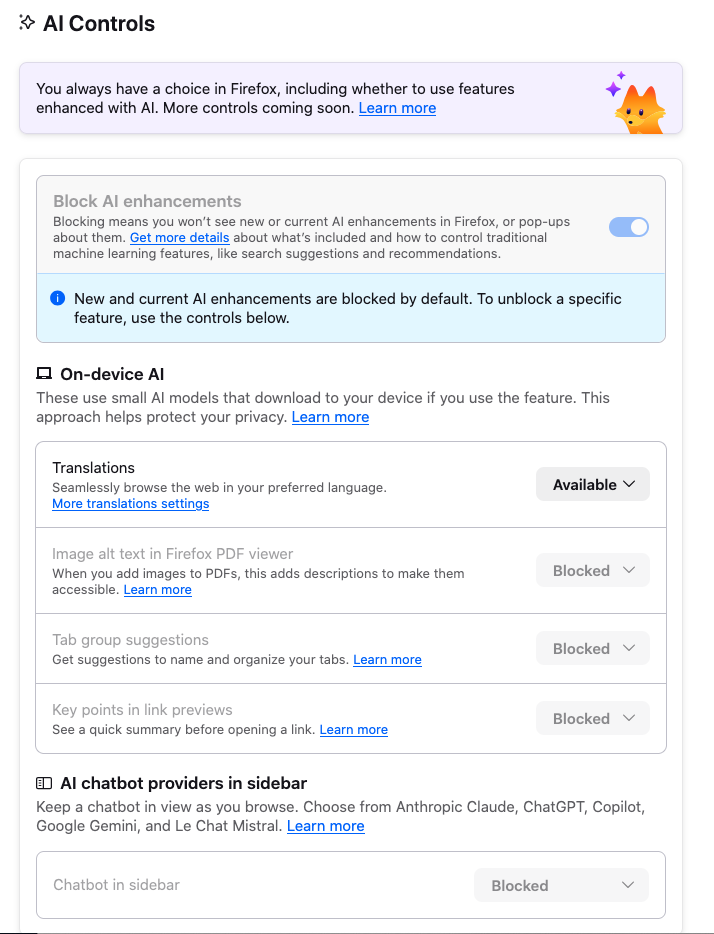
    For those managing Firefox installs looking for the preferences for the new AI controls, here is an example leaving everything but "Translations" blocked and completely unselectable in the UI:

    ```// New "AI" preferences -->
    lockPref("browser.ai.control.default", "blocked");
    lockPref("browser.ai.control.linkPreviewKeyPoints", "blocked");
    lockPref("browser.ai.control.pdfjsAltText", "blocked");
    lockPref("browser.ai.control.sidebarChatbot", "blocked");
    lockPref("browser.ai.control.smartTabGroups", "blocked");
    defaultPref("browser.ai.control.translations", "available");
    lockPref("browser.aiwindow.enabled", false);
    lockPref("browser.aiwindow.endpoint", "");
    lockPref("browser.aiwindow.memories", false);
    lockPref("browser.aiwindow.model", "");
    lockPref("browser.aiwindow.preferences.enabled", false);
    // <--


    Resulting in AI controls that look like this:


    https://support.mozilla.org/en-US/kb/customizing-firefox-using-autoconfig


    #firefox #ai #admin
    Link Preview Image
    1 Reply Last reply
    1
    0
    • R relay@relay.infosec.exchange shared this topic

    Reply
    • Reply as topic
    Log in to reply
    • Oldest to Newest
    • Newest to Oldest
    • Most Votes


    • Login

    • Login or register to search.
    • First post
      Last post
    0
    • Categories
    • Recent
    • Tags
    • Popular
    • World
    • Users
    • Groups