For those managing Firefox installs looking for the preferences for the new AI controls, here is an example leaving everything but "Translations" blocked and completely unselectable in the UI:
-
For those managing Firefox installs looking for the preferences for the new AI controls, here is an example leaving everything but "Translations" blocked and completely unselectable in the UI:
```// New "AI" preferences -->
lockPref("browser.ai.control.default", "blocked");
lockPref("browser.ai.control.linkPreviewKeyPoints", "blocked");
lockPref("browser.ai.control.pdfjsAltText", "blocked");
lockPref("browser.ai.control.sidebarChatbot", "blocked");
lockPref("browser.ai.control.smartTabGroups", "blocked");
defaultPref("browser.ai.control.translations", "available");
lockPref("browser.aiwindow.enabled", false);
lockPref("browser.aiwindow.endpoint", "");
lockPref("browser.aiwindow.memories", false);
lockPref("browser.aiwindow.model", "");
lockPref("browser.aiwindow.preferences.enabled", false);
// <--
Resulting in AI controls that look like this:


https://support.mozilla.org/en-US/kb/customizing-firefox-using-autoconfig


#firefox #ai #admin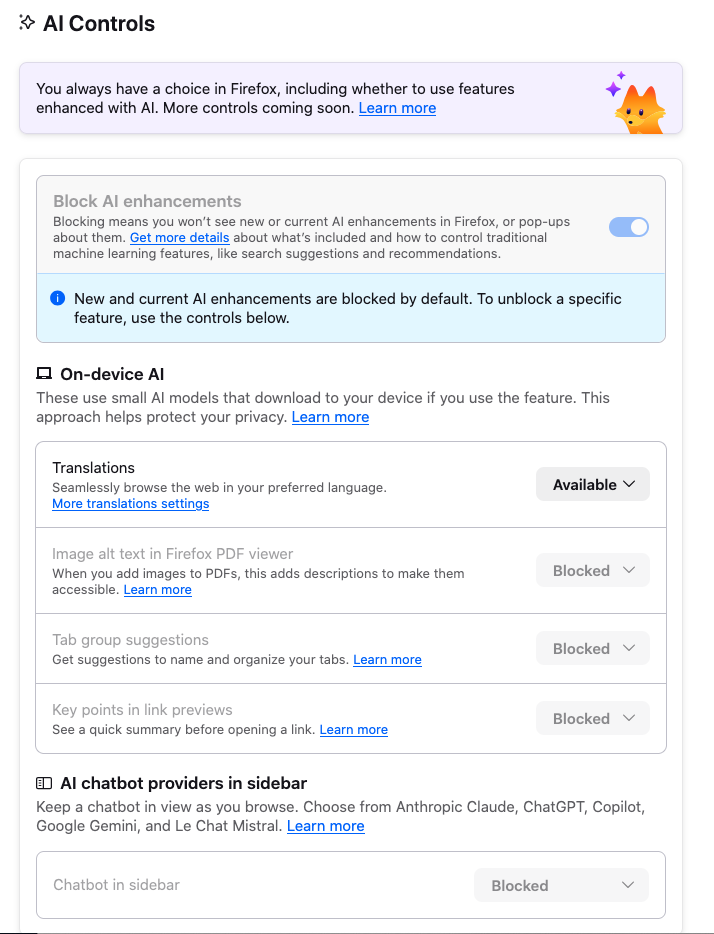
-
R relay@relay.infosec.exchange shared this topic