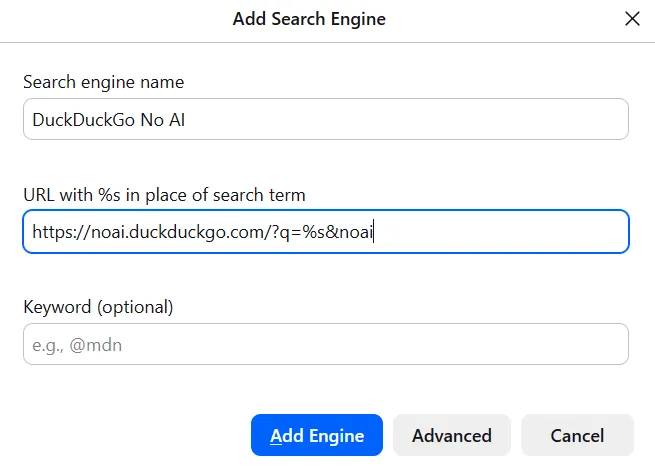
how to switch to noai.duckduckgo.com on firefox without installing any extensions or plugins:
-
@MachineLordZero honestly I hadn't even registered that until you pointed it out. Luckily it turns out that drop down has a "remove ai chat bot" option, so now it is gone from my life

-
@MachineLordZero honestly I hadn't even registered that until you pointed it out. Luckily it turns out that drop down has a "remove ai chat bot" option, so now it is gone from my life
@SudoCat yaaay
-
@Pibert you should be, but it beats google
Like, nowadays google is the worse search engine because it joins metadata from the website and it usually recommends trashy “saas products” that don’t help you and usually need a “fee” to use the product properly.
Dude, I just need to make my fake png into a transparent background png without needing to download an app to do this what the heck or paying a “fee”
-
how to switch to noai.duckduckgo.com on firefox without installing any extensions or plugins:
• open settings > search
• scroll down to search shortcuts and click add
• fill out according to the image below (text in alt text)
• click add engine
• scroll back up and select "DuckDuckGo No AI" under "default search engine"@eniko
Thank you! Just did the right click method on Librewolf and then made it the default. -
how to switch to noai.duckduckgo.com on firefox without installing any extensions or plugins:
• open settings > search
• scroll down to search shortcuts and click add
• fill out according to the image below (text in alt text)
• click add engine
• scroll back up and select "DuckDuckGo No AI" under "default search engine"@eniko you can do that to almost any input search field, including wikipedia, dictionaries and your fedi instance

-
how to switch to noai.duckduckgo.com on firefox without installing any extensions or plugins:
• open settings > search
• scroll down to search shortcuts and click add
• fill out according to the image below (text in alt text)
• click add engine
• scroll back up and select "DuckDuckGo No AI" under "default search engine"@eniko I never see anyone mention that you can just change your site preferences too. DDG actually has meaningful site settings saved as a cookie, no account necessary. You can disable AI features as well as lots of other options, including disabling ads.

-
@eniko There's actually an even easier way - any properly implemented search form can be added to your browser with just a right click
@SudoCat And what web browser is that screen shot about ? Trying to add noai DDG like that has not worked for me in any Firefox or Firefox fork since months. (btw Can be added easily in Tor and Mullvad browser from the search engine part of the browser settings, and LibreWolf people suggested they would be open to do the same).
-
@SudoCat And what web browser is that screen shot about ? Trying to add noai DDG like that has not worked for me in any Firefox or Firefox fork since months. (btw Can be added easily in Tor and Mullvad browser from the search engine part of the browser settings, and LibreWolf people suggested they would be open to do the same).
@regendans Firefox Developer Edition 152.0b5 (aarch64). Although this feature has been around aeons as far as I can remember.
I notice that in your screenshot, there is not a focus outline on the input field, and no text input context items have appeared. Are you right clicking on the text input, or the page itself?

-
@regendans Firefox Developer Edition 152.0b5 (aarch64). Although this feature has been around aeons as far as I can remember.
I notice that in your screenshot, there is not a focus outline on the input field, and no text input context items have appeared. Are you right clicking on the text input, or the page itself?
@SudoCat Oh my bad. You're right, if right clicked in the text field it shows Add search engine. Thank you.

-
how to switch to noai.duckduckgo.com on firefox without installing any extensions or plugins:
• open settings > search
• scroll down to search shortcuts and click add
• fill out according to the image below (text in alt text)
• click add engine
• scroll back up and select "DuckDuckGo No AI" under "default search engine"@eniko I would have expected that right-clicking the address bar should already suggest the search engine addition, but apparently DuckDuckGo serves both versions in the same name DuckDuckGo. So Firefox thinks it already has that search engine and thus shows no option.
Ideally they should serve it under some different name and this should become easier for everyone.
Also filed https://bugzilla.mozilla.org/show_bug.cgi?id=2043838 though.
-
@eniko What does the &noai parameter do? (Other than that, it's identical to what I added a few days ago.)
Most likely nothing.
At least it is not an officially documented URL parameter
How To Use URL Parameters To Change Your DuckDuckGo Search Settings - DuckDuckGo Help Pages
DuckDuckGo doesn’t track you. That’s the DuckDuckGo privacy policy in a nutshell.

(duckduckgo.com)
-
how to switch to noai.duckduckgo.com on firefox without installing any extensions or plugins:
• open settings > search
• scroll down to search shortcuts and click add
• fill out according to the image below (text in alt text)
• click add engine
• scroll back up and select "DuckDuckGo No AI" under "default search engine"Thanks!
-
how to switch to noai.duckduckgo.com on firefox without installing any extensions or plugins:
• open settings > search
• scroll down to search shortcuts and click add
• fill out according to the image below (text in alt text)
• click add engine
• scroll back up and select "DuckDuckGo No AI" under "default search engine"@eniko I can't be the only one who just turns off that function in the "normal" search engine. Am I?
-
how to switch to noai.duckduckgo.com on firefox without installing any extensions or plugins:
• open settings > search
• scroll down to search shortcuts and click add
• fill out according to the image below (text in alt text)
• click add engine
• scroll back up and select "DuckDuckGo No AI" under "default search engine"@eniko What about SearXNG and 4get public instances? -
how to switch to noai.duckduckgo.com on firefox without installing any extensions or plugins:
• open settings > search
• scroll down to search shortcuts and click add
• fill out according to the image below (text in alt text)
• click add engine
• scroll back up and select "DuckDuckGo No AI" under "default search engine"@eniko maybe I should try out ddg again. I stopped using it due to being used to google -
how to switch to noai.duckduckgo.com on firefox without installing any extensions or plugins:
• open settings > search
• scroll down to search shortcuts and click add
• fill out according to the image below (text in alt text)
• click add engine
• scroll back up and select "DuckDuckGo No AI" under "default search engine"@eniko My search engine is now changed, woo! Also made sure to remove google and bing and all that nonsense.
-
@eniko What about SearXNG and 4get public instances?
@feeblu i don't know anything about those
-
how to switch to noai.duckduckgo.com on firefox without installing any extensions or plugins:
• open settings > search
• scroll down to search shortcuts and click add
• fill out according to the image below (text in alt text)
• click add engine
• scroll back up and select "DuckDuckGo No AI" under "default search engine"@eniko this right clicking in the url box only works if at least two search engines are unhidden in the list in settings, in case anyone can't figure out why... it took me too long to figure it out.
-
@eniko I never see anyone mention that you can just change your site preferences too. DDG actually has meaningful site settings saved as a cookie, no account necessary. You can disable AI features as well as lots of other options, including disabling ads.
@rocketsoup @eniko thanks this seems to work on iOS Safari which doesn't let you specify a specific web address for a search engine.
-
how to switch to noai.duckduckgo.com on firefox without installing any extensions or plugins:
• open settings > search
• scroll down to search shortcuts and click add
• fill out according to the image below (text in alt text)
• click add engine
• scroll back up and select "DuckDuckGo No AI" under "default search engine"@eniko You can also just turn AI off in your DDG prefs.