Skip to content
  • Categories
  • Recent
  • Tags
  • Popular
  • World
  • Users
  • Groups
Skins
  • Light
  • Brite
  • Cerulean
  • Cosmo
  • Flatly
  • Journal
  • Litera
  • Lumen
  • Lux
  • Materia
  • Minty
  • Morph
  • Pulse
  • Sandstone
  • Simplex
  • Sketchy
  • Spacelab
  • United
  • Yeti
  • Zephyr
  • Dark
  • Cyborg
  • Darkly
  • Quartz
  • Slate
  • Solar
  • Superhero
  • Vapor

  • Default (Cyborg)
  • No Skin
Collapse
Brand Logo

CIRCLE WITH A DOT

  1. Home
  2. Uncategorized
  3. In stock Mastodon, have I overlooked a setting that sets the default "show/hide boosts" behavior when you follow someone?

In stock Mastodon, have I overlooked a setting that sets the default "show/hide boosts" behavior when you follow someone?

Scheduled Pinned Locked Moved Uncategorized
mastodon
9 Posts 4 Posters 0 Views
  • Oldest to Newest
  • Newest to Oldest
  • Most Votes
Reply
  • Reply as topic
Log in to reply
This topic has been deleted. Only users with topic management privileges can see it.
  • anctreat5358@mindly.socialA This user is from outside of this forum
    anctreat5358@mindly.socialA This user is from outside of this forum
    anctreat5358@mindly.social
    wrote last edited by
    #1

    In stock Mastodon, have I overlooked a setting that sets the default "show/hide boosts" behavior when you follow someone? This seems like it would already have been baked into the UI, but I can't find it.

    If it doesn't exist, then I'll file an enhancement request into the project, in the hopes others would also benefit from controlling their home feed more.

    Edit: It sounds like this setting is currently not present, so I filed suggestion 38350 with the Mastodon GitHub repo.

    #Mastodon

    bazkie@beige.partyB stevegis_ssg@mas.toS donaldham@mstdn.socialD 3 Replies Last reply
    0
    • anctreat5358@mindly.socialA anctreat5358@mindly.social

      In stock Mastodon, have I overlooked a setting that sets the default "show/hide boosts" behavior when you follow someone? This seems like it would already have been baked into the UI, but I can't find it.

      If it doesn't exist, then I'll file an enhancement request into the project, in the hopes others would also benefit from controlling their home feed more.

      Edit: It sounds like this setting is currently not present, so I filed suggestion 38350 with the Mastodon GitHub repo.

      #Mastodon

      bazkie@beige.partyB This user is from outside of this forum
      bazkie@beige.partyB This user is from outside of this forum
      bazkie@beige.party
      wrote last edited by
      #2

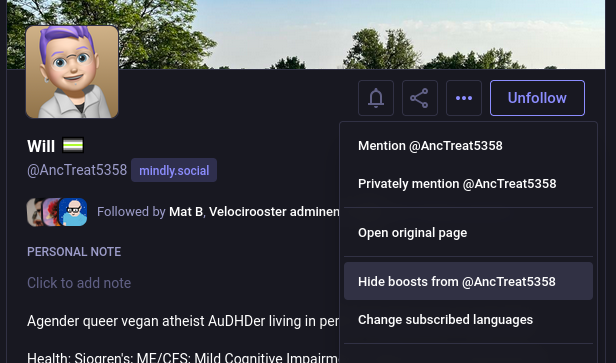
      @AncTreat5358 you mean this one? it's in the profile page 3-dots button menu. or maybe I misunderstand? *oh you mean default setting, I'm not sure that exists? never seen it

      (you can just disable all boosts tho on one of the main feed's top buttons)
      Link Preview Image
      anctreat5358@mindly.socialA 1 Reply Last reply
      0
      • anctreat5358@mindly.socialA anctreat5358@mindly.social

        In stock Mastodon, have I overlooked a setting that sets the default "show/hide boosts" behavior when you follow someone? This seems like it would already have been baked into the UI, but I can't find it.

        If it doesn't exist, then I'll file an enhancement request into the project, in the hopes others would also benefit from controlling their home feed more.

        Edit: It sounds like this setting is currently not present, so I filed suggestion 38350 with the Mastodon GitHub repo.

        #Mastodon

        stevegis_ssg@mas.toS This user is from outside of this forum
        stevegis_ssg@mas.toS This user is from outside of this forum
        stevegis_ssg@mas.to
        wrote last edited by
        #3

        @AncTreat5358

        You go to their profile page and click on the … button. It's one of the options. (This is in the browser; I've never tried any of the apps.)

        anctreat5358@mindly.socialA 1 Reply Last reply
        0
        • bazkie@beige.partyB bazkie@beige.party

          @AncTreat5358 you mean this one? it's in the profile page 3-dots button menu. or maybe I misunderstand? *oh you mean default setting, I'm not sure that exists? never seen it

          (you can just disable all boosts tho on one of the main feed's top buttons)

          Link Preview Image
          anctreat5358@mindly.socialA This user is from outside of this forum
          anctreat5358@mindly.socialA This user is from outside of this forum
          anctreat5358@mindly.social
          wrote last edited by
          #4

          @bazkie Yes, that is where you specify on a per-follow basis if you want to show or hide boosts.

          What I want to do is that, when I initially follow someone, that setting will be what I prefer. I'd prefer to hide boosts by default, and then selectively show boosts.

          bazkie@beige.partyB 1 Reply Last reply
          0
          • anctreat5358@mindly.socialA anctreat5358@mindly.social

            @bazkie Yes, that is where you specify on a per-follow basis if you want to show or hide boosts.

            What I want to do is that, when I initially follow someone, that setting will be what I prefer. I'd prefer to hide boosts by default, and then selectively show boosts.

            bazkie@beige.partyB This user is from outside of this forum
            bazkie@beige.partyB This user is from outside of this forum
            bazkie@beige.party
            wrote last edited by
            #5

            @AncTreat5358 ah no I don't think that has ever been an option!

            yeah that would be handy!

            anctreat5358@mindly.socialA 2 Replies Last reply
            0
            • stevegis_ssg@mas.toS stevegis_ssg@mas.to

              @AncTreat5358

              You go to their profile page and click on the … button. It's one of the options. (This is in the browser; I've never tried any of the apps.)

              anctreat5358@mindly.socialA This user is from outside of this forum
              anctreat5358@mindly.socialA This user is from outside of this forum
              anctreat5358@mindly.social
              wrote last edited by
              #6

              @stevegis_ssg Thanks. Please see the response to bazkie. I am looking to set a default setting for that to show or hide boosts, instead of having to remember to flip that.

              1 Reply Last reply
              0
              • bazkie@beige.partyB bazkie@beige.party

                @AncTreat5358 ah no I don't think that has ever been an option!

                yeah that would be handy!

                anctreat5358@mindly.socialA This user is from outside of this forum
                anctreat5358@mindly.socialA This user is from outside of this forum
                anctreat5358@mindly.social
                wrote last edited by
                #7

                @bazkie Sweet, then I'll file an enhancement request. Thank you!

                1 Reply Last reply
                0
                • anctreat5358@mindly.socialA anctreat5358@mindly.social

                  In stock Mastodon, have I overlooked a setting that sets the default "show/hide boosts" behavior when you follow someone? This seems like it would already have been baked into the UI, but I can't find it.

                  If it doesn't exist, then I'll file an enhancement request into the project, in the hopes others would also benefit from controlling their home feed more.

                  Edit: It sounds like this setting is currently not present, so I filed suggestion 38350 with the Mastodon GitHub repo.

                  #Mastodon

                  donaldham@mstdn.socialD This user is from outside of this forum
                  donaldham@mstdn.socialD This user is from outside of this forum
                  donaldham@mstdn.social
                  wrote last edited by
                  #8

                  @AncTreat5358
                  It's a bit of a workaround, but I think you could set a filter for the word "boosted" and choose whether to filter with a warning or just wipe any posts with that word without you knowing.

                  You'd miss posts that include the word in a different context, such as mention of a car that's turbocharged or supercharged, but it might solve the problem while waiting for an app feature change.

                  1 Reply Last reply
                  0
                  • bazkie@beige.partyB bazkie@beige.party

                    @AncTreat5358 ah no I don't think that has ever been an option!

                    yeah that would be handy!

                    anctreat5358@mindly.socialA This user is from outside of this forum
                    anctreat5358@mindly.socialA This user is from outside of this forum
                    anctreat5358@mindly.social
                    wrote last edited by
                    #9

                    @bazkie Cool; filed suggestion #38350 in the Mastodon repo! Thanks for the confirmation I was not overlooking it.

                    1 Reply Last reply
                    1
                    0
                    • R relay@relay.publicsquare.global shared this topic
                    Reply
                    • Reply as topic
                    Log in to reply
                    • Oldest to Newest
                    • Newest to Oldest
                    • Most Votes


                    • Login

                    • Login or register to search.
                    • First post
                      Last post
                    0
                    • Categories
                    • Recent
                    • Tags
                    • Popular
                    • World
                    • Users
                    • Groups