one of the problems with being a mad scientist is that you can scope creep really fast
-
@foone Could you make Wine emulate dialog boxes close enough? And run in a browser?...
Hmm there's already stuff like BoxedWine, could you load the real Windows icons and fonts, and get the title bars close enough?@nyanpasu64 @foone why not? wine has a built in "desktop mode" for this purpose
-
@foone one and a very complex camshaft?
@Yuki oh that's a clever idea.
-
@Yuki oh that's a clever idea.
@foone hehe yay!
-
BTW with the "pop quiz" my current best solution is 13
@foone beam keystrokes to a PCjr with the infrared port on an HP 48SX calculator
-
but I'm a Mad Scientist.
So what's the Mad Scientist way to do this? Well, how'd I do it before?I wrote a line of code in my Visual Basic 6 IDE and ran it on my Windows 98 VM
@foone Mad Science means never stopping to ask "what's the worst thing that could happen?"
-
@onfy I am, but I'm also not anymore.
-
@foone beam keystrokes to a PCjr with the infrared port on an HP 48SX calculator
@gloriouscow sadly my PCjr can't run windows 95
-
@gloriouscow sadly my PCjr can't run windows 95
@foone skill issue
-
But where do we run the code?
Well there's two obvious options that are sufficiently Mad Scientist enough to be interesting enough to do:1. In the browser. Do this client-side. Boot a VM in the browser that runs Visual Basic and then the resulting EXE and shows that to the user
@foone save a step: VBScript can MsgBox too, so you could use WScript to run a generated .vbs.
-
@gloriouscow sadly my PCjr can't run windows 95
@foone clearly the pcjr runs mtcp over parallel to the windows 95 machine
-
@gloriouscow sadly my PCjr can't run windows 95
@foone @gloriouscow they made a PCjr 286 upgrade, and there are 286->486 upgrades. So you could totally do this.
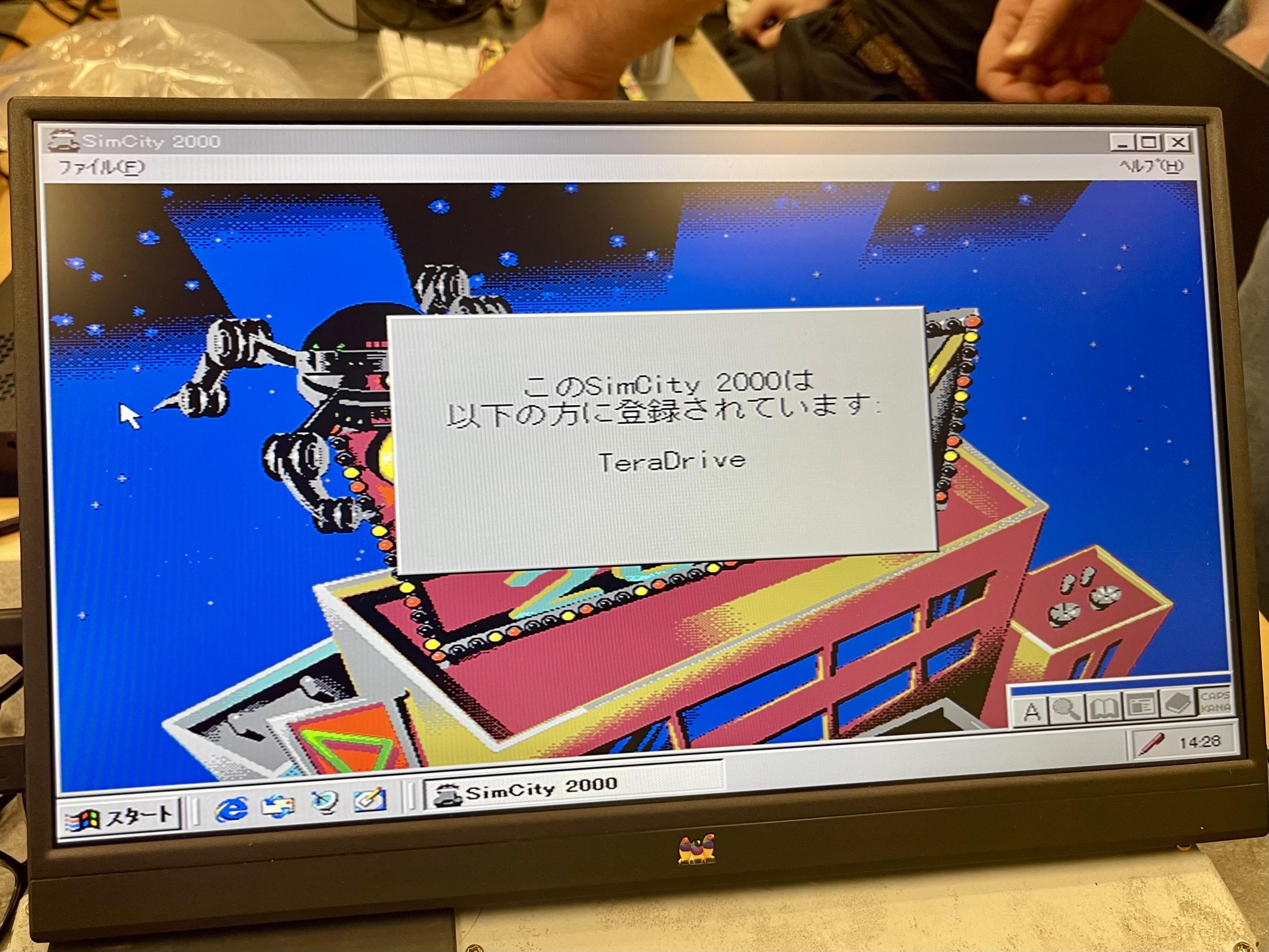
Don’t though. I did the 286->486 upgrade on a Sega TeraDrive owned by a friend and booted Windows 95 on it … it takes about 10 minutes to get to the desktop, in part because the XTIDE isn’t accelerated.
But, alas, after an hour of fucking with it at the Alum Rock library, I booted America’s favorite city simulator.
-
@foone save a step: VBScript can MsgBox too, so you could use WScript to run a generated .vbs.
@ZiggyTheHamster nah using Visual Basic is a loadbearing part of my Mad Science
-
@ZiggyTheHamster nah using Visual Basic is a loadbearing part of my Mad Science
@foone in that case, you can pass switches to the VB6 executable to make it compile a project, so you could generate the .bas/.frm and compile it with a .bat, and finally run it.
I did some version of this when I developed and maintained an IRCX server written in VB6.
-
@sif oh there's a lot of ways I could do this easier. I'm doing it wrong on purpose as part of the bit
-
@foone in that case, you can pass switches to the VB6 executable to make it compile a project, so you could generate the .bas/.frm and compile it with a .bat, and finally run it.
I did some version of this when I developed and maintained an IRCX server written in VB6.
@ZiggyTheHamster the problem is that I still need to get the data into the computer, and "typing it into VB6 IDE" is that step in the current design.
I guess I could write a wrapper program that just types in the input+an enter, then runs the VB6 compile + run, but by that point why don't I just make the program call MessageBoxA?
so having VB6 be part of the loop is important to me
-
@ZiggyTheHamster the problem is that I still need to get the data into the computer, and "typing it into VB6 IDE" is that step in the current design.
I guess I could write a wrapper program that just types in the input+an enter, then runs the VB6 compile + run, but by that point why don't I just make the program call MessageBoxA?
so having VB6 be part of the loop is important to me
@ZiggyTheHamster oh I was thinking about the hardware option, I didn't see this was on the "in the browser" option.
yeah that'd help, that'd be what I'd want to do
-
POP QUIZ: how many servos do you need, if you need to be able to type all the symbol keys on a QWERTY-US keyboard (49 keys), plus the following keys:
F5 (to run the program after we type in the code)
Enter (to close the popup after we take the photo, which will then trigger a shutdown)@foone Three. One to move the finger left and right, ne to move it up and down and one to press the key.
-
BTW with the "pop quiz" my current best solution is 13
@foone can you get it down to 6 by doing an xyz plotter for individual keystrokes plus 3 to cover control alt and shift? Bonus of you use an old RAMPS board without silent stepper drivers so it can sing at you as it types.
-
but it would make my mastodon and blusky posts at least 5% cooler
@foone I’m sure whoever’s running Intel this week would kill for a consistent 5% performance improvement with each CPU generation.
-
The system doesn't have a power supply that windows 95 can turn off automatically (It's a little too old for that), so while I could have the monitoring hardware watch the screen for the "it's now safe to turn off your computer" screen, I'd probably just make it wait 60 seconds after we issue the shutdown, then yank the power.
@foone you could hack an ATX power supply to power off an AT board by toggling a bit on the parallel port to interrupt a circuit that holds it powered on. Also, you could probably automate the whole thing using PXE boot, even swapping OSes remotely.