Skip to content
  • Categories
  • Recent
  • Tags
  • Popular
  • World
  • Users
  • Groups
Skins
  • Light
  • Brite
  • Cerulean
  • Cosmo
  • Flatly
  • Journal
  • Litera
  • Lumen
  • Lux
  • Materia
  • Minty
  • Morph
  • Pulse
  • Sandstone
  • Simplex
  • Sketchy
  • Spacelab
  • United
  • Yeti
  • Zephyr
  • Dark
  • Cyborg
  • Darkly
  • Quartz
  • Slate
  • Solar
  • Superhero
  • Vapor

  • Default (Cyborg)
  • No Skin
Collapse
Brand Logo

CIRCLE WITH A DOT

  1. Home
  2. Uncategorized
  3. #VirtualBox unter #Linux

#VirtualBox unter #Linux

Scheduled Pinned Locked Moved Uncategorized
virtualboxlinuxwindowsvirtualmaschine
1 Posts 1 Posters 0 Views
  • Oldest to Newest
  • Newest to Oldest
  • Most Votes
Reply
  • Reply as topic
Log in to reply
This topic has been deleted. Only users with topic management privileges can see it.
  • oldperl@mastodon.onlineO This user is from outside of this forum
    oldperl@mastodon.onlineO This user is from outside of this forum
    oldperl@mastodon.online
    wrote last edited by
    #1

    #VirtualBox unter #Linux

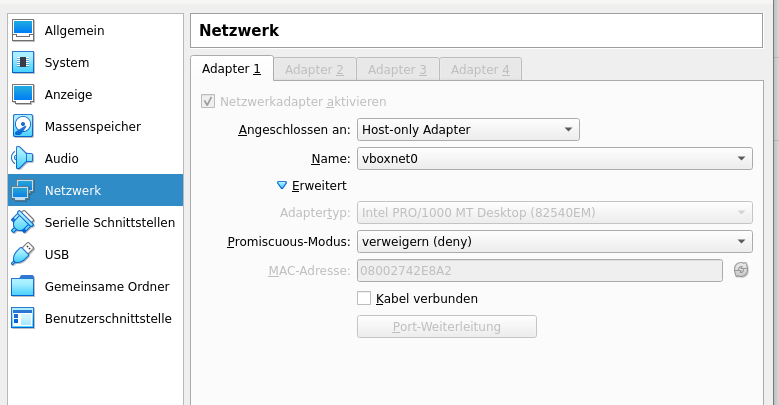
    Wird dein Gemeinsamer Ordner im Gast nicht angezeigt, so kann dies zwei Gründe haben.

    1. Du hast die Gasterweiterung nicht installiert.

    2. Es gibt kein aktiviertes Netzwerk für den Gast. Hier solltest Du zumindest das Host-only Adapter für das Netzwerk aktivieren (siehe Screenshot).

    Alleine die Aktivierung reicht aus, um den Ordner zu verbinden, das virtuelle Kabel muss nicht eingesteckt sein.

    #VM #Linux #Windows #VirtualMaschine
    Link Preview Image
    1 Reply Last reply
    2
    0
    • R relay@relay.an.exchange shared this topic
      R relay@relay.mycrowd.ca shared this topic

    Reply
    • Reply as topic
    Log in to reply
    • Oldest to Newest
    • Newest to Oldest
    • Most Votes


    • Login

    • Login or register to search.
    • First post
      Last post
    0
    • Categories
    • Recent
    • Tags
    • Popular
    • World
    • Users
    • Groups