Gawd sometimes I hate passkeys.
-
Gawd sometimes I hate passkeys.
I have to deal with some fairly old people - people who have lost much of their vision and who have never been particularly technically minded.
The modern race-to-lock-everything has moved a lot of services (such as outlook) to move to passkeys.
That's nice - unless one is trying to deal with problems for an old person who is 800 miles away.
It appears that many of these services treat having a passkey as a one-way ratchet. Once someone (me) has set up a passkey (limited to my computer and phone) then the service switches to demand a passkey rather than the password to get in - but the old person's phone/computer does not have the passkey nor knows how to use it even if they did.
Our present Internet - largely programmed by young people with tech knowledge and good eyesight - is becoming increasingly hard to use by older people while things (like medical services) increase security that these people do not know how to use and can't be managed remotely.
@karlauerbach I feel you. I'm often in a position to support elders with technical issues, and the problem of navigating credentials management is a huge piece of it. For example, the flow to create entries in macOS Passwords is abysmal for someone whose cognition and/or grasp of minimal user interfaces isn't sharp. I have more than one client for whom I want to recommend they return to passwords on paper just because the process of managing them is otherwise so fraught and stressful...
-
@GamesMissed Ah, you have the timeout issue with Authenticator tools that I have - For some reason I can't remember number sequences accurately, so I am at a disadvantage with my bank-supplied RSA widgets (or things like the Google Authenticator app) to get the numbers transferred in the time window. I usually wait until a new time cycle begins, and a new number appears, before attempting it.)
(And yes, arthritis is quite a barrier - I can't really hold a pen, or always accurately use a touch screen, and I have trouble shaping my fingers to form chords on a guitar or mandolin.)
I try to do most financial things through a single desktop computer rather than trying to use a small screen mobile phone. That way I get bigger screens and a real keyboard.
And I sincerely detest websites that have turned on "Do not allow paste" into password fields. That seems such a stupid thing to do. (Consequently I have "Don't F**k With Paste" plugins turned on.)
For lots of reasons, I never do banking or any kind of financial transaction on anything but my desktop. It’s that or walk into the bank and stick a card into an automatic teller.
I just don’t see the point of doing banking transactions on something you cart around with you all day. And on that front, I’ve stopped taking my phone with me when I go outside because downtime is good.
-
@rodneylives @Bodling I suspect that many of us know several people who, either through age or physical or mental issues, have trouble with technological change.
And it is likely that many of us will have similar issues as we age.
Some will write off these people - saying that they are too old and out of touch to deserve a say in our politics or social policies - but I say the opposite: that these people often bring a great deal of practical experience that is little known (or unknown) to younger people. Indeed one could (but I won't) posit the contrary argument, that younger people do not have the experience and judgement to participate in elections. (Yes, that would be very wrong, extremely offensive to and dismissive of our younger citizens; I am merely stating it to demonstrate that there could arguments at both ends of the age spectrum.)
@karlauerbach @rodneylives @Bodling
We might be reduced to a condition where all that knowledge stored up in various peoples heads actually mean something again.
Just looking at the cascade of nightmare unfolding in the global economy as Asia needs to buy to oil that is now going through the Panama Canal. That canal has been suffering, a drought for several years now, and has restricted capacity. Oil tankers can pay a much higher fee than grain cargo.
1/2
-
@karlauerbach @rodneylives @Bodling
We might be reduced to a condition where all that knowledge stored up in various peoples heads actually mean something again.
Just looking at the cascade of nightmare unfolding in the global economy as Asia needs to buy to oil that is now going through the Panama Canal. That canal has been suffering, a drought for several years now, and has restricted capacity. Oil tankers can pay a much higher fee than grain cargo.
1/2
@karlauerbach @rodneylives @Bodling
That means that grain is going to get more expensive for the simple reason that it will probably have to travel around the tip of South America.
It’s a real pile of drought in America’s bread basket plus fertilizer constraints at a bad time, plus extreme weather.
Building a supply chain with no tolerance to it. It’s kind of a problem.
2/2
-
Gawd sometimes I hate passkeys.
I have to deal with some fairly old people - people who have lost much of their vision and who have never been particularly technically minded.
The modern race-to-lock-everything has moved a lot of services (such as outlook) to move to passkeys.
That's nice - unless one is trying to deal with problems for an old person who is 800 miles away.
It appears that many of these services treat having a passkey as a one-way ratchet. Once someone (me) has set up a passkey (limited to my computer and phone) then the service switches to demand a passkey rather than the password to get in - but the old person's phone/computer does not have the passkey nor knows how to use it even if they did.
Our present Internet - largely programmed by young people with tech knowledge and good eyesight - is becoming increasingly hard to use by older people while things (like medical services) increase security that these people do not know how to use and can't be managed remotely.
@karlauerbach
We got my mom a WOW computer because it claimed to be simple for old people. We went over everything with her and labeled the various buttons, even put our phone number to call with any questions. It still "broke" and we had to drive 600 miles to fix it. It turned out the power supply had become unplugged.
Computers and memory loss do not work well together. -
Gawd sometimes I hate passkeys.
I have to deal with some fairly old people - people who have lost much of their vision and who have never been particularly technically minded.
The modern race-to-lock-everything has moved a lot of services (such as outlook) to move to passkeys.
That's nice - unless one is trying to deal with problems for an old person who is 800 miles away.
It appears that many of these services treat having a passkey as a one-way ratchet. Once someone (me) has set up a passkey (limited to my computer and phone) then the service switches to demand a passkey rather than the password to get in - but the old person's phone/computer does not have the passkey nor knows how to use it even if they did.
Our present Internet - largely programmed by young people with tech knowledge and good eyesight - is becoming increasingly hard to use by older people while things (like medical services) increase security that these people do not know how to use and can't be managed remotely.
@karlauerbach Dealing with my MIL's tech at her assisted living facility is a nonstop time suck. And it repeats. And nobody on staff is particularly good at helping either. At this point I've just stopped trying. If she can watch tennis on TV and get her texts on her phone, I just am too burned out with it to jump through hoops anymore. BUT I am thinking through how to set things up for ourselves in our old age. How to simplify.
-
@karlauerbach Dealing with my MIL's tech at her assisted living facility is a nonstop time suck. And it repeats. And nobody on staff is particularly good at helping either. At this point I've just stopped trying. If she can watch tennis on TV and get her texts on her phone, I just am too burned out with it to jump through hoops anymore. BUT I am thinking through how to set things up for ourselves in our old age. How to simplify.
@karlauerbach I should add that I handle nearly everything for my MIL (have done since my FIL died in 2024) so there's very little she needs to do herself. Just use her TV remote and phone for email and texts. Everything else I handle. Finances. Taxes. Legal stuff. Social Security. Receipts. Medicare choices. Bills. You name it.
-
For lots of reasons, I never do banking or any kind of financial transaction on anything but my desktop. It’s that or walk into the bank and stick a card into an automatic teller.
I just don’t see the point of doing banking transactions on something you cart around with you all day. And on that front, I’ve stopped taking my phone with me when I go outside because downtime is good.
@GhostOnTheHalfShell @karlauerbach @GamesMissed My Novobanco website login takes my username / passcode(*), then requires authenticating me via the app on my phone (which requires only the same passcode). Every time I race to login to the app - because the notification will not show up in the app if I'm already logged in - and approve it within 30 seconds.
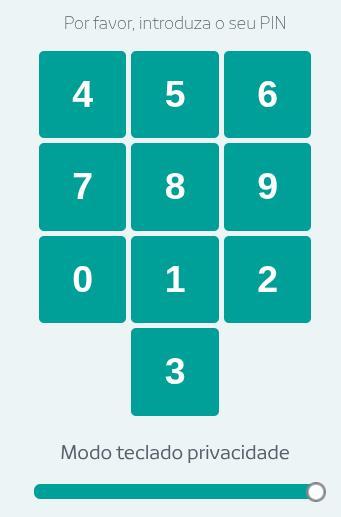
(*) The passcode entry screen is a 10 digit keypad. But the numbers are not where you expect them to be. And they move, each time.
-
Gawd sometimes I hate passkeys.
I have to deal with some fairly old people - people who have lost much of their vision and who have never been particularly technically minded.
The modern race-to-lock-everything has moved a lot of services (such as outlook) to move to passkeys.
That's nice - unless one is trying to deal with problems for an old person who is 800 miles away.
It appears that many of these services treat having a passkey as a one-way ratchet. Once someone (me) has set up a passkey (limited to my computer and phone) then the service switches to demand a passkey rather than the password to get in - but the old person's phone/computer does not have the passkey nor knows how to use it even if they did.
Our present Internet - largely programmed by young people with tech knowledge and good eyesight - is becoming increasingly hard to use by older people while things (like medical services) increase security that these people do not know how to use and can't be managed remotely.
@karlauerbach I still haven’t seen a good concise summary of how to use passkeys in any context, but my vague impression of them is that if I enable them then my access ends when the device fails - and eventually every device will fail, so I’m not using passkeys
-
@karlauerbach One of my parents has arthritis in their hands, and putting in a rotating passkey in 30 seconds is genuinely difficult for them some days. It makes them panic, and they just want to go back to using passwords with no time limit.
@GamesMissed @karlauerbach Those four digit codes aren't passkeys, they're something different. (They're called TOTP authenticator codes, not that you need to know that.) Passkeys - the thing people earlier in the thread are talking about - are a newer thing, kind of like a password that's stored in your computer, and you just have to "unlock" them by doing some simple action like touching a button or scanning your fingerprint or typing in a PIN (which doesn't have to ever change). At least, that's the theoretical idea, though in practice they often wind up being kind of hard to set up.
By the way for the 30-second rotating codes (TOTP), you might want to know that you don't have to enter the code before the next one shows up. There's a grace period where a code is still valid even though it's not showing up on the authenticator app (or whatever). I think it might be another 30 seconds, maybe longer, but I'm not sure offhand.
-
@GamesMissed @karlauerbach Those four digit codes aren't passkeys, they're something different. (They're called TOTP authenticator codes, not that you need to know that.) Passkeys - the thing people earlier in the thread are talking about - are a newer thing, kind of like a password that's stored in your computer, and you just have to "unlock" them by doing some simple action like touching a button or scanning your fingerprint or typing in a PIN (which doesn't have to ever change). At least, that's the theoretical idea, though in practice they often wind up being kind of hard to set up.
By the way for the 30-second rotating codes (TOTP), you might want to know that you don't have to enter the code before the next one shows up. There's a grace period where a code is still valid even though it's not showing up on the authenticator app (or whatever). I think it might be another 30 seconds, maybe longer, but I'm not sure offhand.
@diazona @GamesMissed Thanks for the explanation.
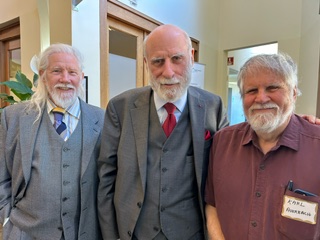
(I was aware that the multiple digit 2FA numbers that come via email or text are not part of passkeys. Same for the six digit things generated my RSA keyfobs and Authenticator apps. I do not know the correct nouns for these things. BTW, I'm somewhat familiar with the workings of things based on public key cryptography - Whit Diffie worked in my computer/network security research group way back when. Here's a somewhat recent photo of me and Whit:
-
@diazona @GamesMissed Thanks for the explanation.
(I was aware that the multiple digit 2FA numbers that come via email or text are not part of passkeys. Same for the six digit things generated my RSA keyfobs and Authenticator apps. I do not know the correct nouns for these things. BTW, I'm somewhat familiar with the workings of things based on public key cryptography - Whit Diffie worked in my computer/network security research group way back when. Here's a somewhat recent photo of me and Whit:
@karlauerbach @GamesMissed Understood, you don't need to prove your credentials to me. It's just that the post I was replying to was conflating passkeys and TOTP codes, and I thought clearing that up would be useful (if not to you, at least to other people reading the thread).
-
@GhostOnTheHalfShell @karlauerbach @GamesMissed My Novobanco website login takes my username / passcode(*), then requires authenticating me via the app on my phone (which requires only the same passcode). Every time I race to login to the app - because the notification will not show up in the app if I'm already logged in - and approve it within 30 seconds.
(*) The passcode entry screen is a 10 digit keypad. But the numbers are not where you expect them to be. And they move, each time.
@oddhack @karlauerbach @GamesMissed
That sounds more frightening than I want to think about
-
@karlauerbach I still haven’t seen a good concise summary of how to use passkeys in any context, but my vague impression of them is that if I enable them then my access ends when the device fails - and eventually every device will fail, so I’m not using passkeys
@ShadSterling Passkeys are somewhat clever. They use the ability of public/private crypto keys to perform an identity challenge that is unique every time it is used. The private key is stored on your machine(s) and the matching public key is on the website/service. A biometric is usually used to allow the private key to be taken from its storage (which could be a protected, trusted bit of hardware, or not) and a random challenge is sent to the website. That website has to unwrap that challenge using the public key and return the challenge (or a digest of it) back to the client and who can check whether the unwrapped challenge is correct. As with most things cryptographic, there are many devils lurking in the details and there are vulnerabilities in unexpected places - such as in public key systems one has to take care not to accept a bogus "public" key.
Update: I made some errors, particularly with regard to who issues the challenge and how it is processed.
-
@oddhack @karlauerbach @GamesMissed
That sounds more frightening than I want to think about
@GhostOnTheHalfShell @karlauerbach @GamesMissed it is cursed beyond reason. Portugal is not big on accessibility in general, and this design pattern is explicitly hostile towards *everyone* using the website.
-
@GhostOnTheHalfShell @karlauerbach @GamesMissed My Novobanco website login takes my username / passcode(*), then requires authenticating me via the app on my phone (which requires only the same passcode). Every time I race to login to the app - because the notification will not show up in the app if I'm already logged in - and approve it within 30 seconds.
(*) The passcode entry screen is a 10 digit keypad. But the numbers are not where you expect them to be. And they move, each time.
@oddhack @GhostOnTheHalfShell @GamesMissed What you are describing is not a passkey system. What you describe seems to be a name:time-based-authenticator system. Usually passkey systems only require a login name and a biometric (the biometric is processed locally on your machine and not transmitted.)
A lot of financial institutions use this method. Indeed many banks hand out RSA fobs to customers to use. These generate a new 6-digit authentication sequence every 30 seconds or so. There are also software versions, such as the Google Authenticator App.
(When I was working on various things at "the labs" sometimes we had to pass through rotating gates, kinda like jails, and we were physically locked in until we had passed all the identification/authentication tests. I never felt comfortable when locked in that way.)
-
@karlauerbach Dealing with my MIL's tech at her assisted living facility is a nonstop time suck. And it repeats. And nobody on staff is particularly good at helping either. At this point I've just stopped trying. If she can watch tennis on TV and get her texts on her phone, I just am too burned out with it to jump through hoops anymore. BUT I am thinking through how to set things up for ourselves in our old age. How to simplify.
@nomdeb I have similar issues with my mother at a living facility. She regularly destroys the software or hardware of her devices by pushing every button (sometimes at the same time) and pounding on things as if she were on a chain gang breaking rocks.
Most recently she bricked, somehow, her iPhone to the degree that it had to be replaced by a new one. (Fortunately I had set it up to back up pretty much everything important to Apple's iCloud - I trust Apple with things far more than I would were it an Android phone and Google.)
-
@karlauerbach @rodneylives @Bodling
That means that grain is going to get more expensive for the simple reason that it will probably have to travel around the tip of South America.
It’s a real pile of drought in America’s bread basket plus fertilizer constraints at a bad time, plus extreme weather.
Building a supply chain with no tolerance to it. It’s kind of a problem.
2/2
@GhostOnTheHalfShell @rodneylives @Bodling I've heard about the Panama drought problem. But you are right that it is under-reported.
Back during the first trump term China realized that the US has become an unreliable supplier of grain, particularly soy.
So China made investments in grain growing countries, such as Argentina, to create solid product-moving infrastructure, such as good roads, good railroads, and deepwater docking facilities - thus greatly reducing the shipping costs and thus effectively permanently putting US growers at a net price disadvantage vis-a-vis non US growers of soy.
China clearly has strategic long term thinkers and investors, something the US seems to have depleted.
-
@ShadSterling Passkeys are somewhat clever. They use the ability of public/private crypto keys to perform an identity challenge that is unique every time it is used. The private key is stored on your machine(s) and the matching public key is on the website/service. A biometric is usually used to allow the private key to be taken from its storage (which could be a protected, trusted bit of hardware, or not) and a random challenge is sent to the website. That website has to unwrap that challenge using the public key and return the challenge (or a digest of it) back to the client and who can check whether the unwrapped challenge is correct. As with most things cryptographic, there are many devils lurking in the details and there are vulnerabilities in unexpected places - such as in public key systems one has to take care not to accept a bogus "public" key.
Update: I made some errors, particularly with regard to who issues the challenge and how it is processed.
@karlauerbach that’s about how passkeys work, not how to use them
-
@nomdeb I have similar issues with my mother at a living facility. She regularly destroys the software or hardware of her devices by pushing every button (sometimes at the same time) and pounding on things as if she were on a chain gang breaking rocks.
Most recently she bricked, somehow, her iPhone to the degree that it had to be replaced by a new one. (Fortunately I had set it up to back up pretty much everything important to Apple's iCloud - I trust Apple with things far more than I would were it an Android phone and Google.)
@karlauerbach YES!!!!!! Said with feeling. So much feeling. Exactly this. She also refuses any efforts I make to get her occupational therapist help to teach her stuff that she uses frequently like the TV remote control. Or learn to use voice controls. All the deep sighs. I did lol to see a book titled stupid things my parents did that I will avoid.
 but more seriously I am planning as best as I can to keep up with tech that will help in my own old age and try for simplicity.