I wanted to try and blog more regularly.
-
I wanted to try and blog more regularly. But I got to a point where the "easy" blog ideas I had were exhausted. I was left with cool topics that required extensive research and writing. It just seemed "too hard" to get started on any of those topics. And so my blog has languished for many months.
Recently I realized that I didn't have to unpack those "cool but difficult" topics to write something useful. So here's a quickie on some useful tips and tricks with the Linux "ls" command.

Linux Notes: ls and Timestamps
Confused about timestamp options and output with the Linux ls command? Here are some of my favorite tips!
Righteous IT (righteousit.com)
For my fellow bloggers the lesson here is that not every post has to be an earth-shattering revelation. You have something useful to say even (or perhaps especially) on topics you have already mastered. Get out there and get writing!
-
I wanted to try and blog more regularly. But I got to a point where the "easy" blog ideas I had were exhausted. I was left with cool topics that required extensive research and writing. It just seemed "too hard" to get started on any of those topics. And so my blog has languished for many months.
Recently I realized that I didn't have to unpack those "cool but difficult" topics to write something useful. So here's a quickie on some useful tips and tricks with the Linux "ls" command.
Linux Notes: ls and Timestamps
Confused about timestamp options and output with the Linux ls command? Here are some of my favorite tips!
Righteous IT (righteousit.com)
For my fellow bloggers the lesson here is that not every post has to be an earth-shattering revelation. You have something useful to say even (or perhaps especially) on topics you have already mastered. Get out there and get writing!
@hal_pomeranz this is good stuff! I especially love the iso 8601 option, which I didn't know about...
-
@hal_pomeranz this is good stuff! I especially love the iso 8601 option, which I didn't know about...
@apgarcia I wish there was a version that included the seconds but not all the other chaff you get with “full”.
-
I wanted to try and blog more regularly. But I got to a point where the "easy" blog ideas I had were exhausted. I was left with cool topics that required extensive research and writing. It just seemed "too hard" to get started on any of those topics. And so my blog has languished for many months.
Recently I realized that I didn't have to unpack those "cool but difficult" topics to write something useful. So here's a quickie on some useful tips and tricks with the Linux "ls" command.
Linux Notes: ls and Timestamps
Confused about timestamp options and output with the Linux ls command? Here are some of my favorite tips!
Righteous IT (righteousit.com)
For my fellow bloggers the lesson here is that not every post has to be an earth-shattering revelation. You have something useful to say even (or perhaps especially) on topics you have already mastered. Get out there and get writing!
That was useful. Thank you.
-
R relay@relay.mycrowd.ca shared this topic
-
I wanted to try and blog more regularly. But I got to a point where the "easy" blog ideas I had were exhausted. I was left with cool topics that required extensive research and writing. It just seemed "too hard" to get started on any of those topics. And so my blog has languished for many months.
Recently I realized that I didn't have to unpack those "cool but difficult" topics to write something useful. So here's a quickie on some useful tips and tricks with the Linux "ls" command.
Linux Notes: ls and Timestamps
Confused about timestamp options and output with the Linux ls command? Here are some of my favorite tips!
Righteous IT (righteousit.com)
For my fellow bloggers the lesson here is that not every post has to be an earth-shattering revelation. You have something useful to say even (or perhaps especially) on topics you have already mastered. Get out there and get writing!
one of the things i learned doing tutorials and classes is that it's very easy to forget that what we think of as trivial often isn't to a newbie. accessible info on basic tasks, written clearly, has real value to them.
-
one of the things i learned doing tutorials and classes is that it's very easy to forget that what we think of as trivial often isn't to a newbie. accessible info on basic tasks, written clearly, has real value to them.
@paul_ipv6 Very true. I was making my blogging life more difficult than it needed to be because I forgot this lesson.
-
I wanted to try and blog more regularly. But I got to a point where the "easy" blog ideas I had were exhausted. I was left with cool topics that required extensive research and writing. It just seemed "too hard" to get started on any of those topics. And so my blog has languished for many months.
Recently I realized that I didn't have to unpack those "cool but difficult" topics to write something useful. So here's a quickie on some useful tips and tricks with the Linux "ls" command.
Linux Notes: ls and Timestamps
Confused about timestamp options and output with the Linux ls command? Here are some of my favorite tips!
Righteous IT (righteousit.com)
For my fellow bloggers the lesson here is that not every post has to be an earth-shattering revelation. You have something useful to say even (or perhaps especially) on topics you have already mastered. Get out there and get writing!
@hal_pomeranz I love the iso option for timestamps, I'll have to add that to my alias.
When I started out decades ago I used to have a very involved .kshrc with lots of aliases and shortcuts. As I've gotten older I've reduced that to only a couple since I got so frustrated with logging into new systems and not having any of my aliases and everything feeling so foreign.
-
@hal_pomeranz I love the iso option for timestamps, I'll have to add that to my alias.
When I started out decades ago I used to have a very involved .kshrc with lots of aliases and shortcuts. As I've gotten older I've reduced that to only a couple since I got so frustrated with logging into new systems and not having any of my aliases and everything feeling so foreign.
@derekmceachern As I embarked on my consulting career, maintaining extensive custom aliases just got to be too much hassle as I moved from job to job. Weirdly, I do have a .emacs file that I bring everywhere because I really dislike the default syntax highlighting colors in Emacs—perhaps because my terminals are black text on white.
-
@derekmceachern As I embarked on my consulting career, maintaining extensive custom aliases just got to be too much hassle as I moved from job to job. Weirdly, I do have a .emacs file that I bring everywhere because I really dislike the default syntax highlighting colors in Emacs—perhaps because my terminals are black text on white.
@hal_pomeranz I have the same thing about my .vimrc file. I have it in GitHub so I can easily copy it down when needed
-
I wanted to try and blog more regularly. But I got to a point where the "easy" blog ideas I had were exhausted. I was left with cool topics that required extensive research and writing. It just seemed "too hard" to get started on any of those topics. And so my blog has languished for many months.
Recently I realized that I didn't have to unpack those "cool but difficult" topics to write something useful. So here's a quickie on some useful tips and tricks with the Linux "ls" command.
Linux Notes: ls and Timestamps
Confused about timestamp options and output with the Linux ls command? Here are some of my favorite tips!
Righteous IT (righteousit.com)
For my fellow bloggers the lesson here is that not every post has to be an earth-shattering revelation. You have something useful to say even (or perhaps especially) on topics you have already mastered. Get out there and get writing!
@hal_pomeranz Great post! Reminds of the good ole days of the Command Line Kung Fu blog that you and Ed Skoudis did back in the day. Really enjoyed those!
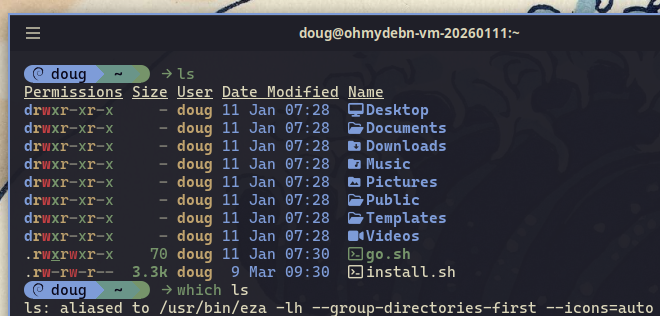
Have you tried eza? That's what I alias ls to these days.
-
@hal_pomeranz Great post! Reminds of the good ole days of the Command Line Kung Fu blog that you and Ed Skoudis did back in the day. Really enjoyed those!
Have you tried eza? That's what I alias ls to these days.
@dougburks I think I'll stick with my "ls" like the other fogeys on the porch. You kids get off my lawn!
-
@dougburks I think I'll stick with my "ls" like the other fogeys on the porch. You kids get off my lawn!
@hal_pomeranz Had a feeling you'd say that! Don't forget to take your back pill

-
R relay@relay.infosec.exchange shared this topic