Subject: "systemctl suspend" on Linux is not reliable.
-
Subject: "systemctl suspend" on Linux is not reliable.
How long has it been since last time I used the the emergency sync SysRq?
Today traveled to Surakarta for a family event, I departed from Sragen. I suspended my laptop with "systemctl suspend" and put it into my backpack.
When I arrived in Surakarta, I opened my bag and felt my bag was so hot. It turned out that my laptop was on (not in a sleep state) and everything was spinning at 100% CPU (especially firefox and vscode).
I had a chance to check htop and tried to kill firefox with "pkill -9 firefox", but then the system froze.
When the GUI froze, I could still see my caps lock button was still working indicated by the caps lock LED on-off still responed to my input.
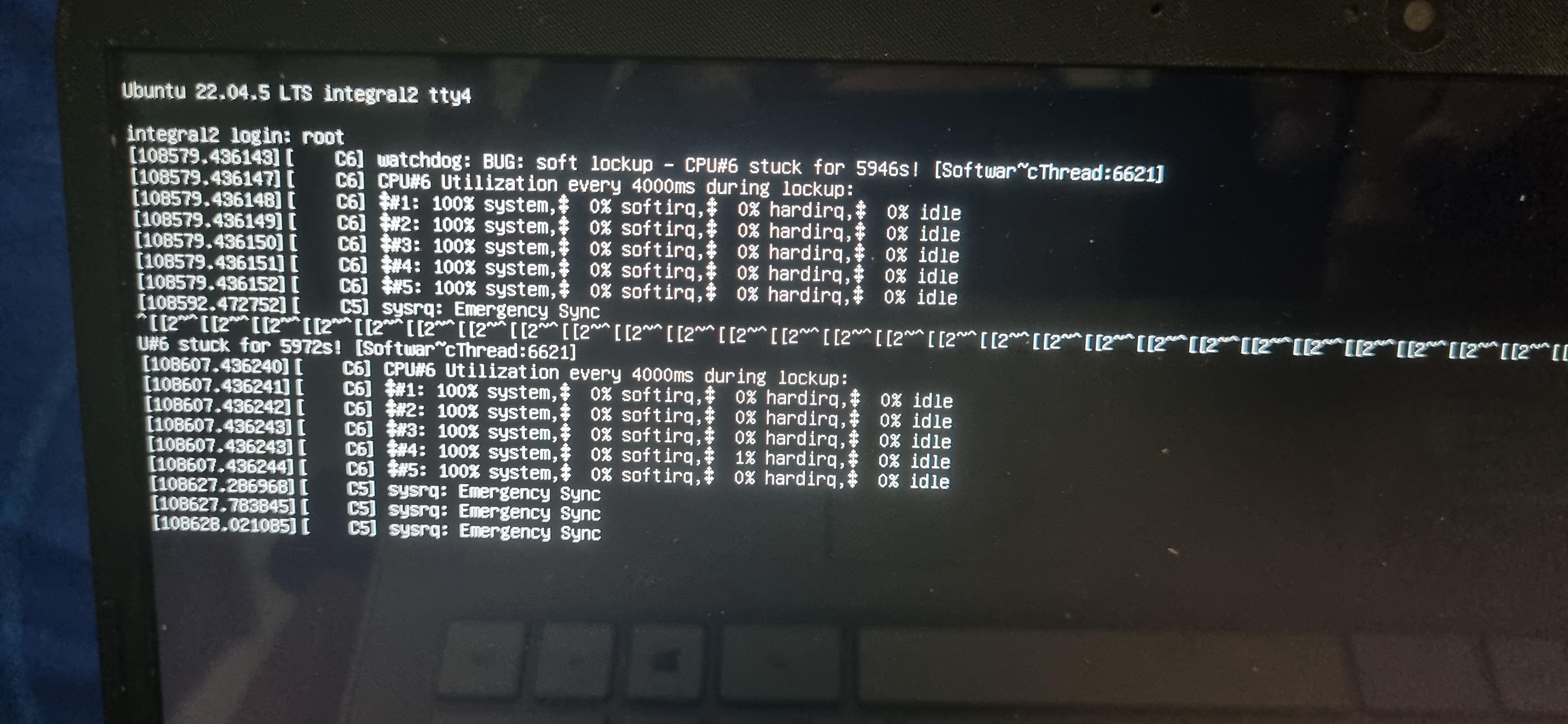
I tried to jump to tty4 and tried to login, but then soft lockup warnings appeared, everything froze. I could not login from tty4 neither.
I invoked an emergency sync procedure (Alt+SysRq+s) and forced my laptop off. Unfortunately, the SysRq to print backtrace was disabled. I am not sure how to debug this.
I hope this was not a kernel bug, just hope it was a random bit flip in my RAM caused by an extrme temperature that led to this scary incident.
Hopefully, my persistent filesystem will still be ok, not corrupted.
-
Subject: "systemctl suspend" on Linux is not reliable.
How long has it been since last time I used the the emergency sync SysRq?
Today traveled to Surakarta for a family event, I departed from Sragen. I suspended my laptop with "systemctl suspend" and put it into my backpack.
When I arrived in Surakarta, I opened my bag and felt my bag was so hot. It turned out that my laptop was on (not in a sleep state) and everything was spinning at 100% CPU (especially firefox and vscode).
I had a chance to check htop and tried to kill firefox with "pkill -9 firefox", but then the system froze.
When the GUI froze, I could still see my caps lock button was still working indicated by the caps lock LED on-off still responed to my input.
I tried to jump to tty4 and tried to login, but then soft lockup warnings appeared, everything froze. I could not login from tty4 neither.
I invoked an emergency sync procedure (Alt+SysRq+s) and forced my laptop off. Unfortunately, the SysRq to print backtrace was disabled. I am not sure how to debug this.
I hope this was not a kernel bug, just hope it was a random bit flip in my RAM caused by an extrme temperature that led to this scary incident.
Hopefully, my persistent filesystem will still be ok, not corrupted.
The watchdog reported CPU#6 stuck for 5946s (observed from the photo).
That is roughly 99 minutes bake, lol.
That means my laptop didn't just wake up right before I checked it.
It likely woke up and hit soft lockups almost immediately after I put it in my backpack and was running at full tilt for the entire journey from Sragen to Surakarta

Shit.
-
R relay@relay.infosec.exchange shared this topic
-
The watchdog reported CPU#6 stuck for 5946s (observed from the photo).
That is roughly 99 minutes bake, lol.
That means my laptop didn't just wake up right before I checked it.
It likely woke up and hit soft lockups almost immediately after I put it in my backpack and was running at full tilt for the entire journey from Sragen to Surakarta
Shit.
on my PC, I fixed it using :
https://wiki.archlinux.org/title/Power_management/Wakeup_triggerson my ryzen PC, I disabled something : PTXH, and USB sides
the problem was when electricity is changing : it wakes the PC up
the only tradeoffs is : it needs power button to wake
you need to test it
also certain kernel parameter needed
-
on my PC, I fixed it using :
https://wiki.archlinux.org/title/Power_management/Wakeup_triggerson my ryzen PC, I disabled something : PTXH, and USB sides
the problem was when electricity is changing : it wakes the PC up
the only tradeoffs is : it needs power button to wake
you need to test it
also certain kernel parameter needed
Noted, thanks.
It seems the doc you referred is actually what I am looking for.
I will try to tweak the wake up sources and play around with those configurations. It is much better to have only the "power button" as a wake up source rather than having random unexpected wakeups.
I will test suspend-resume after tweaking it later today.
-
Subject: "systemctl suspend" on Linux is not reliable.
How long has it been since last time I used the the emergency sync SysRq?
Today traveled to Surakarta for a family event, I departed from Sragen. I suspended my laptop with "systemctl suspend" and put it into my backpack.
When I arrived in Surakarta, I opened my bag and felt my bag was so hot. It turned out that my laptop was on (not in a sleep state) and everything was spinning at 100% CPU (especially firefox and vscode).
I had a chance to check htop and tried to kill firefox with "pkill -9 firefox", but then the system froze.
When the GUI froze, I could still see my caps lock button was still working indicated by the caps lock LED on-off still responed to my input.
I tried to jump to tty4 and tried to login, but then soft lockup warnings appeared, everything froze. I could not login from tty4 neither.
I invoked an emergency sync procedure (Alt+SysRq+s) and forced my laptop off. Unfortunately, the SysRq to print backtrace was disabled. I am not sure how to debug this.
I hope this was not a kernel bug, just hope it was a random bit flip in my RAM caused by an extrme temperature that led to this scary incident.
Hopefully, my persistent filesystem will still be ok, not corrupted.
TILSysRqmagic key. Thanks.
-
R relay@relay.mycrowd.ca shared this topic