Hey, #GIMP using friends: I have either discovered a bug, or I am fatfingering myself into a mode over and over again.
-
Hey, #GIMP using friends: I have either discovered a bug, or I am fatfingering myself into a mode over and over again.
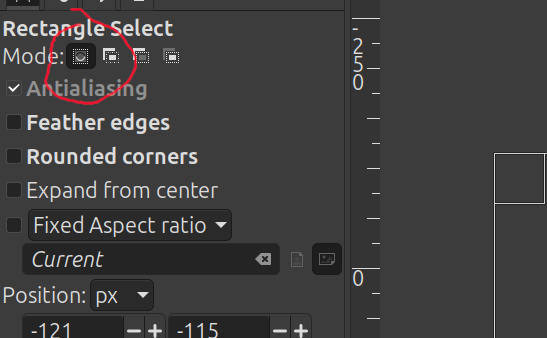
Every time I switch to a selection tool (oval, rectangle, lasso), I somehow end up in SUBTRACT mode, and have to mouse over to the tool options panel and click the "Replace" button.
I have never, ever consciously switched this tool to subtract mode, which leads me to suspect that I am fatfingering it back into this mode somehow.
-
Hey, #GIMP using friends: I have either discovered a bug, or I am fatfingering myself into a mode over and over again.
Every time I switch to a selection tool (oval, rectangle, lasso), I somehow end up in SUBTRACT mode, and have to mouse over to the tool options panel and click the "Replace" button.
I have never, ever consciously switched this tool to subtract mode, which leads me to suspect that I am fatfingering it back into this mode somehow.
Possibly related: when I switch to the "move" tool (typing "m"), I keep defaulting to "Move selection," even though (again) I have never chosen this, and *always* want "Move layer." Also, about 50% of the time, this tool toggles to "Pick a layer or guide" (even though I *always* want "Move the active layer") and it also frequently toggles to "Pick a path" (even though I *never* want this).
-
Possibly related: when I switch to the "move" tool (typing "m"), I keep defaulting to "Move selection," even though (again) I have never chosen this, and *always* want "Move layer." Also, about 50% of the time, this tool toggles to "Pick a layer or guide" (even though I *always* want "Move the active layer") and it also frequently toggles to "Pick a path" (even though I *never* want this).
Did Gimp 3 just add a ton of keyboard shortcuts that are switching my tools into modes I don't want, or are these bugs in Gimp 3?
-
Hey, #GIMP using friends: I have either discovered a bug, or I am fatfingering myself into a mode over and over again.
Every time I switch to a selection tool (oval, rectangle, lasso), I somehow end up in SUBTRACT mode, and have to mouse over to the tool options panel and click the "Replace" button.
I have never, ever consciously switched this tool to subtract mode, which leads me to suspect that I am fatfingering it back into this mode somehow.
-
@lexLohr Huh. Weird that this only started manifesting for me with Gimp 3.
-
@lexLohr Huh. Weird that this only started manifesting for me with Gimp 3.
@pluralistic I remember this issue from an earlier version of the 2.x line a decade ago; Maybe it is a regression.
-
@Suiseiseki @pluralistic they seem to be fixing bugs with each release. I found some of my irritants addressed by upgrading.
-
Hey, #GIMP using friends: I have either discovered a bug, or I am fatfingering myself into a mode over and over again.
Every time I switch to a selection tool (oval, rectangle, lasso), I somehow end up in SUBTRACT mode, and have to mouse over to the tool options panel and click the "Replace" button.
I have never, ever consciously switched this tool to subtract mode, which leads me to suspect that I am fatfingering it back into this mode somehow.
@pluralistic I’d BACKUP the configuration folder and tried resetting the tool options to default (somewhere in Preferences) in order to rule out a config issue caused by the version update.
-
Hey, #GIMP using friends: I have either discovered a bug, or I am fatfingering myself into a mode over and over again.
Every time I switch to a selection tool (oval, rectangle, lasso), I somehow end up in SUBTRACT mode, and have to mouse over to the tool options panel and click the "Replace" button.
I have never, ever consciously switched this tool to subtract mode, which leads me to suspect that I am fatfingering it back into this mode somehow.
@pluralistic
I've seen this behaviour since about 2018. Since when did this start on your end? -
R relay@relay.mycrowd.ca shared this topic