hello fediverse...
-
@jenny753 im automatically connected to the vpn through my work computer. its a security measure.
my phone is not connected to the vpn and its fine. no issues.
@emily_rugburn That definitely makes it tricky to troubleshoot!
How are ping times to your router's IP? They should be < 0.1ms
-
@emily_rugburn That definitely makes it tricky to troubleshoot!
How are ping times to your router's IP? They should be < 0.1ms
@jenny753 ummm how do i check the ping times?
-
@jenny753 ummm how do i check the ping times?
@emily_rugburn Sure!
So remember that screen I had you check the connection speed before? That'll have your IPv4 address listed underneath. It's commonly something like 192.168.xxx.xxx, and your IPv4 default gateway will be under that. Commonly it's 192.168.0.1 or 192.168.1.1
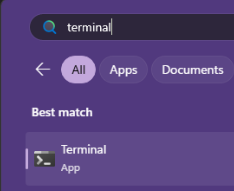
Once you know what that is, click Start and type "Terminal" and hit enter.
A black window will pop up with a tab identifying itself as Windows PowerShell, and it'll have a file path. Ignore that part and just after the > will be a blinking cursor.
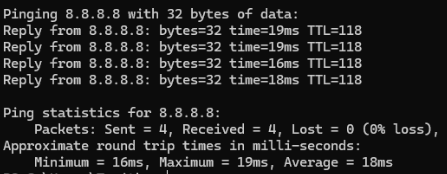
Type the command "ping " (with the space after) and type out that default gateway IP you found. Hit Enter.
It'll return some information -- I'm using Google's default open DNS in my example. What you're looking for is that average time in ms (miliseconds).
That default gateway is your router in your home, so it should be 0.1ms or 0.2ms
-
@emily_rugburn Sure!
So remember that screen I had you check the connection speed before? That'll have your IPv4 address listed underneath. It's commonly something like 192.168.xxx.xxx, and your IPv4 default gateway will be under that. Commonly it's 192.168.0.1 or 192.168.1.1
Once you know what that is, click Start and type "Terminal" and hit enter.
A black window will pop up with a tab identifying itself as Windows PowerShell, and it'll have a file path. Ignore that part and just after the > will be a blinking cursor.
Type the command "ping " (with the space after) and type out that default gateway IP you found. Hit Enter.
It'll return some information -- I'm using Google's default open DNS in my example. What you're looking for is that average time in ms (miliseconds).
That default gateway is your router in your home, so it should be 0.1ms or 0.2ms
@jenny753 omg mine just comes back as expired in transit!

-
@jenny753 omg mine just comes back as expired in transit!
@emily_rugburn Wowwww.
Your work laptop sounds pretty locked down. I'm not sure if you're going to be able to get much help externally.

-
@emily_rugburn Wowwww.
Your work laptop sounds pretty locked down. I'm not sure if you're going to be able to get much help externally.
@jenny753 oh youve been very helpful already. when i call IT again, i can ask them the same thing.
part of me thinks its my internet provider being shit and possibly my hardware in general is pretty old
-
@jenny753 oh youve been very helpful already. when i call IT again, i can ask them the same thing.
part of me thinks its my internet provider being shit and possibly my hardware in general is pretty old
@emily_rugburn I wish you the very best of luck!!
-
hello fediverse...
im having a legit internet/computer issue and IT doesnt know what to do.
i keep having headset issues most likely because my internet speed is running at like 11.
i have to use a VPN for work because of PHI but no one can seem to figure out to increase my speed so i dont have connectivity issues.
any suggestions?
@emily_rugburn@lgbtqia.space what kind of headset do you have and what kind of issues do you have
-
@emily_rugburn@lgbtqia.space what kind of headset do you have and what kind of issues do you have
@amy its a wired logitech h390. the calls are cutting out on both sides and we use cisco jabber
-
@amy its a wired logitech h390. the calls are cutting out on both sides and we use cisco jabber
@emily_rugburn@lgbtqia.space do they cut out if you use integrated speakers/mic? trying to understand if it’s actually a headset issue per se or more general networking
-
@emily_rugburn@lgbtqia.space do they cut out if you use integrated speakers/mic? trying to understand if it’s actually a headset issue per se or more general networking
@amy integrated speakers/mic? what is that?
-
@amy integrated speakers/mic? what is that?
@emily_rugburn@lgbtqia.space as in, the speakers / mic on your device (presumably a laptop?)
so unplugging the headset and doing a test call -
@emily_rugburn@lgbtqia.space as in, the speakers / mic on your device (presumably a laptop?)
so unplugging the headset and doing a test call@amy its a desktop and its the same issue. its def a network issue
-
R relay@relay.infosec.exchange shared this topic