Skip to content
  • Categories
  • Recent
  • Tags
  • Popular
  • World
  • Users
  • Groups
Skins
  • Light
  • Brite
  • Cerulean
  • Cosmo
  • Flatly
  • Journal
  • Litera
  • Lumen
  • Lux
  • Materia
  • Minty
  • Morph
  • Pulse
  • Sandstone
  • Simplex
  • Sketchy
  • Spacelab
  • United
  • Yeti
  • Zephyr
  • Dark
  • Cyborg
  • Darkly
  • Quartz
  • Slate
  • Solar
  • Superhero
  • Vapor

  • Default (Cyborg)
  • No Skin
Collapse
Brand Logo

CIRCLE WITH A DOT

  1. Home
  2. Uncategorized
  3. Here's the glitch in action, which occurs when the camera clip start and end is set to too wide a range.

Here's the glitch in action, which occurs when the camera clip start and end is set to too wide a range.

Scheduled Pinned Locked Moved Uncategorized
blenderglitchglitchart
3 Posts 2 Posters 0 Views
  • Oldest to Newest
  • Newest to Oldest
  • Most Votes
Reply
  • Reply as topic
Log in to reply
This topic has been deleted. Only users with topic management privileges can see it.
  • hellocatfood@post.lurk.orgH This user is from outside of this forum
    hellocatfood@post.lurk.orgH This user is from outside of this forum
    hellocatfood@post.lurk.org
    wrote last edited by
    #1

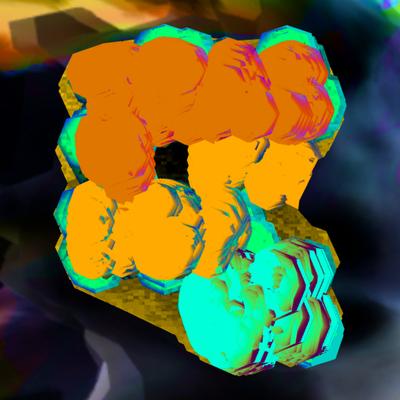
    Here's the glitch in action, which occurs when the camera clip start and end is set to too wide a range. At the top is the glitch when viewport shading is set to solid in any Blender version. In the middle is what rendered view (eevee) looked like in Blender versions prior to 5.0. And at the bottom is what rendered view now looks like in Blender 5.0 onward.

    That they've fixed the clipping distance bug is obviously a "good" thing overall but I want it back! How can I replicate it? @Blender @blendernation

    #blender #glitch #glitchart

    trashpandaqc@mastodon.onlineT hellocatfood@post.lurk.orgH 2 Replies Last reply
    1
    0
    • hellocatfood@post.lurk.orgH hellocatfood@post.lurk.org

      Here's the glitch in action, which occurs when the camera clip start and end is set to too wide a range. At the top is the glitch when viewport shading is set to solid in any Blender version. In the middle is what rendered view (eevee) looked like in Blender versions prior to 5.0. And at the bottom is what rendered view now looks like in Blender 5.0 onward.

      That they've fixed the clipping distance bug is obviously a "good" thing overall but I want it back! How can I replicate it? @Blender @blendernation

      #blender #glitch #glitchart

      trashpandaqc@mastodon.onlineT This user is from outside of this forum
      trashpandaqc@mastodon.onlineT This user is from outside of this forum
      trashpandaqc@mastodon.online
      wrote last edited by
      #2

      @hellocatfood @Blender @blendernation hmm weird it looks like the shape is z-fighting with itself? maybe you could mess with creating a copy of it + displacement & transparency effects, or some remesh modifier to get more angular overlap

      it also reminds me of really low quality screen space ambient occlusion, but that's a TouchDesigner trick not a Blender one...

      1 Reply Last reply
      0
      • hellocatfood@post.lurk.orgH hellocatfood@post.lurk.org

        Here's the glitch in action, which occurs when the camera clip start and end is set to too wide a range. At the top is the glitch when viewport shading is set to solid in any Blender version. In the middle is what rendered view (eevee) looked like in Blender versions prior to 5.0. And at the bottom is what rendered view now looks like in Blender 5.0 onward.

        That they've fixed the clipping distance bug is obviously a "good" thing overall but I want it back! How can I replicate it? @Blender @blendernation

        #blender #glitch #glitchart

        hellocatfood@post.lurk.orgH This user is from outside of this forum
        hellocatfood@post.lurk.orgH This user is from outside of this forum
        hellocatfood@post.lurk.org
        wrote last edited by
        #3

        Looks like this fix now only exists if I'm using Perspective mode. If I switch to Orthographic then I can still use the glitch.

        Link Preview Image
        1 Reply Last reply
        0
        • tsrono@mastodon.socialT tsrono@mastodon.social shared this topic
        Reply
        • Reply as topic
        Log in to reply
        • Oldest to Newest
        • Newest to Oldest
        • Most Votes


        • Login

        • Login or register to search.
        • First post
          Last post
        0
        • Categories
        • Recent
        • Tags
        • Popular
        • World
        • Users
        • Groups