#RetroComputing Fedi:
-
 #RetroComputing Fedi:
What sort of options exist for loopback video capture on Windows 2000 or Windows XP? i.e., I want to have a virtual video capture device that captures my desktop. And while we're at it, how about sound?
-
#RetroComputing Fedi:
What sort of options exist for loopback video capture on Windows 2000 or Windows XP? i.e., I want to have a virtual video capture device that captures my desktop. And while we're at it, how about sound?
@PurpleJillybeans I vaguely recall youtube videos with a watermark that said something like "unregistered hypercam v8" something or other from that era -- they usually had Finger Eleven's Paralyzer playing in lieu of desktop audio, not sure if that was aesthetic choice or technical limitation
no idea if that's still available but there was definitely software from the XP era that could do it
-
@PurpleJillybeans I vaguely recall youtube videos with a watermark that said something like "unregistered hypercam v8" something or other from that era -- they usually had Finger Eleven's Paralyzer playing in lieu of desktop audio, not sure if that was aesthetic choice or technical limitation
no idea if that's still available but there was definitely software from the XP era that could do it
@bamboombibbitybop Not quite what I want. Hypercam saves to a video file but doesn't create a virtual capture device, which is what I need.
-
@bamboombibbitybop Not quite what I want. Hypercam saves to a video file but doesn't create a virtual capture device, which is what I need.
I think you can do what you're suggesting with VLC player. Should work on anything XP SP3 or later.
Use the "Capture Device->Dekstop" option, then instead of hitting play, select the carat dropdown and choose stream.
-
R relay@relay.mycrowd.ca shared this topic
-
I think you can do what you're suggesting with VLC player. Should work on anything XP SP3 or later.
Use the "Capture Device->Dekstop" option, then instead of hitting play, select the carat dropdown and choose stream.
@NoraBell That won't work because I need to use a specific encoding tool that only takes input from a capture device. I can't use VLC as the encoder.
-
#RetroComputing Fedi:
What sort of options exist for loopback video capture on Windows 2000 or Windows XP? i.e., I want to have a virtual video capture device that captures my desktop. And while we're at it, how about sound?
@PurpleJillybeans ooph, virtual capture in XP...
As last-resource, in case not much software turns up, Hauppauge (pronouncez "hoppogi", oui oui) made video capture cards with ample I/O options, and they worked flawlessly, even on obscure AltOSes. Fully recommend, if that is gonna become a thing.
They bring tv to your desktop OR desktop to your tv.
You can find them online, *from* $20 (usually single coax) to average $50 (coax, RCA, SPDIF, etc). "NTSC 44981" or "WinTv" are good search cues.
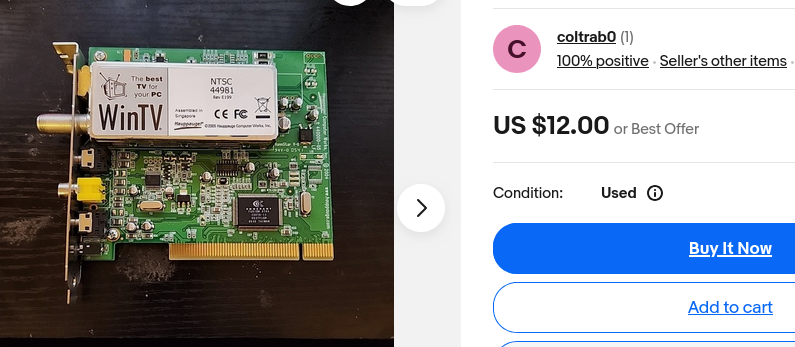
-
@PurpleJillybeans ooph, virtual capture in XP...
As last-resource, in case not much software turns up, Hauppauge (pronouncez "hoppogi", oui oui) made video capture cards with ample I/O options, and they worked flawlessly, even on obscure AltOSes. Fully recommend, if that is gonna become a thing.
They bring tv to your desktop OR desktop to your tv.
You can find them online, *from* $20 (usually single coax) to average $50 (coax, RCA, SPDIF, etc). "NTSC 44981" or "WinTv" are good search cues.
@faraiwe I was hoping to avoid hardware, but it's looking like that's gonna be my only option. I already have some USB capture cards that work; I was hoping to simplify my setup by eliminating them. Oh well.
-
@faraiwe I was hoping to avoid hardware, but it's looking like that's gonna be my only option. I already have some USB capture cards that work; I was hoping to simplify my setup by eliminating them. Oh well.
@PurpleJillybeans I mean, it's probably not the ONLY, but - IMO, IME, AYBABTU, all caveats - it was what worked for me, years ago, after much pain in trying all sorts of hacks and things.
For XP, you could *buy* fancy software, that still relied on the hardware I mentioned, or you could tweak software for hours and hours of painful trial-and-error, but what I found out, then, the $ invested was much less painful than the time invested/wasted.
Good luck, Jim ::lights fuse:: ::thumps bass::
-
@NoraBell That won't work because I need to use a specific encoding tool that only takes input from a capture device. I can't use VLC as the encoder.
You got me to make a VM for this.
Start with XP Service Pack 3
Add "One Core API Binaries"
Download "VC Redist 14" (M$ linkm x86 version)
Install it in "Compatibility Mode for Windows 10 22H2" (possible thanks to OneCoreApi.
Download and install OBS Studio 27.2.4 (use compatibility mode for Windows 7)Should work a charm