📝 Post-mortem on my "lots of little HTML pages" approach — still like it.
-
 Post-mortem on my "lots of little HTML pages" approach — still like it.
The browser's most basic feature is following a link. What if you built a site’s interactions around just that?
e.g. a "menu" could just be: <a href="/menu/"> and a dash of CSS view transitions for flair.
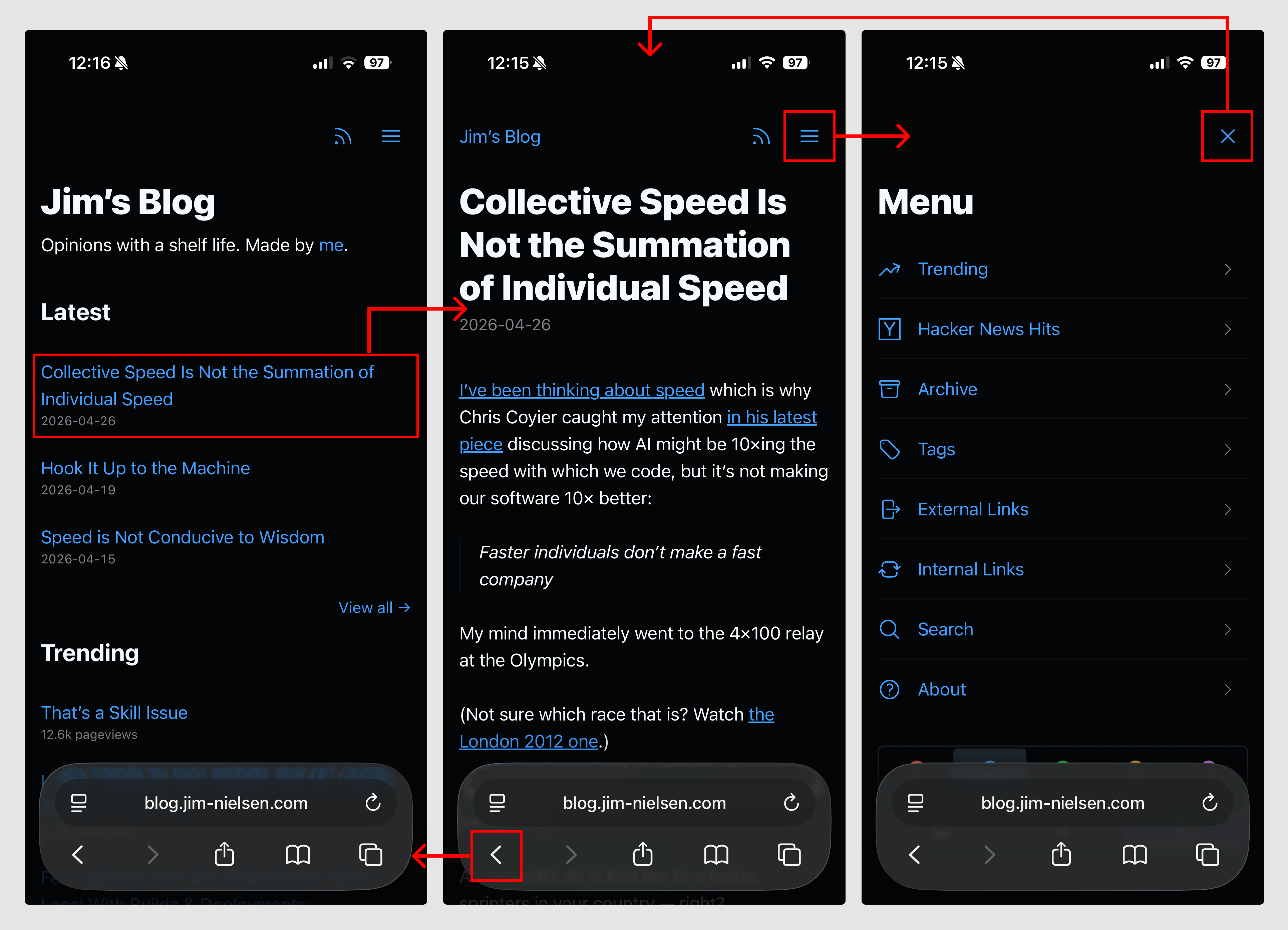
Reminder: You Can Stitch Together Lots of Little HTML Pages With Navigations For Interactions
Writing about the big beautiful mess that is making things for the world wide web.
(blog.jim-nielsen.com)
-
Post-mortem on my "lots of little HTML pages" approach — still like it.
The browser's most basic feature is following a link. What if you built a site’s interactions around just that?
e.g. a "menu" could just be: <a href="/menu/"> and a dash of CSS view transitions for flair.
Reminder: You Can Stitch Together Lots of Little HTML Pages With Navigations For Interactions
Writing about the big beautiful mess that is making things for the world wide web.
(blog.jim-nielsen.com)
@jimniels love this super elegant solution, thank you for sharing Jim!
-
Post-mortem on my "lots of little HTML pages" approach — still like it.
The browser's most basic feature is following a link. What if you built a site’s interactions around just that?
e.g. a "menu" could just be: <a href="/menu/"> and a dash of CSS view transitions for flair.
Reminder: You Can Stitch Together Lots of Little HTML Pages With Navigations For Interactions
Writing about the big beautiful mess that is making things for the world wide web.
(blog.jim-nielsen.com)
@jimniels I came across this post on HN.
it's a nice instinct to try to be js-free, but then you're just using js to manipulate your history, which is surely far more blasphemous than a sprinkling of js to show/hide a menu. Especially when you're doing a full nav for this.
I beg you to check out Datastar. It's precisely what you're looking for. It's more powerful than htmx + alpine js, and smaller than both. You could just have a few declarative html attributes that show/hide the menu.
-
Post-mortem on my "lots of little HTML pages" approach — still like it.
The browser's most basic feature is following a link. What if you built a site’s interactions around just that?
e.g. a "menu" could just be: <a href="/menu/"> and a dash of CSS view transitions for flair.
Reminder: You Can Stitch Together Lots of Little HTML Pages With Navigations For Interactions
Writing about the big beautiful mess that is making things for the world wide web.
(blog.jim-nielsen.com)
@jimniels Thanks for documenting this trick!
I had such a menu on a separate page on my own website for a while, but I grew tired of it. I ended up just putting back 5 links at the top. Ultimately, it’s a personal website, it boils down to personal preference. I’m of course not saying your approach is wrong. I certainly wish more website adopted it instead of cascading expand on hover from hell.
Anyway, I ended up reading a bunch of other posts and subscribing to the RSS feed. Thanks for building this blog, I really enjoy it!
-
Post-mortem on my "lots of little HTML pages" approach — still like it.
The browser's most basic feature is following a link. What if you built a site’s interactions around just that?
e.g. a "menu" could just be: <a href="/menu/"> and a dash of CSS view transitions for flair.
Reminder: You Can Stitch Together Lots of Little HTML Pages With Navigations For Interactions
Writing about the big beautiful mess that is making things for the world wide web.
(blog.jim-nielsen.com)
@jimniels For simple inlineable content like a menu, I think you can do even better in pure CSS and hiding/showing it using attribute selectors. Smoother UX since you don't need to trigger navigation and can forego JS alltogether without degradation.
https://stackoverflow.com/a/33528185
Using a variation of this on Konform Browser front page to dynamically toggle display of installation instructions for the target selected by user with CSS only: https://konform-browser.codeberg.page/
-
R relay@relay.mycrowd.ca shared this topic