Skip to content
  • Categories
  • Recent
  • Tags
  • Popular
  • World
  • Users
  • Groups
Skins
  • Light
  • Brite
  • Cerulean
  • Cosmo
  • Flatly
  • Journal
  • Litera
  • Lumen
  • Lux
  • Materia
  • Minty
  • Morph
  • Pulse
  • Sandstone
  • Simplex
  • Sketchy
  • Spacelab
  • United
  • Yeti
  • Zephyr
  • Dark
  • Cyborg
  • Darkly
  • Quartz
  • Slate
  • Solar
  • Superhero
  • Vapor

  • Default (Cyborg)
  • No Skin
Collapse
Brand Logo

CIRCLE WITH A DOT

  1. Home
  2. Uncategorized
  3. #LibreWolf v147.0.4-1 is now available!
#LibreWolf v147.0.4-1 is now available!

Scheduled Pinned Locked Moved Uncategorized
librewolf
10 Posts 6 Posters 0 Views
  • Oldest to Newest
  • Newest to Oldest
  • Most Votes
Reply
  • Reply as topic
Log in to reply
This topic has been deleted. Only users with topic management privileges can see it.
  • librewolf@chaos.socialL This user is from outside of this forum
    librewolf@chaos.socialL This user is from outside of this forum
    librewolf@chaos.social
    wrote last edited by
    #1

    #LibreWolf v147.0.4-1 is now available!

    Cookie monster!

    favicon

    (codeberg.org)

    Link Preview Image
    LibreWolf Browser

    A custom version of Firefox, focused on privacy, security and freedom.

    favicon

    (librewolf.net)

    Notable Changes:
    - LTO now enabled for our binaries during build – things should be faster now \^\^
    - AppArmor file removed for versions older than 4
    - .rpm should now work on OpenSUSE
    - solided FPP randomization added back
    - StartupWMClass fixed to address issue with icons appearing twice in some cases / DEs

    See https://www.mozilla.org/en-US/firefox/147.0.4/releasenotes/ for upstream changes.

    lexinova@cyberplace.socialL harbeider@mastodon.socialH ulfr@hachyderm.ioU 3 Replies Last reply
    0
    • librewolf@chaos.socialL librewolf@chaos.social

      #LibreWolf v147.0.4-1 is now available!

      Cookie monster!

      favicon

      (codeberg.org)

      Link Preview Image
      LibreWolf Browser

      A custom version of Firefox, focused on privacy, security and freedom.

      favicon

      (librewolf.net)

      Notable Changes:
      - LTO now enabled for our binaries during build – things should be faster now \^\^
      - AppArmor file removed for versions older than 4
      - .rpm should now work on OpenSUSE
      - solided FPP randomization added back
      - StartupWMClass fixed to address issue with icons appearing twice in some cases / DEs

      See https://www.mozilla.org/en-US/firefox/147.0.4/releasenotes/ for upstream changes.

      lexinova@cyberplace.socialL This user is from outside of this forum
      lexinova@cyberplace.socialL This user is from outside of this forum
      lexinova@cyberplace.social
      wrote last edited by
      #2

      @librewolf one question tough, can you prevent it by default to connect to firefox.settings.services.mozilla.com and addon mozilla ? (i maintain my own extension via my own @forgejo instance) and i would like no connection at all to the Advertising / Ai compagny server that Mozilla is.

      kajer@infosec.exchangeK 1 Reply Last reply
      0
      • lexinova@cyberplace.socialL lexinova@cyberplace.social

        @librewolf one question tough, can you prevent it by default to connect to firefox.settings.services.mozilla.com and addon mozilla ? (i maintain my own extension via my own @forgejo instance) and i would like no connection at all to the Advertising / Ai compagny server that Mozilla is.

        kajer@infosec.exchangeK This user is from outside of this forum
        kajer@infosec.exchangeK This user is from outside of this forum
        kajer@infosec.exchange
        wrote last edited by
        #3

        @lexinova @librewolf @forgejo

        I asked this same question... and was quyickly shutdown as people use push services for notifications for some reason?

        I dont know. I mean, in the end, it's a win to only change one thing in about:config and have a completely network silent startup.

        lexinova@cyberplace.socialL 1 Reply Last reply
        0
        • librewolf@chaos.socialL librewolf@chaos.social

          #LibreWolf v147.0.4-1 is now available!

          Cookie monster!

          favicon

          (codeberg.org)

          Link Preview Image
          LibreWolf Browser

          A custom version of Firefox, focused on privacy, security and freedom.

          favicon

          (librewolf.net)

          Notable Changes:
          - LTO now enabled for our binaries during build – things should be faster now \^\^
          - AppArmor file removed for versions older than 4
          - .rpm should now work on OpenSUSE
          - solided FPP randomization added back
          - StartupWMClass fixed to address issue with icons appearing twice in some cases / DEs

          See https://www.mozilla.org/en-US/firefox/147.0.4/releasenotes/ for upstream changes.

          harbeider@mastodon.socialH This user is from outside of this forum
          harbeider@mastodon.socialH This user is from outside of this forum
          harbeider@mastodon.social
          wrote last edited by
          #4

          @librewolf Nice! Tried to install on Leap 15.6 but I got: 'nothing provides 'libX11'. Will try to solve that tomorrow. 🦎🐧🏴‍☠️

          1 Reply Last reply
          0
          • kajer@infosec.exchangeK kajer@infosec.exchange

            @lexinova @librewolf @forgejo

            I asked this same question... and was quyickly shutdown as people use push services for notifications for some reason?

            I dont know. I mean, in the end, it's a win to only change one thing in about:config and have a completely network silent startup.

            lexinova@cyberplace.socialL This user is from outside of this forum
            lexinova@cyberplace.socialL This user is from outside of this forum
            lexinova@cyberplace.social
            wrote last edited by
            #5

            @kajer @librewolf @forgejo technically you can disable the push notification by replacing wss://mozilladomain/somdata by wss://0.0.0.0/somedata

            Sadly addon is always enabled when addon update is on (and it's sad as i don't want their store)

            and settings domain is impossible to stop witch show mozilla don't care at all about privacy ... choice of their user.

            here more info on how to bloc many connection : https://www.abcdesktop.io/common/disable-firefox-connections/

            but until then i remain on cromite that do not connect on start

            kajer@infosec.exchangeK 1 Reply Last reply
            0
            • lexinova@cyberplace.socialL lexinova@cyberplace.social

              @kajer @librewolf @forgejo technically you can disable the push notification by replacing wss://mozilladomain/somdata by wss://0.0.0.0/somedata

              Sadly addon is always enabled when addon update is on (and it's sad as i don't want their store)

              and settings domain is impossible to stop witch show mozilla don't care at all about privacy ... choice of their user.

              here more info on how to bloc many connection : https://www.abcdesktop.io/common/disable-firefox-connections/

              but until then i remain on cromite that do not connect on start

              kajer@infosec.exchangeK This user is from outside of this forum
              kajer@infosec.exchangeK This user is from outside of this forum
              kajer@infosec.exchange
              wrote last edited by
              #6

              @lexinova @librewolf @forgejo

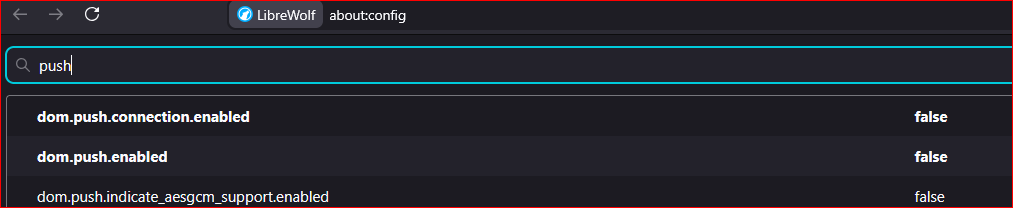
              push services can be disabled here - but yes, ANY network connection on browser startup is unacceptable. Now, there will be things like ublock that go do list updates, and fine... at least those connections are not to Mozilla, AI+AD data broker.
              Link Preview Image
              lexinova@cyberplace.socialL 1 Reply Last reply
              0
              • kajer@infosec.exchangeK kajer@infosec.exchange

                @lexinova @librewolf @forgejo

                push services can be disabled here - but yes, ANY network connection on browser startup is unacceptable. Now, there will be things like ublock that go do list updates, and fine... at least those connections are not to Mozilla, AI+AD data broker.

                Link Preview Image
                lexinova@cyberplace.socialL This user is from outside of this forum
                lexinova@cyberplace.socialL This user is from outside of this forum
                lexinova@cyberplace.social
                wrote last edited by
                #7

                @kajer @librewolf @forgejo even them i block them, i have my own blocklist on my server, so the only connection i accept is to my own server

                forgetpassword@goingdark.socialF 1 Reply Last reply
                0
                • librewolf@chaos.socialL librewolf@chaos.social

                  #LibreWolf v147.0.4-1 is now available!

                  Cookie monster!

                  favicon

                  (codeberg.org)

                  Link Preview Image
                  LibreWolf Browser

                  A custom version of Firefox, focused on privacy, security and freedom.

                  favicon

                  (librewolf.net)

                  Notable Changes:
                  - LTO now enabled for our binaries during build – things should be faster now \^\^
                  - AppArmor file removed for versions older than 4
                  - .rpm should now work on OpenSUSE
                  - solided FPP randomization added back
                  - StartupWMClass fixed to address issue with icons appearing twice in some cases / DEs

                  See https://www.mozilla.org/en-US/firefox/147.0.4/releasenotes/ for upstream changes.

                  ulfr@hachyderm.ioU This user is from outside of this forum
                  ulfr@hachyderm.ioU This user is from outside of this forum
                  ulfr@hachyderm.io
                  wrote last edited by
                  #8

                  @librewolf Pulled the update and restarted. Didn't expect any visible change, noticed the improved snappiness, then caught the mention of LTO. Evidently works a treat.

                  Thanks for putting in all the effort!

                  1 Reply Last reply
                  0
                  • lexinova@cyberplace.socialL This user is from outside of this forum
                    lexinova@cyberplace.socialL This user is from outside of this forum
                    lexinova@cyberplace.social
                    wrote last edited by
                    #9

                    @gme @forgejo @librewolf what i ask is a proper way to disable them, not force disable them for everyone 🙂

                    1 Reply Last reply
                    0
                    • lexinova@cyberplace.socialL lexinova@cyberplace.social

                      @kajer @librewolf @forgejo even them i block them, i have my own blocklist on my server, so the only connection i accept is to my own server

                      forgetpassword@goingdark.socialF This user is from outside of this forum
                      forgetpassword@goingdark.socialF This user is from outside of this forum
                      forgetpassword@goingdark.social
                      wrote last edited by
                      #10

                      @lexinova @kajer @librewolf @forgejo there is a fork of librewolf called konform-browser which has an option for lockdown “Purely Private” mode that almost no connections to mozilla.

                      The extension updates must be triggered by hand in PP mode but theres a toggle in settings to make them automatic again.

                      https://codeberg.org/konform-browser

                      https://discuss.tchncs.de/post/54998565

                      1 Reply Last reply
                      1
                      0
                      • R relay@relay.an.exchange shared this topic

                      Reply
                      • Reply as topic
                      Log in to reply
                      • Oldest to Newest
                      • Newest to Oldest
                      • Most Votes


                      • Login

                      • Login or register to search.
                      • First post
                        Last post
                      0
                      • Categories
                      • Recent
                      • Tags
                      • Popular
                      • World
                      • Users
                      • Groups