Skip to content
  • Categories
  • Recent
  • Tags
  • Popular
  • World
  • Users
  • Groups
Skins
  • Light
  • Brite
  • Cerulean
  • Cosmo
  • Flatly
  • Journal
  • Litera
  • Lumen
  • Lux
  • Materia
  • Minty
  • Morph
  • Pulse
  • Sandstone
  • Simplex
  • Sketchy
  • Spacelab
  • United
  • Yeti
  • Zephyr
  • Dark
  • Cyborg
  • Darkly
  • Quartz
  • Slate
  • Solar
  • Superhero
  • Vapor

  • Default (Cyborg)
  • No Skin
Collapse
Brand Logo

CIRCLE WITH A DOT

  1. Home
  2. Uncategorized
  3. Wie bekomme ich einen neuen Ordner in einen neu partionioierten Festplattenbereich?

Wie bekomme ich einen neuen Ordner in einen neu partionioierten Festplattenbereich?
Scheduled Pinned Locked Moved Uncategorized
fedihelplinux
17 Posts 5 Posters 0 Views
  • Oldest to Newest
  • Newest to Oldest
  • Most Votes
Reply
  • Reply as topic
Log in to reply
This topic has been deleted. Only users with topic management privileges can see it.
  • rex_banner@mastodon.socialR rex_banner@mastodon.social

    @sofasophia Für kde z.B.: sudo dolphin

    sofasophia@fairmove.netS This user is from outside of this forum
    sofasophia@fairmove.netS This user is from outside of this forum
    sofasophia@fairmove.net
    wrote last edited by
    #6

    @Rex_Banner Ah ja, ich glaube, es hat geklappt ... mit
    sudo mkdir Backups

    Dankeschön!

    rex_banner@mastodon.socialR 1 Reply Last reply
    0
    • sofasophia@fairmove.netS sofasophia@fairmove.net

      @Rex_Banner Ah ja, ich glaube, es hat geklappt ... mit
      sudo mkdir Backups

      Dankeschön!

      rex_banner@mastodon.socialR This user is from outside of this forum
      rex_banner@mastodon.socialR This user is from outside of this forum
      rex_banner@mastodon.social
      wrote last edited by
      #7

      @sofasophia So kann man es auch machen.

      sofasophia@fairmove.netS 1 Reply Last reply
      0
      • rex_banner@mastodon.socialR rex_banner@mastodon.social

        @sofasophia So kann man es auch machen.

        sofasophia@fairmove.netS This user is from outside of this forum
        sofasophia@fairmove.netS This user is from outside of this forum
        sofasophia@fairmove.net
        wrote last edited by
        #8

        @Rex_Banner Die Ordner sind nun drin, lassen sich aber nicht befüllen. Gibt aber keine Einfügen-Option und schon gar nicht über Backupbefehl oder Grsync.

        rex_banner@mastodon.socialR 1 Reply Last reply
        0
        • sofasophia@fairmove.netS sofasophia@fairmove.net

          Wie bekomme ich einen neuen Ordner in einen neu partionioierten Festplattenbereich?

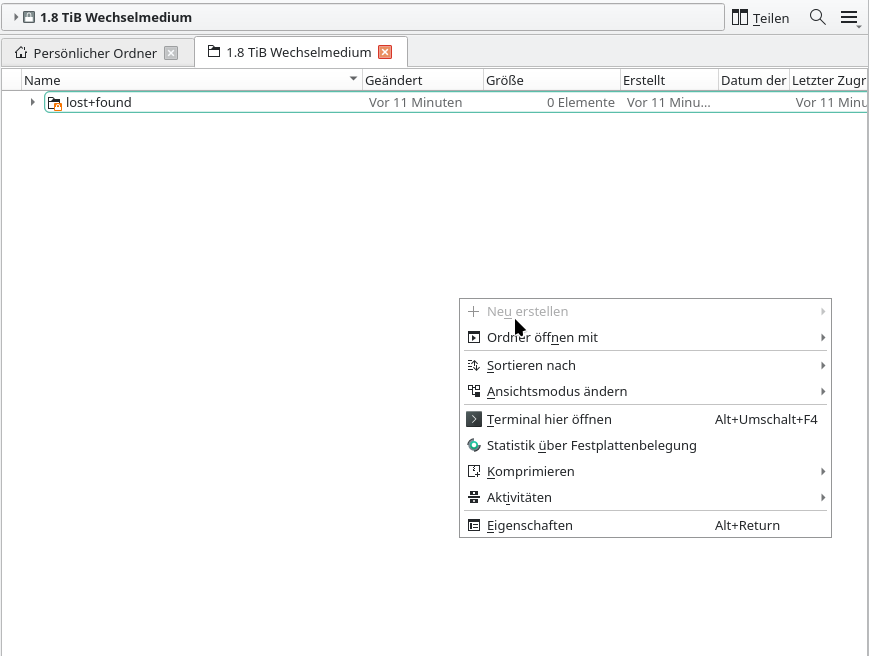
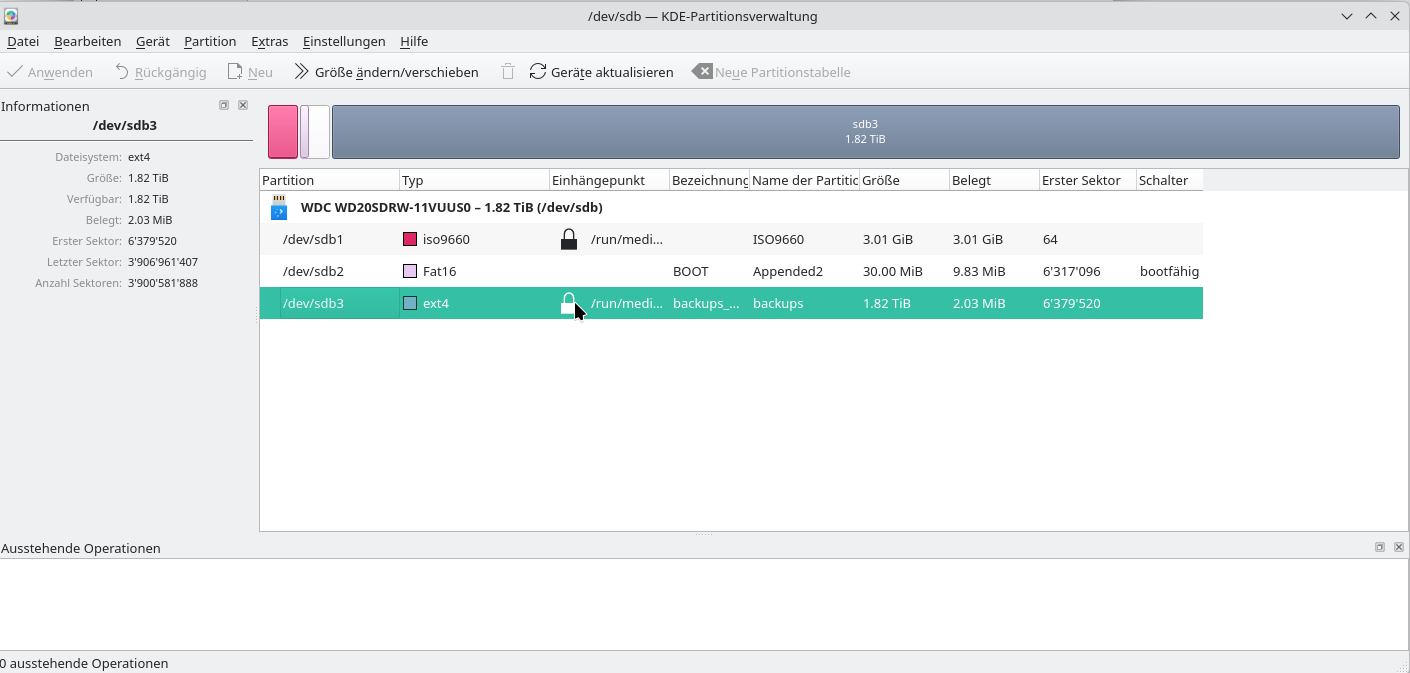
          Ich habe dummerweise meine ganze Backupfestplatte wegen eines Fehlers überschrieben (hatte zwei USB-Speicher eingestöpselt und den falschen angewählt). Nun ist da eine ISO-Datei in der einen Partition und der Rest ist leer. Da soll nun wieder das Backup drauf.

          Bloß bekomme ich da keinen neuen Ordner erstellt.

          Die Partition habe ich als ext4 erstellt.

          EDIT: gelöst. (Rootrechte geändert.)

          #Fedihelp #linux

          atarifrosch@mastodon.deA This user is from outside of this forum
          atarifrosch@mastodon.deA This user is from outside of this forum
          atarifrosch@mastodon.de
          wrote last edited by
          #9

          @sofasophia Benutzerrechte? Eventuell darf da ja nur root drauf?

          spitfire@mastodon.deS dheben@mastodon.socialD 2 Replies Last reply
          0
          • sofasophia@fairmove.netS sofasophia@fairmove.net

            @Rex_Banner Die Ordner sind nun drin, lassen sich aber nicht befüllen. Gibt aber keine Einfügen-Option und schon gar nicht über Backupbefehl oder Grsync.

            rex_banner@mastodon.socialR This user is from outside of this forum
            rex_banner@mastodon.socialR This user is from outside of this forum
            rex_banner@mastodon.social
            wrote last edited by
            #10

            @sofasophia Ich habe das Gefühl wir schreiben aneinander vorbei. Das Hauptproblem ist vermutlich, dass dein Rechner denkt, das die Festplatte ein Betriebssystem ist.

            sofasophia@fairmove.netS 1 Reply Last reply
            0
            • atarifrosch@mastodon.deA atarifrosch@mastodon.de

              @sofasophia Benutzerrechte? Eventuell darf da ja nur root drauf?

              spitfire@mastodon.deS This user is from outside of this forum
              spitfire@mastodon.deS This user is from outside of this forum
              spitfire@mastodon.de
              wrote last edited by
              #11

              @atarifrosch @sofasophia sehr wahrscheinlich dies. ownership checken. neu erstellte Dateisysteme gehören i.d.r. root

              1 Reply Last reply
              0
              • atarifrosch@mastodon.deA atarifrosch@mastodon.de

                @sofasophia Benutzerrechte? Eventuell darf da ja nur root drauf?

                dheben@mastodon.socialD This user is from outside of this forum
                dheben@mastodon.socialD This user is from outside of this forum
                dheben@mastodon.social
                wrote last edited by
                #12

                @atarifrosch @sofasophia Ja, Rechte machen immer Ärger *SCNR* Also: wenn die Partition eingehängt wird, darf normalerweise nur root schreiben (automatisch als User USB-Geräte mounten lassen wir mal außen vor). Der Backup-Ordner wurde wahrscheinlich ebenfalls als root kopiert (s. sudo), hat also dessen Rechte. Lösung: sudo chown -R <Benutzer> Backup. Oder sudo chmod -R 777 Backup (nicht zu empfehlen, setzt alle Rechte für alle Benutzer). Hilft das?

                sofasophia@fairmove.netS 1 Reply Last reply
                0
                • rex_banner@mastodon.socialR rex_banner@mastodon.social

                  @sofasophia Ich habe das Gefühl wir schreiben aneinander vorbei. Das Hauptproblem ist vermutlich, dass dein Rechner denkt, das die Festplatte ein Betriebssystem ist.

                  sofasophia@fairmove.netS This user is from outside of this forum
                  sofasophia@fairmove.netS This user is from outside of this forum
                  sofasophia@fairmove.net
                  wrote last edited by
                  #13

                  @Rex_Banner Ach? Nein, ich glaube nicht. Eher denke ich, es lag daran, dass ich meiner Partition nur Rootrechte erteilt hatte. Das konnte ich nun ändern. Gerade habe ich das Backup angestoßen. Es läuft.
                  Danke fürs Mitdenken.

                  rex_banner@mastodon.socialR 1 Reply Last reply
                  0
                  • dheben@mastodon.socialD dheben@mastodon.social

                    @atarifrosch @sofasophia Ja, Rechte machen immer Ärger *SCNR* Also: wenn die Partition eingehängt wird, darf normalerweise nur root schreiben (automatisch als User USB-Geräte mounten lassen wir mal außen vor). Der Backup-Ordner wurde wahrscheinlich ebenfalls als root kopiert (s. sudo), hat also dessen Rechte. Lösung: sudo chown -R <Benutzer> Backup. Oder sudo chmod -R 777 Backup (nicht zu empfehlen, setzt alle Rechte für alle Benutzer). Hilft das?

                    sofasophia@fairmove.netS This user is from outside of this forum
                    sofasophia@fairmove.netS This user is from outside of this forum
                    sofasophia@fairmove.net
                    wrote last edited by
                    #14

                    @dheben @atarifrosch Ja, es lag an den Rootrechten, die konnte ich nun ändern, so dass ich wieder backupen kann.
                    Das Backup ist nun angestoßen. Danke fürs Mitdenken.

                    atarifrosch@mastodon.deA 1 Reply Last reply
                    0
                    • sofasophia@fairmove.netS sofasophia@fairmove.net

                      @Rex_Banner Ach? Nein, ich glaube nicht. Eher denke ich, es lag daran, dass ich meiner Partition nur Rootrechte erteilt hatte. Das konnte ich nun ändern. Gerade habe ich das Backup angestoßen. Es läuft.
                      Danke fürs Mitdenken.

                      rex_banner@mastodon.socialR This user is from outside of this forum
                      rex_banner@mastodon.socialR This user is from outside of this forum
                      rex_banner@mastodon.social
                      wrote last edited by
                      #15

                      @sofasophia Wenn es läuft, dann ist der Rest egal.

                      sofasophia@fairmove.netS 1 Reply Last reply
                      0
                      • rex_banner@mastodon.socialR rex_banner@mastodon.social

                        @sofasophia Wenn es läuft, dann ist der Rest egal.

                        sofasophia@fairmove.netS This user is from outside of this forum
                        sofasophia@fairmove.netS This user is from outside of this forum
                        sofasophia@fairmove.net
                        wrote last edited by
                        #16

                        @Rex_Banner Genau. Danke.

                        1 Reply Last reply
                        0
                        • sofasophia@fairmove.netS sofasophia@fairmove.net

                          @dheben @atarifrosch Ja, es lag an den Rootrechten, die konnte ich nun ändern, so dass ich wieder backupen kann.
                          Das Backup ist nun angestoßen. Danke fürs Mitdenken.

                          atarifrosch@mastodon.deA This user is from outside of this forum
                          atarifrosch@mastodon.deA This user is from outside of this forum
                          atarifrosch@mastodon.de
                          wrote last edited by
                          #17

                          @sofasophia @dheben 🙂 Wenn Du wo nicht zugreifen (lesen/schreiben/ausführen) darfst, sind's meistens die Eigentumsrechte bzw. Berechtigungen.

                          1 Reply Last reply
                          0
                          • R relay@relay.mycrowd.ca shared this topic
                          Reply
                          • Reply as topic
                          Log in to reply
                          • Oldest to Newest
                          • Newest to Oldest
                          • Most Votes


                          • Login

                          • Login or register to search.
                          • First post
                            Last post
                          0
                          • Categories
                          • Recent
                          • Tags
                          • Popular
                          • World
                          • Users
                          • Groups