Skip to content
  • Categories
  • Recent
  • Tags
  • Popular
  • World
  • Users
  • Groups
Skins
  • Light
  • Brite
  • Cerulean
  • Cosmo
  • Flatly
  • Journal
  • Litera
  • Lumen
  • Lux
  • Materia
  • Minty
  • Morph
  • Pulse
  • Sandstone
  • Simplex
  • Sketchy
  • Spacelab
  • United
  • Yeti
  • Zephyr
  • Dark
  • Cyborg
  • Darkly
  • Quartz
  • Slate
  • Solar
  • Superhero
  • Vapor

  • Default (Cyborg)
  • No Skin
Collapse
Brand Logo

CIRCLE WITH A DOT

  1. Home
  2. Uncategorized
  3. Does anyone have any suggestions for changes to my #Kerbal Space Program control panel before I hit "go" on the laser cutter?

Does anyone have any suggestions for changes to my #Kerbal Space Program control panel before I hit "go" on the laser cutter?

Scheduled Pinned Locked Moved Uncategorized
kerbalkspdiykerbalspaceprog
3 Posts 3 Posters 0 Views
  • Oldest to Newest
  • Newest to Oldest
  • Most Votes
Reply
  • Reply as topic
Log in to reply
This topic has been deleted. Only users with topic management privileges can see it.
  • tj@howse.socialT This user is from outside of this forum
    tj@howse.socialT This user is from outside of this forum
    tj@howse.social
    wrote last edited by
    #1

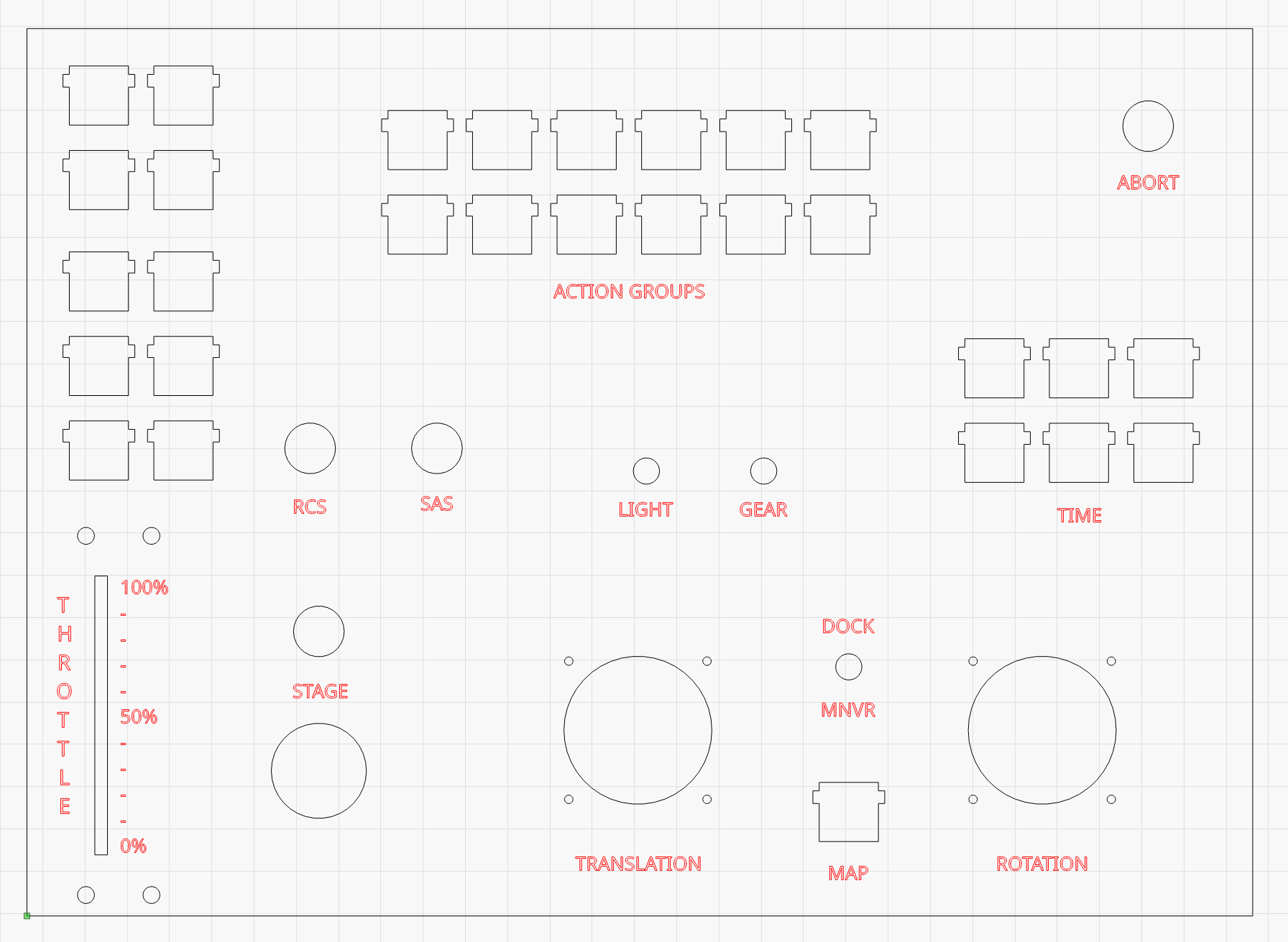
    Does anyone have any suggestions for changes to my #Kerbal Space Program control panel before I hit "go" on the laser cutter?

    The grid in the top left are direction selectors. I'm using knockoff cherry blue keyswitches for all the buttons. The dock/maneuver switch is 3-position. The 3-axis joysticks have a button on top for controlling trim.
    #ksp #diy #kerbalspaceprogram

    Link Preview Image
    gaziel@mastodon.socialG jago@mementomori.socialJ 2 Replies Last reply
    0
    • tj@howse.socialT tj@howse.social

      Does anyone have any suggestions for changes to my #Kerbal Space Program control panel before I hit "go" on the laser cutter?

      The grid in the top left are direction selectors. I'm using knockoff cherry blue keyswitches for all the buttons. The dock/maneuver switch is 3-position. The 3-axis joysticks have a button on top for controlling trim.

      #ksp #diy #kerbalspaceprogram

      Link Preview Image
      gaziel@mastodon.socialG This user is from outside of this forum
      gaziel@mastodon.socialG This user is from outside of this forum
      gaziel@mastodon.social
      wrote last edited by
      #2

      @tj throttle in the middle. (Invert with left)
      Actions button down , before gear, near the control (for less hands mouvement)

      1 Reply Last reply
      0
      • tj@howse.socialT tj@howse.social

        Does anyone have any suggestions for changes to my #Kerbal Space Program control panel before I hit "go" on the laser cutter?

        The grid in the top left are direction selectors. I'm using knockoff cherry blue keyswitches for all the buttons. The dock/maneuver switch is 3-position. The 3-axis joysticks have a button on top for controlling trim.

        #ksp #diy #kerbalspaceprogram

        Link Preview Image
        jago@mementomori.socialJ This user is from outside of this forum
        jago@mementomori.socialJ This user is from outside of this forum
        jago@mementomori.social
        wrote last edited by
        #3

        @tj Without knowing what size joysticks you're using, I suspect translation and rotation are slightly too close for comfort, at least for two-hand operation. Throttle to the middle, stage and translation a bit to the left?

        1 Reply Last reply
        1
        0
        • System shared this topic
        Reply
        • Reply as topic
        Log in to reply
        • Oldest to Newest
        • Newest to Oldest
        • Most Votes


        • Login

        • Login or register to search.
        • First post
          Last post
        0
        • Categories
        • Recent
        • Tags
        • Popular
        • World
        • Users
        • Groups