Groan.
-
Groan.
Clicking on URLs in my signal chats now launches some sort of weird google-based quick browser instead of my default installed Firefox app on my Android device.
Time to play everyone's favorite fun game: Who Fucking Changed What Fucking Thing
(I believe I updated Signal pretty recently and also I just pushed to Android 16 today. This version of Android apparently has something called "instant apps" relating to default links I think? Seems like yet another feature that no one asked for. Time to learn about whatever that is and try to figure out if that's what's breaking this.)
UPDATE 1: maybe this isn't the problem I think I'm having. It turns out that the person in my signal chat sent me a link using this service...
... which I've never really seen before but it appears to be some sort of oddball link handler which, at least on Android, routes around your default preferred web browser and instead launches a Google lite type quick view.
UPDATE 2: Amazingly helpful people have jumped into the discussion and there is a solution! See here...
Pseudo Nym (@pseudonym@mastodon.online)
https://9to5google.com/2025/06/26/google-app-link-shortener/ How to turn off the automatic link shortener on Android google

Mastodon (mastodon.online)
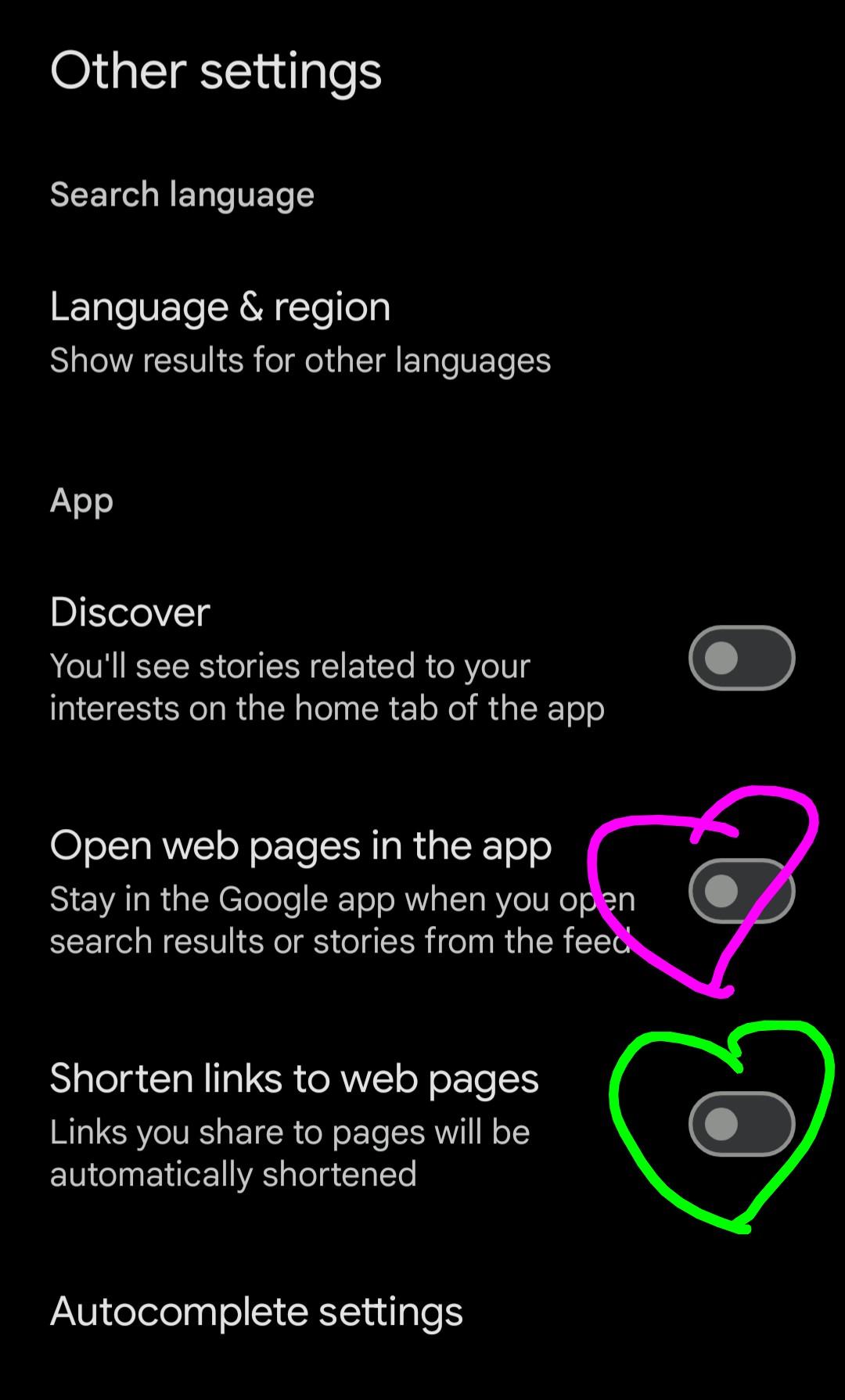
...as well as the screenshot I'm attaching here, hopefully. In short: there are a couple of new settings in the "Google app" on all Android phones now.
The green heart is over top of the toggle you want to turn off to prevent yourself from being annoying to others when you send links from Android now.
The magenta heart is over top of the toggle you want to turn off in order to immunize your own phone against other people's annoying links that they might send you.
-
Groan.
Clicking on URLs in my signal chats now launches some sort of weird google-based quick browser instead of my default installed Firefox app on my Android device.
Time to play everyone's favorite fun game: Who Fucking Changed What Fucking Thing
(I believe I updated Signal pretty recently and also I just pushed to Android 16 today. This version of Android apparently has something called "instant apps" relating to default links I think? Seems like yet another feature that no one asked for. Time to learn about whatever that is and try to figure out if that's what's breaking this.)
UPDATE 1: maybe this isn't the problem I think I'm having. It turns out that the person in my signal chat sent me a link using this service...
... which I've never really seen before but it appears to be some sort of oddball link handler which, at least on Android, routes around your default preferred web browser and instead launches a Google lite type quick view.
UPDATE 2: Amazingly helpful people have jumped into the discussion and there is a solution! See here...
Pseudo Nym (@pseudonym@mastodon.online)
https://9to5google.com/2025/06/26/google-app-link-shortener/ How to turn off the automatic link shortener on Android google
Mastodon (mastodon.online)
...as well as the screenshot I'm attaching here, hopefully. In short: there are a couple of new settings in the "Google app" on all Android phones now.
The green heart is over top of the toggle you want to turn off to prevent yourself from being annoying to others when you send links from Android now.
The magenta heart is over top of the toggle you want to turn off in order to immunize your own phone against other people's annoying links that they might send you.
@deviantollam Is it an incorrect assumption this person is either not very tech literate or is tech literate but also way too optimistic?
-
Groan.
Clicking on URLs in my signal chats now launches some sort of weird google-based quick browser instead of my default installed Firefox app on my Android device.
Time to play everyone's favorite fun game: Who Fucking Changed What Fucking Thing
(I believe I updated Signal pretty recently and also I just pushed to Android 16 today. This version of Android apparently has something called "instant apps" relating to default links I think? Seems like yet another feature that no one asked for. Time to learn about whatever that is and try to figure out if that's what's breaking this.)
UPDATE 1: maybe this isn't the problem I think I'm having. It turns out that the person in my signal chat sent me a link using this service...
... which I've never really seen before but it appears to be some sort of oddball link handler which, at least on Android, routes around your default preferred web browser and instead launches a Google lite type quick view.
UPDATE 2: Amazingly helpful people have jumped into the discussion and there is a solution! See here...
Pseudo Nym (@pseudonym@mastodon.online)
https://9to5google.com/2025/06/26/google-app-link-shortener/ How to turn off the automatic link shortener on Android google
Mastodon (mastodon.online)
...as well as the screenshot I'm attaching here, hopefully. In short: there are a couple of new settings in the "Google app" on all Android phones now.
The green heart is over top of the toggle you want to turn off to prevent yourself from being annoying to others when you send links from Android now.
The magenta heart is over top of the toggle you want to turn off in order to immunize your own phone against other people's annoying links that they might send you.
@deviantollam These "share.google" Links are generated if you share links from the news thingie that's left of the first home screen (idk how its called, i disabled that).
There is an option in the settings to disable that, but the sender has to do that. (Apparently that page has a settings menu, again idk i disabled that)
-
Groan.
Clicking on URLs in my signal chats now launches some sort of weird google-based quick browser instead of my default installed Firefox app on my Android device.
Time to play everyone's favorite fun game: Who Fucking Changed What Fucking Thing
(I believe I updated Signal pretty recently and also I just pushed to Android 16 today. This version of Android apparently has something called "instant apps" relating to default links I think? Seems like yet another feature that no one asked for. Time to learn about whatever that is and try to figure out if that's what's breaking this.)
UPDATE 1: maybe this isn't the problem I think I'm having. It turns out that the person in my signal chat sent me a link using this service...
... which I've never really seen before but it appears to be some sort of oddball link handler which, at least on Android, routes around your default preferred web browser and instead launches a Google lite type quick view.
UPDATE 2: Amazingly helpful people have jumped into the discussion and there is a solution! See here...
Pseudo Nym (@pseudonym@mastodon.online)
https://9to5google.com/2025/06/26/google-app-link-shortener/ How to turn off the automatic link shortener on Android google
Mastodon (mastodon.online)
...as well as the screenshot I'm attaching here, hopefully. In short: there are a couple of new settings in the "Google app" on all Android phones now.
The green heart is over top of the toggle you want to turn off to prevent yourself from being annoying to others when you send links from Android now.
The magenta heart is over top of the toggle you want to turn off in order to immunize your own phone against other people's annoying links that they might send you.
@deviantollam
Can't any android app register itself to be the handler of any web link, based on what the domain is?
https://developer.android.com/codelabs/android-app-links-introduction -
Groan.
Clicking on URLs in my signal chats now launches some sort of weird google-based quick browser instead of my default installed Firefox app on my Android device.
Time to play everyone's favorite fun game: Who Fucking Changed What Fucking Thing
(I believe I updated Signal pretty recently and also I just pushed to Android 16 today. This version of Android apparently has something called "instant apps" relating to default links I think? Seems like yet another feature that no one asked for. Time to learn about whatever that is and try to figure out if that's what's breaking this.)
UPDATE 1: maybe this isn't the problem I think I'm having. It turns out that the person in my signal chat sent me a link using this service...
... which I've never really seen before but it appears to be some sort of oddball link handler which, at least on Android, routes around your default preferred web browser and instead launches a Google lite type quick view.
UPDATE 2: Amazingly helpful people have jumped into the discussion and there is a solution! See here...
Pseudo Nym (@pseudonym@mastodon.online)
https://9to5google.com/2025/06/26/google-app-link-shortener/ How to turn off the automatic link shortener on Android google
Mastodon (mastodon.online)
...as well as the screenshot I'm attaching here, hopefully. In short: there are a couple of new settings in the "Google app" on all Android phones now.
The green heart is over top of the toggle you want to turn off to prevent yourself from being annoying to others when you send links from Android now.
The magenta heart is over top of the toggle you want to turn off in order to immunize your own phone against other people's annoying links that they might send you.
@deviantollam You (meaning the share-r) can turn that shortner off in the Google app settings, in the "Other settings" section.
Shortening has value, but I'm not pleased that it's on by default given the privacy implications.
-
Groan.
Clicking on URLs in my signal chats now launches some sort of weird google-based quick browser instead of my default installed Firefox app on my Android device.
Time to play everyone's favorite fun game: Who Fucking Changed What Fucking Thing
(I believe I updated Signal pretty recently and also I just pushed to Android 16 today. This version of Android apparently has something called "instant apps" relating to default links I think? Seems like yet another feature that no one asked for. Time to learn about whatever that is and try to figure out if that's what's breaking this.)
UPDATE 1: maybe this isn't the problem I think I'm having. It turns out that the person in my signal chat sent me a link using this service...
... which I've never really seen before but it appears to be some sort of oddball link handler which, at least on Android, routes around your default preferred web browser and instead launches a Google lite type quick view.
UPDATE 2: Amazingly helpful people have jumped into the discussion and there is a solution! See here...
Pseudo Nym (@pseudonym@mastodon.online)
https://9to5google.com/2025/06/26/google-app-link-shortener/ How to turn off the automatic link shortener on Android google
Mastodon (mastodon.online)
...as well as the screenshot I'm attaching here, hopefully. In short: there are a couple of new settings in the "Google app" on all Android phones now.
The green heart is over top of the toggle you want to turn off to prevent yourself from being annoying to others when you send links from Android now.
The magenta heart is over top of the toggle you want to turn off in order to immunize your own phone against other people's annoying links that they might send you.
@deviantollam My Android 15 LineageOS device just opens this in Firefox like any other link, while my inherited stock Motorola Android 11 device opens it in Firefox but then immediately asks if I want to "open in Google" before the page even loads. If I click yes it then pops open the usual app picker asking if I want to use Google or Firefox, and if I say Firefox it immediately prompts again to open in Google

At first I was thinking maybe Play services intercepting something but might just be pre-installed Chrome associating itself with particular URLs like any other app could...seems pretty obnoxious though lol
-
@deviantollam the share Google thing is a new built in default for Android. You can disable it, but it defaults to on. Link tracking thanks
@roo is that a setting on the sender's phone?
-
Groan.
Clicking on URLs in my signal chats now launches some sort of weird google-based quick browser instead of my default installed Firefox app on my Android device.
Time to play everyone's favorite fun game: Who Fucking Changed What Fucking Thing
(I believe I updated Signal pretty recently and also I just pushed to Android 16 today. This version of Android apparently has something called "instant apps" relating to default links I think? Seems like yet another feature that no one asked for. Time to learn about whatever that is and try to figure out if that's what's breaking this.)
UPDATE 1: maybe this isn't the problem I think I'm having. It turns out that the person in my signal chat sent me a link using this service...
... which I've never really seen before but it appears to be some sort of oddball link handler which, at least on Android, routes around your default preferred web browser and instead launches a Google lite type quick view.
UPDATE 2: Amazingly helpful people have jumped into the discussion and there is a solution! See here...
Pseudo Nym (@pseudonym@mastodon.online)
https://9to5google.com/2025/06/26/google-app-link-shortener/ How to turn off the automatic link shortener on Android google
Mastodon (mastodon.online)
...as well as the screenshot I'm attaching here, hopefully. In short: there are a couple of new settings in the "Google app" on all Android phones now.
The green heart is over top of the toggle you want to turn off to prevent yourself from being annoying to others when you send links from Android now.
The magenta heart is over top of the toggle you want to turn off in order to immunize your own phone against other people's annoying links that they might send you.
@deviantollam Can confirm, clicking on this demo non-link even here in tusker on an iPhone as well opens the google app to display the contents.
-
Groan.
Clicking on URLs in my signal chats now launches some sort of weird google-based quick browser instead of my default installed Firefox app on my Android device.
Time to play everyone's favorite fun game: Who Fucking Changed What Fucking Thing
(I believe I updated Signal pretty recently and also I just pushed to Android 16 today. This version of Android apparently has something called "instant apps" relating to default links I think? Seems like yet another feature that no one asked for. Time to learn about whatever that is and try to figure out if that's what's breaking this.)
UPDATE 1: maybe this isn't the problem I think I'm having. It turns out that the person in my signal chat sent me a link using this service...
... which I've never really seen before but it appears to be some sort of oddball link handler which, at least on Android, routes around your default preferred web browser and instead launches a Google lite type quick view.
UPDATE 2: Amazingly helpful people have jumped into the discussion and there is a solution! See here...
Pseudo Nym (@pseudonym@mastodon.online)
https://9to5google.com/2025/06/26/google-app-link-shortener/ How to turn off the automatic link shortener on Android google
Mastodon (mastodon.online)
...as well as the screenshot I'm attaching here, hopefully. In short: there are a couple of new settings in the "Google app" on all Android phones now.
The green heart is over top of the toggle you want to turn off to prevent yourself from being annoying to others when you send links from Android now.
The magenta heart is over top of the toggle you want to turn off in order to immunize your own phone against other people's annoying links that they might send you.
@deviantollam I'd block that person...
-
Groan.
Clicking on URLs in my signal chats now launches some sort of weird google-based quick browser instead of my default installed Firefox app on my Android device.
Time to play everyone's favorite fun game: Who Fucking Changed What Fucking Thing
(I believe I updated Signal pretty recently and also I just pushed to Android 16 today. This version of Android apparently has something called "instant apps" relating to default links I think? Seems like yet another feature that no one asked for. Time to learn about whatever that is and try to figure out if that's what's breaking this.)
UPDATE 1: maybe this isn't the problem I think I'm having. It turns out that the person in my signal chat sent me a link using this service...
... which I've never really seen before but it appears to be some sort of oddball link handler which, at least on Android, routes around your default preferred web browser and instead launches a Google lite type quick view.
UPDATE 2: Amazingly helpful people have jumped into the discussion and there is a solution! See here...
Pseudo Nym (@pseudonym@mastodon.online)
https://9to5google.com/2025/06/26/google-app-link-shortener/ How to turn off the automatic link shortener on Android google
Mastodon (mastodon.online)
...as well as the screenshot I'm attaching here, hopefully. In short: there are a couple of new settings in the "Google app" on all Android phones now.
The green heart is over top of the toggle you want to turn off to prevent yourself from being annoying to others when you send links from Android now.
The magenta heart is over top of the toggle you want to turn off in order to immunize your own phone against other people's annoying links that they might send you.
@deviantollam the share.google linkage also started happening within chats in the google messages app and it's driving me bonkers. I'm not sure what to tell people to do differently to stop it.
-
@deviantollam Can confirm, clicking on this demo non-link even here in tusker on an iPhone as well opens the google app to display the contents.
@jpsays yikes. Yet another feature no one wants apparently
-
Groan.
Clicking on URLs in my signal chats now launches some sort of weird google-based quick browser instead of my default installed Firefox app on my Android device.
Time to play everyone's favorite fun game: Who Fucking Changed What Fucking Thing
(I believe I updated Signal pretty recently and also I just pushed to Android 16 today. This version of Android apparently has something called "instant apps" relating to default links I think? Seems like yet another feature that no one asked for. Time to learn about whatever that is and try to figure out if that's what's breaking this.)
UPDATE 1: maybe this isn't the problem I think I'm having. It turns out that the person in my signal chat sent me a link using this service...
... which I've never really seen before but it appears to be some sort of oddball link handler which, at least on Android, routes around your default preferred web browser and instead launches a Google lite type quick view.
UPDATE 2: Amazingly helpful people have jumped into the discussion and there is a solution! See here...
Pseudo Nym (@pseudonym@mastodon.online)
https://9to5google.com/2025/06/26/google-app-link-shortener/ How to turn off the automatic link shortener on Android google
Mastodon (mastodon.online)
...as well as the screenshot I'm attaching here, hopefully. In short: there are a couple of new settings in the "Google app" on all Android phones now.
The green heart is over top of the toggle you want to turn off to prevent yourself from being annoying to others when you send links from Android now.
The magenta heart is over top of the toggle you want to turn off in order to immunize your own phone against other people's annoying links that they might send you.
@deviantollam kudos for also having the "Discover" option disabled - it's a cancer, especially for less web savvy folks

-
@deviantollam You (meaning the share-r) can turn that shortner off in the Google app settings, in the "Other settings" section.
Shortening has value, but I'm not pleased that it's on by default given the privacy implications.
@carraway @deviantollam shortening had value years ago while we were forced for message limits by sms or other services.
now we have so much longer messages that only reason for using shortening is when someone has to manually write it.
but still its easier to write longer user friendly url then short but sjudh67eiehxy6 alike -
Groan.
Clicking on URLs in my signal chats now launches some sort of weird google-based quick browser instead of my default installed Firefox app on my Android device.
Time to play everyone's favorite fun game: Who Fucking Changed What Fucking Thing
(I believe I updated Signal pretty recently and also I just pushed to Android 16 today. This version of Android apparently has something called "instant apps" relating to default links I think? Seems like yet another feature that no one asked for. Time to learn about whatever that is and try to figure out if that's what's breaking this.)
UPDATE 1: maybe this isn't the problem I think I'm having. It turns out that the person in my signal chat sent me a link using this service...
... which I've never really seen before but it appears to be some sort of oddball link handler which, at least on Android, routes around your default preferred web browser and instead launches a Google lite type quick view.
UPDATE 2: Amazingly helpful people have jumped into the discussion and there is a solution! See here...
Pseudo Nym (@pseudonym@mastodon.online)
https://9to5google.com/2025/06/26/google-app-link-shortener/ How to turn off the automatic link shortener on Android google
Mastodon (mastodon.online)
...as well as the screenshot I'm attaching here, hopefully. In short: there are a couple of new settings in the "Google app" on all Android phones now.
The green heart is over top of the toggle you want to turn off to prevent yourself from being annoying to others when you send links from Android now.
The magenta heart is over top of the toggle you want to turn off in order to immunize your own phone against other people's annoying links that they might send you.
@deviantollam Thank you. I first encountered this bullshit yesterday with a link someone posted on here.
-
Groan.
Clicking on URLs in my signal chats now launches some sort of weird google-based quick browser instead of my default installed Firefox app on my Android device.
Time to play everyone's favorite fun game: Who Fucking Changed What Fucking Thing
(I believe I updated Signal pretty recently and also I just pushed to Android 16 today. This version of Android apparently has something called "instant apps" relating to default links I think? Seems like yet another feature that no one asked for. Time to learn about whatever that is and try to figure out if that's what's breaking this.)
UPDATE 1: maybe this isn't the problem I think I'm having. It turns out that the person in my signal chat sent me a link using this service...
... which I've never really seen before but it appears to be some sort of oddball link handler which, at least on Android, routes around your default preferred web browser and instead launches a Google lite type quick view.
UPDATE 2: Amazingly helpful people have jumped into the discussion and there is a solution! See here...
Pseudo Nym (@pseudonym@mastodon.online)
https://9to5google.com/2025/06/26/google-app-link-shortener/ How to turn off the automatic link shortener on Android google
Mastodon (mastodon.online)
...as well as the screenshot I'm attaching here, hopefully. In short: there are a couple of new settings in the "Google app" on all Android phones now.
The green heart is over top of the toggle you want to turn off to prevent yourself from being annoying to others when you send links from Android now.
The magenta heart is over top of the toggle you want to turn off in order to immunize your own phone against other people's annoying links that they might send you.
@deviantollam im pretty sure theres also an option in the general android app settings to disable opening supported links in an app, which would probably also work here for preventing the share.google links from opening within google to begin with (although google would still be able to track you with them)
-
Groan.
Clicking on URLs in my signal chats now launches some sort of weird google-based quick browser instead of my default installed Firefox app on my Android device.
Time to play everyone's favorite fun game: Who Fucking Changed What Fucking Thing
(I believe I updated Signal pretty recently and also I just pushed to Android 16 today. This version of Android apparently has something called "instant apps" relating to default links I think? Seems like yet another feature that no one asked for. Time to learn about whatever that is and try to figure out if that's what's breaking this.)
UPDATE 1: maybe this isn't the problem I think I'm having. It turns out that the person in my signal chat sent me a link using this service...
... which I've never really seen before but it appears to be some sort of oddball link handler which, at least on Android, routes around your default preferred web browser and instead launches a Google lite type quick view.
UPDATE 2: Amazingly helpful people have jumped into the discussion and there is a solution! See here...
Pseudo Nym (@pseudonym@mastodon.online)
https://9to5google.com/2025/06/26/google-app-link-shortener/ How to turn off the automatic link shortener on Android google
Mastodon (mastodon.online)
...as well as the screenshot I'm attaching here, hopefully. In short: there are a couple of new settings in the "Google app" on all Android phones now.
The green heart is over top of the toggle you want to turn off to prevent yourself from being annoying to others when you send links from Android now.
The magenta heart is over top of the toggle you want to turn off in order to immunize your own phone against other people's annoying links that they might send you.
@deviantollam This is also an Android 16-only thing. I checked my -15 phone and no such thingy.
Am thinking if I'm lucky I can just stick on -15 until such time as I can /e/OS it...
-
Groan.
Clicking on URLs in my signal chats now launches some sort of weird google-based quick browser instead of my default installed Firefox app on my Android device.
Time to play everyone's favorite fun game: Who Fucking Changed What Fucking Thing
(I believe I updated Signal pretty recently and also I just pushed to Android 16 today. This version of Android apparently has something called "instant apps" relating to default links I think? Seems like yet another feature that no one asked for. Time to learn about whatever that is and try to figure out if that's what's breaking this.)
UPDATE 1: maybe this isn't the problem I think I'm having. It turns out that the person in my signal chat sent me a link using this service...
... which I've never really seen before but it appears to be some sort of oddball link handler which, at least on Android, routes around your default preferred web browser and instead launches a Google lite type quick view.
UPDATE 2: Amazingly helpful people have jumped into the discussion and there is a solution! See here...
Pseudo Nym (@pseudonym@mastodon.online)
https://9to5google.com/2025/06/26/google-app-link-shortener/ How to turn off the automatic link shortener on Android google
Mastodon (mastodon.online)
...as well as the screenshot I'm attaching here, hopefully. In short: there are a couple of new settings in the "Google app" on all Android phones now.
The green heart is over top of the toggle you want to turn off to prevent yourself from being annoying to others when you send links from Android now.
The magenta heart is over top of the toggle you want to turn off in order to immunize your own phone against other people's annoying links that they might send you.
That will stop the quick browser nonsense but it's still a valid URL and your default browser will still try to open it.
FWIW, GrapheneOS doesn't have the Google assistant nonsense by default. You can add all that stuff back in but runs sandboxed, which is nice. As a security /privacy oriented person, you may find it interesting.
-
Groan.
Clicking on URLs in my signal chats now launches some sort of weird google-based quick browser instead of my default installed Firefox app on my Android device.
Time to play everyone's favorite fun game: Who Fucking Changed What Fucking Thing
(I believe I updated Signal pretty recently and also I just pushed to Android 16 today. This version of Android apparently has something called "instant apps" relating to default links I think? Seems like yet another feature that no one asked for. Time to learn about whatever that is and try to figure out if that's what's breaking this.)
UPDATE 1: maybe this isn't the problem I think I'm having. It turns out that the person in my signal chat sent me a link using this service...
... which I've never really seen before but it appears to be some sort of oddball link handler which, at least on Android, routes around your default preferred web browser and instead launches a Google lite type quick view.
UPDATE 2: Amazingly helpful people have jumped into the discussion and there is a solution! See here...
Pseudo Nym (@pseudonym@mastodon.online)
https://9to5google.com/2025/06/26/google-app-link-shortener/ How to turn off the automatic link shortener on Android google
Mastodon (mastodon.online)
...as well as the screenshot I'm attaching here, hopefully. In short: there are a couple of new settings in the "Google app" on all Android phones now.
The green heart is over top of the toggle you want to turn off to prevent yourself from being annoying to others when you send links from Android now.
The magenta heart is over top of the toggle you want to turn off in order to immunize your own phone against other people's annoying links that they might send you.
@deviantollam I'm so glad Google once again changes something without any notice, for no good reason, for the worse.
Edit: I'm on Android 13 and google search settings had both Discover and Shorten on (turned them off now), Open in the app is greyed out as I disabled Chrome on my phone — I've still seen multiple apps switch to embedded browser view recently for no good reason.
-
R relay@relay.infosec.exchange shared this topic